
1. Koniec produktuview
The Prince Castle 524-005S Printed Circuit Board Controller/Display Kit is a genuine OEM replacement part designed for quick-service operators. This kit provides essential control and display functionalities for compatible Prince Castle equipment, ensuring reliable performance and operational efficiency. It is engineered to meet the specific needs of commercial kitchen environments.
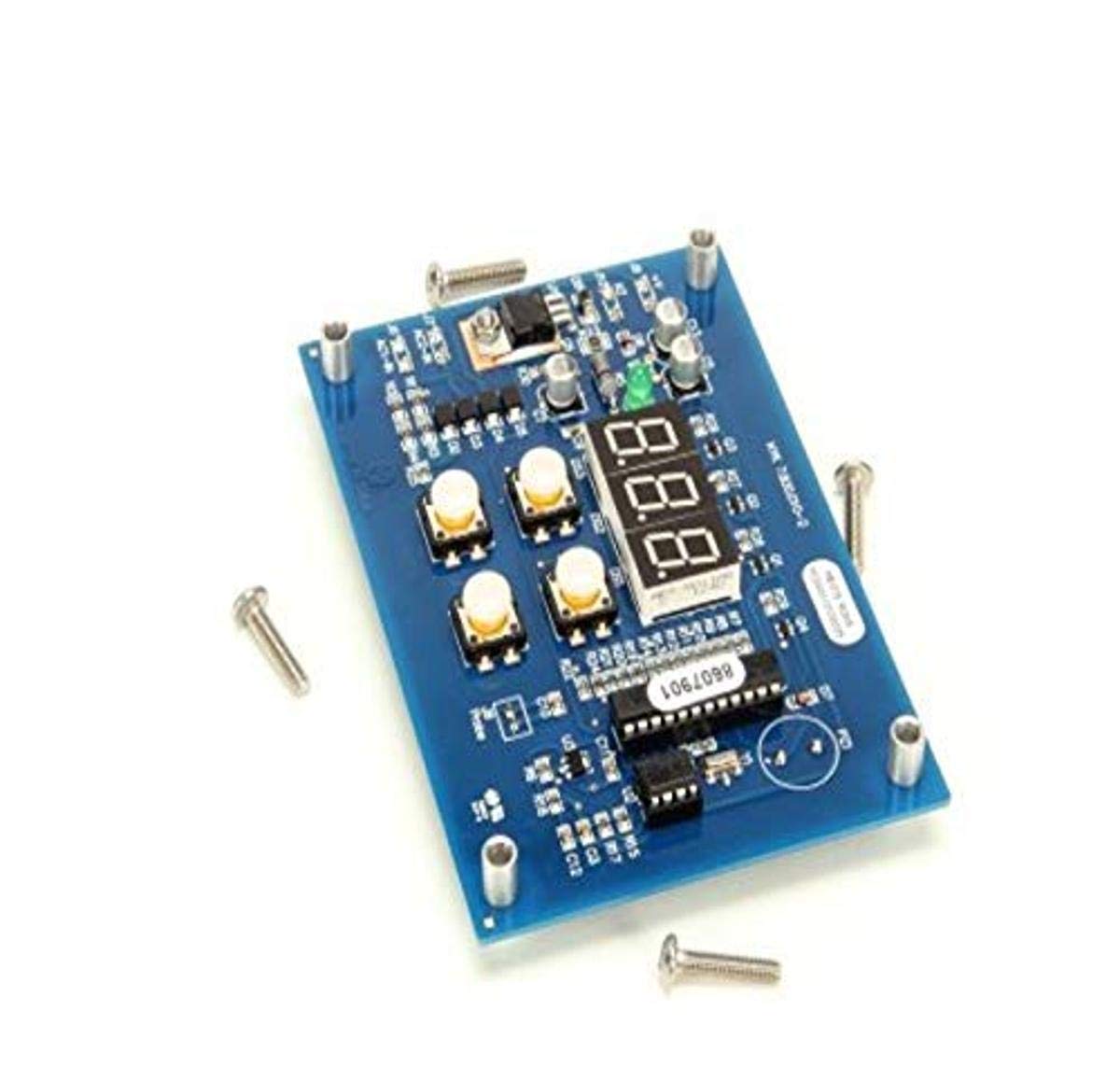
Image 1.1: The Prince Castle 524-005S Printed Circuit Board Controller/Display Kit. This image shows the blue circuit board with several white push buttons, a three-digit LED display, and various integrated circuits and components. Several mounting screws are visible around the board.
Główne cechy:
- Oryginalna część zamienna OEM: Ensures compatibility and maintains equipment integrity.
- Integrated Controller/Display: Combines control logic with a visual interface for user interaction.
- Designed for Quick-Service Operators: Tailored for the demands of fast-paced commercial kitchens.
- Enhanced Safety and Reliability: Manufactured to Prince Castle's quality standards for dependable operation.
2. Instrukcje instalacji
Proper installation of the 524-005S Printed Circuit Board Controller/Display Kit is crucial for its functionality and the safety of the equipment. It is recommended that installation be performed by a qualified service technician.
2.1 Środki ostrożności
- Odłącz zasilanie: Always ensure the main power supply to the equipment is disconnected before beginning any installation or maintenance.
- Wyładowanie statyczne: Use appropriate electrostatic discharge (ESD) precautions, such as an ESD wrist strap, to prevent damage to sensitive electronic components.
- Refer to Equipment Manual: Consult the specific equipment's service manual for detailed disassembly and reassembly instructions.
2.2 Kroki instalacji
- Dostęp do Panelu sterowania: Carefully open the equipment's control panel or housing to expose the existing circuit board.
- Połączenia dokumentów: Before removing the old board, take clear photographs or make detailed diagrams of all wire connections to ensure correct re-connection.
- Usuń starą tablicę: Disconnect all wires and mounting screws securing the old circuit board. Carefully remove the board.
- Zainstaluj nową płytę: Position the new Prince Castle 524-005S board in the designated location. Secure it with the appropriate mounting screws.
- Ponowne podłączenie okablowania: Refer to your documentation and carefully reconnect all wires to their corresponding terminals on the new board. Ensure all connections are secure and correctly polarized where applicable.
- Zamknij panel: Once all connections are verified, carefully close and secure the equipment's control panel or housing.
- Funkcjonalność testu: Reconnect power to the equipment and perform a functional test to ensure the new controller/display kit operates as expected.
3. Działanie
The 524-005S Printed Circuit Board Controller/Display Kit serves as the primary interface and control unit for the equipment it is installed in. Specific operational procedures will vary depending on the host equipment. This section provides general guidance on interacting with the display and controls.
3.1 Interfejs wyświetlacza
- The integrated LED display typically shows operational parameters such as temperature, time, or status codes.
- Refer to the specific equipment's user manual for interpretation of display readings and error codes.
3.2 przyciski sterujące
- The board features several push buttons (as seen in Image 1.1) which are used for navigating menus, adjusting settings, or initiating functions.
- Button functions are context-dependent and defined by the host equipment's programming. Common functions may include:
- SET/ENTER: To confirm selections or enter programming modes.
- Strzałki GÓRA/DÓŁ: To adjust values or scroll through options.
- MODE/FUNCTION: To switch between different operational modes.
- Always consult the equipment's primary user manual for detailed instructions on using the control buttons for specific tasks.
4. Konserwacja
The Prince Castle 524-005S Printed Circuit Board is designed for durability and reliability. Minimal routine maintenance is required for the board itself, beyond ensuring a clean and stable operating environment.
4.1 Czyszczenie
- Wyłączone: Always disconnect power to the equipment before cleaning any internal components.
- Usuwanie kurzu: Use a soft, dry brush or compressed air to gently remove dust and debris from the surface of the circuit board.
- Unikaj płynów: Do not use liquid cleaners, solvents, or abrasive materials directly on the circuit board or its components.
- Panel sterowania: Clean the external control panel surface according to the host equipment's cleaning instructions.
4.2 Względy środowiskowe
- Ensure the equipment operates within its specified temperature and humidity ranges to prevent component stress.
- Protect the control board from excessive moisture, grease, and physical impact.
5. Rozwiązywanie Problemów
This section provides general troubleshooting guidance for issues related to the 524-005S Printed Circuit Board Controller/Display Kit. For comprehensive troubleshooting, refer to the service manual of the equipment in which this board is installed.
| Problem | Możliwa przyczyna | Rozwiązanie |
|---|---|---|
| Display is blank or unlit. | No power to the board; faulty connection; board failure. | Verify power supply to the equipment. Check all wiring connections to the board. If power is present and connections are secure, the board may require replacement. |
| Przyciski nie reagują. | Stuck button; faulty button; software issue; board failure. | Ensure buttons are not physically stuck. Power cycle the equipment. If the issue persists, the board may need inspection or replacement. |
| Nieprawidłowe odczyty na wyświetlaczu. | Sensor issue; calibration required; board failure. | Check connected sensors for damage or dislodgement. Consult equipment manual for calibration procedures. If readings remain incorrect, the board may be faulty. |
| Equipment not responding to controls. | Wiring issue; board failure; host equipment malfunction. | Verify all wiring connections between the board and other equipment components. If connections are good, the board or other equipment components may be faulty. |
Notatka: For complex issues or if you are unsure about performing repairs, contact a qualified service technician.
6. Specyfikacje produktu
| Atrybut | Szczegół |
|---|---|
| Nazwa marki | Prince Castle |
| Numer modelu | 524-005S |
| Waga przedmiotu | 3.2 uncji |
| Wymiary produktu | 5 x 9 x 9 cala |
| Numer części | 524-005S |
| Czy potrzebne są baterie? | NIE |
| ASIN | B00EMQMBCS |
| Data pierwszej dostępności | 15 sierpnia 2013 r. |
7. Gwarancja i wsparcie
Prince Castle products are manufactured to high standards of quality and reliability. This 524-005S Printed Circuit Board Controller/Display Kit is a genuine OEM part, ensuring it meets the specifications of your Prince Castle equipment.
7.1 Informacje o gwarancji
Specific warranty terms for replacement parts may vary. Please refer to the original equipment's warranty documentation or contact Prince Castle customer service for detailed warranty information regarding this replacement part.
7.2 Obsługa klienta
For technical assistance, troubleshooting beyond this manual, or to inquire about service and replacement parts, please contact Prince Castle customer support or an authorized service provider. Contact information can typically be found on the official Prince Castle website or in your equipment's primary documentation.
You can visit the official Prince Castle store for more information: Prince Castle Store on Amazon.