Wstęp
This manual provides comprehensive instructions for the setup, operation, and maintenance of your VTech CS6829-2 2-Handset Cordless Phone with Answering System. This system is designed for home use, offering features such as caller ID, a digital answering machine, backlit keypad, and a full duplex speakerphone for enhanced communication.
Co jest w pudełku
Sprawdź, czy w pakiecie znajdują się wszystkie elementy:
- Jednostka bazowa
- 2 bezprzewodowych słuchawek
- Rumak
- 2 adaptery
- 2 akumulatorów
- Przewód telefoniczny
- Uchwyt ścienny
- Szybki przewodnik
Organizować coś
Follow these steps to set up your VTech CS6829-2 phone system:
- Podłącz jednostkę bazową:
Plug one end of the telephone line cord into the TEL LINE jack on the back of the base unit. Plug the other end into a telephone wall jack. Plug the small end of the power adapter into the POWER jack on the back of the base unit. Plug the large end of the power adapter into a wall outlet not controlled by a wall switch.
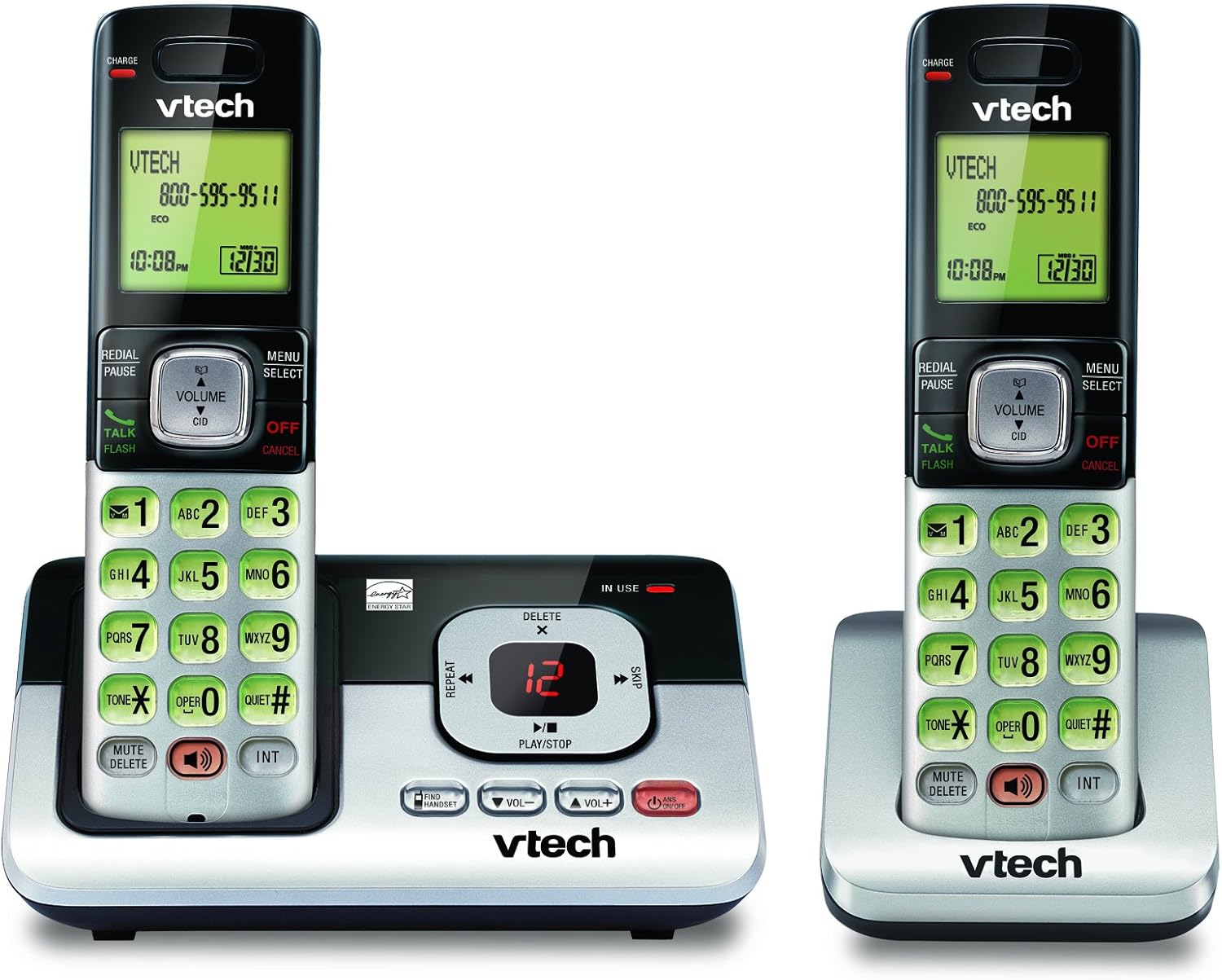
Image: The VTech CS6829-2 base unit with one handset docked, and a second handset with its charging cradle. This illustrates the main components of the phone system.
- Instalacja baterii w słuchawce:
Open the battery compartment cover on the back of each handset. Connect the battery pack connector securely into the jack inside the compartment. Place the battery pack with the label facing up and tuck the wires inside the compartment. Close the battery compartment cover.
- Ładowanie słuchawek:
Place each handset in the base unit or charger with the display facing up. The CHARGE light on the handset will illuminate, indicating proper charging. Allow the handsets to charge for at least 16 hours before initial use for optimal battery performance.

Obraz: kątowy view of the VTech CS6829-2 base unit with one handset docked, and the second handset in its separate charging cradle. This shows how the handsets are placed for charging.
- Ustaw datę i godzinę:
After the handsets are charged, follow the on-screen prompts or refer to the quick start guide to set the date and time. This is important for accurate caller ID and answering system timestamps.
Instrukcja obsługi
Wykonywanie i odbieranie połączeń
- Zadzwonić: Naciskać ROZMOWA/BŁYSK or any dialing key to get a dial tone, then dial the phone number.
- Aby odebrać połączenie: Gdy telefon zadzwoni, naciśnij ROZMOWA/BŁYSK lub dowolnego klawisza wybierania numeru.
- Aby zakończyć połączenie: Naciskać WYŁĄCZ/ANULUJ or place the handset back in the base unit/charger.
Cyfrowy system zgłoszeniowy
- Odtwarzanie wiadomości: Na jednostce bazowej naciśnij ODTWÓRZ/ZATRZYMAJ. On a handset, press MENU/WYBIERZ, scroll to "Answering System", then select "Play Messages".
- Recording an Outgoing Announcement: On the base unit or handset, navigate to the answering system menu and select "Record OGM" (Outgoing Message).
- Usuwanie wiadomości: While a message is playing, press USUWAĆ on the base unit or handset.
Funkcja głośnika
- To Use Speakerphone: Podczas połączenia naciśnij GŁOŚNIK button on the handset. Press it again to switch back to the handset earpiece.
Główne cechy
- Digital Answering System with LED Indicator and Volume Control: This system records up to 14 minutes of messages, announcements, and memos. An LED indicator notifies you of new messages. Volume control keys on the base allow easy adjustment of message playback volume.
- Caller ID / Call Waiting — Stores up to 50 Calls: Displays the name, number, time, and date of incoming calls, helping you identify callers before answering.
- Pełny dupleksowy zestaw głośnomówiący: The handset features a full duplex speakerphone, enabling natural two-way conversations where both parties can speak and be heard simultaneously.
- Podświetlana klawiatura i wyświetlacz: The entire keypad and LCD screen on the handset illuminate, ensuring clear visibility and easy dialing even in low-light conditions.
- ECO Mode Power-Conserving Technology: This technology optimizes power consumption for extended battery performance and energy efficiency.
- Tryb cichy: Allows you to silence the ringer on both the handset and base unit immediately or for a set period, providing peace and quiet when needed.
Konserwacja
- Czyszczenie: Wyczyść telefon i jednostkę bazową miękką szmatką.amp ściereczką. Nie używaj sprayów czyszczących ani płynów czyszczących.
- Pielęgnacja baterii: Replace batteries when they no longer hold a charge. Use only the specified battery type. Dispose of old batteries responsibly according to local regulations.
- Warunki środowiskowe: Avoid placing the phone in direct sunlight, near heat sources, or in areas with excessive moisture.
Rozwiązywanie problemów
Jeśli masz problemy z telefonem, wypróbuj następujące rozwiązania:
| Problem | Rozwiązanie |
|---|---|
| Brak sygnału wybierania. | Ensure the telephone line cord is securely plugged into both the base unit and the wall jack. Check that the power adapter is plugged into a working electrical outlet. |
| Słuchawka nie ładuje się. | Ensure the handset is properly seated in the base unit or charger. Clean the charging contacts on both the handset and base/charger with a dry cloth. Verify the power adapter is connected. |
| Słaba jakość dźwięku / Szumy. | Move the handset closer to the base unit. Avoid placing the phone near other electronic devices (e.g., microwaves, computers) that may cause interference. Check the telephone line cord for damage. |
| Automatyczna sekretarka nie nagrywa wiadomości. | Upewnij się, że automatyczna sekretarka jest włączona. Sprawdź, czy pamięć jest pełna; w razie potrzeby usuń stare wiadomości. |
Specyfikacje
| Funkcja | Szczegół |
|---|---|
| Numer modelu | CS6829-2 |
| Wymiary produktu | 5.77 x 3.41 x 6.77 cala |
| Waga przedmiotu | 1.41 funta |
| Baterie | 2 Wymagane baterie specyficzne dla produktu (w zestawie) |
| Typ systemu odbierającego | Cyfrowy |
| Pamięć identyfikacji dzwoniącego | Do 50 połączeń |
| Czas nagrywania w systemie sekretarskim | Do 14 minut |
| Kolor | Czarny/Srebrny |
| Typ telefonu | Bezprzewodowy |
Gwarancja i wsparcie
Aby uzyskać informacje dotyczące gwarancji i pomocy technicznej, zapoznaj się z kartą gwarancyjną dołączoną do produktu lub odwiedź oficjalną stronę internetową VTech webZachowaj paragon jako dowód zakupu na wypadek reklamacji.
Możesz również odwiedzić Sklep VTech na Amazon Aby uzyskać dodatkowe informacje o produkcie i zasoby pomocy technicznej.


