1. Wprowadzenie
Dziękujemy za zakupasing the Onkyo LS-T10 6.1-Channel 3D Surround Base System. This manual provides essential information for the safe and efficient use of your new audio system. Please read it thoroughly before installation and operation, and keep it for future reference.
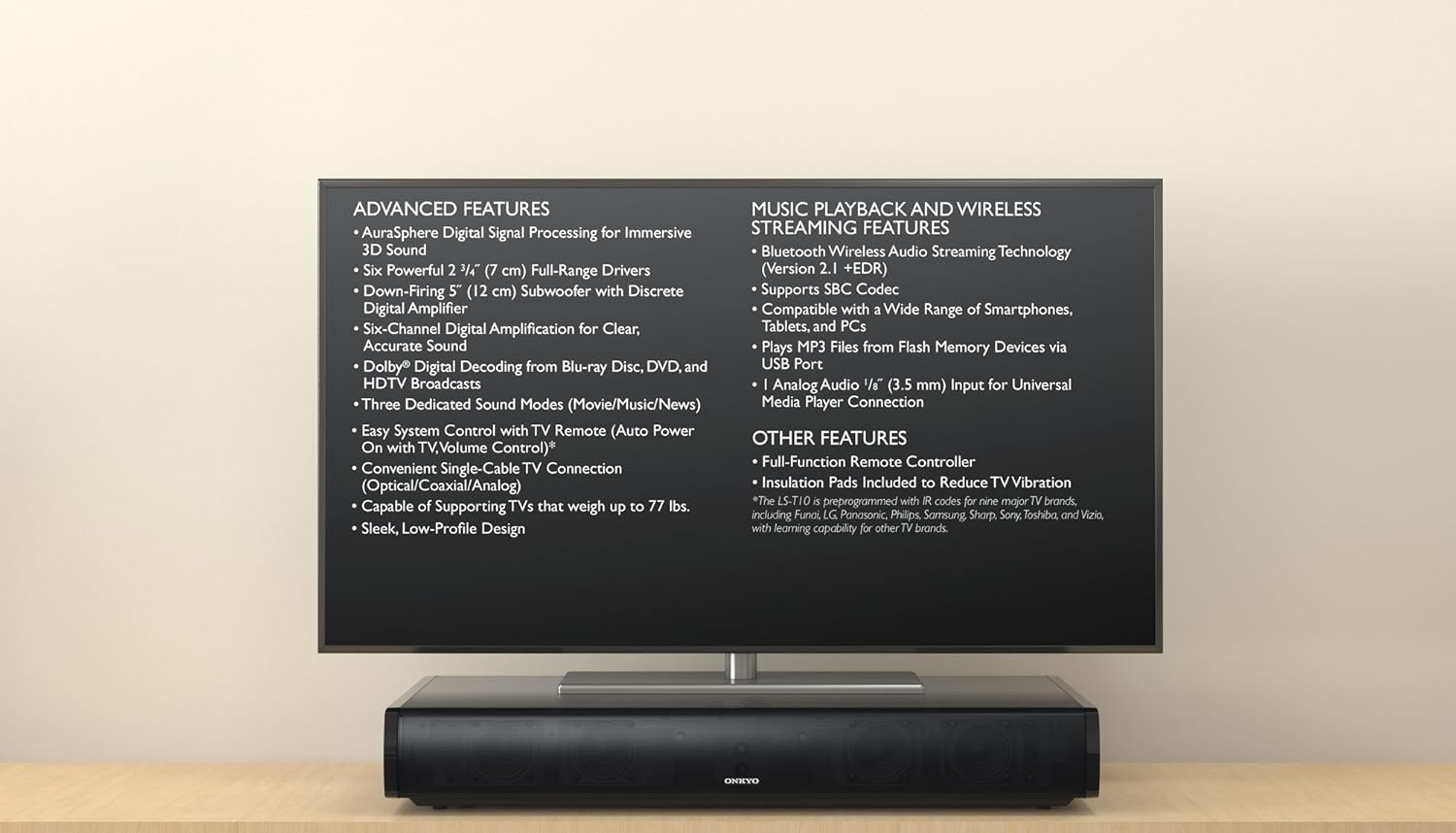
The Onkyo LS-T10 system positioned beneath a television, illustrating its compact design and listing key functionalities such as AuraSphere 3D sound, Bluetooth streaming, and various input options.
2. Informacje dotyczące bezpieczeństwa
Aby zapewnić bezpieczną obsługę i zapobiec uszkodzeniom, należy przestrzegać następujących środków ostrożności:
- Zasilanie: Podłącz urządzenie wyłącznie do gniazdka sieciowego prądu przemiennego.tage określone na tylnym panelu.
- Wentylacja: Nie blokuj otworów wentylacyjnych. Zapewnij odpowiednią ilość miejsca wokół urządzenia, aby zapewnić prawidłowy przepływ powietrza.
- Woda i wilgoć: Nie wystawiaj urządzenia na działanie deszczu, wilgoci ani nadmiernej wilgotności. Nie stawiaj na urządzeniu przedmiotów wypełnionych płynami.
- Ciepło: Trzymaj urządzenie z dala od źródeł ciepła, takich jak grzejniki, kratki wentylacyjne, piece i inne urządzenia wytwarzające ciepło.
- Czyszczenie: Unplug the unit from the wall outlet before cleaning. Use a dry, soft cloth. Do not use liquid or aerosol cleaners.
- Serwisowanie: Nie próbuj samodzielnie naprawiać urządzenia. Wszelkie prace serwisowe zlecaj wykwalifikowanemu personelowi.
3. Zawartość opakowania
Sprawdź, czy w przesyłce znajdują się następujące elementy:
- Onkyo LS-T10 3D Surround Base System Unit
- Zdalne sterowanie
- Przewód zasilający
- Kabel audio cyfrowy optyczny
- Instrukcja obsługi (ten dokument)
- Insulation Pads (to reduce TV vibration)
- Baterie AAA (x2) do pilota
4. Funkcje produktu
The Onkyo LS-T10 is designed to enhance your home entertainment experience with a range of advanced audio and connectivity features:
- AuraSphere Digital Signal Processing: Creates an immersive 3D sound field.
- Powerful Speaker Configuration: Features six 2 3/4" (7 cm) full-range drivers and a down-firing 5" (12 cm) subwoofer with a discrete digital amplifier for 6.1-channel sound.
- Dekodowanie Dolby Digital: Supports high-quality audio from Blu-ray Disc, DVD, and HDTV broadcasts.
- Dedicated Sound Modes: Optimize audio for Movie, Music, and News content.
- Easy System Control: Compatible with TV remote controls for auto power on and volume adjustment.
- Versatile TV Connection: Connects to your TV via a single optical, coaxial, or analog cable.
- Solidna konstrukcja: Capable of supporting TVs weighing up to 77 lbs.
- Bluetooth Wireless Audio Streaming: Version 2.1 +EDR with SBC Codec for streaming from smartphones, tablets, and PCs.
- Odtwarzanie z USB: Odtwórz MP3 files directly from Flash Memory Devices via the USB port.
- Analogowe wejście audio: Includes a 1/8" (3.5 mm) input for universal media player connection.

Odwrócony view of the Onkyo LS-T10 system, providing a clear perspective of the six full-range drivers and the powerful down-firing subwoofer that contribute to its 6.1-channel sound.

Szczegółowy view of one of the Onkyo LS-T10's integrated speaker drivers, emphasizing the quality components used for audio reproduction.
5. Konfiguracja
5.1 Umieszczenie
- Place the LS-T10 on a stable, flat surface directly under your television.
- Ensure the unit is centered with your TV for optimal sound dispersion.
- Leave adequate space around the unit for ventilation.
- If your TV is heavy, ensure the surface can support both the TV and the LS-T10 (the LS-T10 supports TVs up to 77 lbs).
- Apply the included insulation pads to the bottom of the LS-T10 to reduce TV vibration.

Strona view of the Onkyo LS-T10, demonstrating its compact and elegant design, suitable for placement under various television sizes.
5.2 Połączenia
- Połącz z telewizorem: Use the supplied optical digital audio cable to connect the OPTICAL OUT port on your TV to the OPTICAL IN port on the LS-T10. If your TV does not have an optical output, use a coaxial digital audio cable or an analog audio cable (3.5mm stereo mini-jack).
- Podłączenie zasilania: Plug the power cord into the AC IN jack on the LS-T10, then plug the other end into a wall outlet.
6. Instrukcja obsługi
6.1 Podstawowa obsługa
- Włączanie/wyłączanie: Naciśnij MOC button on the remote control or the unit to turn the system on or off.
- Regulacja głośności: Użyj GŁOŚNOŚĆ +/- buttons on the remote or unit to adjust the sound level.
- Wybór wejścia: Naciśnij WEJŚCIE button on the remote or unit to cycle through available inputs (Optical, Coaxial, Analog, Bluetooth, USB).
- Tryby dźwięku: Naciśnij FILM, MUZYKA, Lub AKTUALNOŚCI buttons on the remote to select the desired sound mode.
6.2 Przesyłanie strumieniowe przez Bluetooth
- Naciśnij WEJŚCIE button until "Bluetooth" is selected. The Bluetooth indicator on the unit will flash.
- Włącz Bluetooth na swoim smartfonie, tablecie lub komputerze i wyszukaj dostępne urządzenia.
- Select "ONKYO LS-T10" from the list of devices. Once paired, the Bluetooth indicator will glow steadily.
- Start playing audio on your device, and it will stream wirelessly to the LS-T10.

A smartphone streaming audio via Bluetooth to the Onkyo LS-T10 3D Surround Base System, showcasing its capability for streaming music, podcasts, and internet radio.
6.3 Odtwarzanie USB
- Włóż dysk flash USB zawierający dźwięk w formacie MP3 files into the USB port on the LS-T10.
- Naciśnij WEJŚCIE przycisk, aż zostanie wybrana opcja „USB”.
- The system will automatically begin playing MP3 files from the USB drive. Use the remote control to skip tracks or pause playback.
7. Konserwacja
- Czyszczenie: Przetrzyj urządzenie miękką, suchą ściereczką. Nie używaj środków czyszczących o właściwościach ściernych, wosków ani rozpuszczalników.
- Wentylacja: Okresowo sprawdzaj, czy otwory wentylacyjne nie są zablokowane kurzem lub zanieczyszczeniami.
- Baterie do pilota zdalnego sterowania: Replace the AAA batteries in the remote control when its operating range decreases.
8. Rozwiązywanie Problemów
If you experience issues with your LS-T10, refer to the following common problems and solutions:
- Brak zasilania:
- Upewnij się, że przewód zasilający jest prawidłowo podłączony do urządzenia i gniazdka ściennego.
- Sprawdź, czy gniazdko ścienne działa, podłączając do niego inne urządzenie.
- Brak dźwięku:
- Verify that the correct input source is selected on the LS-T10.
- Check the volume level on both the LS-T10 and your TV/connected device.
- Ensure audio cables are securely connected. Try a different cable if possible.
- Confirm that your TV's audio output is set to the correct format (e.g., PCM for optical if Dolby Digital is not working).
- Problemy z połączeniem Bluetooth:
- Ensure the LS-T10 is in Bluetooth input mode and discoverable (indicator flashing).
- Delete "ONKYO LS-T10" from your device's Bluetooth list and try pairing again.
- Move your Bluetooth device closer to the LS-T10.
- Pilot nie działa:
- Sprawdź i wymień baterie (2x AAA).
- Upewnij się, że między pilotem a czujnikiem urządzenia nie ma żadnych przeszkód.
9. Specyfikacje
| Numer modelu | LS-T10 |
| Moc wyjściowa | 100 W (6.1 channels) |
| Konfiguracja głośników | 6 x 2 3/4" (7 cm) Full-Range Drivers, 1 x 5" (12 cm) Down-Firing Subwoofer |
| Łączność | Bluetooth (Version 2.1 +EDR, SBC Codec), USB (MP3 playback), 1 x Analog Audio (1/8" / 3.5 mm) |
| TV Audio Inputs | 1 x Optical Digital, 1 x Coaxial Digital, 1 x Analog (RCA) |
| Supported TV Weight | Do 77 funtów (35 kg) |
| Baterie do pilota zdalnego sterowania | 2 x AAA (w zestawie) |
10. Gwarancja i wsparcie
Onkyo products are manufactured to high standards and are designed for reliable performance. For warranty information specific to your region, please refer to the warranty card included with your product or visit the official Onkyo webstrona.
For technical support, service, or inquiries, please contact your authorized Onkyo dealer or the customer support center in your country. Keep your purchase receipt as proof of purchase for warranty claims.


