1. Wprowadzenie
This manual provides detailed instructions for the setup, operation, and maintenance of your Rii Mini i8 2.4GHz Wireless Keyboard with Touchpad. This device combines a full QWERTY keyboard with a multi-touch touchpad, designed for convenient control of various devices such as PCs, Smart TVs, Android TV Boxes, and game consoles.

Obraz: kątowy view of the Rii Mini i8 Wireless Keyboard, showcasinze względu na kompaktową konstrukcję i rozmieszczenie klawiszy.
2. Zawartość opakowania
Sprawdź zawartość paczki, aby upewnić się, że znajdują się w niej wszystkie elementy:
- Rii Mini i8 Wireless Keyboard with Touchpad
- USB Receiver (stored inside the battery compartment)
- Kabel ładujący USB
- Instrukcja obsługi (ten dokument)
3. Konfiguracja
- Zlokalizuj odbiornik USB: Open the battery compartment cover on the back of the keyboard. The USB receiver is stored inside.
- Włóż odbiornik USB: Plug the USB receiver into an available USB port on your device (PC, Smart TV, Android TV Box, etc.).
- Włącz klawiaturę: Znajdź przełącznik WŁ./WYŁ. znajdujący się z boku klawiatury i przesuń go do pozycji „WŁ.”.
- Automatyczne połączenie: Klawiatura powinna automatycznie połączyć się z urządzeniem. Zazwyczaj nie są wymagane żadne dodatkowe sterowniki.

Obraz: Tył view of the Rii Mini i8 keyboard, showing the battery compartment and the USB receiver stored within.

Obraz: Tył view of the Rii Mini i8 keyboard with the battery cover open, illustrating the location of the removable USB receiver.
4. Instrukcja obsługi
Once connected, the Rii Mini i8 functions as a standard keyboard and mouse.
- Pisanie na maszynie: Use the QWERTY keyboard layout for text input.
- Funkcja myszy: The central touchpad allows for cursor control.
- Klucze multimedialne: Dedicated keys for volume control, play/pause, and other media functions are located on the left side.
- Klawisze funkcyjne (Fn): Naciśnij i przytrzymaj Fn key (bottom left) and then press a key with a blue icon to access its secondary function (e.g., Fn+F1 for email).

Image: A user holding the Rii Mini i8 keyboard, demonstrating its use for controlling a television display.
5. Układ klawiatury i funkcje
The Rii Mini i8 features a compact QWERTY layout with additional function and multimedia keys.

Obraz: widok z góry view of the Rii Mini i8 Wireless Keyboard, clearly showing the full QWERTY layout, touchpad, and dedicated function keys.
- QWERTY Keys: Standard alphanumeric keys for typing.
- Klawisze funkcyjne (F1-F12): Dostęp po naciśnięciu Fn + corresponding key.
- Multimedia Control Keys: Volume up/down, mute, play/pause, next/previous track.
- Pad kierunkowy: Located on the right side for navigation.
- Left/Right Mouse Buttons: Dedicated buttons below the touchpad.
6. Funkcje touchpada
The integrated touchpad supports multi-touch gestures for intuitive navigation.
- Stuknięcie jednym palcem: Działa jak kliknięcie lewym przyciskiem myszy.
- Stuknięcie dwoma palcami: Działa jak kliknięcie prawym przyciskiem myszy.
- Two Finger Drag (Vertical): Scrolls up or down.
- Przeciąganie jednym palcem: Przesuwa kursor.
7. Ładowanie urządzenia
The Rii Mini i8 keyboard is powered by a rechargeable Lithium Metal battery.
- Podłącz kabel ładujący: Plug the small end of the included USB charging cable into the mini-USB port on the top edge of the keyboard.
- Podłącz do źródła zasilania: Plug the standard USB end of the cable into a USB port on your computer, a USB wall adapter, or a power bank.
- Wskaźnik ładowania: A charging indicator light (usually red) will illuminate during charging and turn off or change color when fully charged.
- Czas pracy baterii: The keyboard is designed for extended use on a single charge.

Image: The included USB charging cable, showing the mini-USB connector for the keyboard and the standard USB connector for a power source.
8. Konserwacja
- Czyszczenie: Do czyszczenia powierzchni klawiatury należy używać miękkiej, suchej ściereczki. W przypadku uporczywych zabrudzeń należy użyć delikatnego detergentu.amp Można użyć ściereczki, upewniając się, że do urządzenia nie dostanie się żadna ciecz.
- Składowanie: When not in use for extended periods, turn off the keyboard to conserve battery life. Store in a cool, dry place.
- Pielęgnacja baterii: Unikaj częstego całkowitego rozładowywania baterii. Regularnie ładuj urządzenie, aby utrzymać baterię w dobrym stanie.
9. Rozwiązywanie Problemów
| Problem | Możliwe rozwiązanie |
|---|---|
| Klawiatura nie odpowiada |
|
| Ruch kursora jest nieregularny lub powolny |
|
| Klucze nie działają |
|
10. Specyfikacje
Key technical specifications for the Rii Mini i8 Wireless Keyboard:
- Model: RT-MWK08RF
- Łączność: Bezprzewodowa sieć 2.4 GHz (przez klucz USB)
- Interfejs sprzętowy: Częstotliwość radiowa
- Objętość operacyjnatage: 3.3 wolty
- Źródło zasilania: Battery Powered (Lithium Metal, included)
- Wymiary produktu: 5.79 x 0.75 x 3.86 cm (ok. 147 x 18 x 97 mm)
- Waga przedmiotu: 110 gramów
- Cechy szczególne: Bezprzewodowy, Touchpad
- Technologia wykrywania ruchu: Optical (for touchpad)
- Opis klawiatury: Wnętrz
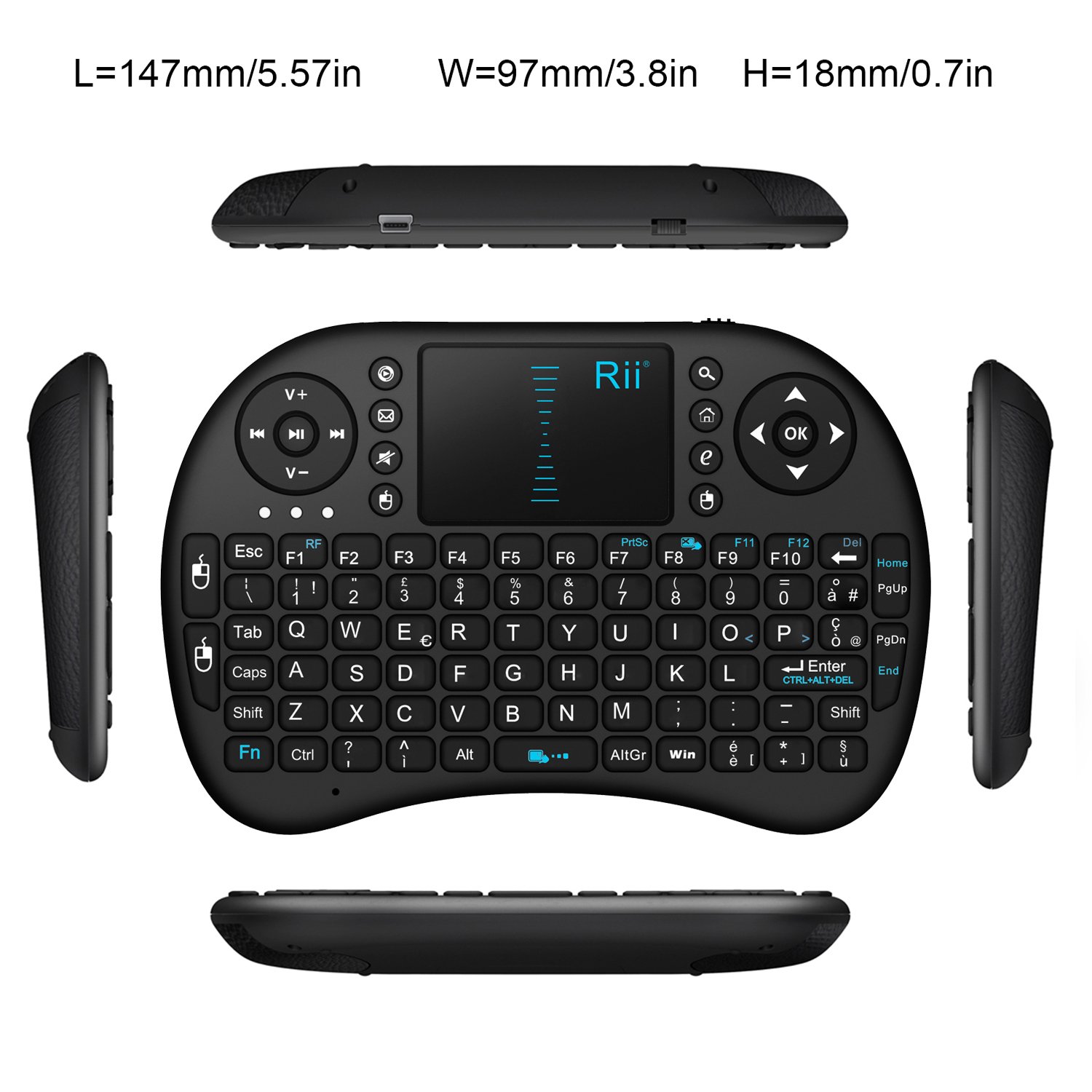
Obraz: widok z góry view of the Rii Mini i8 keyboard with its dimensions (length, width, height) indicated in millimeters and inches.
11. Gwarancja i wsparcie
Aby uzyskać informacje dotyczące gwarancji i pomocy technicznej, zapoznaj się z oficjalną instrukcją producenta webOdwiedź witrynę lub skontaktuj się ze sprzedawcą. Zachowaj paragon zakupu na wypadek reklamacji.