1. Koniecview
The Canon EF-M 22mm f/2 STM is a moderate wide-angle lens designed for the EOS M Digital Camera series. Its ultra-slim and compact form factor makes it highly portable. Featuring a bright f/2.0 aperture, this lens excels in low-light conditions and produces attractive background blur (bokeh). An aspheric lens element contributes to high resolution and contrast. The built-in Stepping Motor (STM) ensures smooth and quiet continuous autofocus, particularly beneficial for video recording. With a short minimum focusing distance, it allows for close-up photography.

Rycina 1: Przód view of the Canon EF-M 22mm f2 STM Compact System Lens.
2. Co znajduje się w pudełku
- EF-M22mm 1:2 STM Lens
- Lens Cap E-43
- Osłona przeciwpyłowa obiektywu EB
- Instrukcja obsługi
- Karta gwarancyjna
3. Główne cechy
- Moderate Wide-Angle: Equivalent to 35mm on a full-frame camera, offering a versatile field of view.
- Płynny i cichy autofokus: Built-in Stepping Motor (STM) provides silent and fluid continuous autofocus, ideal for video recording.
- Jasna przysłona f/2.0: Excellent for low-light performance and creating beautiful, soft background blur with its 7-blade circular aperture.
- Wysoka jakość obrazu: An aspheric lens element ensures high resolution and contrast.
- Close-Up Capabilities: Minimum focusing distance of 5.9 inches (0.15 meters) allows for detailed close-up shots.
- Kompaktowa konstrukcja: Ultra-slim and lightweight, making it easy to carry and suitable for travel.
4. Konfiguracja i instalacja
Mocowanie obiektywu
- Sprawdź, czy kamera jest wyłączona.
- Remove the rear lens cap from the EF-M 22mm f/2 STM lens and the body cap from your EOS M camera.
- Dopasuj czerwoną kropkę na obiektywie do czerwonej kropki na mocowaniu obiektywu aparatu.
- Włóż obiektyw do uchwytu aparatu i obróć go zgodnie z ruchem wskazówek zegara, aż zatrzaśnie się na swoim miejscu.
Odłączanie soczewki
- Sprawdź, czy kamera jest wyłączona.
- Przytrzymując przycisk zwalniający obiektyw na obudowie aparatu, obróć obiektyw w kierunku przeciwnym do ruchu wskazówek zegara, aż do zatrzymania.
- Carefully remove the lens from the camera.
- Attach the rear lens cap to the removed lens and the body cap to the camera to protect the sensor.

Rysunek 2: Strona view of the Canon EF-M 22mm f2 STM lens, showing the mount.
5. Obsługa obiektywu
Autofocus (AF) and Manual Focus (MF)
The EF-M 22mm f/2 STM lens supports both autofocus and manual focus. The STM (Stepping Motor) technology provides exceptionally smooth and quiet autofocus, which is particularly advantageous when shooting video, as it minimizes distracting focus motor noise. For precise control, switch to manual focus mode on your camera.
Aperture and Low-Light Performance
With a wide maximum aperture of f/2.0, this lens allows a significant amount of light to reach the camera's sensor. This makes it highly effective for shooting in challenging low-light conditions without needing to drastically increase ISO sensitivity. The wide aperture also enables shallow depth of field, creating a pleasing background blur that isolates your subject.
Fotografia z bliska
The lens features a minimum focusing distance of just 0.15 meters (5.9 inches). This allows you to get very close to your subjects, capturing intricate details and achieving a near-macro effect. Experiment with this feature for creative close-up shots.
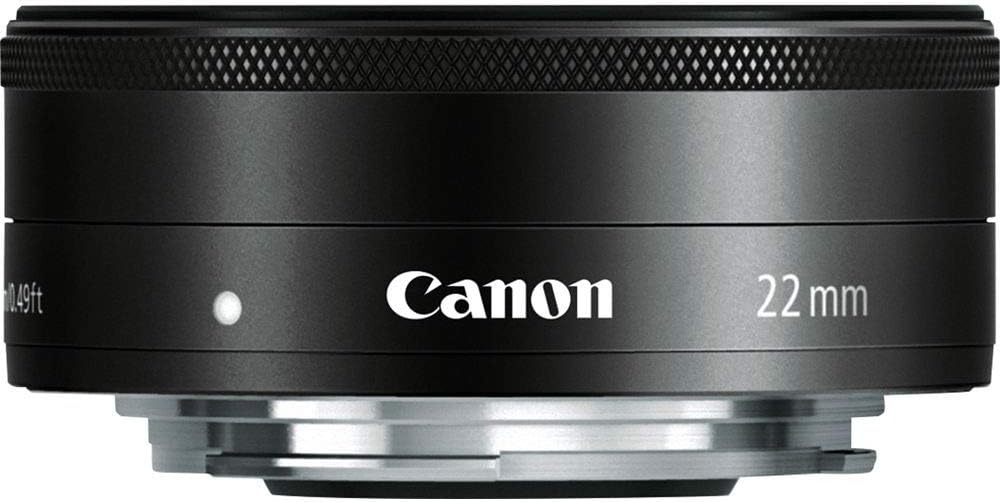
Rycina 3: Przód view of the Canon EF-M 22mm f2 STM lens, illustrating the aperture blades.
Understanding STM Lenses
The Stepping Motor (STM) is a type of autofocus motor designed by Canon to provide smooth and quiet focusing, especially during video recording. Unlike traditional ultrasonic motors (USM) which can be noisy, STM lenses are optimized for silent operation, preventing unwanted audio interference in your videos.
Wideo 1: Overview of Canon STM Lenses, explaining their benefits for smooth and quiet autofocus.
6. Konserwacja i pielęgnacja
- Czyszczenie obiektywu: Use a soft, lint-free cloth or a lens brush to remove dust. For smudges, use a lens cleaning solution and a microfiber cloth. Avoid touching the glass elements directly with your fingers.
- Składowanie: When not in use, keep the lens attached to the camera or with both front and rear caps on. Store in a cool, dry place away from direct sunlight and extreme temperatures.
- Unikaj uderzenia: Protect the lens from drops or impacts, which can damage internal components.
- Ochrona przed wilgocią: Avoid exposing the lens to excessive moisture or humidity. If it gets wet, dry it immediately with a soft cloth.
7. Rozwiązywanie Problemów
- Autofokus nie działa: Ensure the lens is securely mounted to the camera. Check the camera's focus mode settings (AF/MF). Clean the electrical contacts on both the lens and camera body with a clean, dry cloth.
- Problemy z jakością obrazu: Ensure the lens elements are clean and free from dust or smudges. Check camera settings for appropriate aperture, ISO, and shutter speed.
- Lens Not Recognized: Power off the camera, detach and reattach the lens, then power on the camera again. Ensure camera firmware is up to date.
8. Specyfikacje
| Funkcja | Specyfikacja |
|---|---|
| Ogniskowa i maksymalna apertura | 22 mm, f / 2 |
| Budowa soczewki | 7 elementów w 6 grupach |
| Kąt przekątny View | 63°30' |
| Regulacja ostrości | Inner Focusing System |
| Najmniejsza odległość ogniskowania | 0.49 stóp / 0.15 m |
| Rozmiar filtra | 43mm |
| Maksymalna średnica x długość | 2.4 x 0.9 cala / 60.9 x 23.7 mm |
| Waga | 3.7 uncji / 105 g |
| Numer modelu przedmiotu | 5985B002 |
| ASIN | B008NF8BRI |
9. Gwarancja i wsparcie
This product is subject to a 14-day return policy. For detailed warranty information and customer support, please refer to the Warranty Card included in the product packaging or visit the official Canon support website. Ensure you register your product to activate any applicable warranties.


