Wstęp
This user manual provides comprehensive instructions for the installation, operation, and maintenance of your RCA RTS736W 30-Inch Streaming Soundbar. Please read this manual thoroughly before using the product to ensure proper functionality and to prevent damage.
The RCA RTS736W is designed to enhance your home audio experience with its 3.0 channel sound and integrated Wi-Fi for streaming online content.
Główne cechy
- Wi-Fi Built-In for streaming video content to a TV.
- 3.0 Channel Left/Center/Right audio configuration.
- HDMI 1080p Output for high-definition connectivity.
- Includes 1 Rear Analog Audio-in Jack and 1 Side Line-in Jack for various audio sources.
- Flexible placement options: includes table or wall mounting brackets.
Zawartość opakowania
Sprawdź, czy w opakowaniu znajdują się wszystkie elementy:
- RCA RTS736W 30-Inch Streaming Soundbar
- Zdalne sterowanie
- Zasilacz
- Table or Wall Mounting Brackets
- Instrukcja obsługi (ten dokument)

Image: The RCA RTS736W 30-Inch Streaming Soundbar, shown with its sleek black design and integrated controls.
Organizować coś
1. Opcje rozmieszczenia
The soundbar offers flexible placement:
- Umiejscowienie blatu: Place the soundbar on a flat, stable surface in front of your television. Ensure there is adequate ventilation around the unit.
- Montaż na ścianie: Use the included wall mounting brackets to secure the soundbar to a wall. Refer to the separate wall mounting template (if provided) for detailed instructions. Ensure the wall can support the weight of the soundbar.

Image: The RCA RTS736W soundbar positioned on a TV stand, demonstrating a typical home theater setup with various streaming service icons displayed on the television screen.
2. Podłączanie do zasilania
- Connect the power adapter to the DC IN 13.5V port on the back of the soundbar.
- Podłącz drugi koniec zasilacza do gniazdka ściennego.
3. Połączenia audio
Choose one of the following methods to connect the soundbar to your audio source:
- Wyjście HDMI: Connect an HDMI cable from the HDMI OUT port on the soundbar to an HDMI input on your television. This connection supports 1080p video output from the soundbar's streaming functions.
- Analog Audio-in (AUX 1 / AUX 2): Use RCA audio cables to connect your TV or other audio devices to the AUX 1 or AUX 2 input jacks on the back of the soundbar. Match the red and white connectors.
- Side Line-in Jack: For portable devices like smartphones or tablets, connect a 3.5mm audio cable from your device's headphone jack to the Line-in jack located on the side of the soundbar.

Obraz: Zbliżenie view of the rear panel of the RCA RTS736W soundbar, highlighting the AUX 1, AUX 2, DC IN 13.5V, HDMI OUT, and VIDEO OUT ports for various connections.
4. Połączenie sieciowe (Wi-Fi)
To utilize the streaming features, connect the soundbar to your home Wi-Fi network. This process is typically guided by on-screen prompts when the soundbar is first powered on and connected to a TV via HDMI.
- Ensure your TV is connected to the soundbar via HDMI and powered on.
- Postępuj zgodnie z instrukcjami wyświetlanymi na ekranie, aby wybrać swoją sieć Wi-Fi i wpisać hasło.
Instrukcja obsługi
1. Włączanie/wyłączanie zasilania
Naciśnij Moc przycisk na pasku dźwiękowym lub pilocie, aby włączyć lub wyłączyć urządzenie.
2. Wybór wejścia
Naciśnij Wejście button on the remote control or the soundbar to cycle through available audio sources: HDMI, AUX 1, AUX 2, Line-in, and Wi-Fi streaming.
3. Regulacja głośności
Użyj Volume + I Tom - buttons on the remote control or the soundbar to adjust the audio level.
Naciśnij Niemy przycisk, aby tymczasowo wyciszyć dźwięk.
4. Przesyłanie strumieniowe treści
Once connected to Wi-Fi and your TV via HDMI, you can access various streaming applications. Navigate using the directional buttons and OK przycisk na pilocie.
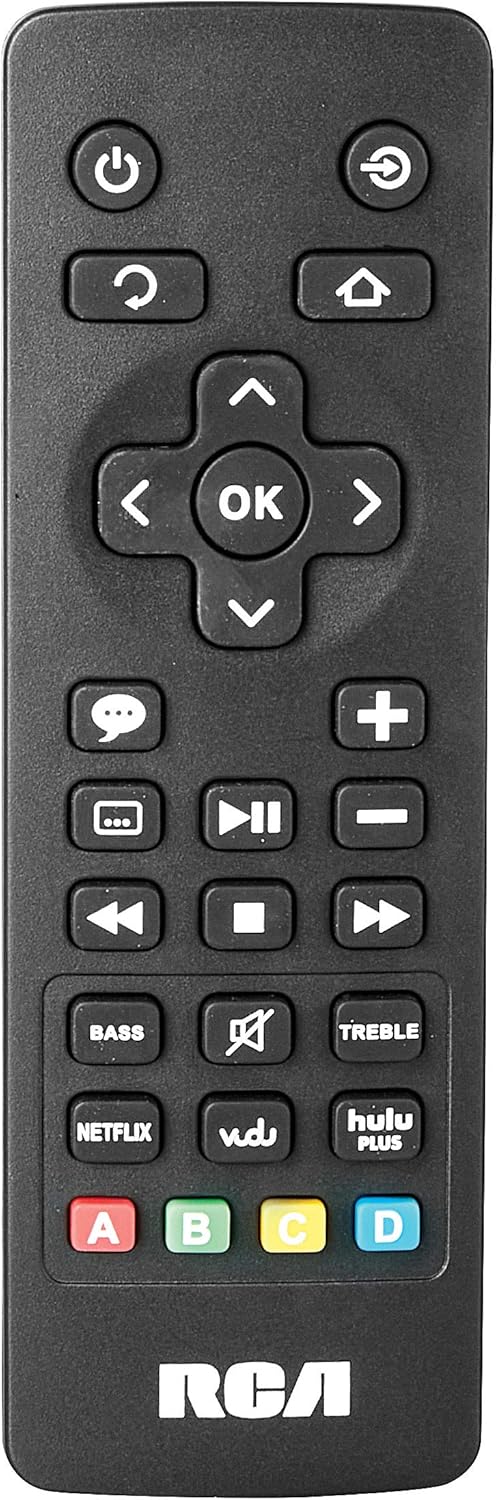
Image: The remote control for the RCA RTS736W soundbar, featuring dedicated buttons for power, volume, input selection, navigation, and direct access to streaming services like Netflix, Vudu, and Hulu Plus.
Dedicated buttons for services like Netflix, Vudu, and Hulu Plus may be available on the remote for direct access.
5. Regulacja dźwięku
Użyj BASS I POTROIĆ buttons on the remote control to fine-tune the audio output to your preference.
Konserwacja
- Czyszczenie: Disconnect the soundbar from the power outlet before cleaning. Use a soft, dry cloth to wipe the exterior surfaces. Do not use liquid cleaners or abrasive materials.
- Wentylacja: Upewnij się, że otwory wentylacyjne w soundbarze nie są zablokowane. Prawidłowy przepływ powietrza zapobiega przegrzaniu.
- Składowanie: Jeśli przechowujesz soundbar przez dłuższy czas, odłącz go od zasilania i przechowuj w chłodnym, suchym miejscu, z dala od bezpośredniego światła słonecznego i ekstremalnych temperatur.
Rozwiązywanie problemów
Brak zasilania
- Check if the power adapter is securely connected to the soundbar and a working wall outlet.
- Sprawdź, czy gniazdko elektryczne jest aktywne, sprawdzając je za pomocą innego urządzenia.
Brak dźwięku
- Sprawdź, czy na soundbarze wybrano prawidłowe źródło sygnału wejściowego.
- Check all audio cable connections between the soundbar and your audio source (TV, etc.).
- Ensure the volume on both the soundbar and the connected audio source is turned up and not muted.
- If using HDMI, confirm that your TV's audio output settings are configured to send audio to the soundbar.
Streaming Issues (Buffering, Freezing)
- Check your Wi-Fi network connection. Ensure the signal strength is adequate.
- Restart your home router and modem.
- Restart the soundbar by unplugging it from the power outlet for a few minutes, then plugging it back in.
- Ensure your internet service is active and performing correctly.
Pilot nie działa
- Wymień baterie w pilocie.
- Upewnij się, że między pilotem zdalnego sterowania a czujnikiem soundbara nie ma żadnych przeszkód.
- Skieruj pilota bezpośrednio na soundbar.
Specyfikacje
| Numer modelu | RTS736W |
| Typ głośnika | Soundbar |
| Kanały | 3.0 (Left/Center/Right) |
| Łączność | HDMI, RCA, Wi-Fi |
| Technologia bezprzewodowa | Wi-Fi |
| Wyjście HDMI | 1080p |
| Wejścia audio | 2x Analog Audio-in (RCA), 1x Side Line-in (3.5mm) |
| Rozmiar głośnika | 30 cali |
| Maksymalna moc wyjściowa | 150 watów |
| Impedancja | 8 omy |
| Źródło zasilania | Elektryczny przewodowy |
| Wymiary produktu (dł. x szer. x wys.) | 33.5 x 6.5 x 5.5 cala |
| Waga przedmiotu | 5.55 funta |
| Producent | Alco Electronics Ltd. |
Informacje o gwarancji
Specific warranty details for the RCA RTS736W Soundbar are typically provided with the product packaging or can be found on the official RCA webStrona. Zachowaj dowód zakupu na wypadek roszczeń gwarancyjnych.
For warranty service, contact RCA customer support with your model number and purchase date.
Obsługa klienta
For further assistance, technical support, or service inquiries, please refer to the contact information provided in your product's original documentation or visit the official RCA support webstrona.
Zasoby internetowe: Odwiedź sklep RCA na Amazon
Powiązane dokumenty - RTS736W
 |
Środki ostrożności i przewodnik wprowadzający do telewizora RCA Ultra HD Smart TV Kompleksowe środki ostrożności, ważne instrukcje, lista akcesoriów i przewodnik wprowadzający do telewizorów RCA Ultra HD Smart TV, zawierający również informacje na temat pilota i baterii. |
 |
Instrukcja obsługi telewizora RCA RNSMU5836 58 cali 4K UHD Smart TV Kompleksowa instrukcja obsługi telewizora RCA RNSMU5836 58 cali 4K UHD Smart TV. Obejmuje konfigurację, połączenia, funkcje inteligentne, opcje menu i rozwiązywanie problemów, aby zapewnić optymalne wrażenia użytkownika. |
 |
Instrukcja obsługi i przewodnik konfiguracji soundbara RCA SBT17015B Kompleksowa instrukcja obsługi soundbara RCA SBT17015B, szczegółowo opisująca konfigurację, połączenia, parowanie Bluetooth, regulacje dźwięku, środki ostrożności i informacje gwarancyjne. |
 |
RCA RPJ135 Standard HD Projector with Roku Streaming Stick - User Manual Instruction manual for the RCA RPJ135 Standard HD Projector, including setup, operation, troubleshooting, and warranty information for the projector and integrated Roku Streaming Stick. |
 |
RCA RS32H2-EU 32-Inch LED HD LCD TV User Manual Comprehensive user manual for the RCA RS32H2-EU 32-Inch LED HD LCD TV, covering safety instructions, setup, operation, specifications, and troubleshooting. |
 |
Instrukcja obsługi RCA RENO Kompleksowy podręcznik użytkownika smartfona RCA RENO, szczegółowo opisujący konfigurację, funkcje, komunikację, narzędzia, bezpieczeństwo i konserwację systemu Android 10 (edycja Go). |