1. Wprowadzenie
This manual provides instructions for the Perixx PX-1000 Backlit Gaming Keyboard. It covers setup, operation, maintenance, and troubleshooting to ensure optimal performance and user experience. The PX-1000 is designed for various environments, including office, home, and gaming, featuring adjustable backlighting and a Windows key lock function.
2. Koniec produktuview
2.1 Główne cechy
- Podświetlane klawisze: Three-level adjustable backlighting for visibility in low-light conditions.
- Opcje kolorów: Switch between blue, red, and purple backlight colors.
- Windows Lock Function: Disable the Windows key to prevent accidental interruptions during gaming.
- Łączność USB: Standard USB connection for broad compatibility.
2.2 Układ klawiatury
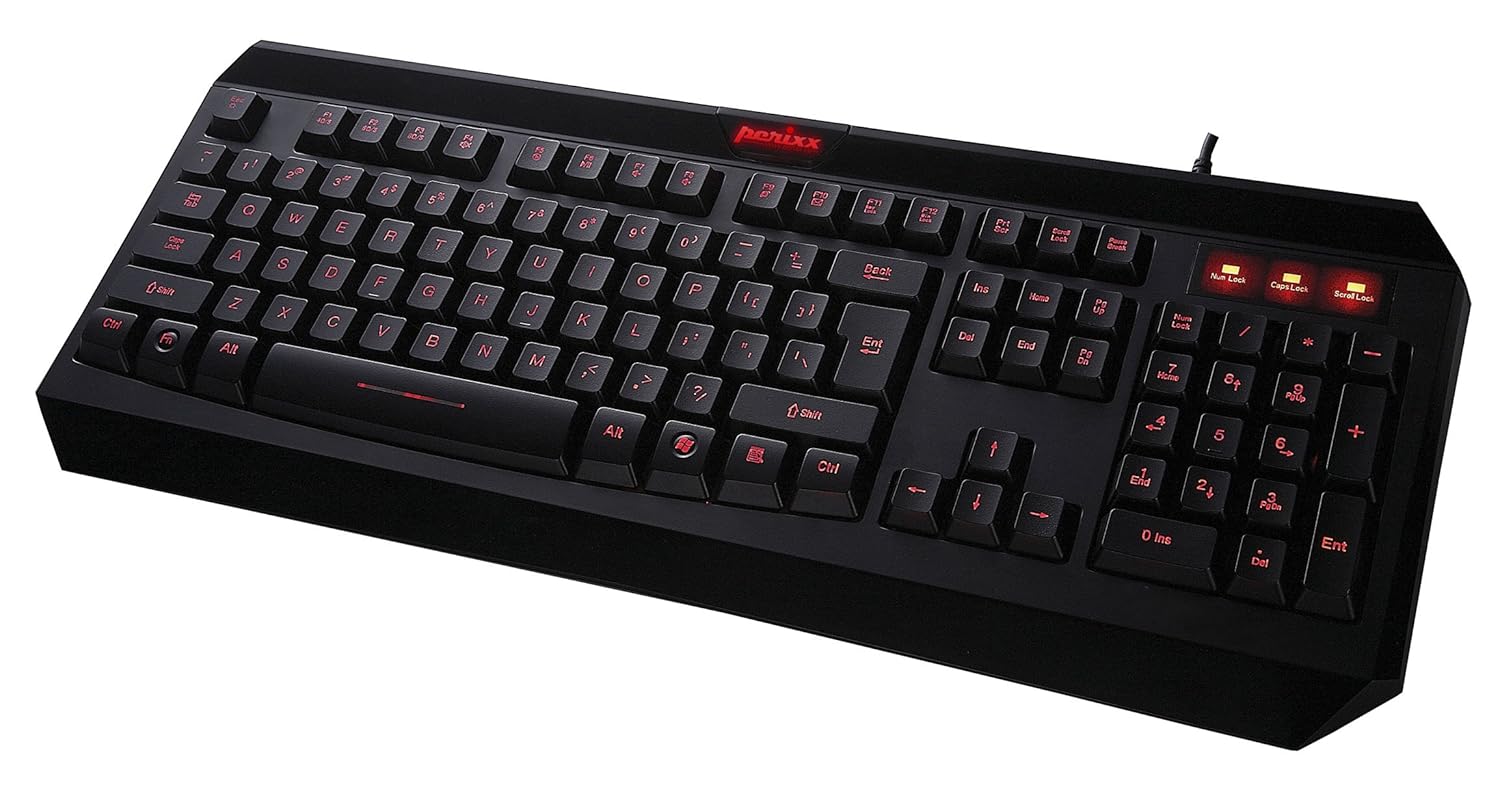
Rysunek 2.1: Widok z góry na dół view of the Perixx PX-1000 keyboard with red backlighting activated. This image displays the full QWERTY layout, numeric keypad, and function keys.

Figure 2.2: Technical diagram illustrating the key layout and dimensions of the Perixx PX-1000 keyboard.
3. Konfiguracja
- Rozpakowywanie: Carefully remove the keyboard from its packaging. Ensure all components, including the USB cable, are present.
- Połączenie: Podłącz złącze USB klawiatury do dostępnego portu USB w komputerze.
- Instalacja sterownika: The Perixx PX-1000 is a plug-and-play device. Your operating system (Windows) should automatically detect and install the necessary drivers. No additional software installation is typically required.
- Umieszczenie: Position the keyboard comfortably on your desk.
4. Instrukcja obsługi
Sterowanie podświetleniem 4.1
The PX-1000 features adjustable backlighting with multiple color options.
- Changing Backlight Color: Naciśnij Fn klucz + Blokada przewijania key simultaneously to cycle through the available backlight colors: Blue, Red, and Purple.
- Regulacja jasności podświetlenia: Naciśnij Fn klucz + Strona w górę key to increase brightness, and Fn klucz + Strona w dół key to decrease brightness. There are three brightness levels.
- Turning Backlight On/Off: To turn off the backlight, cycle through the brightness levels until it is off, or press Fn klucz + Blokada przewijania until the backlight is off.
4.2 Windows Key Lock Function
To prevent accidental activation of the Windows Start menu during intensive tasks or gaming, the Windows key can be disabled.
- Activating/Deactivating Windows Key Lock: Naciśnij Fn klucz + Klawisz Windows simultaneously. An indicator light (usually near the Num Lock/Caps Lock indicators) will illuminate when the Windows key is locked. Repeat the combination to unlock.
5. Konserwacja
Właściwa konserwacja zapewnia długowieczność i wydajność klawiatury.
- Czyszczenie: Use a soft, dry cloth to wipe the surface of the keyboard. For deeper cleaning, use a can of compressed air to remove dust and debris from between the keys. Avoid using harsh chemicals or abrasive materials.
- Wycieki: In case of liquid spills, immediately disconnect the keyboard from your computer. Turn it upside down to drain any liquid and allow it to dry completely before reconnecting. Do not attempt to use the keyboard while it is wet.
- Składowanie: Jeśli klawiatura nie będzie używana przez dłuższy czas, należy ją przechowywać w czystym i suchym miejscu, chroniąc przed ekstremalnymi temperaturami.
6. Rozwiązywanie Problemów
| Problem | Możliwa przyczyna | Rozwiązanie |
|---|---|---|
| Klawiatura nie odpowiada. | Luźne połączenie USB, uszkodzony port USB, problem ze sterownikiem. |
|
| Podświetlenie nie działa lub jest zablokowane na jednym kolorze. | Backlight function not activated, incorrect settings. |
|
| Windows key not functioning. | Windows key lock is active. | Naciskać Fn + Klawisz Windows to toggle the lock function. Check the indicator light. |
| Klawisze są lepkie lub nie reagują. | Zanieczyszczenia pod klawiszami, uszkodzenia spowodowane przez ciecze. |
|
7. Specyfikacje

Figure 7.1: Detailed dimensions of the Perixx PX-1000 keyboard.
| Funkcja | Szczegół |
|---|---|
| Marka | Perixx |
| Numer modelu | PX-1000 (Item model number: 10992) |
| Kolor | Black, Red (Backlight colors: Blue, Red, Purple) |
| Technologia łączności | USB |
| Kompatybilne urządzenia | PC |
| System operacyjny | Okna |
| Wymiary produktu (dł. x szer. x wys.) | 46 x 19.2 x 3 cm (18.11 x 7.56 x 1.18 cala) |
| Waga przedmiotu | 812 g (1.79 funta) |
| Zawarte komponenty | Kabel USB |
| Funkcja specjalna | Podświetlany |
8. Gwarancja i wsparcie
For warranty information and technical support, please refer to the documentation included with your product or visit the official Perixx website. Perixx provides customer support for product-related inquiries and assistance with troubleshooting.
Zasoby internetowe: Aby uzyskać dodatkową pomoc i informacje o produkcie, odwiedź stronę Sklep Perixx na Amazonie.


