1. Wprowadzenie
This manual provides comprehensive instructions for the installation, operation, and maintenance of your ZENEC ZE-NC620DMH 2-DIN Navigation Receiver. Designed specifically for motorhomes and caravans, this device integrates advanced navigation with multimedia functionalities. Please read this manual thoroughly before using the product to ensure correct operation and to prevent damage.
2. Informacje dotyczące bezpieczeństwa
- Instalacja: Ensure installation is performed by a qualified technician to avoid damage to the vehicle or the device. Incorrect installation can lead to malfunction or accidents.
- Zasilanie: Connect the device only to a 12V DC vehicle power supply with a negative ground.
- Obsługa podczas jazdy: Nie używaj urządzenia w sposób, który odwraca Twoją uwagę od prowadzenia pojazdu. Zawsze priorytetowo traktuj bezpieczeństwo na drodze.
- Czyszczenie: Do czyszczenia używaj miękkiej, suchej ściereczki. Nie używaj ściernych środków czyszczących ani rozpuszczalników.
- Temperatura: Unikaj wystawiania urządzenia na działanie ekstremalnych temperatur lub bezpośredniego światła słonecznego przez dłuższy czas.
3. Koniec produktuview
The ZENEC ZE-NC620DMH is a versatile 2-DIN navigation and multimedia system. It features a 6.2-inch touchscreen display and various input/output options.
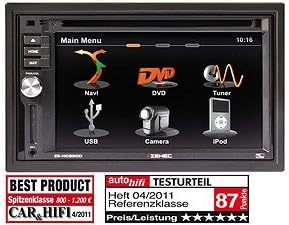
Rysunek 3.1: Interfejs menu głównego. This image displays the primary menu screen of the ZENEC ZE-NC620DMH. Key functions are accessible via touch icons, including Navigation (Navi), DVD playback, Radio Tuner, USB media, Camera input, and iPod connectivity. The top right corner shows the current time (10:16).
3.1 Funkcje menu głównego
- Navi: Access the integrated navigation system with specialized POIs for campPierwszy
- PŁYTA DVD: Play DVDs and CDs via the built-in optical drive.
- Tuner: Select and listen to radio stations.
- USB: Podłącz urządzenia pamięci masowej USB w celu odtwarzania multimediów.
- Kamera: View input from a connected rearview or front camera.
- iPod'a: Connect and control compatible iPod/iPhone devices for audio playback.
4. Konfiguracja
4.1 Instalacja
The ZE-NC620DMH is designed for dashboard mounting in vehicles with a 2-DIN slot. Professional installation is highly recommended. Ensure all wiring connections (power, ground, speakers, antenna, GPS antenna, external microphone, camera inputs, USB) are secure and correctly polarized according to the wiring diagram provided in the separate installation guide.
4.2 Konfiguracja początkowa
- Włączanie: Turn on your vehicle's ignition. The device should power on automatically.
- Wybór języka: Aby wybrać preferowany język, postępuj zgodnie z instrukcjami wyświetlanymi na ekranie.
- Czas i data: Ustaw prawidłową strefę czasową, datę i godzinę.
- Konfiguracja GPS: Upewnij się, że antena GPS jest zainstalowana w miejscu z wolnym dostępem view of the sky. The system will acquire satellite signals automatically.
- Parowanie Bluetooth: To pair your mobile phone, navigate to the Bluetooth menu, enable pairing mode on your phone, and select the ZE-NC620DMH from the list of available devices.
5. Instrukcja obsługi
5.1 System nawigacyjny
- Tap the "Navi" icon on the main menu to launch the navigation software.
- Wprowadź miejsce docelowe za pomocą klawiatury ekranowej.
- Select route preferences (e.g., fastest, shortest, avoid tolls).
- The system provides turn-by-turn voice guidance and visual map display.
- Access specialized POIs (Points of Interest) for campers, such as campsites, service stations, and parking areas.
5.2 Multimedia Playback (DVD/CD, USB, iPod)
- DVD/CD: Insert a disc into the slot. The device will automatically switch to DVD/CD mode. Use the on-screen controls for playback.
- USB: Connect a USB flash drive to the designated USB port. Tap the "USB" icon to browse and play media files (audio, video, images).
- iPod'a: Connect your iPod/iPhone using a compatible cable. Tap the "iPod" icon to access your music library and control playback.
5.3 Tuner radiowy
- Tap the "Tuner" icon to access the radio.
- Użyj funkcji skanowania, aby znaleźć dostępne stacje lub ręcznie dostrój się do częstotliwości.
- Zapisz swoje ulubione stacje jako ustawienia wstępne, aby mieć do nich szybki dostęp.
5.4 Wejście kamery
- Jeśli tyłview kamera jest podłączona, wyświetlacz automatycznie przełączy się na kamerę view gdy pojazd jest włączony z biegiem wstecznym.
- Tap the "Camera" icon to manually view the camera feed (if supported by your camera setup).
6. Konserwacja
- Czyszczenie ekranu: Gently wipe the touchscreen with a soft, lint-free cloth. For stubborn smudges, slightly dampen the cloth with water or a screen-safe cleaner. Do not spray liquids directly onto the screen.
- Aktualizacje oprogramowania: Periodically check the ZENEC website for available software and map updates to ensure optimal performance and the latest navigation data.
- Napęd dysków: Keep the disc slot free from dust and debris. Avoid inserting damaged or dirty discs.
7. Rozwiązywanie Problemów
| Problem | Możliwa przyczyna | Rozwiązanie |
|---|---|---|
| Brak zasilania | Przepalony bezpiecznik, nieprawidłowe okablowanie, luźne połączenie. | Check vehicle fuses. Verify power and ground connections. Consult an installer. |
| Brak sygnału GPS | Antena GPS jest zasłonięta lub odłączona. | Ensure antenna has a clear view nieba. Sprawdź połączenie antenowe. |
| Brak dźwięku | Głośność jest za niska, wyciszenie włączone, problem z okablowaniem głośników. | Zwiększ głośność. Sprawdź wyciszenie. Sprawdź połączenia głośników. |
| Ekran dotykowy nie reaguje | Tymczasowy błąd oprogramowania. | Perform a soft reset (refer to installation guide for reset button location, usually a small pinhole). |
If problems persist after attempting these solutions, please contact ZENEC customer support or a qualified service center.
8. Specyfikacje
- Marka: Zenek
- Nazwa modelu: ZENEC ZE-NC620DMH
- Rodzaj serwisu pojazdu: Ciężarówka (Note: Optimized for Motorhome/Caravan use)
- Rozmiar ekranu: 6.2 cali
- Dodatek specjalny: Adaptation for motorhomes and caravans
- Technologia łączności: Bluetooth, USB
- Typ mapy: Europa
- Zawartość zestawu: CD/DVD player, external microphone
- Tryb wyjścia audio: Stereofoniczny
- Typ montażu: Montaż na desce rozdzielczej
9. Gwarancja i wsparcie
For warranty information, please refer to the warranty card included with your product or visit the official ZENEC website. Technical support and service inquiries should be directed to your authorized ZENEC dealer or the ZENEC customer service department.
Proszę zachować dowód zakupu na potrzeby roszczeń gwarancyjnych.


