Wstęp
This manual provides comprehensive instructions for the setup, operation, maintenance, and troubleshooting of your DISH DISH211 4-Device Universal Remote. Designed for ease of use, this remote supports DISH TV receivers and can control up to four different devices, including TVs and other entertainment systems. Its ability to learn commands from original remotes makes it a versatile replacement.
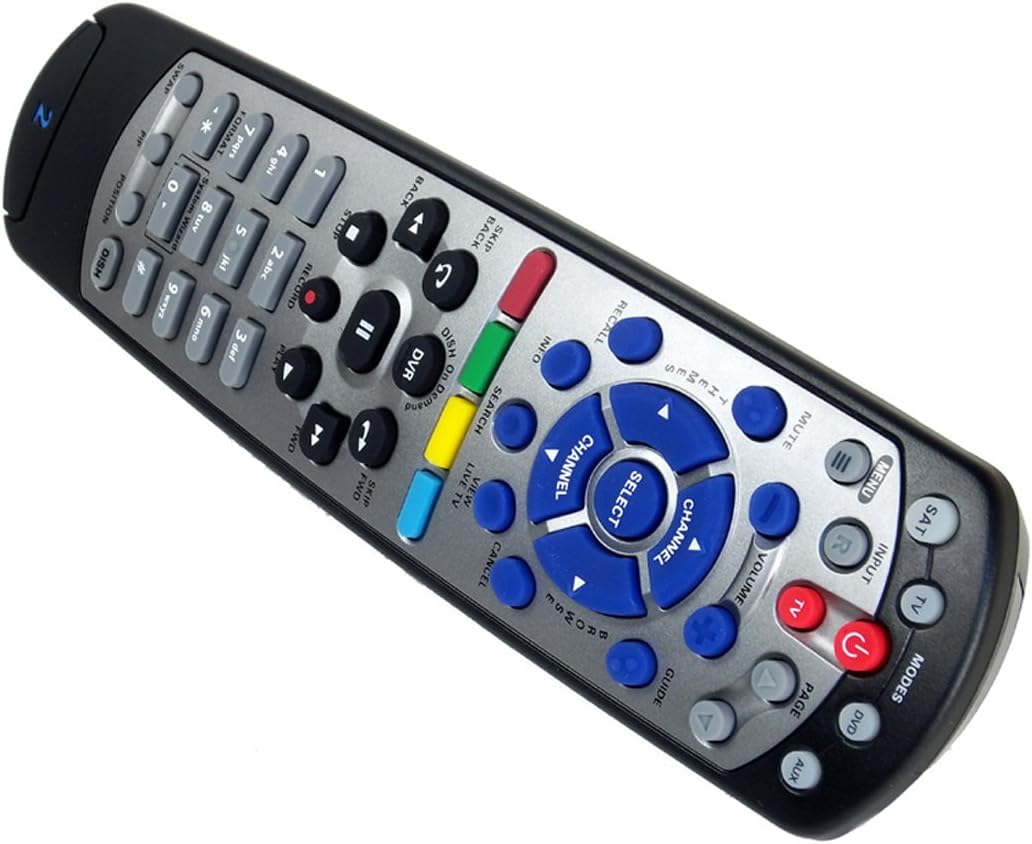
Figure 1: The DISH DISH211 4-Device Universal Remote, showcasinze względu na ergonomiczną konstrukcję i układ przycisków.
Organizować coś
1. Instalacja baterii
The DISH211 remote requires two (2) AA batteries for operation. To install:
- Znajdź komorę baterii z tyłu pilota.
- Przesuń pokrywę baterii w dół i unieś, aby otworzyć.
- Włóż dwie baterie AA, upewniając się, że bieguny dodatni (+) i ujemny (-) są ustawione zgodnie ze wskaźnikami wewnątrz komory.
- Załóż pokrywę baterii, przesuwając ją do góry, aż zatrzaśnie się na swoim miejscu.
2. Device Pairing and Programming
The DISH211 remote can be programmed to control your DISH receiver and other devices. It supports both Infrared (IR) and Ultra High Frequency (UHF) communication, depending on your receiver model.

Figure 2: Cover of the official DISH Remote User Guide, which provides detailed programming instructions.
For DISH Receiver Pairing (UHF/IR):
Some DISH receivers may require setting the remote's address and communication type (UHF or IR). A small switch near the battery compartment may allow selection between UHF and IR modes. Ensure this switch is set correctly for your receiver type.
To address the remote to your receiver:
- Naciśnij Informacje o systemie button on the front of your receiver to access the system information screen.
- Naciśnij i przytrzymaj OSOBA button on the remote until all mode lights illuminate.
- Enter a number between 1-15 on the remote keypad. This number corresponds to the TV-2 UHF address displayed on your receiver's screen.
- Naciśnij # (pound) button once.
- Naciśnij Nagrywać przycisk trzy razy.
- Wybierać Zrobione on the system info screen and test the remote's functionality.
For Other Devices (TV, DVD, AUX):
The remote has a large code library and can learn commands from your original remotes. Refer to the official DISH remote user guide (often included with the product or available online) for specific programming codes and learning instructions for various brands and device types.

Figure 3: The back of the DISH remote packaging, indicating compatible DISH receiver models for both IR and IR/UHF configurations.
Instrukcja obsługi
The DISH211 remote is designed for intuitive control of your entertainment system. It features backlit active MODE keys for visibility in low light conditions and dedicated DVR controls.
1. Wybór trybu
Press the desired mode button (e.g., OSOBA for DISH receiver, TV dla telewizji, płyta DVD for DVD player, AUX for auxiliary device) at the top of the remote to select the device you wish to control. The selected mode button will illuminate.
2. Podstawowe sterowanie
- Moc: Naciśnij MOC przycisk, aby włączyć lub wyłączyć wybrane urządzenie.
- Tom: Użyj ZWIĘKSZANIE/ZMNIEJSZANIE GŁOŚNOŚCI buttons to adjust the audio level of your television.
- Kanał: Użyj KANAŁ W GÓRĘ/W DÓŁ buttons to change channels on your DISH receiver or television.
- Niemy: Naciśnij NIEMY przycisk, aby wyciszyć dźwięk.
- Wejście: Naciśnij WEJŚCIE button to cycle through video inputs on your television.
3. DVR Controls
The remote includes dedicated buttons for DVR functionality:
- Nagrywać: Rozpoczyna nagrywanie bieżącego programu.
- Odtwórz/Pauza: Starts or pauses playback of recorded content or live TV.
- Zatrzymać: Zatrzymuje odtwarzanie.
- Przewijanie do tyłu/do przodu: Controls playback speed and direction.
- Skip Forward (DISH Skip Forward): Allows quick skipping through commercials or segments.
- Przejdź do tyłu: Skips backward in recorded content.

Rysunek 4: Zbliżenie view of the DISH DISH211 remote, highlighting the central navigation and DVR control buttons.
Konserwacja
1. Wymiana baterii
When the remote's performance degrades or buttons become unresponsive, it is likely time to replace the batteries. Follow the battery installation steps outlined in the Setup section.
2. Czyszczenie
Aby wyczyścić pilota, delikatnie przetrzyj jego powierzchnię miękką, suchą ściereczką. W przypadku uporczywych zabrudzeń delikatnie przetrzyj.ampPrzetrzyj ściereczkę wodą lub delikatnym, nieściernym środkiem czyszczącym. Unikaj stosowania nadmiernej ilości płynu lub silnych środków chemicznych, ponieważ mogą one uszkodzić elektronikę lub wykończenie pilota.
Rozwiązywanie problemów
Pilot nie odpowiada
- Sprawdź baterie: Upewnij się, że baterie są prawidłowo zainstalowane i wystarczająco naładowane. W razie potrzeby wymień je.
- Line of Sight (IR): If using IR mode, ensure there is a clear line of sight between the remote and the device's IR receiver. Obstructions can block the signal.
- Wybór trybu: Verify that the correct mode button (e.g., SAT, TV) is selected for the device you are trying to control.
- Remote Address/UHF-IR Switch: For DISH receivers, confirm the remote's address is correctly set and the UHF/IR switch (if present) matches your receiver's configuration. Incorrect settings can prevent communication.
Funkcjonalność okresowa
- Ingerencja: Other electronic devices or strong light sources (like plasma TV IR interference) can sometimes interfere with IR signals. Try operating the remote from a different angle or location.
- DVR Directory Update: If experiencing lag or unresponsiveness with DVR functions, ensure your DVR's directory is updated. Consult your DISH receiver's manual for instructions on updating its software or directory.
Przyciski nie działają
- Wyczyść pilota: Dirt or debris under buttons can cause them to stick or become unresponsive. Clean the remote as described in the Maintenance section.
- Przeprogramowanie: If specific buttons for a device are not working, the remote may need to be reprogrammed for that device.
Specyfikacje
| Funkcja | Szczegół |
|---|---|
| Numer modelu | DISH211 |
| Marka | DANIE |
| Wymiary produktu | 1.75 x 4.81 x 11.38 cala |
| Waga przedmiotu | 9.6 uncji |
| Wymagane baterie | 2 baterie AA |
| Maksymalna liczba obsługiwanych urządzeń | 4 |
| Kompatybilne urządzenia | Television, DISH TV receivers (TV1 and TV2 locations) |
| Technologia łączności | Infrared (IR), Ultra High Frequency (UHF) |
| Cechy specjalne | Backlit keys, Universal compatibility, Learning capability |
Gwarancja i wsparcie
Informacje o gwarancji
The DISH DISH211 Universal Remote typically comes with a Ograniczona 90-dniowa gwarancja. Please refer to the documentation enclosed with your product for specific terms, conditions, and details regarding warranty claims.
Obsługa klienta
For further assistance with programming, troubleshooting, or general inquiries, it is recommended to consult the official DISH Network support resources. This may include their website, online user guides, or customer service contact information. The manufacturer of this product is Audiovox Accessories Corporation.


