1. Wprowadzenie
This manual provides comprehensive instructions for the safe and effective operation, maintenance, and troubleshooting of your OWON SDS6062 Digital Storage Oscilloscope. Please read this manual thoroughly before using the device to ensure proper functionality and to prevent damage.
The OWON SDS6062 is a 60 MHz Deep Memory Digital Storage Oscilloscope featuring 10 M points of memory and 2 channels. It is equipped with LAN and VGA interfaces for enhanced connectivity and display options. This package includes the oscilloscope, two probes, a power cable, a USB cable, this manual, and a CD with software.
2. Koniec produktuview
2.1 Główne cechy
- 10M record length with 500MS/s sampstawka.
- Auto Scale function for simplified operation.
- Smart design body for easy workplace integration.
- SVGA port for enlarged waveform display on external monitors.
- 8-inch high definition TFT display (800 x 600 pixels).
- Pass/Fail function for automated testing.
- LAN and USB connectivity for data transfer and remote control.
2.2 Zawartość pudełka
Po rozpakowaniu należy sprawdzić, czy wszystkie wymienione poniżej przedmioty znajdują się na miejscu i są w dobrym stanie:
- Cyfrowy oscyloskop pamięciowy OWON SDS6062
- Przewód zasilający
- Kabel łączący USB
- Instrukcja obsługi (ten dokument)
- Płyta CD z oprogramowaniem
- Probe Set (2 probes)
2.3 Produkt Views

Rycina 2.1: Przód view of the OWON SDS6062 Digital Storage Oscilloscope, showing the large 8-inch display and control panel with various knobs and buttons for measurement, acquisition, horizontal, vertical, and trigger settings.

Rysunek 2.2: Tył view of the OWON SDS6062 Oscilloscope, highlighting the power input socket and the main power switch. The included power cable is also shown connected.

Rysunek 2.3: Strona view of the OWON SDS6062 Oscilloscope, illustrating the USB (Device and Host), VGA, LAN, and Probe Compensation ports. Two oscilloscope probes and a USB cable are also displayed, indicating the included accessories.
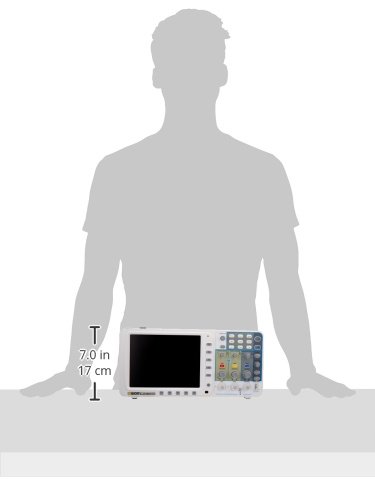
Figure 2.4: A silhouette showing the approximate dimensions of the OWON SDS6062 Oscilloscope, indicating a height of approximately 7.0 inches (17 cm) for scale.
3. Informacje dotyczące bezpieczeństwa
Aby zapobiec obrażeniom ciała i uszkodzeniu urządzenia, należy zawsze przestrzegać następujących środków ostrożności:
- Źródło zasilania: Connect the instrument only to a power source that provides the specified voltage i częstotliwości. Upewnij się, że przewód zasilający jest prawidłowo uziemiony.
- Grunt: The oscilloscope chassis is connected to the ground terminal of the power cord. To prevent electric shock, ensure the instrument is properly grounded before making any connections.
- Sondy: Use only probes supplied or recommended by Owon. Ensure probes are rated for the voltage and current being measured. Do not touch the probe tip or exposed components when connected to a live circuit.
- Środowisko: Operate the oscilloscope in a well-ventilated area, away from direct sunlight, high temperatures, humidity, and excessive dust. Avoid operating in explosive atmospheres.
- Czyszczenie: Przed czyszczeniem odłącz zasilanie. Użyj miękkiej, suchej ściereczki. Nie używaj środków czyszczących ani rozpuszczalników o działaniu ściernym.
- Serwisowanie: Wszelkie prace serwisowe należy zlecać wykwalifikowanemu personelowi. Nie należy podejmować prób samodzielnego otwierania ani naprawy urządzenia.
4. Konfiguracja
4.1 Rozpakowanie i kontrola
Carefully remove the oscilloscope and all accessories from the packaging. Inspect for any signs of damage during transit. If any damage is found, contact your dealer immediately.
4.2 Połączenie zasilania
- Ensure the oscilloscope's power switch (located on the rear panel, refer to Figure 2.2) is in the OFF position.
- Connect the provided power cord to the AC power input socket on the rear panel of the oscilloscope.
- Podłącz drugi koniec przewodu zasilającego do uziemionego gniazdka sieciowego.
4.3 Podłączenie sondy i kompensacja
- Connect the BNC connector of a probe to one of the input channels (CH1 or CH2) on the front panel.
- Attach the probe ground clip to the ground terminal on the oscilloscope's front panel (typically near the probe compensation output).
- Connect the probe tip to the probe compensation output terminal (PROBE COMP) on the front panel (refer to Figure 2.3).
- Power on the oscilloscope.
- Adjust the probe compensation screw on the probe until a flat-top square wave is displayed on the screen. This ensures accurate measurements.
4.4 Connecting to External Devices (LAN/VGA/USB)
The SDS6062 offers multiple connectivity options:
- Port LAN: Connect an Ethernet cable from the oscilloscope's LAN port to your network router or PC for remote control and data transfer. Refer to the software CD for PC application installation and network configuration.
- Port VGA: Connect a VGA cable from the oscilloscope's VGA port to an external monitor or projector to display the waveform on a larger screen.
- Porty USB:
- Port urządzenia USB: Use the provided USB cable to connect the oscilloscope to a PC for data transfer and remote control. Install the necessary drivers and software from the included CD.
- Port hosta USB: Connect a USB flash drive to save waveform data or screenshots directly from the oscilloscope.
5. Instrukcja obsługi
5.1 Włączanie/wyłączanie zasilania
To power on the oscilloscope, press the power switch on the rear panel to the ON position. To power off, press the switch to the OFF position.
5.2 Zrozumienie wyświetlacza
The 8-inch TFT display provides a clear view of waveforms and measurement parameters. The screen is divided into a grid for easy amplitude and time measurement. Key information such as channel status, trigger settings, and measurement values are displayed around the waveform area.
5.3 Podstawowe pozyskiwanie przebiegów
- Podłącz sondę: Ensure your probe is correctly connected to a channel (CH1 or CH2) and compensated.
- Podłącz do obwodu: Connect the probe tip to the test point in your circuit and the ground clip to the circuit's ground.
- Skalowanie automatyczne: Naciśnij Automatyczny button on the front panel. The oscilloscope will automatically adjust the vertical and horizontal settings to display a stable waveform. This is useful for quickly viewodbieranie nieznanego sygnału.
- Regulacje ręczne:
- Vertical Position (VOLTS/DIV): Use the vertical position knob for the selected channel to move the waveform up or down. Use the VOLTS/DIV knob to adjust the vertical scale (voltage na działkę).
- Horizontal Position (SEC/DIV): Use the horizontal position knob to move the waveform left or right. Use the SEC/DIV knob to adjust the horizontal scale (time per division).
5.4 Wyzwalanie
Triggering stabilizes repetitive waveforms and captures single-shot events. The trigger controls are located on the right side of the front panel.
- Poziom wyzwalania: Dostosuj POZIOM TRIGU pokrętło do ustawiania głośnościtagPoziom, na którym następuje wystąpienie wyzwalacza.
- Tryb wyzwalania: Select trigger modes (e.g., Edge, Pulse, Video) using the dedicated buttons or menu options. Edge triggering is the most common for general-purpose use.
- Źródło wyzwalacza: Select the channel (CH1, CH2, EXT, AC Line) that will serve as the trigger source.
5.5 Pomiary
The SDS6062 offers various automatic measurement functions:
- Naciśnij Mierzyć button to access the automatic measurement menu.
- Select desired parameters such as Vpp (peak-to-peak voltage), Vmax, Vmin, Frequency, Period, Rise Time, Fall Time, etc.
- The selected measurements will be displayed on the screen, typically at the bottom or side.
5.6 Pass/Fail Function
The Pass/Fail function allows for automated testing against predefined waveform masks. If a waveform falls outside the specified mask, it is flagged as a "Fail".
- Access the Pass/Fail settings through the menu system.
- Define the upper and lower limits of the waveform mask.
- Enable the function to begin continuous testing.
5.7 Zapisywanie i przywoływanie danych
Waveforms, setups, and screenshots can be saved to internal memory or a USB flash drive.
- Naciśnij Ratować button to access saving options.
- Choose to save waveform data, oscilloscope setup, or a screen image.
- Select the destination (internal memory or USB drive).
- To recall, press the Przypomnienie sobie czegoś przycisk i wybierz żądany file.
6. Konserwacja
6.1 Ogólna pielęgnacja i czyszczenie
To maintain the performance and longevity of your oscilloscope:
- Keep the instrument clean and free from dust. Use a soft, dry cloth for cleaning the exterior. For stubborn dirt, a cloth lightly dampened with water and mild detergent may be used, ensuring no liquid enters the device.
- Do not use abrasive cleaners, solvents, or strong chemicals, as these can damage the plastic components and screen.
- Regularly inspect probes and cables for damage. Replace any damaged accessories immediately.
6.2 Przechowywanie
When not in use for extended periods, store the oscilloscope in a cool, dry environment, away from direct sunlight and extreme temperatures. Use the original packaging or a suitable carrying case to protect it from physical shock and dust.
7. Rozwiązywanie Problemów
This section addresses common issues you might encounter with your OWON SDS6062 oscilloscope. If the problem persists after following these steps, contact customer support.
| Problem | Możliwa przyczyna | Rozwiązanie |
|---|---|---|
| Brak wyświetlania po włączeniu. | Power cord not connected; power switch off; power outlet fault. | Ensure power cord is securely connected. Verify power switch is ON. Test power outlet with another device. |
| Nie wyświetla się żaden przebieg. | Probe not connected; signal too small/large; incorrect vertical/horizontal settings; trigger issues. | Verify probe connection to channel and circuit. Press Automatyczny. Adjust VOLTS/DIV and SEC/DIV. Check trigger level and mode. |
| Niestabilny lub toczący się przebieg fali. | Incorrect trigger settings; signal noise. | Adjust trigger level. Change trigger mode (e.g., to Edge). Select appropriate trigger source. Ensure stable signal input. |
| VGA/LAN/USB connectivity issues. | Cable not connected; driver issues; software incompatibility; port malfunction. | Ensure cables are securely connected. Install/reinstall drivers from the included CD. Verify software compatibility with your operating system. Test with different cables/ports if possible. |
| Niedokładne pomiary. | Probe not compensated; incorrect probe attenuation setting; signal distortion. | Perform probe compensation (Section 4.3). Ensure probe attenuation setting on oscilloscope matches the probe (e.g., 1X, 10X). Check signal integrity. |
8. Specyfikacje
| Parametr | Wartość |
|---|---|
| Przepustowość łącza | 60MHz |
| Kanały | 2 |
| Sampstawka | 500 MS/s (Real-time) |
| Długość rekordu | 10 mln punktów |
| Wyświetlacz | 8-inch Color TFT LCD (800 x 600 pixels) |
| Łączność | LAN, VGA, USB (Host & Device) |
| Funkcje | Auto Scale, Pass/Fail, Multiple Measurement Types |
| Wymiary (dł. x szer. x wys.) | 14 x 3 x 7 cala (w przybliżeniu) |
| Waga | 5.5 funta (w przybliżeniu) |
| Producent | OWON |
9. Gwarancja i wsparcie
For information regarding warranty coverage, technical support, or service, please refer to the documentation included with your product or visit the official OWON webZachowaj paragon jako dowód zakupu na wypadek reklamacji.
Producent: OWON


