1. Koniec produktuview
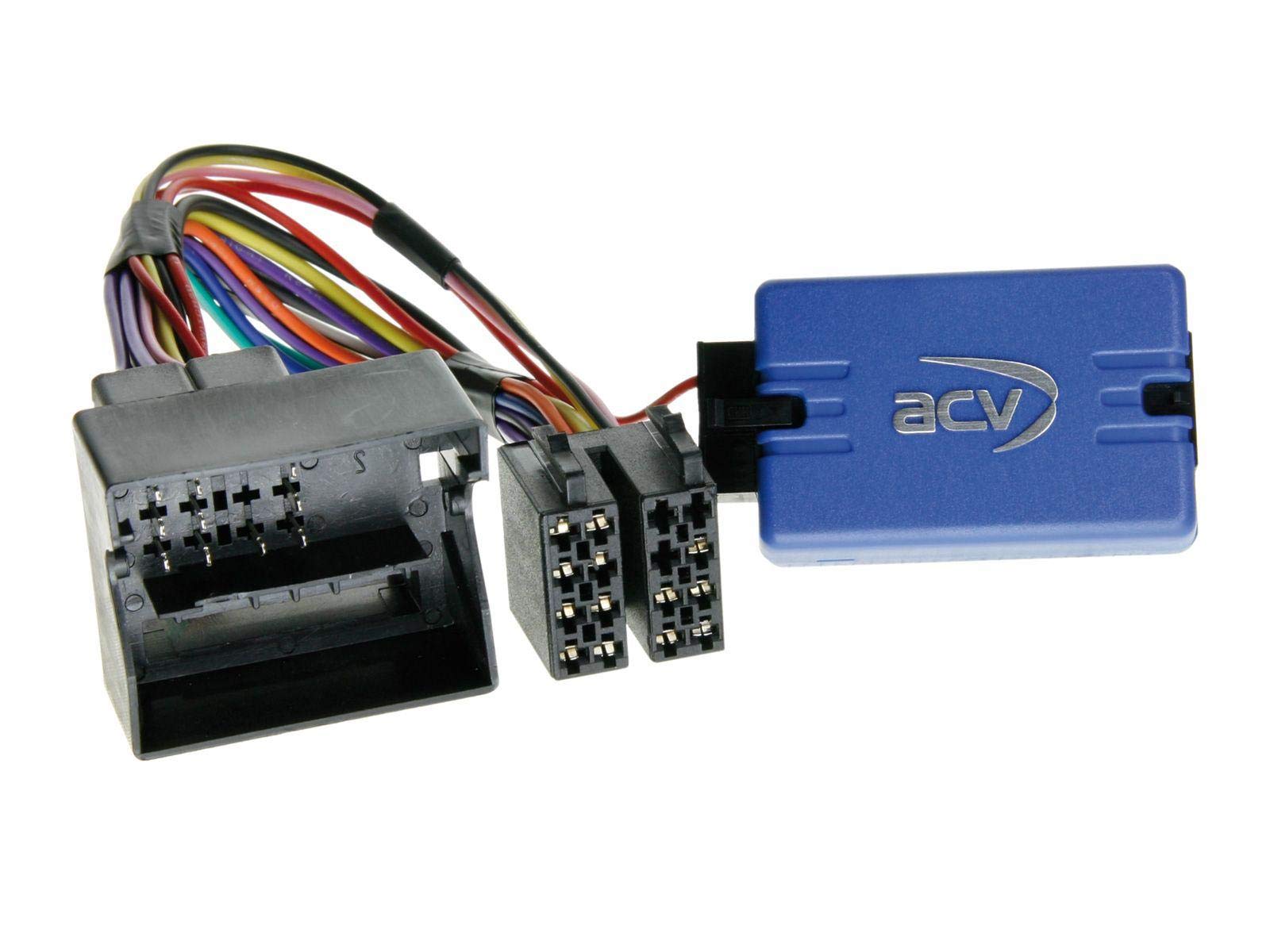
The ACV 42-BM-604 Steering Wheel Remote Control Adapter is designed to integrate an aftermarket car radio with your vehicle's existing steering wheel controls. This adapter allows you to retain the convenience of controlling your radio's basic functions (such as volume, track selection, and mode) directly from your steering wheel, even after replacing the factory head unit.
This adapter is specifically engineered for select BMW and Mini models equipped with a Quadlock connector and without an external amplifier. It provides compatibility with Sony and Pioneer aftermarket radios that feature a 3.5mm jack for steering wheel control input.
2. Vehicle and Radio Compatibility
2.1 Compatible Vehicles (with Quadlock connector and without ampliyfikator):
- BMW 3 Series (E46): 2001–2007
- BMW Z4 (E85): 2002–2008 (models with soft top)
- BMW 5 Series (E39): 2001–April 2004
- BMW Mini: 2001–2006 (Boost HU models)
- BMW X3 (E83): 2004–2010
- BMW X5 (E53): 1999–2006
Notatka: This adapter is suitable for vehicles with 16:9 Navigation/Becker systems.
2.2 Compatible Aftermarket Radios:
- Sony car radios with 3.5mm steering wheel control input
- Pioneer car radios with 3.5mm steering wheel control input
3. Konfiguracja i instalacja
Installation of the ACV 42-BM-604 adapter requires basic knowledge of car audio wiring and vehicle disassembly. If you are unsure about any steps, it is highly recommended to seek professional installation from a qualified car audio technician.
3.1 Kroki instalacji:
- Odłącz akumulator: Before beginning any electrical work, disconnect the negative terminal of your vehicle's battery to prevent short circuits.
- Usuń fabryczne radio: Carefully remove your vehicle's existing factory radio according to your vehicle's service manual.
- Identify Vehicle Harness: Locate the vehicle's main wiring harness, which should feature a Quadlock connector.
- Podłącz adapter do pojazdu: Connect the vehicle-specific end of the ACV 42-BM-604 adapter (the multi-pin Quadlock connector) to your vehicle's wiring harness. Ensure a secure and firm connection.
- Connect Adapter to Aftermarket Radio: Connect the 3.5mm jack from the ACV 42-BM-604 adapter to the steering wheel control input port on your Sony or Pioneer aftermarket radio. This port is typically labeled 'SWC', 'Remote In', or 'W/R'.
- Bezpieczne połączenia: Ensure all connections are properly seated and secured to prevent accidental disconnections or intermittent functionality.
- Reinstall Radio and Test: Carefully reinstall your aftermarket radio into the dashboard. Reconnect the vehicle battery. Turn on the radio and test the functionality of your steering wheel controls (volume up/down, track next/previous, mode).
- Montaż końcowy: Once confirmed working, complete the reassembly of your dashboard components.
4. Instrukcja obsługi
Once the ACV 42-BM-604 adapter is correctly installed, your vehicle's steering wheel controls will function automatically with your compatible aftermarket Sony or Pioneer radio. No additional setup or configuration is typically required for the adapter itself.
Simply use your steering wheel buttons as you normally would to control functions such as:
- Głośność w górę/w dół
- Utwór Następny/Poprzedni
- Mode/Source Selection (functionality may vary depending on radio model)
Refer to your aftermarket radio's instruction manual for specific details on how it interprets steering wheel control signals.
5. Konserwacja
The ACV 42-BM-604 Steering Wheel Remote Control Adapter is a passive electronic component and requires no routine maintenance. To ensure its longevity and reliable performance:
- Upewnij się, że wszystkie połączenia są solidne i nie ulegają korozji.
- Avoid exposing the adapter to extreme temperatures, excessive moisture, or direct physical damage.
- Do not attempt to open or modify the adapter, as this may void any potential warranty and could damage the unit.
6. Rozwiązywanie Problemów
If you experience issues with your steering wheel controls after installing the ACV 42-BM-604 adapter, consider the following troubleshooting steps:
- No Control Functionality:
- Verify all connections are secure, especially the Quadlock connector to the vehicle and the 3.5mm jack to the aftermarket radio.
- Confirm that your aftermarket radio is compatible with steering wheel controls and that the 3.5mm jack is connected to the correct input.
- Check your aftermarket radio's settings menu for any steering wheel control configuration options. Some radios require initial programming or calibration.
- Ensure your vehicle model and year are listed in the compatibility section (Section 2.1).
- Intermittent Control Functionality:
- Sprawdź wszystkie połączenia elektryczne pod kątem luźnych połączeń i uszkodzonej izolacji.
- Ensure the 3.5mm jack is fully inserted into the radio's input.
- Incorrect Button Functionality:
- Some aftermarket radios allow for remapping of steering wheel buttons. Consult your radio's manual for instructions.
- Ensure the adapter is correctly identified by the radio (if applicable).
If these steps do not resolve the issue, it is advisable to consult a professional car audio installer for further diagnosis.
7. Specyfikacje
| Marka | Ocet jabłkowy |
| Numer modelu | 42-BM-604 |
| Typ produktu | Adapter zdalnego sterowania na kierownicy |
| Zgodność pojazdu | BMW 3 Series (E46), 5 Series (E39), X5 (E53), X3 (E83), Z4 (E85), Mini (2001-2006 Boost HU) - all with Quadlock connector. |
| Kompatybilność radiowa | Sony, Pioneer aftermarket radios (via 3.5mm jack) |
| Uwaga specjalna | For vehicles with Quadlock and without amplifier. Compatible with 16:9 Navigation/Becker systems. |
8. Gwarancja i wsparcie
Specific warranty information for the ACV 42-BM-604 adapter is not provided in this manual. For details regarding warranty coverage, duration, and claims, please refer to the documentation included with your purchase or contact your retailer.
For technical assistance, installation queries, or further support, please contact ACV customer service or the authorized dealer from whom you purchased the product.


