1. Wprowadzenie
Dziękujemy za zakupasing the RCA DHT235A 3.5-Inch LED-lit 720p 60Hz TV. This portable television is designed to provide digital television viewing on a compact screen. This manual provides instructions for the proper setup, operation, and maintenance of your device.
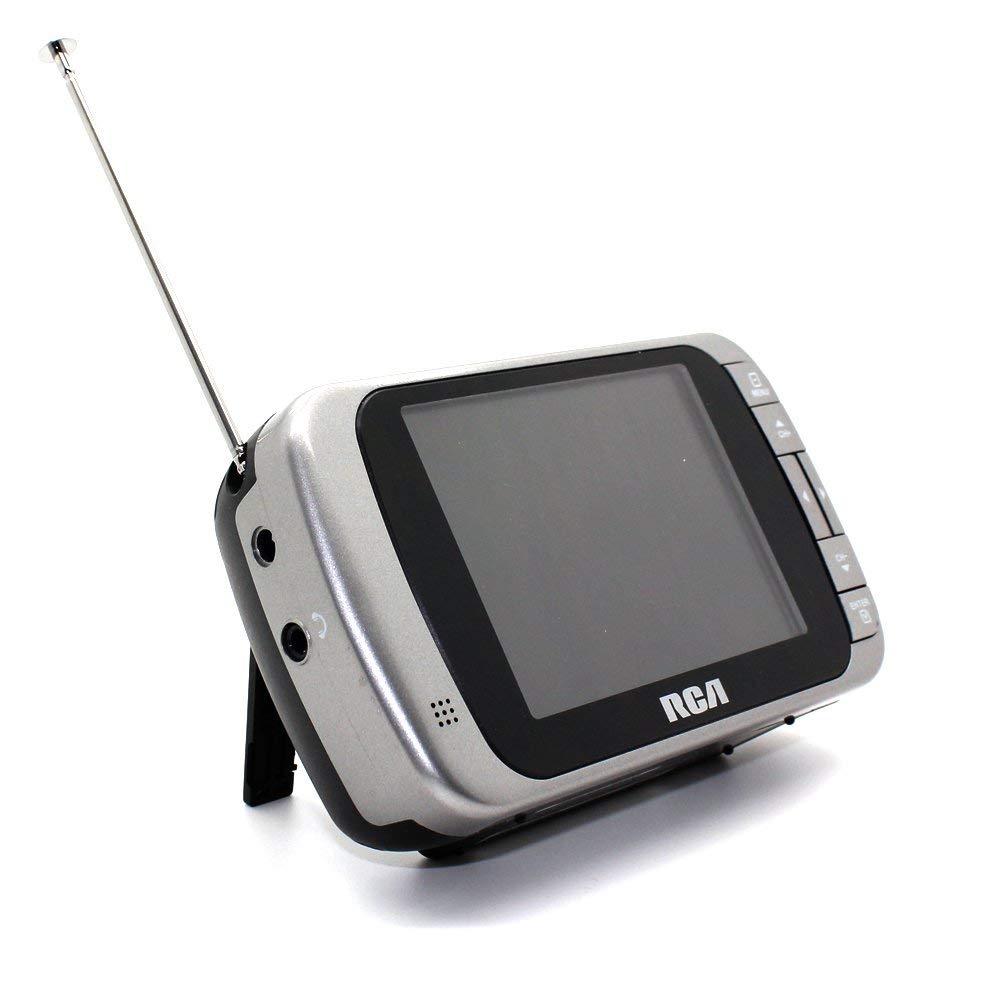
Image 1.1: The RCA DHT235A portable television, featuring its 3.5-inch screen and compact design.
2. Informacje dotyczące bezpieczeństwa
- Przed przystąpieniem do obsługi urządzenia przeczytaj wszystkie instrukcje.
- Aby uniknąć pożaru lub porażenia prądem, nie wystawiaj urządzenia na działanie deszczu i wilgoci.
- Nie blokuj otworów wentylacyjnych. Zapewnij odpowiednią ilość miejsca wokół urządzenia, aby zapewnić prawidłowy przepływ powietrza.
- Use only specified power sources (4 AA batteries or compatible AC adapter).
- Unikaj upuszczania urządzenia i narażania go na silne uderzenia.
- Nie próbuj samodzielnie naprawiać tego produktu. Wszelkie czynności serwisowe należy powierzyć wykwalifikowanemu personelowi serwisowemu.
- Baterie należy utylizować zgodnie z lokalnymi przepisami.
3. Zawartość opakowania
Sprawdź, czy w opakowaniu znajdują się wszystkie elementy:
- RCA DHT235A Portable TV Unit
- Podstawka
- Quick Guide (refer to this manual for detailed instructions)
- Instrukcja obsługi (ten dokument)
4. Koniec produktuview
The RCA DHT235A features a 3.5-inch LED-lit display, designed for portable digital television reception. Key components include:
- 3.5-Inch LED Backlit LCD Display: Provides clear visual output.
- Wbudowany głośnik: Do wyjścia audio.
- Gniazdo słuchawkowe: Do prywatnego słuchania.
- Embedded Monopole Antenna: For receiving terrestrial ATSC and NTSC signals.
- Komora baterii: Na 4 baterii AA.
- AC Adapter Input (9-24VDC): For external power.
- Przyciski sterujące: For power, channel, volume, and menu navigation.
5. Konfiguracja
5.1 Powering the TV
The TV can be powered by 4 AA batteries or an optional AC adapter.
Korzystanie z baterii:
- Locate the battery compartment on the back of the TV.
- Otwórz pokrywę komory baterii.
- Włóż 4 baterie AA, zwracając uwagę na prawidłową polaryzację (+/-).
- Dokładnie zamknij pokrywę komory baterii.
Korzystanie z zasilacza sieciowego (opcjonalnie):
- Connect a compatible 9-24VDC AC adapter (not included) to the DC input jack on the TV.
- Podłącz zasilacz sieciowy do standardowego gniazdka ściennego.
5.2 Konfiguracja anteny
Extend the embedded monopole antenna fully for optimal signal reception. For improved reception, especially in areas with weak signals, an external antenna may be connected to the dedicated RCA connector input.
6. Instrukcja obsługi
6.1 Włączanie/wyłączanie zasilania
Naciśnij MOC przycisk włączania i wyłączania telewizora.
6.2 Początkowe skanowanie kanałów
Upon first use or after moving to a new location, perform an auto channel scan to find available digital and analog channels.
- Naciśnij MENU przycisk.
- Navigate to the "Channel" or "Setup" menu using the arrow buttons.
- Select "Auto Scan" or "Auto Program" and confirm.
- The TV will scan for available channels. This process may take several minutes.
6.3 Wybór kanału
- Użyj CH+ I CH- przyciski umożliwiające przełączanie się między dostępnymi kanałami.
- For direct channel input, use the numeric keypad (if available on your model) or the "Direct Channel Changing" option in the menu.
6.4 Regulacja głośności
Użyj Objętość + I TOM- przyciski do regulacji głośności dźwięku.
6.5 Nawigacja po menu
Naciśnij MENU button to access settings. Use the arrow buttons to navigate and the OK or WCHODZIĆ przycisk, aby potwierdzić wybór. Naciśnij MENU again or an EXIT button to leave the menu.
Available menu options include:
- Ustawienia obrazu: Dostosuj jasność, kontrast i kolor.
- Ustawienia dźwięku: Adjust audio mode, balance.
- Ustawienia kanału: Auto scan, manual scan, channel editing.
- Ustawienia czasu: Auto time setting, time zone.
- Język: Select menu language (English, Spanish).
- Napisy dla niesłyszących: Enable/disable digital closed captioning (E1A-708B compliant).
7. Konserwacja
7.1 Czyszczenie
- Before cleaning, ensure the TV is powered off and disconnected from any external power source.
- Do wycierania ekranu i powierzchni zewnętrznych należy używać miękkiej, suchej ściereczki.
- W przypadku uporczywych plam delikatnieampWytrzyj szmatkę wodą. Nie używaj środków czyszczących o działaniu ściernym, wosków ani rozpuszczalników.
- Unikaj rozpylania płynów bezpośrednio na ekran lub do otworów.
7.2 Przechowywanie
When storing the TV for an extended period, remove the batteries to prevent leakage. Store the unit in a cool, dry place away from direct sunlight and extreme temperatures.
8. Rozwiązywanie Problemów
| Problem | Możliwe rozwiązanie |
|---|---|
| Brak zasilania | Ensure batteries are correctly inserted and not depleted. If using AC adapter, verify it is properly connected and the outlet is functional. |
| No Picture/Weak Signal | Extend the antenna fully. Perform an auto channel scan. Try repositioning the TV or antenna. Consider using an external antenna for better reception. Check signal strength display in the menu. |
| Brak dźwięku | Increase the volume. Check if headphones are plugged in. Ensure the Mute function is not active. |
| Przyciski nie odpowiadają | Turn the TV off and then on again. If the issue persists, remove and reinsert batteries or disconnect/reconnect the AC adapter. |
| Screen Scratches Easily | Handle the screen with care. Use a screen protector if desired (not included). |
| Krótki czas pracy baterii | Use fresh, high-quality alkaline or rechargeable batteries. Consider using the AC adapter for extended viewing. |
| Low Audio Volume | Ensure volume is set to maximum. For better audio, consider connecting external speakers to the headphone jack. |
9. Specyfikacje
- Model: DHT235A
- Rozmiar wyświetlacza: 3.5 cala (przekątna)
- Typ wyświetlacza: Podświetlany wyświetlacz LCD
- Rezolucja: 320 x 240 digital RGB (720p compatible)
- Częstotliwość odświeżania: 60 Hz
- Dekodowanie wideo: MPEG-2 (MP at ML, MP at HL)
- Dekodowanie dźwięku: Dolby Digital Audio, Digital multi-lingual
- Tuner: Terrestrial ATSC 8VSB, Terrestrial NTSC CH2 - CH69
- Źródło zasilania: 4 AA Batteries or 9-24VDC AC Adapter (optional)
- Czas pracy baterii: Approximately 2+ hours of DTV playback on 4 AA batteries
- Wyjście audio: Headphone jack, Built-in speaker
- Dodatkowe funkcje: Real-time signal strength display, On-screen program information, Direct channel changing, Channel editing, Time zone setting, Auto channel scan, Digital Closed Captioning (E1A-708B compliant), Menu languages (English, Spanish).
- Wymiary: Około 4.84 x 1.34 x 2.83 cala
- Waga: Około 5.6 uncji
10. Informacje o gwarancji
This product is covered by a limited warranty. For detailed warranty terms and conditions, please refer to the warranty card included with your purchase or visit the official RCA webZachowaj dowód zakupu na wypadek roszczeń gwarancyjnych.
11. Obsługa klienta
If you encounter any issues or have questions not covered in this manual, please contact RCA customer support. You can find contact information on the official RCA webna stronie internetowej lub w dokumentacji dołączonej do produktu.
Wsparcie online: Visit the official RCA webStrona z odpowiedziami na często zadawane pytania i zasobami pomocy.
Wsparcie telefoniczne: Refer to your product packaging or the RCA webstrona z aktualnymi numerami kontaktowymi.


