Wstęp
This manual provides essential instructions for the safe and efficient operation of your I-TEC T2404 Universal Wireless Bluetooth Portable Sound System (Model BTO-SPEAKRST). Please read this manual thoroughly before using the device and retain it for future reference.
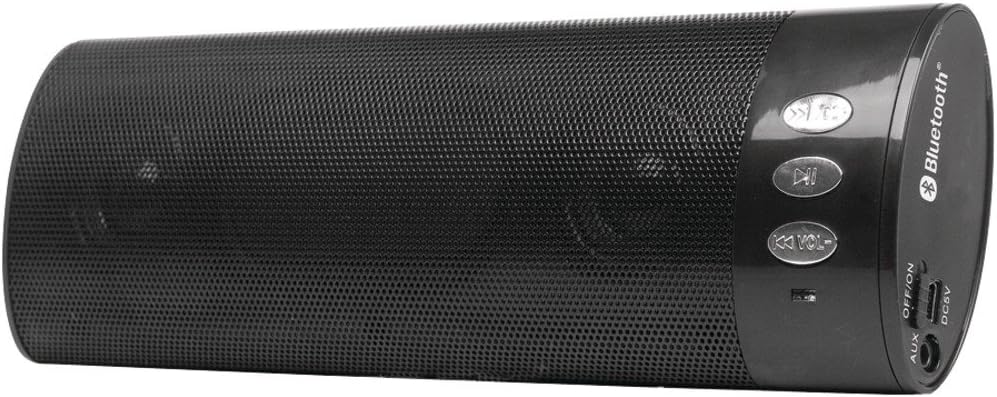
Rysunek 1: I-TEC T2404 Universal Wireless Bluetooth Portable Sound System. This image shows the cylindrical black speaker with a perforated metal grille, control buttons on one end, and input/output ports on the other end.
Organizować coś
1. Rozpakowywanie
Carefully remove the sound system from its packaging. Verify that all components are present. If any items are missing or damaged, contact your retailer.
2. Włączanie urządzenia
The I-TEC T2404 is powered via a DC 5V input. Connect a standard USB power adapter (not included) to the DC5V port on the speaker using a compatible USB cable. Ensure the power source provides 5V DC.
3. Włączanie/wyłączanie zasilania
Locate the "OFF/ON" switch on the side panel of the speaker. Slide the switch to the "ON" position to power on the device. Slide it to the "OFF" position to power off.
Rysunek 2: Close-up of the control panel and ports. This image highlights the buttons for track control and volume, the Bluetooth logo, and the AUX, OFF/ON switch, and DC5V ports on the side of the speaker.
Instrukcja obsługi
1. Parowanie Bluetooth
- Ensure the speaker is powered on. It will automatically enter Bluetooth pairing mode, indicated by a flashing LED light (location not specified in product data, assume standard behavior).
- Activate Bluetooth on your mobile device (smartphone, tablet, computer).
- Szukaj available Bluetooth devices. The speaker will appear as "I-TEC T2404" or a similar name.
- Select the speaker from the list to pair. A confirmation tone or steady LED light will indicate successful pairing.
- Po sparowaniu możesz odtwarzać dźwięk z urządzenia przez głośnik.
2. Działanie wejścia AUX
Aby użyć wejścia AUX:
- Podłącz jeden koniec kabla audio 3.5 mm (nie ma go w zestawie) do portu AUX w głośniku.
- Podłącz drugi koniec kabla audio 3.5 mm do gniazda słuchawkowego lub wyjścia audio zewnętrznego urządzenia audio.
- The speaker should automatically switch to AUX mode. If not, ensure no Bluetooth device is actively connected or try cycling the power.
3. Przyciski sterujące
The speaker features several control buttons:
- Przycisk Odtwórz/Pauza: Naciśnij, aby odtworzyć lub wstrzymać odtwarzanie dźwięku.
- Previous Track / Volume Down (K<< VOL-): Press briefly to skip to the previous track. Press and hold to decrease the volume.
- Next Track / Volume Up (>>K VOL+): Naciśnij krótko, aby przejść do następnego utworu. Naciśnij i przytrzymaj, aby zwiększyć głośność.
Konserwacja
1. Czyszczenie
Wipe the exterior of the speaker with a soft, dry cloth. Do not use abrasive cleaners, waxes, or solvents as they may damage the finish. Avoid getting moisture into any openings.
2. Przechowywanie
When not in use for extended periods, store the speaker in a cool, dry place, away from direct sunlight and extreme temperatures. Disconnect it from the power source.
Rozwiązywanie problemów
| Problem | Możliwa przyczyna | Rozwiązanie |
|---|---|---|
| Brak zasilania | Speaker is off; power cable not connected; power source issue. | Ensure the "OFF/ON" switch is in the "ON" position. Verify the DC5V power cable is securely connected to a working power source. |
| Nie można sparować przez Bluetooth | Speaker not in pairing mode; Bluetooth disabled on device; device too far; interference. | Ensure the speaker is on and in pairing mode (flashing LED). Enable Bluetooth on your device. Move the device closer to the speaker. Turn off other Bluetooth devices to reduce interference. |
| Brak dźwięku | Volume too low; incorrect input mode; audio source issue. | Increase the volume on both the speaker and your connected device. Ensure the correct input mode (Bluetooth or AUX) is active. Check if the audio source is playing correctly. |
| Zniekształcenie dźwięku | Volume too high; weak Bluetooth signal; damaged audio cable. | Reduce the volume. Move the Bluetooth device closer to the speaker. If using AUX, try a different audio cable. |
Specyfikacje
- Marka: i-tec
- Model: BTO-SPEAKRST (T2404 Series)
- Technologia łączności: Bluetooth, bezprzewodowy
- Łączność głośników: Bluetooth
- Cechy szczególne: Przenośny
- Cotage: 4 watów
- Typ montażu: Blat stołu
- Pobór mocy: DC 5V (przez USB)
- Waga przedmiotu: 268 gramów
- Wymiary opakowania: Wymiary 23.62 x 9.4 x 4.57 cm
- Data pierwszej dostępności: 29 sierpnia 2022
Gwarancja i wsparcie
For warranty information or technical support, please refer to the documentation provided with your purchase or visit the official i-tec webZachowaj dowód zakupu na wypadek roszczeń gwarancyjnych.


