1. Wprowadzenie i informacje dotyczące bezpieczeństwa
This manual provides essential instructions for the safe and efficient operation of your NEC NP-V300X projector. Please read this manual thoroughly before using the projector and retain it for future reference.
Ważne środki ostrożności:
- Nie blokuj otworów wentylacyjnych. Zapewnij odpowiednią przestrzeń wokół projektora, aby zapewnić prawidłowy przepływ powietrza.
- Unikaj patrzenia bezpośrednio w obiektyw projektora, gdyamp jest włączony, ponieważ jasne światło może uszkodzić wzrok.
- Nie umieszczaj projektora na niestabilnym wózku, stojaku lub stole.
- Disconnect the power cord from the wall outlet before cleaning.
- Wszelkie prace serwisowe należy powierzać wykwalifikowanemu personelowi.
2. Projector Components Overview
Familiarize yourself with the main components of your NEC NP-V300X projector.
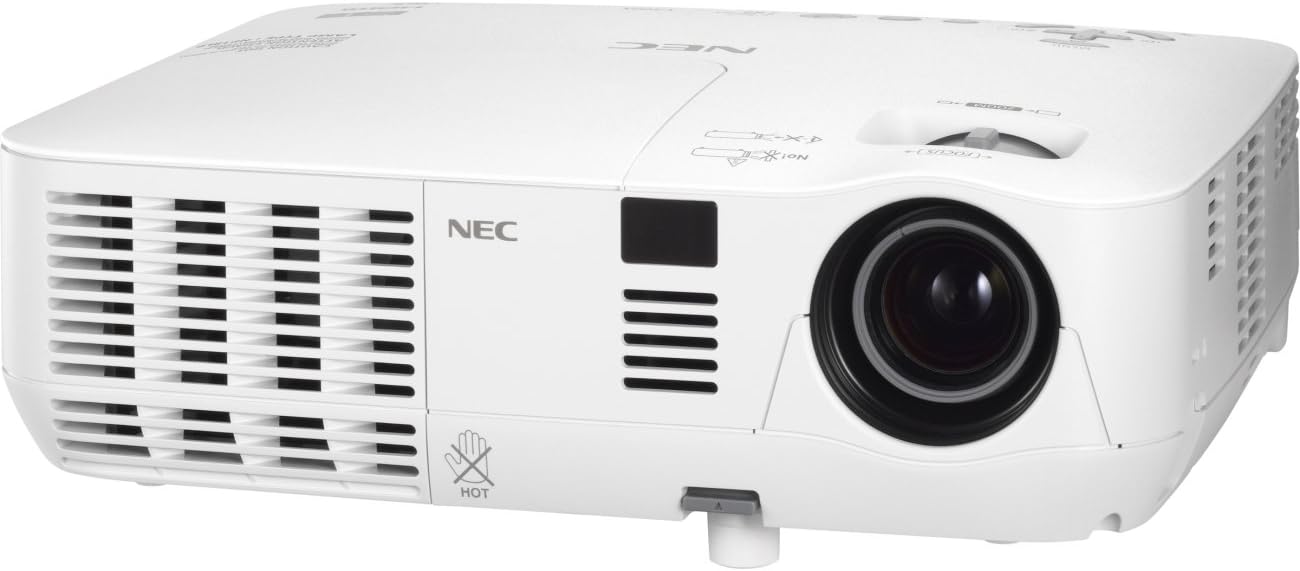
An image showing the front and left side of the white NEC NP-V300X projector, highlighting the lens, ventilation grilles, and control panel area.
Kluczowe komponenty:
- Soczewka projekcyjna: Emits the image onto the screen. Features manual focus adjustment.
- Kratki wentylacyjne: Located on the sides, these ensure proper cooling of the projector. Do not obstruct.
- Panel sterowania: Buttons for power, menu navigation, input selection, and image adjustments.
- Terminale wejściowe: Various ports for connecting external devices (e.g., HDMI, VGA).
- Regulowana stopa: Allows for minor height adjustments to align the projected image.
3. Instrukcje konfiguracji
Follow these steps to set up your projector for initial use.
3.1 Umieszczenie
- Ustaw projektor na stabilnej, płaskiej powierzchni lub zamontuj go w bezpieczny sposób.
- Ensure the projector is positioned at an appropriate distance from the screen to achieve the desired image size.
- Adjust the projector's height using the adjustable foot to align the image with the screen.
3.2 Podłączanie zasilania
- Connect the supplied power cord to the projector's power inlet.
- Podłącz drugi koniec przewodu zasilającego do uziemionego gniazdka elektrycznego.
3.3 Podłączanie źródeł wejściowych
The NP-V300X supports various input sources, including HDMI.
- Connect your video source (e.g., laptop, Blu-ray player) to the appropriate input terminal on the projector (e.g., HDMI port).
- Ensure the connection cables are securely fastened.
4. Obsługa projektora
Instructions for basic operation of your NEC NP-V300X projector.
4.1 Włączanie/wyłączanie
- Włączanie: Press the power button on the projector's control panel or remote control. The power indicator light will change.
- Aby wyłączyć: Press the power button again. A confirmation message may appear. Press the power button a second time to confirm shutdown. Allow the projector to cool down before unplugging.
4.2 Wybór źródła sygnału wejściowego
Use the 'Input' button on the control panel or remote control to cycle through available input sources (e.g., HDMI, VGA).
4.3 Regulacja obrazu
- Centrum: Rotate the focus ring around the lens manually until the image appears sharp and clear.
- Brzęczenie: Adjust the zoom ring (if present) to change the image size without moving the projector.
- Korekcja Keystone'a: If the image is trapezoidal, use the keystone correction function in the projector's menu to square the image.
- Jasność/Kontrast: Adjust these settings via the on-screen display (OSD) menu to optimize image quality for your viewśrodowiska.
5. Konserwacja
Regularna konserwacja zapewnia optymalną wydajność i wydłuża żywotność projektora.
5.1 Czyszczenie projektora
- Zewnętrzny: Wytrzyj projektor casinCzyścić miękką, suchą, niepozostawiającą włókien ściereczką. Nie używać środków ściernych ani rozpuszczalników.
- Obiektyw: Delikatnie wyczyść soczewkę ściereczką lub papierem do czyszczenia soczewek. Unikaj dotykania powierzchni soczewki palcami.
- Kratki wentylacyjne: Periodically clean the ventilation grilles to prevent dust buildup, which can lead to overheating. Use a soft brush or compressed air.
5.2 Łamp Pielęgnacja
Projektor lamp ma skończony okres życia. Kiedy lamp indicator lights up or the image becomes dim, the lamp may need replacement. Refer to the on-screen display for lamp hour information. Always allow the projector to cool down completely before attempting any lamp konserwacja.
6. Rozwiązywanie Problemów
W tej sekcji omówiono typowe problemy, które mogą wystąpić podczas korzystania z projektora.
Typowe problemy i rozwiązania:
- Brak obrazu:
- Ensure the projector is powered on and the power indicator is active.
- Verify the input source is correctly selected and the cable is securely connected.
- Check if the connected device (e.g., laptop) is outputting a signal.
- Słaba jakość obrazu:
- Adjust the focus and zoom settings.
- Sprawdź lamp hours; the lamp może zbliżać się do końca swojego istnienia.
- Wyczyść soczewkę projektora.
- Dostosuj ustawienia jasności i kontrastu.
- Przegrzanie projektora:
- Ensure ventilation grilles are not blocked.
- Clean any dust from the grilles.
- Używaj projektora w dobrze wentylowanym pomieszczeniu.
Jeśli problem nadal występuje, skontaktuj się z działem obsługi klienta lub wykwalifikowanym technikiem serwisowym.
7. Specyfikacje techniczne
Detailed technical specifications for the NEC NP-V300X projector.
| Funkcja | Specyfikacja |
|---|---|
| Numer modelu | NP-V300X |
| Technologia wyświetlania | DLP (0.55" DMD) |
| Rozdzielczość natywna | XGA 1024x768 |
| Maksymalna rozdzielczość | UXGA 1600 x 1200 |
| Jasność | 3000 lumenów |
| Centrum | Podręcznik |
| Kompatybilność sygnału PC | SVGA, XGA, WXGA, WXGA+, SXGA, SXGA+, UXGA |
| Hałas wentylatora | 37dB |
| Technologia łączności | HDMI |
| Funkcja specjalna | 3D-Ready, 3D-built-in |
| Wymiary produktu | 12.2 x 3.78 x 9.72 cala |
| Waga przedmiotu | 5.51 funta |
| Producent | NEC |
8. Gwarancja i wsparcie
For warranty information and technical support, please refer to the documentation provided with your purchase or visit the official NEC webZachowaj dowód zakupu na wypadek roszczeń gwarancyjnych.
If you require assistance with troubleshooting or repairs beyond the scope of this manual, please contact NEC customer service or an authorized service center.


