Wstęp
Microsoft LifeCam HD-3000 to kamera o wysokiej rozdzielczości webcam designed for clear video communication and recording. It offers a true HD-quality experience with 720p video chat and cinematic 16:9 widescreen recording. Featuring TrueColor Technology, it automatically adjusts to deliver bright and colorful video in various lighting conditions. Its universal attachment base allows for versatile placement on desktops, laptops, or notebooks.
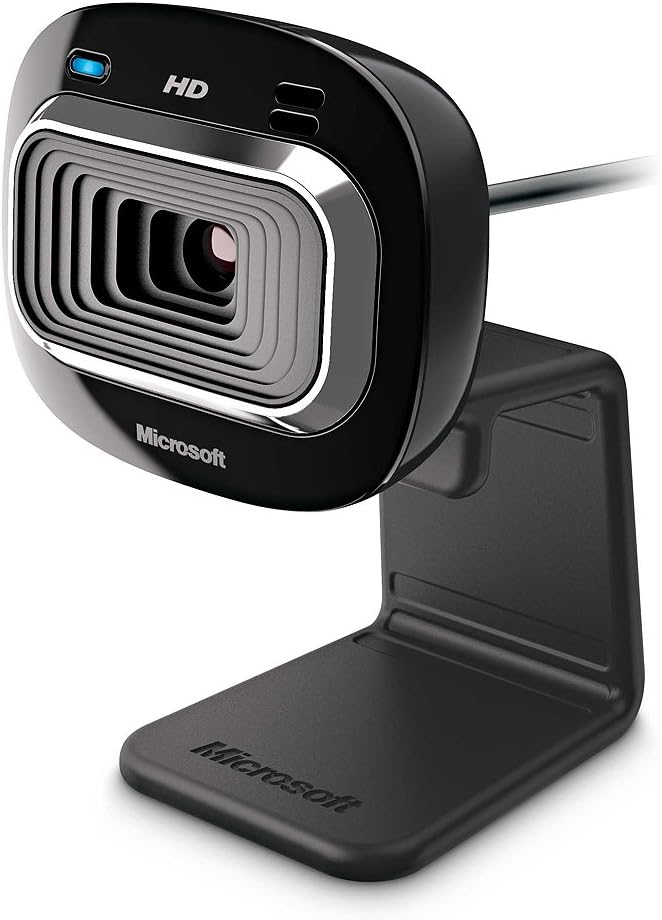
Rycina 1: Przód view of the Microsoft LifeCam HD-3000.
Konfiguracja i instalacja
Setting up your LifeCam HD-3000 is straightforward. Follow these steps for quick installation:
- Rozpakuj Webkrzywka: Carefully remove the LifeCam HD-3000 from its packaging. Ensure all components, including the USB cable and mounting buckle, are present.
- Połącz się z komputerem: Plug the USB 2.0 connector of the LifeCam into an available USB port on your desktop, laptop, or notebook. The webcam is designed for plug-and-play functionality on compatible Windows operating systems (Windows 8, Windows 7, Windows Vista, Windows XP SP2 or higher).
- Pozycja Webkrzywka: The universal attachment base is flexible and can be securely placed on top of your monitor, laptop screen, or directly on your desk. Adjust the webcam's angle as needed for optimal viewing. The rubberized base helps prevent scratches on your screen.
- Instalacja sterownika (jeśli to konieczne): In most cases, your operating system will automatically detect and install the necessary drivers. If prompted, follow the on-screen instructions to complete the driver installation. You may also visit the official Microsoft support webstrona z najnowszymi sterownikami.
- Konfiguracja oprogramowania: For full functionality and advanced settings, it is recommended to install the Microsoft LifeCam software (if not pre-installed or automatically downloaded). This software allows for customization of video settings, photo capture, and special effects.

Figure 2: The flexible base allows for easy mounting on various surfaces.
Operating Your LifeCam HD-3000
Once installed, your LifeCam HD-3000 is ready for use with various communication and recording applications.
- Czat wideo: Ten webcam is optimized for 720p HD video chat, providing clear and vibrant visuals for your online conversations. It is compatible with popular video conferencing applications like Skype, Zoom, and Microsoft Teams.
- Widescreen Recording: Utilize the 16:9 widescreen format for cinematic video recording. This is ideal for creating content for online video platforms.
- TrueColor Technology: The TrueColor Technology automatically adjusts exposure and white balance to ensure your video remains bright and colorful, even in challenging lighting conditions. This feature operates in the background, providing optimal image quality without manual intervention.
- Wbudowany mikrofon: The LifeCam HD-3000 includes a digital microphone for clear audio capture during video calls and recordings. Ensure your communication software is configured to use the LifeCam's microphone as the input device.
- Ujęcie: Use the dedicated LifeCam software or your preferred application to capture still images.
Konserwacja
To ensure the longevity and optimal performance of your Microsoft LifeCam HD-3000, follow these simple maintenance guidelines:
- Czyszczenie obiektywu: Delikatnie wytrzyj webWytrzyj soczewkę kamery miękką, niepozostawiającą włókien ściereczką. W przypadku uporczywych plam delikatnieampen the cloth with a small amount of lens cleaning solution. Avoid using abrasive materials or harsh chemicals.
- Pielęgnacja kabli: Avoid bending or crimping the USB cable excessively. Store the cable neatly when not in use to prevent damage.
- Składowanie: W przypadku nieużywania przez dłuższy czas, należy przechowywać webPrzechowywać w chłodnym i suchym miejscu, z dala od bezpośredniego światła słonecznego i ekstremalnych temperatur.
- Aktualizacje oprogramowania: Periodically check for software and driver updates from the official Microsoft support website to ensure compatibility and access to the latest features and performance improvements.
Rozwiązywanie problemów
Jeśli napotkasz problemy z kamerą LifeCam HD-3000, wypróbuj poniższe rozwiązania:
- Webkamera nie została wykryta:
- Ensure the USB cable is securely plugged into a working USB 2.0 port. Try a different USB port.
- Uruchom ponownie komputer.
- Check Device Manager (Windows) to see if the webcam is listed and if there are any driver issues (indicated by a yellow exclamation mark). Reinstall drivers if necessary.
- Poor Video Quality (Grainy, Dark, Washed Out):
- Ensure adequate lighting in your environment. While TrueColor Technology helps, sufficient ambient light is crucial for best results.
- Sprawdź ustawienia wideo w swojej aplikacji i upewnij się, że wybrana jest rozdzielczość 720p.
- Sprawdź, czy soczewka jest czysta i nie ma na niej smug.
- No Audio from Microphone:
- Check your computer's sound settings and ensure the LifeCam HD-3000 microphone is selected as the default recording device.
- Verify microphone settings within your video conferencing application.
- Ensure the microphone is not muted in your system settings or application.
- Video Freezes or Lags:
- Close other applications that might be consuming significant system resources (CPU, RAM, network bandwidth).
- Ensure your internet connection is stable and has sufficient bandwidth for HD video streaming.
- Zaktualizuj sterowniki graficzne.
Specyfikacje
| Funkcja | Szczegół |
|---|---|
| Wymiary produktu | 1.75 x 1.55 x 4.29 cala |
| Waga przedmiotu | 3.2 uncji |
| Numer modelu przedmiotu | T3H-00001 |
| Producent | Microsoft |
| Technologia czujnika fotograficznego | CMOS |
| Rozdzielczość przechwytywania wideo | 720p (1280x720) |
| Maksymalna apertura | 1.2 stopnia |
| Format przechwytywania wideo | MP4 |
| Obsługiwany format audio | PCM |
| Technologia łączności | USB |
| Kolor | Czarny |
| Wymagania systemowe | Windows 8, Windows 7, Windows Vista, Windows XP (with Service Pack 2 (SP2) or higher); VGA video calling: Intel Dual-Core 1.6 GHz or higher, 1 GB of RAM; 720p HD recording: Intel Dual-Core 3.0 GHz or higher, 2GB of RAM; 1.5 GB free space; USB 2.0; Windows-compatible speakers or headphones. |

Figure 3: Dimensions of the LifeCam HD-3000.
Gwarancja i wsparcie
Microsoft products typically come with a limited warranty. For detailed warranty information, product registration, and technical support, please visit the official Microsoft support webZachowaj dowód zakupu na wypadek roszczeń gwarancyjnych.
For further assistance, you can also refer to the Sklep Microsoft Store na Amazon.
Oficjalne filmy produktowe
No official seller-created product videos are available for embedding at this time.


