Wstęp
This manual provides comprehensive instructions for the safe and efficient use of your BlackBerry HS-300 Wireless Bluetooth Headset. Please read this manual thoroughly before operating the device and retain it for future reference. The BlackBerry HS-300 is designed for hands-free communication with compatible Bluetooth-enabled devices.
Zawartość opakowania
Sprawdź, czy w przesyłce znajdują się następujące elementy:
- BlackBerry HS-300 Wireless Bluetooth Headset
- Ear hook (optional, for secure fit)
- Ear gels/tips (various sizes for comfort)
- Kabel ładujący
- Instrukcja obsługi (ten dokument)
Urządzenie ponadview
Familiarize yourself with the components of your BlackBerry HS-300 headset.
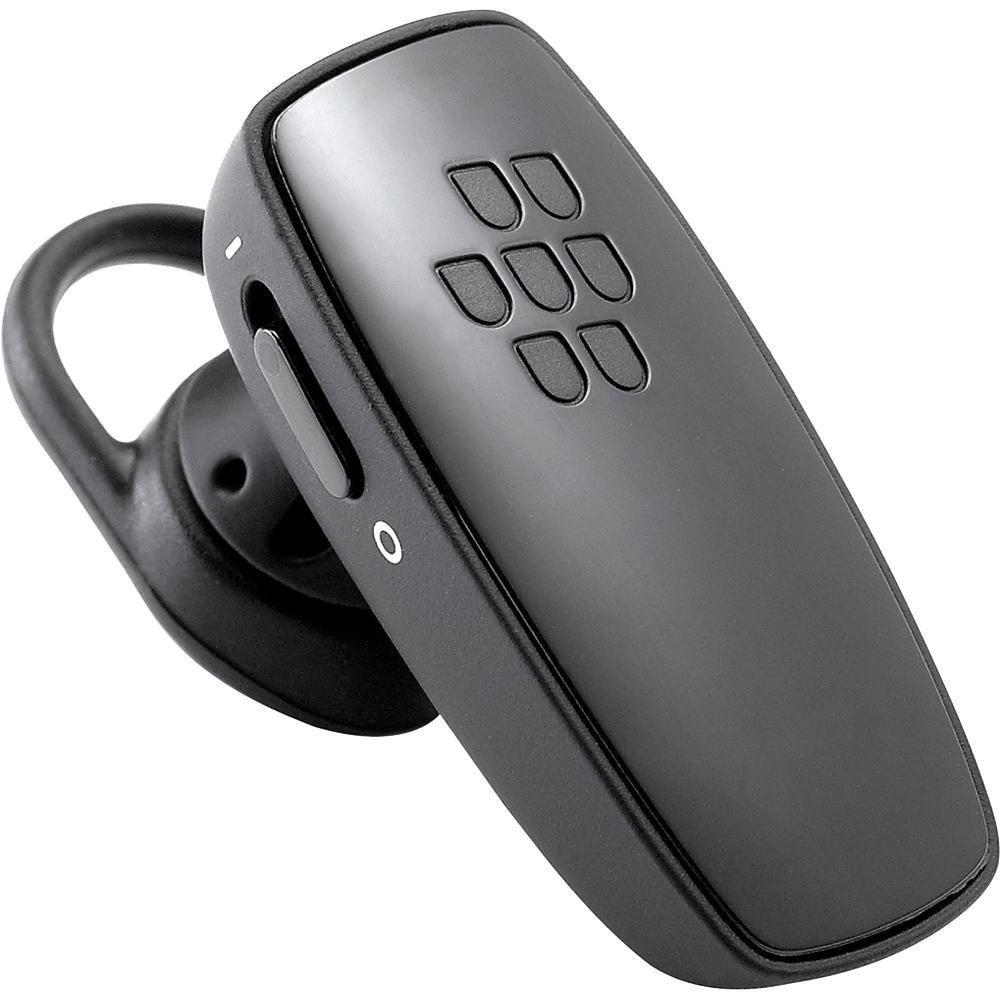
Obraz 1: Przód view of the BlackBerry HS-300 Wireless Bluetooth Headset. The image displays the main body of the headset, featuring the BlackBerry logo (seven-dot pattern) on the front surface. A slender button, likely for volume control or multi-function, is visible on the side. An ear hook is attached, designed to secure the headset over the ear. A small indicator light is also present near the button.
- Przycisk wielofunkcyjny: Used for answering/ending calls, voice commands, and pairing.
- Przyciski regulacji głośności: Adjusts call and media volume.
- Kontrolka LED: Displays status (power, pairing, charging).
- Mikrofon: Captures your voice during calls.
- Przycisk zasilania: Włącza i wyłącza zestaw słuchawkowy.
- Port ładowania: Connects to the charging cable.
Organizować coś
1. Ładowanie zestawu słuchawkowego
Before initial use, fully charge your headset. The HS-300 features rapid charge capabilities.
- Connect the charging cable to the headset's charging port and to a compatible USB power source.
- The LED indicator will show the charging status (e.g., solid red for charging, solid blue for fully charged).
- A full charge provides up to 4 hours of talk time.
2. Parowanie z urządzeniem Bluetooth
To use your headset, it must be paired with a Bluetooth-enabled phone or device.
- Upewnij się, że zestaw słuchawkowy jest wyłączony.
- Press and hold the Multi-function Button until the LED indicator flashes blue and red alternately. This indicates pairing mode.
- On your phone, enable Bluetooth and search for new devices.
- Select "BlackBerry HS-300" from the list of available devices.
- Jeśli zostaniesz poproszony o podanie hasła, wpisz „0000” (cztery zera).
- Po sparowaniu dioda LED będzie okresowo migać na niebiesko.
Instrukcja obsługi
Włączanie/wyłączanie zasilania
- Włączanie: Slide the Power Switch to the 'On' position. The LED indicator will flash blue.
- Aby wyłączyć: Slide the Power Switch to the 'Off' position. The LED indicator will turn off.
Wykonywanie i odbieranie połączeń
- Odbieranie połączenia: Naciśnij przycisk wielofunkcyjny jeden raz.
- Zakończenie połączenia: Naciśnij przycisk wielofunkcyjny jeden raz podczas połączenia.
- Odrzucenie połączenia: Naciśnij i przytrzymaj przycisk wielofunkcyjny przez około 2 sekundy.
- Nawiązywanie połączenia: Wybierz numer na swoim telefonie. Połączenie zostanie automatycznie przekierowane na zestaw słuchawkowy, jeśli jest podłączony.
- Voice Dialing (if supported by phone): Press the Multi-function Button once when not on a call.
Kontrola głośności
- Use the Volume Control Buttons on the headset to adjust the call or media volume.
Konserwacja
- Zestaw słuchawkowy należy regularnie czyścić miękką, suchą ściereczką.
- Unikaj wystawiania zestawu słuchawkowego na działanie ekstremalnych temperatur, wilgoci i substancji żrących.
- Gdy nie używasz zestawu słuchawkowego, przechowuj go w chłodnym i suchym miejscu.
- Nie należy podejmować prób demontażu ani modyfikacji zestawu słuchawkowego, gdyż spowoduje to utratę gwarancji i może spowodować uszkodzenia.
Rozwiązywanie problemów
| Problem | Rozwiązanie |
|---|---|
| Zestaw słuchawkowy nie włącza się. | Ensure the headset is charged. Connect it to a power source using the charging cable. |
| Nie mogę sparować zestawu słuchawkowego z telefonem. |
|
| Brak dźwięku lub słaba jakość dźwięku. |
|
| Zestaw słuchawkowy często się rozłącza. |
|
Specyfikacje
| Funkcja | Szczegół |
|---|---|
| Numer modelu | HS-300 |
| Łączność | Bluetooth Wireless (Version 2.1) |
| Czas rozmowy | Do 4 godzin |
| Ładowanie | Rapid charge capable |
| Sterownica | Volume control, Multi-function button |
| Mikrofon | Zintegrowany |
| Współczynnik kształtu | On-ear (single ear) |
| Waga | Około 3.2 uncji |
| Wymiary | 2.5 x 2 x 6.5 cale (w przybliżeniu) |
Gwarancja i wsparcie
For warranty information and technical support, please refer to the documentation provided at the time of purchase or visit the official BlackBerry support webZachowaj dowód zakupu na wypadek roszczeń gwarancyjnych.
Wsparcie online: www.blackberry.com/support


