1. Wprowadzenie
The Intermatic EI400C Electronic Countdown In-Wall Timer is designed to provide automatic shut-off functionality for various electrical loads, including indoor and outdoor lighting, bathroom fans, whole house fans, and other appliances. This timer offers precise control from 1 second to 24 hours, enhancing convenience and energy efficiency in your home or office. Its silent operation and simple push-button interface make it user-friendly, while its no-neutral wire requirement simplifies installation in most standard wall boxes.
2. Ważne informacje dotyczące bezpieczeństwa
OSTRZEŻENIE: Ryzyko porażenia prądem. Nieprawidłowa instalacja może prowadzić do poważnych obrażeń ciała lub śmierci.
- Always turn off power at the circuit breaker or fuse box before installing or servicing the timer.
- Instalację powinien wykonać wykwalifikowany elektryk lub zgodnie z lokalnymi i krajowymi przepisami dotyczącymi instalacji elektrycznych.
- Do not use this timer with sunlamps, saunas, or any loads that could cause personal injury if timed incorrectly or if the timer malfunctions.
- Upewnij się, że wszystkie połączenia przewodów są solidne i właściwie zaizolowane.
- Urządzenie przeznaczone jest wyłącznie do użytku wewnątrz pomieszczeń.
3. Koniec produktuview
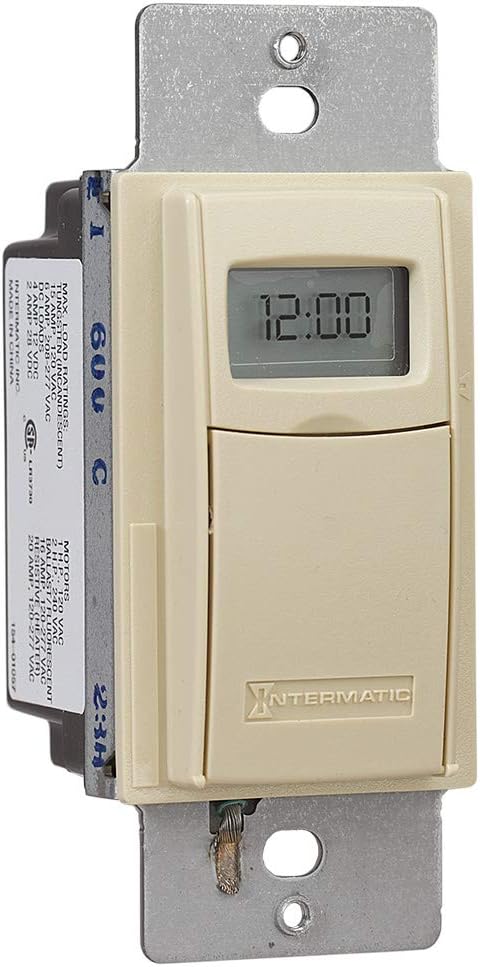
The Intermatic EI400C is an electronic countdown timer designed for in-wall installation. It features a digital display and intuitive controls for setting countdown durations.
3.1 Składniki
- Wyświetlacz cyfrowy: Shows current time and countdown status.
- Przycisk włączania/wyłączania: Activates or deactivates the timer.
- Przyciski Plus (+) / Minus (-): Adjust countdown duration.
- Przycisk pauzy: Temporarily stops the countdown.
- Komora baterii: Mieści baterię litową CR2.
3.2 Zdjęcia produktów



4. Konfiguracja i instalacja
The Intermatic EI400C timer is designed for easy installation, compatible with single-pole or 3-way switch configurations and does not require a neutral wire connection.
4.1 Czynności przed instalacją
- Wyłącz zasilanie: Locate the circuit breaker or fuse that controls the switch you are replacing and turn off the power. Verify power is off using a voltagtester.
- Usuń istniejący przełącznik: Ostrożnie zdejmij płytkę ścienną i odkręć istniejący przełącznik od puszki ściennej. Odłącz przewody od starego przełącznika.
4.2 instrukcje okablowania
The EI400C timer is compatible with both single-pole and 3-way switch setups. Refer to the diagram provided with your product for specific wiring configurations. Generally, the timer will have two load wires and a ground wire. For 3-way applications, one of the traveler wires from the existing 3-way switch will be connected to the timer.
- Connect the timer's wires to the corresponding house wires using wire nuts.
- Sprawdź, czy wszystkie połączenia są dobrze dokręcone i bezpieczne.
- The EI400C does not require a neutral wire, simplifying installation in older homes.
4.3 Mounting and Finalizing Installation
- Carefully push the wired timer into the wall box.
- Secure the timer to the wall box with the provided screws.
- Attach the decorative wall plate.
- Przywróć zasilanie: Włącz ponownie zasilanie za pomocą wyłącznika obwodu.
4.4 Instalacja baterii
The timer comes with a replaceable CR2 lithium battery, which powers the internal clock and settings memory. The battery is typically pre-installed or needs to be inserted upon initial setup.
- Open the small front cover of the timer to access the battery compartment.
- Insert the CR2 lithium battery, observing the correct polarity.
- Dokładnie zamknij pokrywę komory baterii.
5. Instrukcja obsługi
The EI400C timer offers simple, push-button operation for setting countdown durations from 1 second to 24 hours.
5.1 Setting a Countdown Time
- Kontrola dostępu: Gently open the front cover of the timer to reveal the control buttons.
- Dostosuj czas: Użyj + I - buttons to set the desired countdown duration. The display will show the selected time.
- Uruchom zegar: Naciśnij Włącz/Wyłącz button to activate the timer. The connected load will turn on, and the timer will begin counting down.
5.2 Turning Off Before Countdown Ends
If you wish to turn off the connected load before the set countdown time expires, simply press the Włącz/Wyłącz button again. This will immediately turn off the load and reset the timer.
5.3 Funkcja pauzy
Naciśnij Pauza button to temporarily halt the countdown. The connected load will remain on. Press Pauza ponownie, aby wznowić odliczanie.
5.4 Lockable Settings
The timer features lockable settings to prevent unintended changes to the program. Refer to the detailed instructions included in the product packaging for how to activate and deactivate this feature.
5.5 Visual/Audible Warnings
The EI400C can be configured to provide a visual or audible warning before the timer turns off. Consult the full product manual for steps on enabling and customizing these warning options.
5.6 Film instruktażowy
Wideo 1: An official Intermatic video providing an overview of their in-wall timers, including the EI400 series. This video demonstrates general features and benefits of Intermatic in-wall timers, which are applicable to the EI400C model.
6. Konserwacja
The Intermatic EI400C timer requires minimal maintenance, primarily focusing on battery replacement.
6.1 Wymiana baterii
The internal CR2 lithium battery provides power for the timer's memory and display, typically lasting up to three years. When the battery is low, a 'LoBatt' indicator may appear on the display.
- Open the front cover of the timer.
- Ostrożnie wyjmij starą baterię CR2 z jej komory.
- Włóż nową baterię litową CR2, zwracając uwagę na prawidłową biegunowość.
- Zamknij dokładnie przednią pokrywę.
Notatka: Some users have reported that the battery compartment cover can be difficult to open or may not stay securely closed after multiple battery changes. Exercise care when opening and closing the compartment. If the cover does not stay closed, ensure the battery makes proper contact.
7. Rozwiązywanie Problemów
This section addresses common issues you might encounter with your Intermatic EI400C timer.
| Problem | Możliwa przyczyna | Rozwiązanie |
|---|---|---|
| Timer display is blank or shows 'LoBatt' | Low or dead CR2 battery, or poor battery contact. | Replace the CR2 lithium battery. Ensure the battery is inserted correctly and the compartment cover is securely closed to maintain contact. |
| Timer shows 'NoOP' error | Indicates a problem with battery contact or internal operation. | Check and re-seat the CR2 battery. If the issue persists, the unit may require replacement. |
| Connected load does not turn on/off | No power to the timer, incorrect wiring, or faulty load. | Verify power at the circuit breaker. Double-check wiring connections according to the installation instructions. Test the connected load (e.g., light bulb) with a different switch or power source. |
| Difficulty opening battery compartment cover | Tight fit or worn plastic tabs. | Use a small, flat-head screwdriver to gently pry open the cover. Be careful not to damage the plastic tabs. |
| Timer does not hold settings after power outage | Dead or missing CR2 battery. | The CR2 battery maintains settings during power outages. Ensure it is installed and functional. |
8. Specyfikacje
| Funkcja | Szczegół |
|---|---|
| Numer modelu | EI400C |
| Marka | Intermatyczny |
| Kolor | Kość słoniowa |
| Tworzywo | Plastikowy |
| Tomtage | 120-277 VAC |
| Maksymalne obciążenie | 20 Amps |
| Zakres timera | 1 Second to 24 Hours |
| Typ przełącznika | Single-pole or 3-way |
| Typ montażu | Standard Wall Box, Rectangular Decorator Wall Plate |
| Wymagany akumulator | 1 CR2 Lithium (included) |
| Żywotność baterii | Do 3 lat |
| Wymiary | 4.13 x 1.75 x 1.2 cala |
| Waga przedmiotu | 6 uncji (0.38 funta) |
| Orzecznictwo | Certyfikat CSA |
| UPC | 078275101371 |
9. Gwarancja i pomoc techniczna
9.1 Informacje o gwarancji
The Intermatic EI400C Electronic Countdown In-Wall Timer comes with a 5-roczna ograniczona gwarancjaNiniejsza gwarancja obejmuje wady materiałowe i wykonawcze powstałe w wyniku normalnego użytkowania. Prosimy zachować dowód zakupu na potrzeby roszczeń gwarancyjnych.
9.2 Obsługa klienta
W celu uzyskania pomocy technicznej, rozwiązania problemów wykraczających poza zakres niniejszej instrukcji lub w sprawie gwarancji prosimy o kontakt z działem obsługi klienta Intermatic. Zapoznaj się z oficjalną instrukcją obsługi Intermatic. webAktualne dane kontaktowe znajdziesz na stronie internetowej lub opakowaniu produktu.
Zasoby internetowe: Odwiedź Sklep Intermatic na Amazon Aby uzyskać dodatkowe informacje i zasoby dotyczące produktu.


