1. Wprowadzenie
This manual provides detailed instructions for the installation, operation, and maintenance of your Chacon 54311 Digital Thermostat. This device is designed to help you manage your heating system efficiently, allowing for energy savings through precise temperature control and programming.
Główne cechy obejmują:
- Hourly and daily programming for optimal use.
- Two temperature levels: Day (presence) and ECO (night or absence).
- Seven distinct programming schedules.
- Wskaźnik niskiego poziomu naładowania baterii.
2. Koniec produktuview
The Chacon 54311 Digital Thermostat features a clear digital display and intuitive buttons for setting and programming your heating preferences.
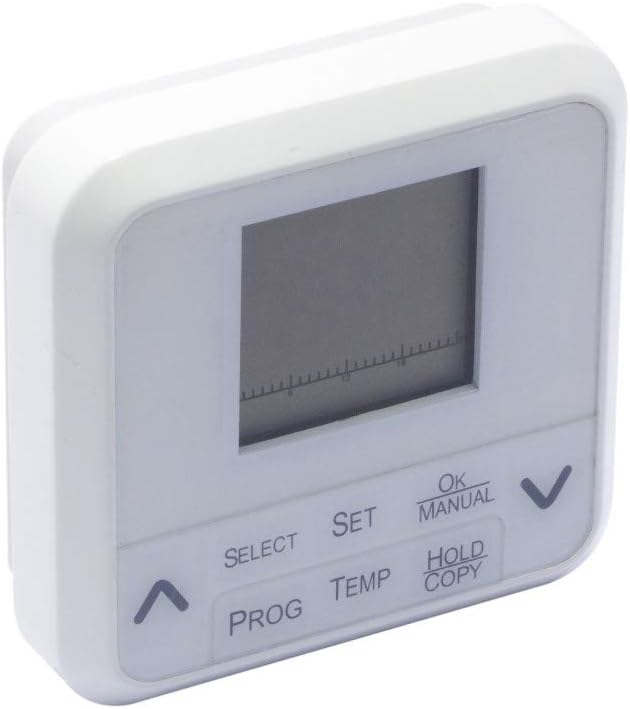
Rysunek 1: Przód view of the Chacon 54311 Digital Thermostat, showing the digital display and control buttons.
Panel sterowania zawiera:
- Wyświetlacz cyfrowy: Shows current temperature, time, day, and program status.
- Przycisk WYBIERZ: Służy do poruszania się po opcjach menu.
- Przycisk SET: Confirms selections or enters setting modes.
- Przycisk OK/RĘCZNY: Confirms settings or switches to manual operation mode.
- HOLD/COPY Button: Used to hold a temperature or copy program settings.
- Przycisk PROG: Wchodzi w tryb programowania.
- Przycisk TEMP: Dostosowuje ustawienia temperatury.
- Strzałki w górę (▲) / w dół (▼): Adjust values or navigate options.

Rysunek 2: Z bliska view of the Chacon 54311 Digital Thermostat's control buttons for detailed reference.
3. Konfiguracja
3.1 Rozpakowanie
Carefully remove the thermostat from its packaging. Ensure all components are present: the digital thermostat unit and this instruction manual.
3.2 Instalacja baterii
The thermostat is powered by batteries (not included). Locate the battery compartment on the back of the unit. Insert the required batteries, ensuring correct polarity (+/-). The display should activate. If not, recheck battery placement or replace with new batteries.
3.3 Montaż
The Chacon 54311 is designed for wall mounting. Choose a suitable location away from direct sunlight, drafts, or heat sources that could affect temperature readings. Mount the thermostat at an appropriate height, typically 1.5 meters (5 feet) from the floor, for accurate room temperature sensing.
3.4 Okablowanie
Ważny: Wiring should only be performed by a qualified electrician to ensure safety and proper functionality. Incorrect wiring can damage the thermostat or your heating system.
Connect the thermostat to your heating system according to the wiring diagram provided with your heating appliance or by a professional. The thermostat supports common 2-wire or 3-wire heating system connections.
4. Instrukcja obsługi
4.1 Initial Setup: Time and Day
- Naciśnij USTAWIĆ przycisk. Wyświetlacz czasu zacznie migać.
- Użyj W górę (▲) or W dół (▼) arrows to adjust the hour. Press USTAWIĆ aby potwierdzić.
- Dostosuj minuty za pomocą W górę (▲) or W dół (▼) strzałki. naciskać USTAWIĆ aby potwierdzić.
- Dzień tygodnia zacznie migać. Użyj W górę (▲) or W dół (▼) arrows to select the current day (e.g., 1 for Monday, 2 for Tuesday, etc.). Press USTAWIĆ to confirm and exit time/day setting.
4.2 Ustawianie żądanej temperatury
W normalnym trybie pracy naciśnij TEMP button. The target temperature will flash. Use the W górę (▲) or W dół (▼) arrows to adjust the desired temperature. The thermostat will automatically save the setting after a few seconds or by pressing USTAWIĆ.
4.3 Programming Schedules (7 Programs)
The thermostat allows for 7 programmable schedules, offering two temperature levels: Day (comfort) and ECO (economy). Programming can be complex; follow these steps carefully.
- Naciśnij ŻARCIE button to enter programming mode. The day of the week (e.g., '1' for Monday) and a program number will flash.
- Użyj W górę (▲) or W dół (▼) arrows to select the day or group of days you wish to program. Press USTAWIĆ aby potwierdzić.
- The first program period (e.g., P1) will flash. Use the W górę (▲) or W dół (▼) arrows to set the start time for this period. Press USTAWIĆ.
- Użyj W górę (▲) or W dół (▼) arrows to set the desired temperature for this period (Day or ECO). Press USTAWIĆ.
- Repeat steps 3 and 4 for all program periods (P1-P7) for the selected day(s).
- After setting all programs for the current day(s), press ŻARCIE again to move to the next day or group of days, or press OK/RĘCZNIE aby wyjść z trybu programowania.
4.4 Manual Mode (Temporary Override)
To temporarily override the current program, press the OK/RĘCZNIE button. The thermostat will switch to manual mode, indicated on the display. You can then use the W górę (▲) or W dół (▼) arrows to set a desired temperature. This manual setting will remain active until the next programmed period or until you press OK/RĘCZNIE again to return to program mode.
4.5 Funkcja wstrzymania
To maintain a specific temperature indefinitely, press the HOLD/COPY button. Set your desired temperature using the W górę (▲) or W dół (▼) arrows. The thermostat will maintain this temperature until the HOLD function is cancelled by pressing HOLD/COPY Ponownie.
5. Konserwacja
5.1 Wymiana baterii
When the low battery indicator appears on the display, it is time to replace the batteries. Open the battery compartment on the back of the unit, remove the old batteries, and insert new ones, ensuring correct polarity. The thermostat is designed for a minimum of 1 year of normal use on a fresh set of batteries.
5.2 Czyszczenie
Clean the thermostat's exterior with a soft, dry cloth. Do not use abrasive cleaners, solvents, or chemical sprays, as these can damage the unit.
6. Rozwiązywanie Problemów
- Thermostat not turning on / Display blank: Sprawdź instalację baterii i upewnij się, że są nowe. W razie potrzeby wymień.
- System ogrzewania nie odpowiada: Verify that the thermostat is correctly wired to the heating system. Check the set temperature and ensure it is above the current room temperature if heating is desired. Ensure the thermostat is not in an unintended manual or hold mode.
- Trudności z programowaniem: Refer to section 4.3 and follow the steps precisely. Programming can be intricate; take your time and re-read instructions if needed.
- Niedokładne odczyty temperatury: Ensure the thermostat is not exposed to direct sunlight, drafts, or heat sources. Its placement significantly impacts accuracy.
- Thermostat overheating / Burning smell: Immediately remove batteries and disconnect from the heating system. This indicates a serious malfunction. Do not attempt to use the device again and contact customer support.
7. Specyfikacje
| Funkcja | Specyfikacja |
|---|---|
| Numer modelu | 54311 |
| Marka | Chacon |
| Tworzywo | PCV |
| Kolor | Biały |
| Styl wyświetlania | Cyfrowy |
| Źródło zasilania | Zasilany bateryjnie (baterie nie są dołączone) |
| Maksymalna moctage | 1150 watów |
| Typ montażu | Montaż ścienny |
| Cechy specjalne | Hourly and daily programming, 7 programs |
| Przeznaczenie | Sterowanie ogrzewaniem |
8. Gwarancja i wsparcie
Specific warranty details for the Chacon 54311 Digital Thermostat are not provided in the product information. For warranty claims, technical support, or further assistance, please contact Chacon customer service directly. Keep your purchase receipt as proof of purchase.


