Instrukcja obsługi bezprzewodowego systemu głośników multimedialnych Creative Inspire S2 Bluetooth
Model: Inspire S2 (51MF0390AA003)
Produkt ponadview
The Creative Inspire S2 Bluetooth Wireless Multimedia Speaker System provides high-quality audio through its two satellite speakers and a subwoofer, with the added convenience of Bluetooth wireless connectivity. This system is designed for use with computers and other Bluetooth-enabled devices, offering a versatile audio solution.
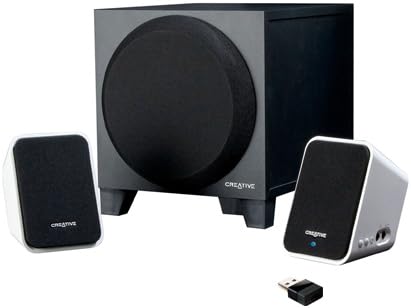
Image: The Creative Inspire S2 system, showing the central subwoofer unit, two compact satellite speakers, and a small USB Bluetooth transmitter. The satellite speakers are white with black grilles, and the subwoofer is black.
Zawartość pudełka
Sprawdź, czy w opakowaniu znajdują się wszystkie elementy:
- Dwa głośniki satelitarne
- Jeden subwoofer
- Nadajnik Bluetooth USB
- Uniwersalny zasilacz
- Szybki przewodnik (szczegółowe instrukcje można znaleźć w tym podręczniku)
- Warranty/Technical Support Leaflet
Instrukcje konfiguracji
1. Połączenie fizyczne
- Pozycjonowanie: Place the subwoofer on the floor or a sturdy surface. Position the two satellite speakers on either side of your computer monitor or listening area for optimal stereo separation.
- Podłącz głośniki satelitarne: Podłącz kable głośników satelitarnych do odpowiednich portów z tyłu subwoofera. Upewnij się, że połączenie jest stabilne.
- Podłącz zasilanie: Plug the universal power adapter into the subwoofer's power input, then connect the adapter to a wall outlet.
2. Bluetooth Connection (Wireless Audio)
For Computers (using included USB Bluetooth Transmitter):
- Włóż nadajnik: Plug the included USB Bluetooth transmitter into an available USB port on your computer. Your computer may automatically install necessary drivers.
- Power On Speakers: Ensure the speaker system is powered on. The power button is typically located on one of the satellite speakers. A green light should indicate power.
- Automatyczne parowanie: The speaker system and USB transmitter should automatically pair. A blue light on the satellite speaker will indicate a successful Bluetooth connection.
- Wybierz wyjście audio: On your computer, navigate to your sound settings and select the "Creative Inspire S2" or similar Bluetooth audio device as your default playback device.
For Other Bluetooth Devices (e.g., Smartphones, Tablets, Laptops with built-in Bluetooth):
- Power Off Speakers: Ensure the speaker system is turned off.
- Wejdź w tryb parowania: With the speakers off, press and hold the '+' (volume up) button on the satellite speaker. Continue holding until a blue light begins to flash rapidly. This indicates the speakers are in pairing mode.
- Włącz Bluetooth na urządzeniu: Na smartfonie, tablecie lub laptopie przejdź do ustawień Bluetooth i upewnij się, że funkcja Bluetooth jest włączona.
- Select "Inspire S2": In the list of available devices, select "Inspire S2" (or similar). If prompted for a passcode, enter "0000" (four zeros).
- Potwierdź połączenie: Once paired, the blue light on the satellite speaker will become solid, indicating a successful connection.
3. Wired Connection (Auxiliary Input)
The Inspire S2 system also supports a wired connection for devices without Bluetooth or for a direct audio link.
- Podłącz kabel audio: Connect a 3.5mm audio cable (not included) from the audio output of your device (e.g., MP3 player, laptop headphone jack) to the "Audio In" port on the side of the satellite speaker.
- Power On Speakers: Sprawdź, czy system głośnikowy jest włączony.
- Odtwarzanie nagranego dźwięku: Begin audio playback from your connected device. The system will automatically prioritize the wired input if a cable is connected.
Instrukcja obsługi
Włączanie/wyłączanie zasilania
- To power on the system, press the power button located on one of the satellite speakers. A green LED will illuminate.
- To power off, press the power button again. The LED will turn off.
Kontrola głośności
- Use the '+' and '-' buttons on the satellite speaker to adjust the system's volume.
- You can also control the volume from your connected Bluetooth device or computer.
Odtwarzanie dźwięku
- Once connected via Bluetooth or auxiliary cable, simply start playing audio from your source device.
- Ensure the volume on both the speaker system and your source device is adjusted appropriately.
Konserwacja
- Czyszczenie: Use a soft, dry cloth to clean the surfaces of the speakers and subwoofer. Avoid using liquid cleaners or abrasive materials.
- Umieszczenie: Ensure the speakers are placed on stable surfaces to prevent accidental falls. Avoid placing them in direct sunlight, near heat sources, or in excessively humid environments.
- Wentylacja: Do not block the ventilation openings on the subwoofer to ensure proper airflow and prevent overheating.
- Zarządzanie kablami: Keep cables organized and untangled to prevent damage and tripping hazards.
Rozwiązywanie problemów
| Problem | Możliwe rozwiązanie |
|---|---|
| Brak dźwięku z głośników. |
|
| Bluetooth device cannot pair or connect. |
|
| Dźwięk jest zniekształcony lub przerywany. |
|
| Speakers turn off unexpectedly when using auxiliary input. |
|
Specyfikacje
| Funkcja | Szczegół |
|---|---|
| Nazwa modelu | Inspire S2 |
| Numer modelu | 51MF0390AA003 |
| Typ głośnika | Desktop Multimedia Speaker System |
| Technologia łączności | Bluetooth Wireless, Wired (3.5mm Auxiliary) |
| Maksymalna moc wyjściowa głośnika | 7 W (RMS) |
| Stosunek sygnału do szumu | 75dB |
| Product Dimensions (Satellite) | 2.9 x 2.9 x 4.05 cale (w przybliżeniu) |
| Waga przedmiotu | 3 funta (cały system) |
| Źródło zasilania | Elektryczny przewodowy |
| Cechy specjalne | USB Bluetooth technology, Creative DIRECT-THROW subwoofer, easy-access controls, Energy Star qualified |
Gwarancja i wsparcie
For warranty information and technical support, please refer to the warranty/technical support leaflet included in your product packaging. You may also visit the official Creative webwitryna zawierająca najnowsze zasoby pomocy technicznej, odpowiedzi na często zadawane pytania i informacje kontaktowe.
Wsparcie online: www.creative.com/support


