1. Wprowadzenie
Dziękujemy za zakupasing the Korg GA30 Guitar and Bass Tuner. This ultra-compact, high-precision tuner is designed to provide accurate and stable tuning for both guitar and bass instruments. Please read this manual thoroughly to understand the features and proper operation of your GA30 tuner.
2. Koniec produktuview
The Korg GA30 features an LCD needle-type meter for stable tuning, a Quinta Flat Tuning mode, support for 7-string guitar tunings, and a Sound Out function for reference tones. Its auto power-off function helps conserve battery life, providing approximately 100 hours of continuous use.
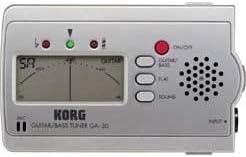
Rysunek 1: Front panel of the Korg GA30 Tuner. This image displays the front panel of the Korg GA30 tuner, showing its LCD needle-type display, input jack, speaker, and control buttons for power, guitar/bass mode, flat tuning, and sound out.
Główne cechy:
- Ultrakompaktowa konstrukcja: Przenośny i łatwy do przenoszenia.
- High Precision LCD Needle-Type Meter: Provides stable and accurate visual tuning.
- Quinta Flat Tuning Mode: Allows tuning 1 to 5 semitones flat.
- 7-String Guitar Support: Accommodates extended range guitars.
- Sound Out Function: Produces a reference tone from the internal speaker.
- Automatyczne wyłączanie: Automatically shuts off to save battery life.
- Dłuższa żywotność baterii: Approximately 100 hours of continuous operation.
3. Konfiguracja
3.1 Instalacja baterii
- Otwórz pokrywę komory baterii znajdującą się z tyłu urządzenia.
- Włóż dwie baterie AAA, zwracając uwagę na prawidłową biegunowość (+/-).
- Dokładnie zamknij pokrywę komory baterii.
3.2 Podłączanie instrumentu
Connect your guitar or bass to the INPUT jack on the right side of the GA30 tuner using a standard 1/4-inch instrument cable.
3.3 Włączanie/wyłączanie
Naciśnij czerwony WŁ./WYŁ. button located on the front panel to turn the tuner on. Press and hold the WŁ./WYŁ. button for a few seconds to turn the tuner off. The tuner will automatically power off after a period of inactivity to conserve battery life.
4. Instrukcja obsługi
4.1 Selecting Instrument Mode (Guitar/Bass)
Naciśnij GITARA/BAS button to toggle between Guitar mode and Bass mode. The selected mode will be indicated on the LCD display.
4.2 Standard Tuning
In either Guitar or Bass mode, play a single note on your instrument. The LCD needle will indicate the pitch. Adjust your instrument's tuning pegs until the needle is centered and the green indicator light illuminates, signifying accurate tuning.
4.3 Flat Tuning (Quinta Flat)
The GA30 allows for flat tuning from 1 to 5 semitones. Press the PŁASKI button repeatedly to select the desired number of semitones flat (b, bb, bbb, bbbb, bbbbb). The selected flat setting will be displayed. Tune your instrument as you would in standard tuning, but the tuner will now register the pitch relative to the flat setting.
4.4 Sound Out Function
Naciśnij DŹWIĘK button to activate the Sound Out function. The tuner will emit a reference tone from its internal speaker. Press the GITARA/BAS button to cycle through different reference notes. This feature is useful for tuning by ear. Press the DŹWIĘK button again to turn off the reference tone.
5. Konserwacja
5.1 Wymiana baterii
When the display becomes dim or the tuner does not power on, replace the batteries. Follow the steps in Section 3.1 for battery installation. Always use fresh AAA batteries and dispose of old batteries responsibly.
5.2 Czyszczenie
Wipe the unit with a soft, dry cloth. Do not use abrasive cleaners, waxes, or solvents, as these can damage the finish and internal components.
5.3 Przechowywanie
If the unit will not be used for an extended period, remove the batteries to prevent leakage and potential damage. Store the tuner in a cool, dry place away from direct sunlight and extreme temperatures.
6. Rozwiązywanie Problemów
- Brak zasilania:
Check if the batteries are inserted correctly with the proper polarity. Replace with fresh batteries if necessary. - Niedokładne strojenie:
Ensure your instrument is properly connected to the INPUT jack. Make sure you are playing a single, clear note. Check for external noise interference. - No Sound from Speaker (Sound Out):
Ensure the SOUND function is activated. Adjust the volume on your instrument if applicable (though the tuner's speaker volume is fixed). - Wyświetlacz jest przyciemniony:
Oznacza to niski poziom naładowania baterii. Wymień baterie.
7. Specyfikacje
- Model: GA30
- Marka: Korg
- Tuning Scale: 12-nutowy równy temperament
- Zasięg wykrywania: A0 (27.50 Hz) – C8 (4186.01 Hz) (for a sine wave)
- Skok odniesienia: A4 = 430 – 450 Hz (kroki co 1 Hz)
- Strojenie płaskie: 1 to 5 semitones (Quinta Flat)
- Impedancja wejściowa: 1 MOhm
- Złącza: INPUT (1/4" mono jack)
- Zasilanie: Dwie baterie AAA (3V)
- Czas pracy baterii: Około 100 godzin (baterie alkaliczne)
- Wymiary: (W x D x H) Approximately 102 x 60 x 16 mm (4.02 x 2.36 x 0.63 inches)
- Waga: Approximately 99.79 g (3.52 oz) (including batteries)
- Producent: Korg
- ASIN: B001VHQKSW
Dane techniczne mogą ulec zmianie bez powiadomienia w celu ulepszenia produktu.
8. Gwarancja i wsparcie
For warranty information and customer support, please refer to the warranty card included with your product or visit the official Korg webZachowaj paragon jako dowód zakupu na wypadek ewentualnych roszczeń gwarancyjnych.