Wstęp
The Creative Inspire T10 2.0 Multimedia Speaker System is designed to deliver high-quality audio for your PC, notebook, or MP3 player. Featuring a sleek, compact design and BasXPort Technology, these speakers provide enhanced audio performance without the need for a separate subwoofer. This manual provides essential information for setting up, operating, maintaining, and troubleshooting your Inspire T10 speakers.

Image: The Creative Inspire T10 2.0 Multimedia Speaker System, showcasing both left and right speakers with their sleek black finish and speaker grilles.
Główne cechy
- Kompaktowy i elegancki wygląd: High-glossy black finish, ideal for matching with PCs, notebooks, or MP3 players.
- Premium 2.0 Speaker System: Dedicated tweeter in each satellite for improved highs and mid-tones.
- Technologia BasXPort: Provides strong bass without requiring a separate subwoofer.
- Extended Listening Options: Built-in headphone jack for private listening and an AUX In connector for external audio devices.
Organizować coś
1. Rozpakowywanie
Ostrożnie wyjmij wszystkie elementy z opakowania. Upewnij się, że znajdują się w nim następujące elementy:
- Creative Inspire T10 Left Speaker
- Creative Inspire T10 Right Speaker (with controls)
- Zasilacz
- Kabel audio stereo 3.5 mm
2. Rozmieszczenie głośników
For optimal sound quality, place the speakers on a flat, stable surface, equidistant from your listening position. Position them to form an equilateral triangle with your ears. Ensure there are no obstructions in front of the speakers.
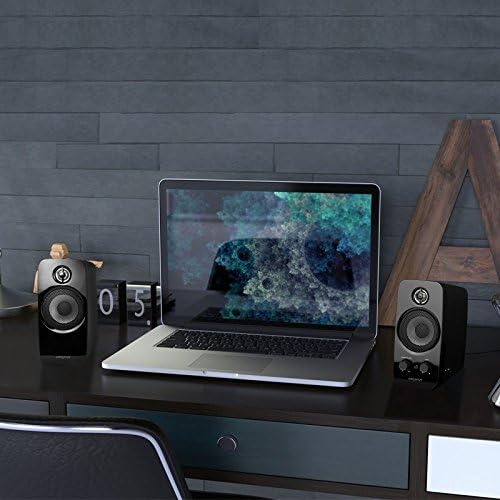
Image: Creative Inspire T10 speakers positioned on a desk alongside a laptop, demonstrating typical setup.
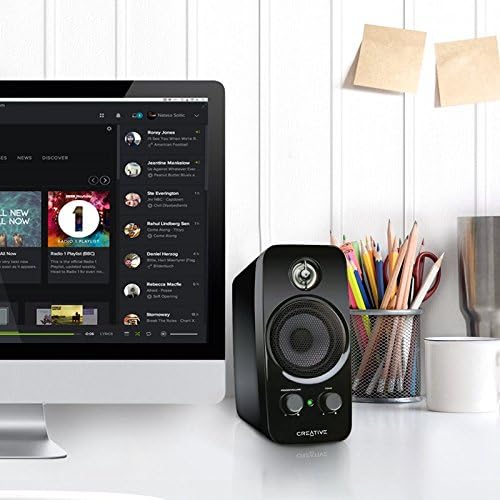
Image: A single Creative Inspire T10 speaker placed next to a desktop computer monitor, illustrating a common desktop setup.
3. Podłączanie głośników
- Connect the audio cable from the left speaker to the corresponding port on the right speaker.
- Connect the 3.5mm stereo audio cable from the "AUX IN" port on the right speaker to the audio output jack (headphone jack) of your computer, MP3 player, or other audio source.
- Connect the power adapter to the power input port on the right speaker, then plug the adapter into a wall outlet.
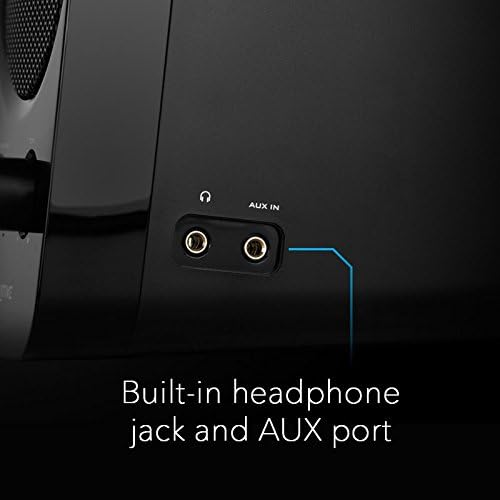
Obraz: szczegółowy view of the side panel of the Creative Inspire T10 speaker, highlighting the built-in headphone jack and AUX In port for external audio connections.
Instrukcja obsługi
Włączanie / wyłączanie i regulacja głośności
The main control knob on the right speaker functions as both the power switch and volume control.
- Aby włączyć, obróć MOC/GŁOŚNOŚĆ knob clockwise until you hear a click and the power indicator light illuminates.
- Aby zwiększyć głośność, kontynuuj obracanie zgodnie z ruchem wskazówek zegara.
- Obróć przeciwnie do ruchu wskazówek zegara, aby zmniejszyć głośność.
- Aby wyłączyć, obróć MOC/GŁOŚNOŚĆ knob counter-clockwise until you hear a click and the power indicator light turns off.
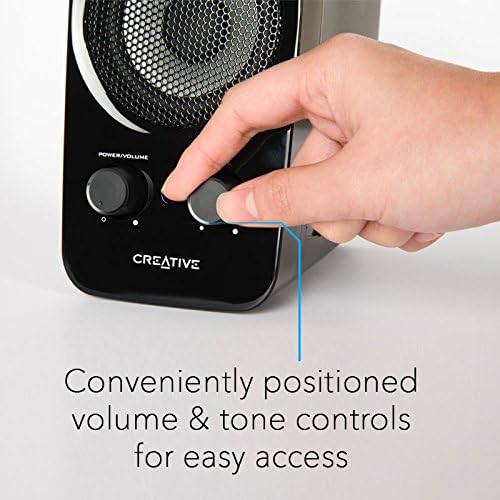
Image: A hand adjusting the conveniently positioned Power/Volume and Tone controls on the front of the Creative Inspire T10 speaker.
Kontrola tonu
Ten TON knob allows you to adjust the audio characteristics, balancing between bass and treble to suit your preference.
- Obróć TON knob clockwise to enhance higher frequencies (treble).
- Rotate counter-clockwise to emphasize lower frequencies (bass).
Korzystanie z gniazda słuchawkowego
For private listening, plug your headphones into the headphone jack located on the side of the right speaker. When headphones are connected, audio output from the speakers will automatically mute.
Obraz: szczegółowy view of the side panel of the Creative Inspire T10 speaker, highlighting the built-in headphone jack and AUX In port for external audio connections.
Konserwacja
Czyszczenie
- Before cleaning, ensure the speakers are powered off and unplugged from the wall outlet.
- Wipe the speaker surfaces with a soft, dry, lint-free cloth.
- Do not use liquid cleaners, aerosols, or abrasive cleaning agents, as these may damage the finish or internal components.
Składowanie
Jeśli głośniki nie będą używane przez dłuższy czas, należy je przechowywać w chłodnym i suchym miejscu, z dala od bezpośredniego światła słonecznego i ekstremalnych temperatur.
Środki ostrożności
- Nie wystawiaj głośników na działanie wody ani nadmiernej wilgoci.
- Unikaj umieszczania głośników w pobliżu źródeł ciepła lub w bezpośrednim świetle słonecznym.
- Nie próbuj samodzielnie otwierać ani naprawiać głośników. Wszelkie prace serwisowe zleć wykwalifikowanemu personelowi.
- Zapewnij odpowiednią wentylację wokół głośników.
Rozwiązywanie problemów
If you encounter issues with your Creative Inspire T10 speakers, refer to the following common problems and solutions:
| Problem | Możliwa przyczyna | Rozwiązanie |
|---|---|---|
| Brak dźwięku z głośników. |
|
|
| Zniekształcony lub niewyraźny dźwięk. |
|
|
| Brzęczenie lub brzęczenie. |
|
|
Specyfikacje
| Nazwa modelu | Inspire T10 |
| Numer modelu | IN-T10-R3 |
| Typ głośnika | Computer, Satellite |
| Konfiguracja kanału dźwięku przestrzennego | 2.0 |
| Maksymalna moc wyjściowa głośnika | 10 watów |
| Wymiary produktu (Gł. x Szer. x Wys.) | 6.9" gł. x 9.4" szer. x 8.1" wys. |
| Waga przedmiotu | 0.01 Ounces (Note: This weight seems unusually low and might be a data entry error. Actual product weight is likely higher.) |
| Technologia łączności | Przewodowy |
| Tryb wyjścia audio | Stereofoniczny |
| Kompatybilne urządzenia | Komputer stacjonarny, laptop, odtwarzacz MP3, projektor, smartfon, tablet, telewizor |
| Metoda kontroli | Manual Knobs (Power/Volume, Tone) |
| Cechy specjalne | BasXPort Technology, Built-in Headphone Jack, AUX In |
Uwaga: Dane techniczne mogą ulec zmianie bez wcześniejszego powiadomienia.
Gwarancja i wsparcie
Informacje o gwarancji
Creative products are covered by a limited hardware warranty. For specific warranty terms and conditions applicable to your region, please refer to the warranty card included with your product or visit the official Creative webstrona.
Obsługa klienta
For technical assistance, product inquiries, or warranty claims, please contact Creative customer support through their official webstrona:
Visit Creative Support Webstrona
Please have your product model number (IN-T10-R3) and purchase details ready when contacting support.


