1. Wprowadzenie
This manual provides detailed instructions for the installation, operation, and maintenance of your Lutron Maestro MSCLV-600M-SW Magnetic Low Voltage Digital Dimmer. This dimmer is designed for use with 600-watt magnetic low voltage lighting applications and supports multi-location dimming from up to ten locations when paired with coordinating Maestro Accessory Dimmers.
Główne cechy obejmują:
- Multi-location dimming capability (up to nine accessory dimmers).
- One tap on/off to selected light level.
- Two taps for full brightness.
- Press and hold for a 10-second fade to off.
- Delayed off feature provides light as you exit the room.
- Rocker switch for precise light level adjustment.
2. Ważne informacje dotyczące bezpieczeństwa
OSTRZEŻENIE: Ryzyko porażenia prądem.
- Turn off power at the circuit breaker or fuse box before installing or servicing the dimmer.
- Installation must be performed by a qualified electrician or trained personnel in accordance with all local and national electrical codes.
- Do not use with standard incandescent, LED, or electronic low voltage lighting. This dimmer is specifically for magnetic low voltage ładunki.
- Zapewnij całkowitą moctage of the connected lighting does not exceed the dimmer's maximum rating of 600 watts.
- Ground the dimmer in accordance with local and national electrical codes.
3. Zawartość opakowania
Your Lutron Maestro MSCLV-600M-SW package should include:
- One (1) Lutron Maestro MSCLV-600M-SW Digital Dimmer
- Instrukcja instalacji (ten dokument)
- Śruby montażowe
Note: Wall plates and coordinating accessory dimmers (for multi-location control) are sold separately.
4. Instrukcje instalacji
Before beginning, ensure power is turned off at the circuit breaker. This dimmer is designed for single-pole or multi-location applications. For multi-location control, you will need one Maestro MSCLV-600M-SW dimmer and up to nine Maestro Accessory Dimmers.
4.1 Wiring Diagram (Typical Single-Pole Installation)
Refer to the diagram below for a typical single-pole wiring configuration. For multi-location wiring, consult the specific instructions provided with your Maestro Accessory Dimmers.
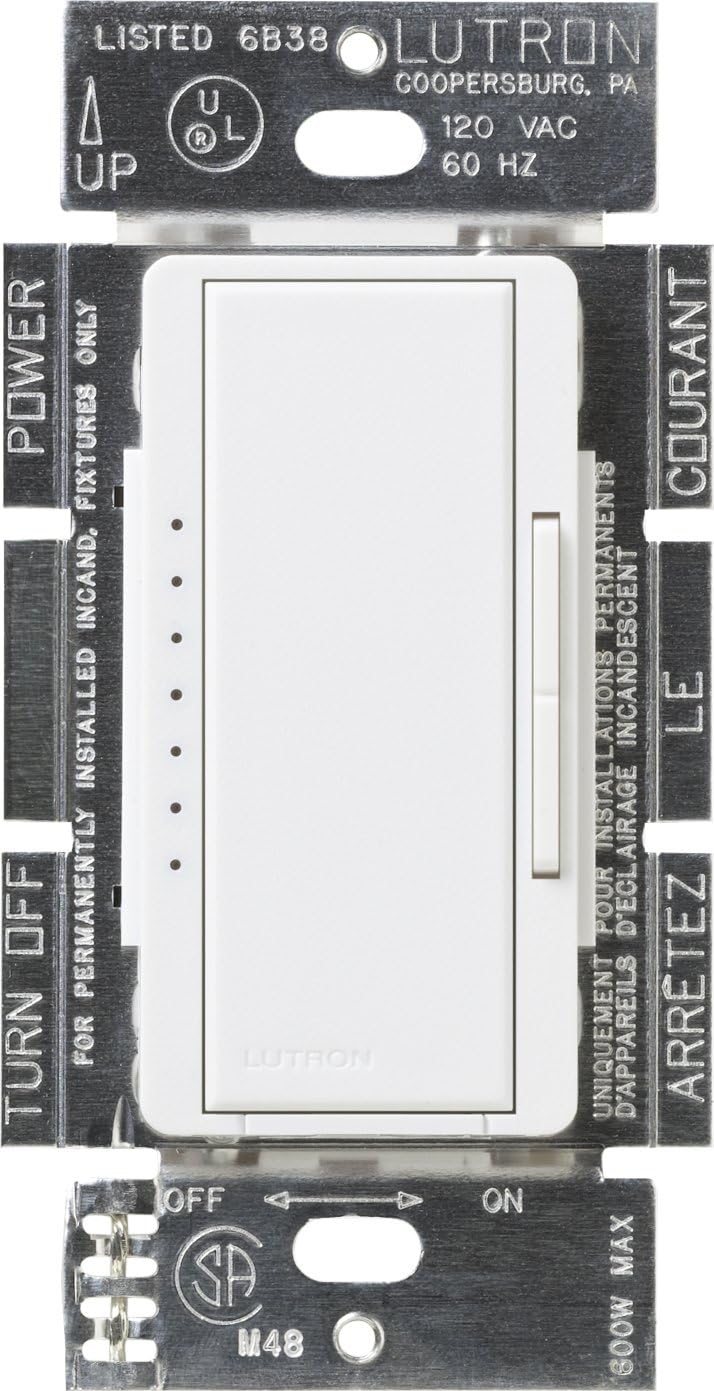
Opis obrazu: This image displays the Lutron Maestro MSCLV-600M-SW dimmer module from the front, showing its internal components and wiring terminals. Labels indicate 'POWER', 'TURN OFF', 'UP', 'ON', 'OFF', and '800W MAX' (note: product is 600W, this label might be generic for the series). The dimmer has a main rocker switch and a smaller vertical slider for dimming control, along with a row of indicator lights. The metal mounting straps are visible with regulatory markings.
- Wyłącz zasilanie: Locate the circuit breaker that controls the lighting circuit and switch it to the OFF position. Verify power is off at the switch location using a voltagtester.
- Usuń istniejący przełącznik: Ostrożnie zdejmij płytkę ścienną i odkręć istniejący przełącznik od puszki ściennej. Odłącz przewody od starego przełącznika.
- Identyfikacja przewodów: Identify the following wires in the wall box:
- Hot/Line Wire: The wire bringing power from the circuit breaker.
- Przewód obciążeniowy: The wire going to the light fixture.
- Uziemienie: Bare copper or green insulated wire.
- Przewód neutralny: (If present, typically white) This dimmer does not require a neutral wire.
- Wire the Dimmer: Connect the wires from the wall box to the dimmer's terminals as follows:
- Połącz Gorąca linia wire to the dimmer's designated line terminal (usually black).
- Połącz Obciążenie wire to the dimmer's designated load terminal (usually red).
- Połącz Grunt wire to the dimmer's green ground screw.
- For multi-location installations, connect the traveler wires according to the accessory dimmer instructions.
- Montaż ściemniacza: Carefully fold the wires into the wall box and secure the dimmer to the wall box using the provided screws.
- Zainstaluj płytę ścienną: Attach the coordinating wall plate (sold separately) over the dimmer.
- Przywróć zasilanie: Włącz ponownie zasilanie za pomocą wyłącznika.
5. Instrukcja obsługi
The Lutron Maestro Digital Dimmer offers intuitive control over your magnetic low voltage oświetlenie.

Opis obrazu: This image shows the Lutron Maestro MSCLV-600M-SW dimmer installed with a white faceplate. The main rocker switch and the smaller vertical slider are clearly visible, along with the row of five small LED indicator lights on the left side, with one light illuminated in yellow, indicating the current dimming level.
5.1 Podstawowa obsługa
- Włącz/Wyłącz: Tap the main rocker switch once to turn the lights on to your previously selected level, or off.
- Pełna jasność: Tap the main rocker switch twice quickly to turn the lights on to full brightness.
- Przyciemnij/Rozjaśnij: Use the small vertical rocker switch on the right side to adjust the light level up or down. The LED indicator lights on the left will show the current brightness level.
- Opóźnione wyłączenie: Press and hold the main rocker switch for approximately 10 seconds. The lights will gradually fade to off, providing time to exit the room before the lights extinguish completely.
6. Konserwacja
Your Lutron Maestro dimmer is designed for long-lasting performance with minimal maintenance.
- Czyszczenie: To clean the dimmer and wall plate, wipe with a soft, damp ściereczką. Nie używaj środków czyszczących o działaniu ściernym, rozpuszczalników ani środków chemicznych w sprayu, ponieważ mogą one uszkodzić wykończenie lub elementy wewnętrzne.
- Brak części nadających się do samodzielnej naprawy przez użytkownika: Wewnątrz ściemniacza nie ma żadnych części, które mogłyby zostać naprawione przez użytkownika. Nie należy otwierać ani naprawiać urządzenia.
7. Rozwiązywanie Problemów
If your Lutron Maestro dimmer is not functioning as expected, consult the following common issues and solutions:
| Problem | Możliwa przyczyna | Rozwiązanie |
|---|---|---|
| Światła nie włączają się. | Zasilanie jest wyłączone na wyłączniku. Luźne połączenie okablowania. Bulb(s) burned out. | Check the circuit breaker and turn it ON. Sprawdź, czy wszystkie połączenia przewodów są solidne (najpierw upewnij się, że zasilanie jest wyłączone). Wymień żarówkę(e). |
| Lights do not dim or flicker. | Incorrect bulb type (not magnetic low voltagmi). Całkowita wattage exceeds dimmer capacity. Luźne okablowanie. | Ensure you are using magnetic low voltage bulbs/fixtures. Zmniejsz całkowitą ilość watówtage of connected lights to below 600W. Sprawdź połączenia okablowania (upewnij się najpierw, że zasilanie jest wyłączone). |
| Dimmer is warm to the touch. | Normalna praca. | It is normal for dimmers to feel warm during operation. If it is excessively hot or emits smoke/odor, turn off power immediately and contact support. |
| Multi-location control not working. | Incorrect wiring for multi-location. Accessory dimmer not compatible or faulty. | Review multi-location wiring diagrams for the Maestro system. Ensure you are using genuine Lutron Maestro Accessory Dimmers. |
If the problem persists after trying these solutions, please contact Lutron Customer Support.
8. Specyfikacje
| Funkcja | Szczegół |
|---|---|
| Numer modelu | MSCLV-600M-SW |
| Marka | Lutron |
| Cotage | 600 Watts (Magnetic Low Voltage) |
| Objętość operacyjnatage | 120 V AC, 60 Hz |
| Tryb działania | Wyłączony |
| Typ sterowania | Touch with Dimmer Control |
| Typ siłownika | Naciśnij przycisk |
| Typ obwodu | 9-way (for multi-location with accessory dimmers) |
| Kolor | Śnieg |
| Wymiary (dł. x szer. x wys.) | 1.5 x 2.2 x 4.2 cala |
| Waga przedmiotu | 4 uncji |
| Protokół łączności | X-10 |
| Cechy specjalne | Deep Back Cover |
9. Informacje o gwarancji
Specific warranty details for the Lutron Maestro MSCLV-600M-SW dimmer are typically provided with the product packaging or can be found on the official Lutron website. Lutron generally offers a limited warranty covering defects in materials and workmanship. Please retain your proof of purchase for warranty claims.
10. Obsługa klienta
For additional assistance, technical support, or troubleshooting not covered in this manual, please contact Lutron Customer Support.
10.1 Lutron 24/7 Support Video
Opis filmu: This video highlights Lutron's commitment to customer support, emphasizing that help is available 24/7. It shows a person installing a Lutron product and then a customer service representative assisting a customer, conveying the ease of getting projects done with Lutron's continuous support.
Lutron 24/7 Support Phone: 844-588-7661
You can also visit the official Lutron website for more resources, FAQs, and product information.


