1. Wprowadzenie
This manual provides instructions for the setup, operation, and maintenance of your Polycom SoundPoint IP 430 phone. The SoundPoint IP 430 is a two-line desktop IP phone designed for clear voice communication, featuring a full-duplex speakerphone with Polycom Acoustic Clarity Technology.
2. Konfiguracja
2.1 Rozpakowanie
Ostrożnie wyjmij wszystkie elementy z opakowania. Upewnij się, że znajdują się w nim następujące elementy:
- Polycom SoundPoint IP 430 Phone Unit
- Słuchawka
- Przewód słuchawki
- Kabel Ethernet
- Stojak na telefon
- (Note: Power supply is not included with this specific product offering and must be acquired separately if Power over Ethernet (PoE) is not available.)
2.2 Podłączanie telefonu
- Zamontuj podstawkę pod telefon: Align the stand with the slots on the back of the phone unit and snap it into place.
- Podłącz słuchawkę: Podłącz jeden koniec spiralnego przewodu słuchawkowego do słuchawki, a drugi koniec do portu słuchawki w urządzeniu telefonicznym (zazwyczaj oznaczonego ikoną słuchawki).
- Połącz z siecią: Plug one end of the Ethernet cable into the LAN port on the phone (marked with a network icon) and the other end into an active network port (e.g., a wall jack or network switch).
- Podłącz zasilanie (jeśli nie używasz PoE): If your network does not provide Power over Ethernet (PoE), connect an appropriate external power adapter (not included) to the power port on the phone unit and then to a power outlet.
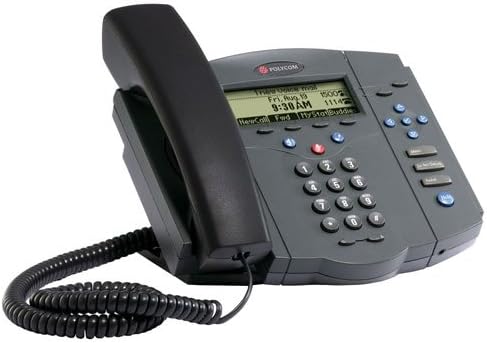
Figure 1: Polycom SoundPoint IP 430 Phone. This image displays the complete phone unit, including the main body, handset, and coiled handset cord. The phone features a monochrome LCD display, a numeric keypad, and various function buttons for call management.
Once connected, the phone will power on and begin its boot-up sequence. This may take a few moments as it connects to the network and registers with your VoIP system.
3. Instrukcja obsługi
3.1 Podstawowe funkcje wywołań
- Nawiązywanie połączenia:
- Pick up the handset, press the Speaker button, or press a Line button.
- Wybierz żądany numer za pomocą klawiatury.
- Press the "Dial" soft key or wait for the call to connect automatically.
- Odbieranie połączenia:
- Pick up the handset, press the Speaker button, or press the flashing Line button.
- Zakończenie połączenia:
- Hang up the handset, press the Speaker button again, or press the "End Call" soft key.
3.2 Speakerphone and Mute
- Korzystanie z zestawu głośnomówiącego: Naciśnij Głośnik przycisk umożliwiający włączenie lub wyłączenie trybu głośnomówiącego.
- Wyciszanie mikrofonu: Podczas połączenia naciśnij Niemy button to mute your microphone. The button will illuminate when active. Press again to unmute.
3.3 Regulacja głośności
Użyj Tom buttons (located below the display) to adjust the volume of the handset, speakerphone, or ringer, depending on the phone's current state.
3.4 Hold and Transfer
- Wstrzymanie połączenia: Podczas aktywnego połączenia naciśnij Trzymać soft key. To resume the call, press the flashing Line button or the "Resume" soft key.
- Przekazywanie połączenia:
- Podczas aktywnego połączenia naciśnij Przenosić soft key. The current call will be placed on hold.
- Dial the number of the party you wish to transfer the call to.
- Once the second party answers, you can announce the call (consulted transfer) or press the Przenosić soft key again to complete the transfer (blind transfer).
3.5 Voicemail Access
Naciśnij Wiadomości button (envelope icon) to access your voicemail. Follow the audio prompts to retrieve your messages.
4. Konserwacja
4.1 Czyszczenie telefonu
- Użyj miękkiego, lekko damp, lint-free cloth to clean the phone's exterior.
- Nie należy używać środków czyszczących o właściwościach ściernych, wosków ani rozpuszczalników.
- Unikaj rozpylania płynów bezpośrednio na telefon.
- Ensure the phone is disconnected from power before cleaning.
4.2 Ogólna opieka
- Keep the phone away from excessive heat sources, direct sunlight, and moisture.
- Unikaj upuszczania telefonu i narażania go na silne uderzenia.
5. Rozwiązywanie Problemów
This section addresses common issues you might encounter with your Polycom SoundPoint IP 430 phone.
| Problem | Możliwa przyczyna | Rozwiązanie |
|---|---|---|
| Telefon się nie włącza. | Brak zasilania lub wadliwe połączenie. |
|
| Brak sygnału wybierania. | Network connectivity issue or phone not registered. |
|
| Nie słyszę dzwoniącego / Dzwoniący mnie nie słyszy. | Volume settings, mute active, or faulty handset/speaker. |
|
6. Specyfikacje
Key technical specifications for the Polycom SoundPoint IP 430 phone:
| Funkcja | Szczegół |
|---|---|
| Wymiary produktu | 14 x 12.5 x 6 cala |
| Waga przedmiotu | 3.55 funta |
| Numer modelu | IP430 |
| Marka | Policom |
| Kolor | Szary |
| Typ telefonu | Sznurowy |
| Źródło zasilania | Corded Electric (PoE compatible, external adapter not included) |
| Typ dialera | Pojedyncza klawiatura |
| Typ systemu odbierającego | Cyfrowy |
| Możliwość prowadzenia rozmów konferencyjnych | 2-drożny |
| Producent | Firma Polycom Inc. |
7. Gwarancja i wsparcie
7.1 Informacje o gwarancji
For specific warranty details regarding your Polycom SoundPoint IP 430 phone, please refer to the warranty documentation provided at the time of purchase or visit the official Polycom (now Poly) webWarunki gwarancji zazwyczaj obejmują wady produkcyjne przez określony czas.
7.2 Wsparcie techniczne
If you require technical assistance beyond the scope of this manual, please contact your VoIP service provider or IT department. For direct manufacturer support, visit the Poly (formerly Polycom) support webwitryna zawierająca zasoby, odpowiedzi na często zadawane pytania i informacje kontaktowe.


