1. Wprowadzenie
This manual provides detailed instructions for the installation, operation, and maintenance of your IOGEAR GUH275W6 High-Speed USB 2.0 Hub. Please read this manual thoroughly before using the device to ensure proper functionality and to prevent damage.
The IOGEAR GUH275W6 is a 4-port USB 2.0 hub designed to expand the USB connectivity of your computer. It offers high-speed data transfer rates and is backward compatible with USB 1.1 devices.
2. Funkcje produktu
- Provides 4 Hi-Speed USB 2.0 ports.
- Obsługuje prędkość przesyłu danych do 480 Mb/s.
- Backward compatible with USB 1.1 specifications and devices.
- Plug-n-Play functionality for easy setup.
- Hot-swappable, allowing devices to be connected and disconnected without restarting the computer.
- Kompaktowa i przenośna konstrukcja.
- Compatible with Windows 98SE, 2000, ME, XP, and Mac OS X or later.
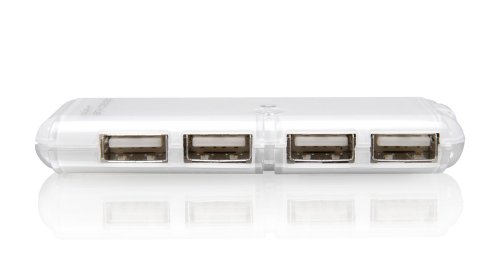
Rysunek 1: The IOGEAR GUH275W6 4-Port USB 2.0 Hub, showing its four USB ports on the front face.
3. Instrukcje konfiguracji
- Connect the Hub to Your Computer: Locate an available USB port on your computer. Plug the USB connector cable from the IOGEAR GUH275W6 hub into this port.
- Wykrywanie systemu operacyjnego: Your operating system (Windows or Mac OS) should automatically detect and install the necessary drivers for the hub. This process is typically quick and requires no user intervention.
- Podłącz urządzenia USB: Once the hub is recognized, you can connect your USB devices (e.g., flash drives, keyboards, mice, printers) to the available ports on the IOGEAR GUH275W6 hub.
- Sprawdź rozpoznawanie urządzenia: Ensure that your connected USB devices are recognized by your computer. You may check your computer's Device Manager (Windows) or System Information (Mac OS) to confirm.
Notatka: The IOGEAR GUH275W6 is a Plug-n-Play device and typically does not require external power for most standard USB devices. For high-power consumption devices, an optional external power adapter (not included) may be required, if the hub supports it. The product description does not explicitly mention an external power port, so we assume it's bus-powered for typical use.
4. Instrukcja obsługi
The IOGEAR GUH275W6 hub operates automatically once connected. Here are general guidelines for its use:
- Podłączanie urządzeń: Simply plug your USB 2.0 or USB 1.1 compatible devices into any of the four available ports on the hub.
- Odłączanie urządzeń: The hub supports hot-swapping. You can disconnect devices at any time. For storage devices, it is recommended to safely eject them from your operating system before physical disconnection to prevent data corruption.
- Transfer danych: The hub facilitates data transfer between your connected USB devices and your computer at speeds up to 480 Mbps, depending on the connected device and your computer's USB port capabilities.
5. Konserwacja
To ensure the longevity and optimal performance of your IOGEAR GUH275W6 USB hub, follow these simple maintenance guidelines:
- Czyszczenie: Use a soft, dry cloth to clean the exterior of the hub. Avoid using liquid cleaners or solvents, as they may damage the device.
- Składowanie: Gdy piasta nie jest używana, należy ją przechowywać w chłodnym, suchym miejscu, z dala od bezpośredniego światła słonecznego i ekstremalnych temperatur.
- Obsługiwanie: Ostrożnie obchodź się z piastą. Unikaj jej upuszczania i narażania na silne uderzenia.
- Zarządzanie kablami: Ensure that the USB cable connected to the hub is not excessively bent or strained, which could lead to internal damage.
6. Rozwiązywanie Problemów
If you encounter issues with your IOGEAR GUH275W6 hub, refer to the following troubleshooting steps:
- Urządzenie nierozpoznane:
- Sprawdź, czy koncentrator jest prawidłowo podłączony do działającego portu USB w komputerze.
- Spróbuj podłączyć koncentrator do innego portu USB w komputerze.
- Uruchom ponownie komputer.
- If connecting a high-power device, ensure your computer's USB port can supply sufficient power. Some older or lower-power USB ports may not provide enough power for multiple high-drain devices through a hub.
- Powolny transfer danych:
- Verify that both the hub and the connected device are USB 2.0 compatible. If either is USB 1.1, data transfer will be limited to USB 1.1 speeds.
- Ensure your computer's USB port is a USB 2.0 port.
- Disconnect other high-bandwidth devices from the hub or other USB ports on your computer to free up bandwidth.
- Połączenia przerywane:
- Sprawdź wszystkie połączenia kablowe pod kątem luzu.
- Test the hub with different USB devices to isolate if the issue is with the hub or a specific device.
- Unikaj umieszczania koncentratora w pobliżu źródeł silnych zakłóceń elektromagnetycznych.
7. Specyfikacje
| Model | GUH275W6 |
| Marka | OSPRZĘT |
| Typ produktu | Hub USB 2.0 |
| Liczba portów | 4 |
| Interfejs sprzętowy | USB2.0 |
| Szybkość przesyłu danych | Do 480 megabitów na sekundę (Mb/s) |
| Zgodność | Windows 98SE, 2000, ME, XP, and Mac OS X or later |
| Cechy specjalne | Plug-n-Play, Hot Swappable |
| Wymiary (w przybliżeniu) | 2.54 x 2.54 x 2.54 cm (1 x 1 x 1 cala) |
| Waga (w przybliżeniu) | 453.59 g (1 funta) |
| UPC | 881317004406 |
8. Gwarancja i wsparcie
The IOGEAR GUH275W6 High-Speed USB 2.0 Hub is backed by a 3-roczna ograniczona gwarancja from IOGEAR. For warranty claims or technical support, please refer to the official IOGEAR webstronie lub skontaktuj się z działem obsługi klienta.
For the most current support information, drivers, and FAQs, please visit the official IOGEAR support page:


