Wstęp
The RCA DRC8052N DVD Recorder is designed for recording and playing back video content on DVD discs. This device allows you to record from various sources such as a television, camcorder, or other video devices, and archive your favorite movies and shows. It features an HDMI output for a high-quality digital connection and upconversion to high-definition resolution, enhancing your viewing experience. The unit also supports DivX playback and includes convenient front audio/video input jacks for easy connectivity.
Organizować coś
Follow these steps to set up your RCA DRC8052N DVD Recorder:
- Rozpakowywanie: Carefully remove the DVD recorder and all accessories from the packaging. Ensure all components are present.
- Podłączenie zasilania: Connect the power cord to the DC IN 9V port on the rear of the unit and then plug it into a standard electrical outlet.
- Podłączenie wyjścia wideo:
- For optimal picture quality, connect an HDMI cable from the Wyjście HDMI port on the DVD recorder to an HDMI IN port w telewizorze.
- Alternatively, use composite video (yellow) and stereo audio (red/white) cables to connect the WYJŚCIE WIDEO I AUDIO OUT (R/L) ports on the DVD recorder to corresponding input ports on your television.
- Video Input Connection (for recording):
- To record from a camcorder, connect it to the DV-Input port on the front panel. This digital connection is ideal for transferring digital video.
- For other video sources (e.g., VCR, cable box), use the AUDIO IN (R/L) I WIDEO W jacks on the rear panel, or the convenient Front Audio/Video Input Jacks.
- Baterie do pilota zdalnego sterowania: Insert two AA batteries into the remote control unit, observing the correct polarity. The remote control is essential for full functionality.
- Pierwsze włączenie: Naciśnij MOC button on the unit or remote control to turn on the DVD recorder. Follow any on-screen prompts for initial setup.
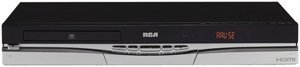
Rysunek 1: Przód view of the RCA DRC8052N DVD Recorder, showing the disc tray and control buttons.
Instrukcja obsługi
This section details the basic operation of your DVD recorder.
Odtwarzanie DVD
- Ensure the DVD recorder is powered on and your TV is set to the correct input source (e.g., HDMI 1, AV1).
- Naciśnij OTWÓRZ/ZAMKNIJ przycisk, aby otworzyć tacę na płytę.
- Połóż płytę DVD na tacy etykietą do góry.
- Naciśnij OTWÓRZ/ZAMKNIJ Naciśnij przycisk ponownie, aby zamknąć tackę. Płyta załaduje się automatycznie.
- Użyj GRAĆ, PAUZA, ZATRZYMYWAĆ SIĘ, and navigation buttons on the remote control to manage playback.
Nagrywanie na DVD
The RCA DRC8052N supports recording to DVD+R/+RW and DVD-R/-RW discs.
- Włóż pustą, nagrywalną płytę DVD do napędu.
- Select the input source you wish to record from (e.g., DV-Input, AV-Input) using the remote control.
- Ensure the source device is playing or transmitting the content you want to record.
- Naciśnij NAGRYWAĆ button on the remote control or the unit to begin recording.
- Naciśnij ZATRZYMYWAĆ SIĘ przycisk, aby zakończyć nagrywanie.
- Finalize the disc if necessary, following the on-screen instructions, to ensure it can be played on other DVD players.
HDMI with HD Upconversion
When connected via HDMI, the DVD recorder can upconvert standard DVD images to high-definition resolution (up to 1080i), providing a clearer and more detailed picture on compatible HD televisions.
DivX Playback
This unit is DivX certified, allowing playback of DivX video files stored on compatible discs. Insert a disc containing DivX files, and the interactive user interface will guide you through selecting and playing the content.
Konserwacja
Proper care ensures the longevity and optimal performance of your DVD recorder.
- Czyszczenie urządzenia: Do czyszczenia zewnętrznej części urządzenia należy używać miękkiej, suchej ściereczki. Nie należy używać płynnych środków czyszczących ani materiałów ściernych, ponieważ mogą one uszkodzić powłokę.
- Pielęgnacja dysków: Handle discs by their edges to avoid fingerprints and scratches. Store discs in their cases when not in use. Clean dirty discs with a soft, lint-free cloth, wiping from the center outwards.
- Wentylacja: Ensure the unit has adequate ventilation. Do not block any ventilation openings on the top, sides, or bottom of the recorder. Avoid placing the unit in an enclosed space or on soft surfaces that may obstruct airflow.
- Wyłączone: Jeśli urządzenie nie będzie używane przez dłuższy czas, zaleca się odłączenie go od gniazdka zasilania.
Rozwiązywanie problemów
If you encounter issues with your RCA DRC8052N DVD Recorder, refer to the following common solutions:
| Problem | Możliwa przyczyna / rozwiązanie |
|---|---|
| Urządzenie nie włącza się. | Ensure the power cord is securely connected to both the unit and a working electrical outlet. |
| Brak obrazu i dźwięku w telewizorze. | Check all video and audio cable connections (HDMI, composite). Ensure your TV is set to the correct input source (e.g., HDMI 1, AV1). |
| Dysk nie odtwarza się. | Ensure the disc is inserted correctly with the label side up. Check if the disc is clean and free of scratches. Verify the disc format is compatible with the player (e.g., DVD-Video, DivX). Some discs may be region-coded and not compatible. |
| Nie można nagrywać. | Ensure a blank, recordable DVD disc (DVD+R/+RW or DVD-R/-RW) is inserted. Verify the input source is correctly selected and providing a signal. Check if the disc has sufficient free space. |
| Pilot nie działa. | Check and replace the batteries (2 AA batteries required). Ensure there are no obstructions between the remote and the unit's sensor. The remote control is necessary for full operation. |
| Unit takes a long time to start up. | A brief startup sequence (approximately 20 seconds) is normal for this device before it fully responds to commands. |
Specyfikacje
- Marka: RCA
- Numer modelu: DRC8052N
- Wymiary produktu: 16.9 x 11 x 2.6 cala
- Waga przedmiotu: 10.1 funta
- Baterie: 2 AA batteries required (for remote control)
- Cechy szczególne: Kompaktowa konstrukcja
- Typ nośnika: DVD (+R/+RW, -R/-RW)
- Rezolucja: Up to 1920x1080 (via HDMI upconversion)
- Typ złącza: RCA, HDMI
- Technologia łączności: HDMI, RCA
- Tryb wyjścia audio: Stereofoniczny
- Obsługiwany format audio: Dolby Digital, DTS, PCM
- Całkowita liczba portów HDMI: 1
Gwarancja i wsparcie
For detailed warranty information, please refer to the warranty card included with your product or visit the official RCA website. For technical support or service inquiries, please contact RCA customer service through their official channels.


