This manual provides comprehensive instructions for the installation, operation, maintenance, and troubleshooting of your Skylink GS-101 Garage Door Sensor. The GS-101 is designed to notify you when a garage door is open, enhancing home security. Please read this manual thoroughly before installation and use to ensure proper function and safety.
Produkt ponadview
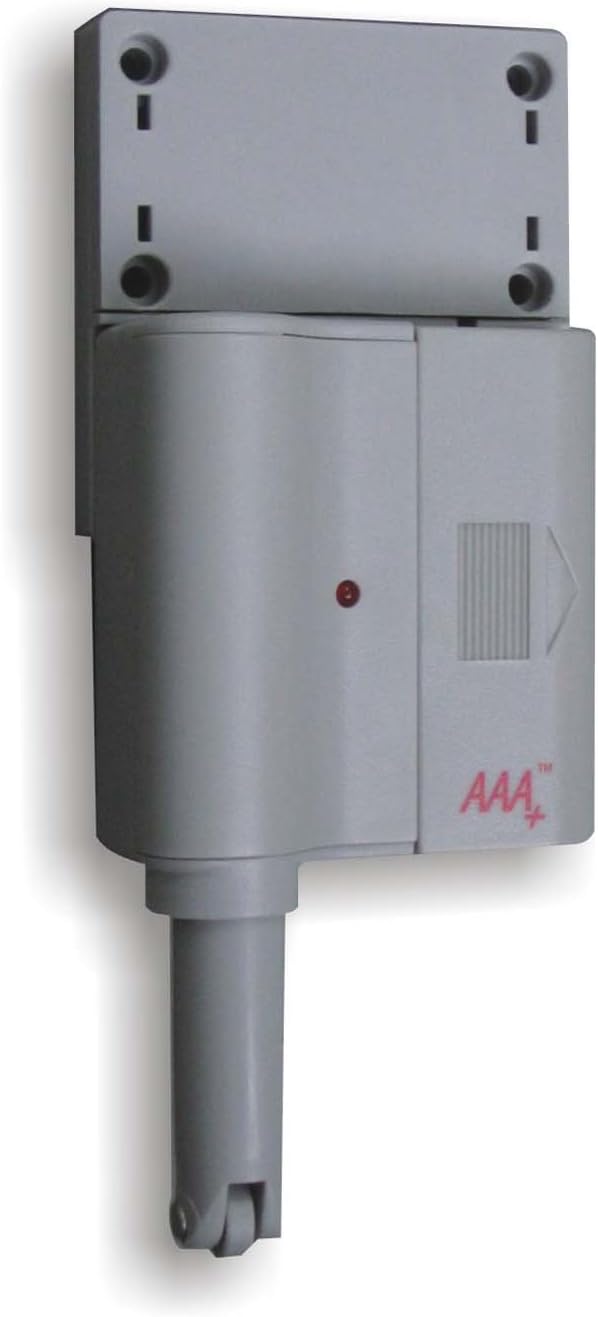
Rysunek 1: Skylink GS-101 Garage Door Sensor Main Unit. The image displays the main unit of the Skylink GS-101 Garage Door Sensor. It is a grey, rectangular device with a cylindrical extension at the bottom, featuring a small wheel. A red indicator light is visible on the front, along with the 'AAA+' logo. The top section shows mounting holes for installation.
The Skylink GS-101 is a sensor designed to detect the position of a garage door. When installed correctly, it communicates with a compatible receiver (sold separately) to alert users to the door's status. It features a plunger mechanism that is activated when the garage door is closed, and deactivated when open.
Konfiguracja i instalacja
1. Rozpakowanie i komponenty
Carefully remove all components from the packaging. Ensure you have the GS-101 sensor unit and any included mounting hardware.
2. Instalacja baterii
The GS-101 requires batteries for operation. Locate the battery compartment, typically on the back or side of the unit. Insert the required Lithium batteries, ensuring correct polarity (+/-). The unit includes batteries.
3. Miejsce montażu
Select a suitable location on your garage door frame or wall. The sensor should be mounted where the plunger mechanism can be depressed when the garage door is closed and released when the door is open. Avoid direct exposure to extreme heat or sunlight, especially on metal garage doors, as this can affect performance and longevity.
4. Montaż czujnika
Position the sensor unit on the garage door frame or wall.
Mark the locations for the mounting screws using the holes on the sensor's mounting bracket.
W razie potrzeby wywierć otwory pilotażowe.
Secure the sensor unit using the provided screws. Ensure the plunger mechanism is aligned to be activated by the garage door.
Test the plunger mechanism by manually opening and closing the garage door to confirm it moves freely and activates the sensor as intended.
5. Parowanie z odbiornikiem
The GS-101 operates with a compatible Skylink receiver (e.g., GM-318R or similar models). Refer to your receiver's instruction manual for specific pairing procedures. Generally, this involves putting the receiver into a learning mode and then activating the GS-101 sensor (e.g., by opening/closing the garage door) to transmit its signal.
Instrukcja obsługi
Once installed and paired, the Skylink GS-101 operates automatically. When the garage door is opened, the sensor's plunger is released, triggering a signal transmission to the paired receiver. When the garage door is closed, the plunger is depressed, indicating a closed state.
Open Door Detection: When the garage door opens, the sensor sends a signal to the receiver, which will then provide an alert (e.g., audible alarm, visual indicator).
Closed Door Indication: When the garage door closes, the sensor's plunger is pressed, and it typically sends a signal indicating the door is secure.
Kontrolka: The red indicator light on the sensor may flash to confirm signal transmission or indicate low battery status.
Konserwacja
Wymiana baterii
The GS-101 uses Lithium batteries. When the battery level is low, the sensor may exhibit a specific indicator (e.g., a rapid flash of the red LED or a notification from the receiver). To replace batteries:
Ostrożnie otwórz komorę baterii.
Wyjmij stare baterie.
Insert new Lithium batteries, ensuring correct polarity.
Dokładnie zamknij komorę baterii.
Test the sensor to ensure it is functioning correctly after battery replacement.
Czyszczenie
Wipe the sensor unit with a soft, dry cloth. Do not use abrasive cleaners or solvents, as these can damage the plastic housing or electronic components.
Rozwiązywanie problemów
Problem
Możliwa przyczyna
Rozwiązanie
Sensor not responding or receiver not receiving signals.
Niski poziom naładowania baterii lub jej rozładowanie.
Czujnik nie jest prawidłowo sparowany z odbiornikiem.
Sensor out of range from receiver.
Obstruction between sensor and receiver.
Plunger mechanism stuck or misaligned.
Replace batteries with new Lithium batteries.
Re-pair the sensor with the receiver according to the receiver's manual.
Relocate the sensor or receiver closer to each other.
Ensure no large metal objects or thick walls are blocking the signal path.
Check plunger for free movement; adjust mounting position if necessary.
Fałszywe alarmy lub niespójne odczyty.
Sensor mounting is loose.
Plunger not fully depressed when door is closed.
Environmental factors (e.g., extreme heat).
Dokręcić śruby mocujące.
Adjust sensor position to ensure plunger is fully depressed when the door is closed.
Ensure sensor is not installed in direct sunlight or areas of extreme temperature fluctuation.
Specyfikacje
Model: GS-101
Marka: SKYLINK
Źródło zasilania: Batteries (Lithium, included)
Tworzywo: Plastikowy
Typ montażu: Mocowanie do drzwi
Waga przedmiotu: 8 uncji
Wymiary opakowania: 6.8 x 5 x 1.4 cala
Konkretne zastosowania: Home Security (Garage Door Monitoring)
Zgodność: Works with compatible Skylink receivers (sold separately).
Informacje o gwarancji
The Skylink GS-101 Garage Door Sensor comes with a 1-letnia gwarancja. This warranty covers repair or replacement of defective units. For warranty claims or further details, please contact Skylink customer support.
Obsługa klienta
For technical assistance, troubleshooting not covered in this manual, or general inquiries, please visit the official SKYLINK weblub skontaktuj się z działem obsługi klienta. Dane kontaktowe zazwyczaj znajdują się na opakowaniu produktu lub u producenta. webstrona.
Instrukcja programowania i obsługi pilota do bramy garażowej Skylink KN-318 Kompleksowy podręcznik dotyczący pilota do drzwi garażowych Skylink KN-318, obejmujący informacje na temat instalacji, programowania drzwi pojedynczych i wieloskrzydłowych, trybów pracy, rozwiązywania problemów oraz gwarancji.
Instrukcja programowania i konfiguracji systemu bezkluczykowego Skylink G5K Wireless Kompleksowy przewodnik programowania bezprzewodowego systemu bezkluczykowego Skylink G5K do otwierania bramy garażowej. Obejmuje ustawienia częstotliwości, konfigurację zworek, programowanie przełączników DIP, obsługę klawiatury, instalację i rozwiązywanie problemów.
Skylink SMO™ Side Mount Garage Door Opener Owner's Manual This owner's manual provides detailed instructions for the installation, operation, and maintenance of the Skylink SMO™ Side Mount Garage Door Opener. It includes safety information, parts lists, programming guides, and troubleshooting tips.
Przewodnik programowania pilota Skylink Model 39 do uniwersalnego garażu Szczegółowe instrukcje programowania uniwersalnego pilota do drzwi garażowych Skylink Model 39 w celu obsługi różnych otwieraczy drzwi garażowych, obejmujące konfigurację częstotliwości, marki zworek i ustawień kodu.