1. Wprowadzenie
The Wolo WOL345 Animal House Electric Horn is a versatile sound system designed for 12-volt vehicles. It features a wide array of sounds, including animal noises, sirens, and musical tunes, along with a public address (P.A.) system function. This manual provides detailed instructions for installation, operation, and maintenance to ensure optimal performance and longevity of your device.

Figure 1: Complete Wolo WOL345 Animal House Electric Horn system, including the control unit, weatherproof speaker, and P.A. microphone.
2. Informacje dotyczące bezpieczeństwa
Please read and understand all safety instructions before installing or operating the Wolo WOL345 horn. Failure to follow these instructions may result in property damage or personal injury.
- Bezpieczeństwo elektryczne: Ensure the vehicle's power is disconnected before beginning installation to prevent electrical shock or short circuits.
- Tomtage Kompatybilność: This device is designed for 12-volt DC systems only. Do not connect to other voltage źródła.
- Montowanie: Mount the speaker and control unit securely to prevent detachment during vehicle operation.
- Poziomy dźwięku: The horn can produce very loud sounds. Avoid prolonged exposure to high volume levels to prevent hearing damage.
- Legal Use: Be aware of local laws and regulations regarding the use of vehicle horns and siren sounds.
3. Zawartość opakowania
Sprawdź, czy w opakowaniu znajdują się wszystkie komponenty:
- Jednostka sterująca
- Głośnik odporny na warunki atmosferyczne
- P.A. Microphone
- Sprzęt montażowy
- Instrukcja obsługi (ten dokument)
4. Instalacja
The Wolo WOL345 horn is designed for easy installation in any 12-volt vehicle, requiring no special tools. Follow these general steps:
- Wybierz miejsce montażu:
- Jednostka sterująca: Select a dry, accessible location inside the vehicle, such as under the dashboard.
- Głośnik: Mount the weatherproof speaker in an area that allows sound to project clearly, such as behind the grille or under the hood, ensuring it is protected from direct impact.
- Bezpieczne komponenty: Use appropriate mounting hardware to securely fasten the control unit and speaker.
- Okablowanie:
- Connect the control unit to a 12-volt power source (e.g., vehicle battery) ensuring proper polarity (positive to positive, negative to ground). It is recommended to use an inline fuse for protection.
- Connect the speaker to the control unit using the provided wiring.
- Podłączenie mikrofonu: Plug the P.A. microphone into the designated MIC input on the control unit.
- Funkcjonalność testu: Once all connections are made, reconnect the vehicle's power and test the horn's functions.

Figure 2: The control unit, featuring volume control, sound selection dials, and mode switches.

Figure 3: The weatherproof speaker, designed for external vehicle mounting.
5. Działanie
The Wolo WOL345 offers a variety of sound options and a P.A. system. Familiarize yourself with the control unit's functions:
- Włączanie/wyłączanie zasilania i regulacja głośności: The left-most knob controls both power and volume. Turn clockwise to power on and increase volume; turn counter-clockwise to decrease volume and power off.
- Wybór dźwięku:
- Odgłosy zwierząt: The middle knob selects from 9 animal sounds (hen, bull, horse, sheep, rooster, frog, dog, duck, cat).
- Dźwięki syren: The right-most knob selects from 10 siren sounds.
- Piosenki muzyczne: The unit also includes 50 musical songs, which are not individually selectable but are part of the sound rotation.
- Zmiana trybu: A toggle switch allows you to select between "Animals" and "Sirens" modes.
- P.A. System:
- To use the P.A. system, ensure the microphone is plugged into the MIC input.
- Engage the P.A. function via the dedicated switch (labeled "PA").
- Speak into the microphone. The sound will be amplified through the external speaker. Adjust volume as needed using the main volume knob.
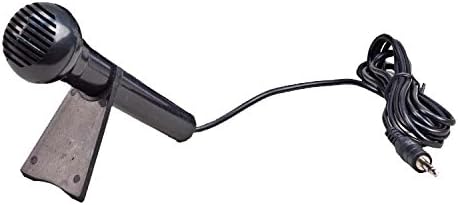
Figure 4: The P.A. microphone, used for public address functionality.
6. Konserwacja
The Wolo WOL345 is built for dependable service with minimal maintenance. Follow these guidelines to ensure its longevity:
- Czyszczenie: Wipe the control unit and speaker with a soft, damp płótno. Nie używaj ostrych środków chemicznych ani ściernych środków czyszczących.
- Znajomości: Okresowo sprawdzaj wszystkie połączenia elektryczne, aby mieć pewność, że są solidne i nie są skorodowane.
- Ochrona głośników: Although weatherproof, avoid directing high-pressure water sprays directly at the speaker.
7. Rozwiązywanie Problemów
If you encounter issues with your Wolo WOL345 horn, refer to the following common problems and solutions:
| Problem | Możliwa przyczyna | Rozwiązanie |
|---|---|---|
| Brak dźwięku z głośnika | No power; loose connections; faulty speaker. | Check power supply and fuse; verify all wiring connections; test speaker with another audio source if possible. |
| P.A. system not working | Microphone not connected; P.A. switch off; faulty microphone. | Ensure microphone is fully plugged in; activate P.A. switch; test microphone on another device if available. |
| Zniekształcony dźwięk | Volume too high; poor connection; damaged speaker. | Reduce volume; check wiring for secure connections; inspect speaker for physical damage. |
8. Specyfikacje
| Marka | Wolo |
| Numer modelu | 345 |
| Wymiary produktu (dł. x szer. x wys.) | 15.24 x 17.53 x 11.94 cm (6 x 6.9 x 4.7 cala) |
| Waga przedmiotu | 508 g (1.12 funta) |
| Tomtage | 12 woltów prądu stałego |
| Tworzywo | Plastikowy |
| Poziom hałasu | 105 decybeli |
| Opcje dźwięku | 9 Animal Sounds, 10 Siren Sounds, 50 Musical Songs |
| Typ dopasowania | Uniwersalne dopasowanie |
| Typ serwisu pojazdu | Samochód osobowy |
9. Gwarancja i wsparcie
For warranty information or technical support, please refer to the contact details provided with your purchase or visit the official Wolo Manufacturing Corp. webZachowaj dowód zakupu na wypadek roszczeń gwarancyjnych.


