Wstęp
This manual provides comprehensive instructions for the setup, operation, and maintenance of your VTech t2451 2.4 GHz Analog Cordless Phone with Answering System and Caller ID. Please read this manual thoroughly before using your new phone system to ensure proper functionality and to take full advantage jego funkcji.
Key features of your VTech t2451 include:
- 2.4 GHz analog reception for clear communication.
- Digital answering system with 3 mailboxes and 15 minutes of recording time.
- 50 name/number phonebook directory for easy contact management.
- 99 name/number Caller ID history to review nieodebrane połączenie.
- Headset compatibility (2.5 mm jack) for hands-free operation.
- Hold function, page/handset locator, and selectable ring tones.
- Wall-mountable design for flexible placement.
Organizować coś
Follow these steps to set up your VTech t2451 cordless phone system.
- Rozpakowywanie: Carefully remove all components from the packaging. Ensure you have the cordless handset, base unit, AC power adapter, telephone line cord, and battery pack.
- Montaż baterii: Open the battery compartment on the back of the cordless handset. Connect the battery pack connector to the jack inside the compartment, ensuring correct polarity. Place the battery pack into the compartment and close the cover.
- Podłączanie jednostki bazowej:
- Connect one end of the telephone line cord to the TEL LINE jack on the base unit and the other end to a telephone wall jack.
- Connect the small end of the AC power adapter to the DC IN 9V jack on the base unit. Plug the large end of the AC power adapter into a standard electrical outlet.
- Ładowanie słuchawki: Place the cordless handset in the base unit's charging cradle. The charge indicator on the handset should illuminate, indicating that the battery is charging. Allow the handset to charge for at least 12 hours before initial use.
- Montaż na ścianie (opcjonalnie): The base unit is designed to be wall-mountable. Refer to the included wall-mount bracket and instructions for secure installation.
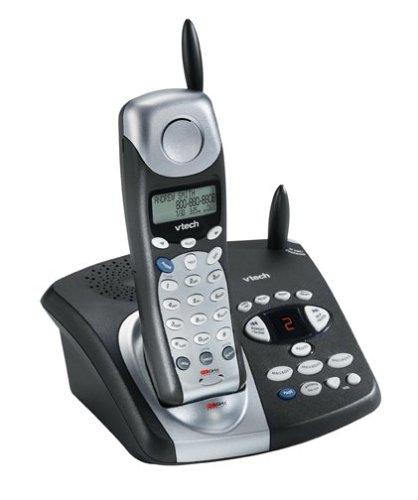
Image: The VTech t2451 cordless phone system, showing the black base unit with the silver and black handset docked in its charging cradle. The base unit features an integrated digital answering system with controls and a display.
Instrukcja obsługi
Wykonywanie i odbieranie połączeń
- Zadzwonić: Naciśnij ROZMAWIAĆ button, wait for a dial tone, then dial the phone number.
- Aby odebrać połączenie: Gdy zadzwoni telefon, naciśnij ROZMAWIAĆ button or any key on the keypad (Any Key Answer).
- Aby zakończyć połączenie: Naciśnij KONIEC button or place the handset back in the base unit.
- Funkcja wstrzymania: Podczas połączenia naciśnij TRZYMAĆ button to place the call on hold. Press ROZMAWIAĆ ponownie, aby wznowić połączenie.
Cyfrowy system zgłoszeniowy
Your phone system includes a digital answering system with 3 mailboxes and 15 minutes of recording time.
- Odtwarzanie wiadomości: Naciśnij GRAĆ przycisk na jednostce bazowej, aby odsłuchać nowe wiadomości.
- Nagrywanie wiadomości wychodzącej (OGM): Follow the voice prompts to record a personalized outgoing message.
- Mailbox Management: The system supports up to 3 distinct mailboxes. Refer to the detailed instructions in the full user guide for setting up and accessing individual mailboxes.
Caller ID and Phonebook
- Identyfikator dzwoniącego: When subscribed to Caller ID service, the handset display will show the caller's name and number. Press the CID przycisk do ponownegoview the 99-name/number Caller ID history.
- Książka telefoniczna: Store up to 50 names and numbers in the phonebook. Use the navigation buttons to scroll through entries and the MENU/WYBIERZ button to add or edit entries.
Inne funkcje
- Page/Handset Locator: Naciśnij STRONA button on the base unit to locate a misplaced handset.
- Ringer Tones: Customize your phone's ringer by selecting from various available tones. Refer to the handset settings menu.
- Użycie zestawu słuchawkowego: Connect a 2.5 mm compatible headset to the headset jack on the side of the handset for hands-free communication.
Konserwacja
Proper care ensures the longevity of your VTech t2451 phone system.
- Czyszczenie: Wyczyść telefon i jednostkę bazową miękką szmatką.amp płótno. Nie używaj ostrych środków chemicznych ani ściernych środków czyszczących.
- Pielęgnacja baterii:
- Gdy nie używasz słuchawki, zawsze odkładaj ją do jednostki bazowej, aby mieć pewność, że jest naładowana.
- Jeżeli telefon nie będzie używany przez dłuższy czas, należy wyjąć baterię z słuchawki.
- Replace the battery when its performance significantly degrades. Use only the specified replacement battery pack.
- Warunki środowiskowe: Unikaj wystawiania telefonu na działanie ekstremalnych temperatur, bezpośredniego światła słonecznego i wilgoci.
Rozwiązywanie problemów
If you experience issues with your VTech t2451, try these common troubleshooting steps.
| Problem | Rozwiązanie |
|---|---|
| Brak sygnału wybierania. |
|
| Słaby odbiór lub zakłócenia. |
|
| Słuchawka się nie ładuje. |
|
| Automatyczna sekretarka nie nagrywa wiadomości. |
|
Specyfikacje
| Funkcja | Szczegół |
|---|---|
| Marka | VTech |
| Numer modelu | T2451 |
| Typ telefonu | Bezprzewodowy |
| Częstotliwość | 2.4 GHz Analog |
| Typ systemu odbierającego | Cyfrowy |
| Pojemność nagrywania | 15 minut |
| Mailboxes | 3 |
| Książka telefoniczna | 50 names/numbers |
| Pamięć identyfikacji dzwoniącego | 99 names/numbers |
| Zgodność zestawu słuchawkowego | Gniazdo 2.5 mm |
| Źródło zasilania | Elektryczny przewodowy |
| Wymiary produktu | 7.1 x 8.5 x 5.1 cala |
| Waga przedmiotu | 2.19 funta |
| Producent | Vtech |
Gwarancja i wsparcie
For warranty information, please refer to the warranty card included with your product packaging or visit the official VTech website. VTech provides customer support for product inquiries, technical assistance, and service. Contact information can typically be found on the VTech webstronie internetowej lub w oryginalnej dokumentacji produktu.
Producent: VTech


