Wstęp
The Denon RCD-100 is a high-quality CD receiver designed to deliver excellent audio performance. It integrates a powerful amplifier, a versatile CD player, and an RDS FM/MW tuner into a single, compact unit. This manual provides essential information for setting up, operating, and maintaining your RCD-100 to ensure optimal performance and longevity.

Rycina 1: Przód view of the Denon RCD-100 CD Receiver.
This image displays the front panel of the Denon RCD-100, highlighting its sleek gold finish. Visible components include the CD tray on the left, a central digital display, various function buttons for playback and tuner control, and a prominent volume knob on the right. A power button is located on the bottom left.
Organizować coś
Follow these steps to properly set up your Denon RCD-100 CD Receiver.
1. Rozpakowanie i kontrola
- Carefully remove the RCD-100 from its packaging.
- Verify that all accessories, including the remote control, are present.
- Sprawdź, czy urządzenie nie nosi śladów uszkodzeń powstałych podczas transportu.
2. Połączenia głośnikowe
The RCD-100 supports two pairs of front speakers. Ensure correct polarity (+ to + and - to -) for optimal sound quality.
- Connect your main speakers to the "SPEAKER SYSTEMS" terminals on the rear panel. The unit provides 2 x 45 watts of output power.
- If using a second pair of speakers, connect them to the additional speaker terminals.
3. Audio Input/Output Connections
The RCD-100 offers various connectivity options for external audio devices.
- Wejścia analogowe: Connect external audio sources (e.g., tape deck, auxiliary device) to the two pairs of analog input jacks (MD/AUX, TAPE).
- Wyjścia analogowe: Use the two pairs of analog output jacks (MD/AUX REC, TAPE REC) to connect to recording devices.
- Optyczne wyjście cyfrowe: For digital audio connection to a compatible device, use the optical digital output.
4. Połączenia antenowe
- Connect the supplied FM antenna to the FM antenna terminal.
- Connect the supplied AM (MW) loop antenna to the AM antenna terminals.
5. Podłączenie zasilania
Once all audio and antenna connections are made, plug the power cord into a suitable AC outlet.

Figure 2: Rear panel connections of the Denon RCD-100.
This image illustrates the rear panel of the Denon RCD-100, detailing the various connection ports. Key areas include the speaker terminals on the left, analog audio input/output jacks (RCA) in the center, antenna connections, an optical digital output, and the AC power inlet on the right. Labels clearly indicate the function of each port.
Instrukcja obsługi
This section details the basic operation of your Denon RCD-100 CD Receiver.
1. Włączanie/wyłączanie zasilania
- Naciśnij MOC przycisk na panelu przednim lub pilocie, aby włączyć lub wyłączyć urządzenie.
2. Wybór źródła
- Naciśnij FUNKCJONOWAĆ button on the front panel or the corresponding source buttons (CD, TUNER, MD/AUX, TAPE) on the remote control to select your desired audio source.
3. Obsługa odtwarzacza CD
- Ładowanie płyty CD: Naciśnij OTWÓRZ/ZAMKNIJ button to open the CD tray. Place a CD with the label side up and press OTWÓRZ/ZAMKNIJ ponownie, aby zamknąć tacę.
- Odtwarzanie nagranego dźwięku: Naciśnij GRAĆ przycisk, aby rozpocząć odtwarzanie.
- Pauza: Naciśnij PAUZA Przycisk, aby tymczasowo zatrzymać odtwarzanie. Naciśnij ponownie, aby wznowić.
- Zatrzymać: Naciśnij ZATRZYMYWAĆ SIĘ przycisk, aby zakończyć odtwarzanie.
- Pomijanie utworów: Użyj POMINĄĆ guziki (▶▶| or |◀◀) to move to the next or previous track.
- Odtwarzanie programu: The CD player features a versatile programmable function. Refer to the detailed remote control section for programming specific track orders. The unit utilizes an 8x oversampling digital filter for enhanced audio fidelity.
4. Tuner (Radio) Operation
- Wybór zespołu: Naciśnij ZESPÓŁ przycisk umożliwiający przełączanie między pasmami FM i MW (AM).
- Strojenie: Użyj STROJENIE guziki (▶ or ◀) aby ręcznie dostroić się do stacji.
- Zaprogramowane stacje: The tuner features 30 station presets. Use the USTAWIENIE WSTĘPNE guziki (▶ or ◀) to recall stored stations. Refer to the remote control section for instructions on storing presets.
- Funkcja RDS: The RDS (Radio Data System) feature provides station information (e.g., station name, program type) on the display when available.
5. Regulacja głośności
- Obróć duży TOM knob on the front panel clockwise to increase volume and counter-clockwise to decrease.
- Alternatywnie użyj GŁOŚNOŚĆ +/- przyciski na pilocie.
6. Pilot zdalnego sterowania
A versatile system remote control is included for convenient operation of all functions from a distance.
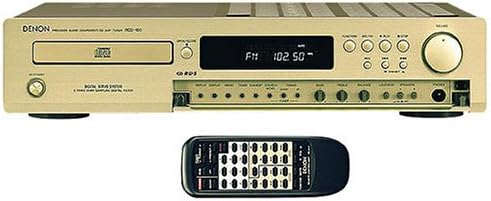
Figure 3: Denon RCD-100 with its system remote control.
This image shows the Denon RCD-100 unit from the front, with its accompanying black system remote control positioned directly in front of it. The remote control features numerous buttons for comprehensive control over the receiver's functions, including power, source selection, CD playback, and tuner operations.
Konserwacja
Proper care and maintenance will ensure the longevity and optimal performance of your Denon RCD-100.
- Czyszczenie: Do przecierania zewnętrznej części urządzenia użyj miękkiej, suchej ściereczki. W przypadku uporczywych zabrudzeń delikatnie przetrzyj.ampPrzetrzyj szmatkę wodą. Unikaj stosowania środków czyszczących o działaniu ściernym, rozpuszczalników ani sprayów chemicznych, ponieważ mogą one uszkodzić wykończenie.
- Tacka na płyty CD: Keep the CD tray free of dust and debris. Do not force the tray open or closed.
- Wentylacja: Ensure that the ventilation slots on the top and sides of the unit are not obstructed. Adequate airflow is crucial to prevent overheating.
- Składowanie: Jeśli urządzenie będzie przechowywane przez dłuższy czas, należy odłączyć je od gniazdka zasilania i przechowywać w chłodnym, suchym miejscu, z dala od bezpośredniego światła słonecznego i ekstremalnych temperatur.
Rozwiązywanie problemów
If you encounter any issues with your Denon RCD-100, refer to the following common problems and solutions before seeking professional service.
| Problem | Możliwa przyczyna | Rozwiązanie |
|---|---|---|
| Brak zasilania | Przewód zasilający nie jest podłączony; gniazdko elektryczne jest uszkodzone; urządzenie znajduje się w trybie czuwania. | Ensure power cord is securely plugged in. Try a different outlet. Press the POWER button. |
| Brak dźwięku | Volume too low; Incorrect source selected; Speaker wires disconnected or incorrectly connected. | Increase volume. Select the correct input source. Check speaker connections for proper polarity and secure fit. |
| Płyta CD nie odtwarza się | CD inserted incorrectly; CD is dirty or scratched; CD player lens dirty. | Insert CD with label side up. Clean CD with a soft cloth. Try a different CD. Consult a service center if lens cleaning is suspected. |
| Słaby odbiór radia | Antenna not connected or poorly positioned; Interference from other electronic devices. | Ensure antennas are properly connected and extended. Adjust antenna position. Move unit away from other electronics. |
| Pilot nie działa | Baterie są rozładowane lub nieprawidłowo włożone; Przeszkoda między pilotem a urządzeniem. | Wymień baterie, upewniając się, że polaryzacja jest prawidłowa. Usuń wszelkie przeszkody. Skieruj pilota bezpośrednio na czujnik urządzenia. |
Specyfikacje
Below are the key technical specifications for the Denon RCD-100 CD Receiver.
- Moc wyjściowa: 2 x 45 watów
- Odtwarzacz CD: Versatile programmable, 8x oversampLing cyfrowy filtr
- Tuner: RDS FM Stereo / MW (AM) tuner with 30 station presets
- Wejścia analogowe: 2 pairs (RCA)
- Wyjścia analogowe: 2 pairs (RCA)
- Wyjście cyfrowe: 1 Optical Digital Output
- Zawartość zestawu: Versatile system remote control
- Kolor: Gold (also available in black)
- Dimensions (Approx. Package): 53 x 41 x 21 cm (dł. x szer. x wys.)
- Weight (Approx. Package): 5.5 kilogramów
- Kanały: 2
- Technologia łączności: Analog audio connections, digital audio outputs
Gwarancja i wsparcie
For warranty information and technical support, please refer to the documentation provided at the time of purchase or contact your retailer. Denon, the manufacturer, can also provide support for their products.
Producent: Denon
For further assistance, visit the official Denon webstronie lub skontaktuj się z działem obsługi klienta.


