1. Wprowadzenie
This manual provides detailed instructions for the proper use and care of your RCA CC6393 VHS-C AutoShot Camcorder. Please read this manual thoroughly before operating the device to ensure optimal performance and longevity. The RCA CC6393 is designed for recording video onto VHS-C tapes and capturing still images, offering a compact and user-friendly experience.
2. Koniec produktuview i funkcje
The RCA CC6393 VHS-C AutoShot Camcorder combines ease of use with versatile recording capabilities. Key features include:
- VHS-C Format: Records onto compact VHS-C tapes, which can be played back in any standard VHS VCR using the included cassette adapter.
- Kompaktowa i lekka konstrukcja: Weighing approximately 1.9 pounds, it is highly portable for travel and everyday use.
- 3-calowy kolorowy wyświetlacz LCDView Ekran: A rotatable (270 degrees) color monitor allows for easy framing and playback.
- AutoShot Feature: Automatically adjusts focus and exposure to available light for simplified recording.
- Steady Pix Image Stabilization: Minimizes camera shake, particularly useful when zooming or recording while moving.
- Digital Still Camera Capability: Capture still images and transfer them to a PC using the included cable and software (compatible with Windows 95/98).
- Brzęczenie: Features 16x optical zoom and 400x digital zoom for capturing distant subjects.
- Creative Recording Modes: Includes fade-in/out, wide-format 16:9 mode, animation mode, and time-lapse recording.

Obraz 2.1: Przód view of the RCA CC6393 camcorder with its LCD screen open, displaying an image.
3. Zawartość opakowania
Sprawdź, czy w pakiecie znajdują się wszystkie poniższe elementy:
- RCA CC6393 VHS-C AutoShot Camcorder
- Akumulator do ponownego ładowania
- AC Adapter and Charger
- Pasek na ramię
- VHS-C Cassette Adapter
- Cassette Adapter Battery
- Clock Cell
- Software CD-ROM (for still image transfer)
- PC Connection Cable (USB)
- Instrukcja obsługi (ten dokument)

Image 3.1: Included accessories for the RCA CC6393 camcorder, featuring the VHS-C cassette adapter, AC adapter/charger, software CD, and shoulder strap.
4. Konfiguracja
4.1 Ładowanie akumulatora
- Connect the AC adapter to the camcorder's DC input jack.
- Podłącz zasilacz sieciowy do standardowego gniazdka elektrycznego.
- Allow the battery to charge fully before first use. The charging indicator light will typically show the charging status.
4.2 Wkładanie baterii
- Otwórz pokrywę komory baterii w kamerze.
- Insert the charged battery pack, ensuring it clicks into place securely.
- Zamknij pokrywę komory baterii.
4.3 Inserting a VHS-C Tape
- Otwórz pokrywę komory taśmy.
- Insert a VHS-C tape with the window facing outwards, ensuring it is correctly oriented.
- Gently close the tape compartment cover until it latches.

Obraz 4.1: Prawa strona view of the RCA CC6393 camcorder, highlighting the tape compartment and various control buttons.
5. Instrukcja obsługi
5.1 Podstawowe nagrywanie
- Włącz kamerę.
- Open the LCD ColorView screen or use the viewwyszukiwarka, aby wykadrować ujęcie.
- Ten AutoShot feature will automatically adjust focus and exposure.
- Naciśnij Nagrywać button to start recording. Press it again to stop.
5.2 Korzystanie z monitora LCD
The 3-inch LCD monitor can rotate 270 degrees, allowing for flexible viewing angles during recording and playback. Adjust it to your preferred position for comfortable operation.
5.3 Funkcja zoomu
Use the zoom controls (typically a rocker switch) to zoom in (telephoto) or zoom out (wide-angle) on your subject. The Steady Pix feature helps stabilize images during zooming.
5.4 Specjalne tryby nagrywania
- Fade-in/Fade-out: Adds professional transitions to your recordings. Consult the on-screen menu or dedicated buttons for activation.
- Wide-format 16:9 Mode: Records video in a widescreen aspect ratio.
- Tryb animacji: Creates the illusion of movement by recording a series of slightly different poses.
- Nagrywanie poklatkowe: Programs the camcorder to record at preset time intervals, ideal for observing subtle changes over time (e.g., plant growth, cloud formations).
- Five-second Recording: An option for quick scene transitions.
5.5 Odtwarzanie
To play back your recordings:
- Switch the camcorder to playback mode.
- Use the playback controls (Play, Stop, Pause, Fast Forward, Rewind) to navigate your tape.
- Playback options include visual search, stop-action pause, time counter, tracking, and time base corrector.
5.6 Digital Still Camera Function
The camcorder can capture still images. To transfer these images to a PC:
- Connect the camcorder to your PC using the provided PC connection cable (USB).
- Install the included software CD-ROM on your Windows 95 or 98 operating system.
- Follow the software instructions to transfer and manage your still images.
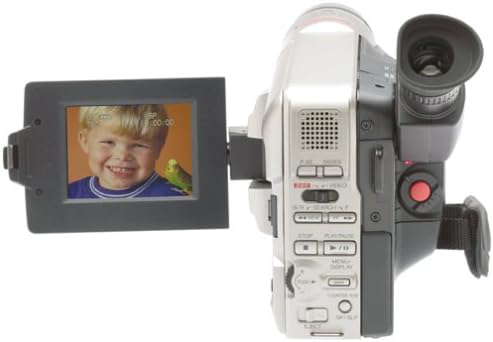
Obraz 5.1: Tył view of the RCA CC6393 camcorder, displaying the control panel and battery compartment.
6. Konserwacja
6.1 Czyszczenie kamery
- Do czyszczenia zewnętrznej części kamery należy używać miękkiej, suchej ściereczki.
- Do czyszczenia soczewek należy używać specjalnej ściereczki i płynu do czyszczenia soczewek. Unikaj dotykania soczewek palcami.
- Nie używaj żrących chemikaliów ani ściernych środków czyszczących.
6.2 Pielęgnacja baterii
- Gdy nie używasz baterii, przechowuj ją w chłodnym i suchym miejscu.
- Aby przedłużyć żywotność akumulatora, należy unikać jego całkowitego rozładowywania.
- Jeżeli kamera nie będzie używana przez dłuższy czas, należy wyjąć z niej baterię.
7. Rozwiązywanie Problemów
Jeśli masz problemy z kamerą, zapoznaj się z poniższymi typowymi problemami i ich rozwiązaniami:
- Brak zasilania: Ensure the battery is charged and correctly inserted, or connect the AC adapter.
- Nie można nagrać: Check if a tape is inserted correctly and if the tape's write-protect tab is not engaged. Ensure sufficient battery power.
- Słaba jakość obrazu: Clean the camcorder lens. Ensure adequate lighting for your recording environment. If playing back, ensure the tape heads are clean (professional cleaning may be required).
- Still Images Not Transferring: Verify the PC connection cable is securely connected to both the camcorder and the computer. Ensure the software is correctly installed and compatible with your operating system (Windows 95/98).
- Nie wyświetla się ekran LCD: Check if the screen is properly opened and rotated. Ensure the camcorder is powered on.
For persistent issues, please contact RCA customer support.
8. Specyfikacje
| Funkcja | Specyfikacja |
|---|---|
| Numer modelu | 1001B3 |
| Format nagrywania | Kaseta VHS-C |
| Rozmiar ekranu LCD | 3 Inches (ColorView) |
| Zoom optyczny | 16x |
| Zoom cyfrowy | 400x |
| Stabilizacja obrazu | Steady Pix |
| Still Camera Capability | Tak |
| Łączność | USB (do połączenia z komputerem) |
| Waga | Approx. 1.9 pounds (camcorder only) |
| Źródło zasilania | Rechargeable Battery, AC Adapter |
9. Gwarancja i wsparcie
For warranty information and customer support, please refer to the warranty card included with your product or visit the official RCA webZachowaj paragon jako dowód zakupu na wypadek ewentualnych roszczeń gwarancyjnych.
For technical assistance or service inquiries, please contact RCA customer service through their official channels.


