
Wstęp
This manual provides detailed instructions for the setup, operation, and maintenance of your Gosasa Digital Watch SM 8105. This watch features a 7-color LED backlight, 5ATM water resistance, alarm, stopwatch, countdown timer, dual time, and 12/24-hour format display. Please read this manual thoroughly to ensure proper use and care of your watch.
Produkt ponadview

Rycina 1: Przód view of the Gosasa Digital Watch SM 8105. The watch features a digital display with a black case and strap.
Funkcje przycisków
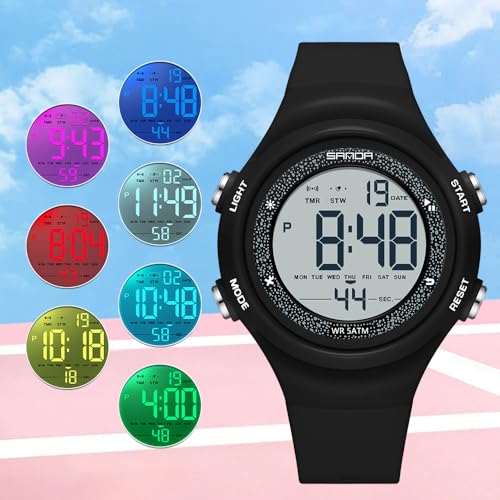
Figure 2: Watch with buttons labeled A, B, C, D for functional reference.
- Przycisk A (lewy górny róg): Włącza podświetlenie LED.
- Przycisk B (prawy górny róg): Used for starting/stopping functions (e.g., stopwatch, countdown) and adjusting values during setting.
- Przycisk C (lewy dolny róg): Przełącza się między różnymi trybami (Czas, Alarm, Stoper, Odliczanie, Podwójny czas).
- Przycisk D (prawy dolny róg): Used for selecting items or resetting functions (e.g., stopwatch reset) and advancing values during setting.
Elementy wyświetlania
The digital display shows the current time (hours, minutes, seconds), date (month, day), day of the week, and indicators for active functions such as alarm, stopwatch, or countdown timer. It also indicates AM/PM for 12-hour format.
Organizować coś
Ustawianie czasu i daty
- From the Time Mode, press Przycisk C three times to enter Time Setting Mode. The seconds will flash.
- Naciskać Przycisk D to cycle through the setting items: Seconds → Hour → Minute → Month → Day → Day of Week.
- While an item is flashing, press Przycisk B to adjust its value. For seconds, pressing Button B will reset them to 00.
- To switch between 12-hour and 24-hour format, press Przycisk B while the hour is flashing.
- Po wprowadzeniu wszystkich prawidłowych ustawień naciśnij Przycisk C to exit Time Setting Mode and return to Time Mode.
Tryby pracy
Przełączanie trybów
Naciskać Przycisk C repeatedly to cycle through the following modes:
- Tryb czasu (domyślny wyświetlacz)
- Tryb alarmu
- Tryb stopera
- Tryb odliczania czasu
- Tryb podwójnego czasu
Tryb alarmu
- W trybie czasu naciśnij Przycisk C raz, aby wejść w tryb alarmu.
- Naciskać Przycisk D aby wybrać godzinę lub minutę do ustawienia.
- Naciskać Przycisk B Aby dostosować wartość migania.
- Naciskać Przycisk C aby wyjść z trybu ustawiania alarmu.
- Aby aktywować/dezaktywować alarm, naciśnij Przycisk B while in Alarm Mode (not setting). An alarm icon will appear/disappear on the display.
Tryb stopera
- W trybie czasu naciśnij Przycisk C twice to enter Stopwatch Mode. The display will show 00:00:00.
- Naciskać Przycisk B aby uruchomić stoper.
- Naciskać Przycisk B ponownie, aby zatrzymać stoper.
- While the stopwatch is stopped, press Przycisk D to reset it to 00:00:00.
Tryb odliczania czasu
- W trybie czasu naciśnij Przycisk C trzy razy, aby wejść w tryb odliczania.
- Naciskać Przycisk D aby wybrać godzinę, minutę lub sekundę do ustawienia.
- Naciskać Przycisk B Aby dostosować wartość migania.
- Naciskać Przycisk C to exit Countdown Setting Mode.
- Naciskać Przycisk B Aby rozpocząć lub wstrzymać odliczanie.
- When the countdown is paused, press Przycisk D to reset it to the initial set time.
Tryb podwójnego czasu
- W trybie czasu naciśnij Przycisk C cztery razy, aby wejść w tryb podwójnego czasu.
- Naciskać Przycisk D aby wybrać godzinę lub minutę do ustawienia.
- Naciskać Przycisk B Aby dostosować migającą wartość dla drugiej strefy czasowej.
- Naciskać Przycisk C to exit Dual Time Setting Mode.
LED Backlight
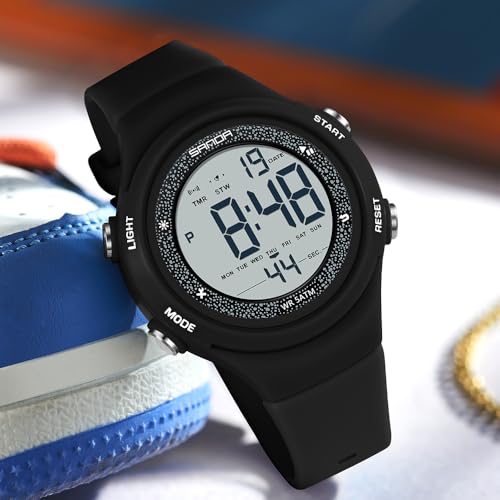
Figure 3: Watch display illuminated by the blue LED backlight.
Naciskać Przycisk A (Top Left) to activate the 7-color LED backlight. The backlight will illuminate the display for a few seconds, enhancing visibility in low-light conditions.
Konserwacja
Czyszczenie
Regularnie przecieraj zegarek miękką, suchą ściereczką. W przypadku uporczywych zabrudzeń, delikatnie przetrzyjamp Można użyć ściereczki, a następnie natychmiast wysuszyć. Unikać stosowania chemicznych środków czyszczących i materiałów ściernych.
Wymiana baterii
The watch uses 1 Nonstandard Battery. When the display becomes dim or functions are erratic, the battery may need replacement. It is recommended to have the battery replaced by a qualified watch technician to ensure water resistance integrity.
Wodoodporność (5ATM)
Your Gosasa Digital Watch is rated 5ATM (50 meters / 168 feet) water resistant. This means it is suitable for daily splashes, hand washing, rain, and sweat. It is nie recommended for swimming, bathing, diving, showering, or hot water environments. DO NOT press any buttons while the watch is underwater. Avoid exposure to steam, hot water, saunas, and high-pressure water. If moisture or condensation appears inside the watch, discontinue use immediately and contact customer service. Clean and dry the watch thoroughly after contact with water, sweat, or seawater to prevent damage.
Rozwiązywanie problemów
- Wyświetlacz jest pusty lub przyciemniony: Bateria może być słaba. Wymień baterię zgodnie z opisem w sekcji Konserwacja.
- Przyciski nie reagują: Ensure the watch is not in a locked mode (if applicable, though this model typically does not have one). If the issue persists, the battery may be low or there could be an internal malfunction.
- Czas jest nieprawidłowy: Re-set the time and date following the instructions in the Setup section. Ensure the 12/24-hour format is correctly selected.
- Woda wewnątrz zegarka: Immediately stop using the watch and contact customer service. Do not attempt to open or dry the watch yourself.
Specyfikacje
| Numer modelu | SM 8105 |
| Typ wyświetlacza | Cyfrowy |
| Typ ruchu | Cyfrowy kwarc |
| Materiał obudowy | Akrylonitryl-butadien-styren (ABS) |
| Materiał paska | Poliuretan termoplastyczny (TPU) |
| Materiał kryształu | Żywica |
| Rodzaj zapięcia | Klamra |
| Średnica koperty | 1.61 cala (41 mm) |
| Grubość obudowy | 0.51 cala (13 mm) |
| Przepustowość łącza | 0.79 cala (20 mm) |
| Całkowita długość oglądania | 9.06 cala (230 mm) |
| Waga przedmiotu | 1.38 uncje (39 g) |
| Odporność na wodę | 5ATM (50 metrów / 168 stopy) |
| Typ baterii | 1 Nonstandard Battery |
| Dodatkowe funkcje | Alarm, Easy Reader, Glow In The Dark, Lightweight, Shock Resistant |
Gwarancja
This product comes with a Limited Warranty. For specific details regarding warranty coverage, terms, and conditions, please refer to the warranty information provided at the time of purchase or contact Gosasa customer service directly.
Wsparcie
If you encounter any issues or have questions not covered in this manual, please contact Gosasa customer service for assistance. You can typically find contact information on the product packaging, the official Gosasa webna stronie internetowej lub u sprzedawcy.