
1. Wprowadzenie
This manual provides essential information and instructions for using your realme 16T 5G Smartphone. Please read this manual thoroughly before using your device to ensure proper operation and to maximize its performance and longevity. Keep this manual for future reference.
2. Co znajduje się w pudełku
Sprawdź, czy w opakowaniu produktu znajdują się wszystkie elementy:
- realme 16T Smartphone
- Kabel danych USB
- Etui na telefon
- Szybki przewodnik
3. Urządzenie ponadview
Zapoznaj się z fizycznymi podzespołami smartfona realme 16T 5G.
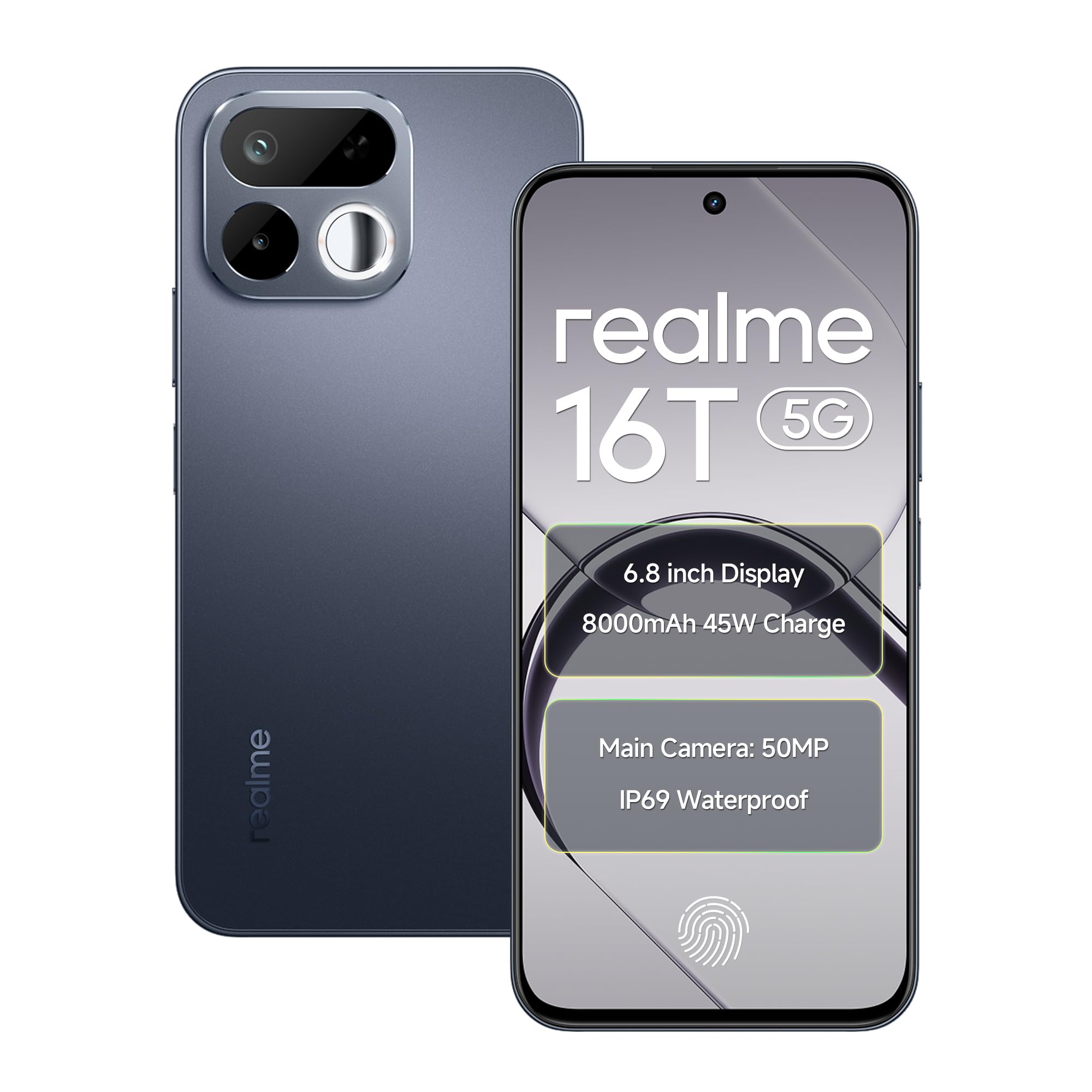
Obraz: przód i tył view of the realme 16T 5G Smartphone, showcasing jego konstrukcji i modułu kamery.
Główne cechy:
- Wyświetlacz: 6.8-inch HD+ LCD with 144Hz refresh rate and 1200 nits peak brightness.
- Edytor: MediaTek Dimensity 6300 Octa-core chipset.
- Bateria: 8000mAh capacity with 45W SUPERVOOC flash charging.
- Kamera: 50MP AI main camera with selfie mirror functionality.
- Trwałość: IP69 Pro dust and water resistance, MIL-STD-810H military-grade reliability.
- System operacyjny: Android 16 with realme UI 7.0.
4. Konfiguracja
4.1 Wkładanie kart SIM i karty MicroSD
- Znajdź tackę na kartę SIM znajdującą się z boku urządzenia.
- Otwórz tackę na kartę SIM za pomocą dołączonego narzędzia do wyjmowania karty SIM.
- Carefully place your Nano-SIM cards (supports dual 5G SIM) and a microSD card (for expandable storage up to 2TB) into the designated slots. Ensure the gold contacts are facing down.
- Gently push the SIM tray back into the device until it is flush with the side.
4.2 Pierwsze włączenie i podstawowa konfiguracja
- Naciśnij i przytrzymaj przycisk zasilania, aż pojawi się logo realme.
- Postępuj zgodnie z instrukcjami wyświetlanymi na ekranie, aby wybrać język i region, a następnie nawiązać połączenie z siecią Wi-Fi.
- Zaloguj się na swoje konto Google lub utwórz nowe, aby uzyskać dostęp do usług Google i Sklepu Play.
- Ustaw preferowaną metodę blokowania ekranu (kod PIN, wzór, hasło, odcisk palca lub odblokowanie twarzą).
5. Instrukcja obsługi
5.1 Zarządzanie energią
- Włączanie: Press and hold the Power button until the device vibrates and the realme logo appears.
- Wyłączone: Naciśnij i przytrzymaj przycisk zasilania, a następnie dotknij opcji „Wyłącz” na ekranie.
- Uruchom ponownie: Naciśnij i przytrzymaj przycisk zasilania, a następnie dotknij opcji „Uruchom ponownie” na ekranie.
5.2 Ustawienia wyświetlania
Your realme 16T features a 6.8-inch HD+ LCD with a 144Hz refresh rate for smooth visuals and a 180Hz touch sampling rate for responsive interaction. The display offers up to 1200 nits peak brightness for clear visibility in various lighting conditions.

Image: The realme 16T 5G Smartphone display showcasing a game, highlighting the 144Hz refresh rate and bright visuals.
- To adjust refresh rate: Go to Settings > Display > Screen refresh rate.
- To adjust brightness: Go to Settings > Display > Brightness level or use the quick settings panel.
5.3 Bateria i ładowanie
The device is equipped with an 8000mAh battery and supports 45W SUPERVOOC flash charging.

Image: An illustration of the realme 16T 5G Smartphone's 8000mAh battery capacity and 45W charging capability, with usage estimates for WhatsApp, Instagram, gaming, and YouTube.
- Use the provided 45W SUPERVOOC charger and USB Data Cable for optimal charging speed.
- Avoid using non-certified chargers or cables to prevent damage to the device.
5.4 Funkcje aparatu
The realme 16T features a 50MP AI main camera. It also includes a selfie mirror function, allowing you to use the rear camera for high-quality selfies.

Image: A person taking a selfie using the realme 16T 5G Smartphone's selfie mirror feature, highlighting the 50MP camera.

Image: A collage demonstrating the AI image editing capabilities of the realme 16T 5G Smartphone, including original, modeling photoshoot, 3D emoji, and cartoon shot options.
- Otwórz aplikację Aparat na ekranie głównym lub w szufladzie aplikacji.
- Switch between photo, video, portrait, and other modes.
- Utilize the AI features for enhanced image processing and editing.
5.5 Funkcje bezpieczeństwa
The device supports side fingerprint recognition and face recognition for secure and quick unlocking.
- To set up fingerprint unlock: Go to Ustawienia > Bezpieczeństwo > Odcisk palca i postępuj zgodnie z instrukcjami.
- To set up face unlock: Go to Ustawienia > Bezpieczeństwo > Rozpoznawanie twarzy i postępuj zgodnie z instrukcjami.
5.6 Łączność
The realme 16T supports 5G dual-SIM dual-standby, Wi-Fi, Bluetooth, and USB OTG.
- Sieć 5G: Ensure your SIM cards are 5G enabled and you are in a 5G coverage area.
- Wi-Fi: Połącz się z sieciami Wi-Fi za pomocą Ustawienia > Wi-Fi.
- Bluetooth: Sparuj z urządzeniami Bluetooth za pomocą Ustawienia > Bluetooth.
- USB OTG: Connect USB devices (e.g., flash drives) using a USB OTG adapter.
Dźwięk 5.7
Experience studio-quality sound with Hi-Res high-resolution audio certification. The device also features 400% Ultra Volume for enhanced audio output.

Image: A person holding the realme 16T 5G Smartphone while playing a game, illustrating the 400% Ultra Volume feature with sound waves emanating from the device.
6. Konserwacja
6.1 Czyszczenie urządzenia
- Do czyszczenia ekranu i obudowy telefonu należy używać miękkiej, niepozostawiającej włókien ściereczki.
- Unikaj stosowania silnych środków chemicznych i materiałów ściernych.
6.2 Aktualizacje oprogramowania
Regularnie sprawdzaj dostępność aktualizacji oprogramowania i instaluj je, aby mieć pewność, że Twoje urządzenie ma najnowsze funkcje, poprawki zabezpieczeń i udoskonalenia wydajności.
- Idź do Ustawienia > Informacje o urządzeniu > wersja interfejsu użytkownika realme aby sprawdzić dostępność aktualizacji.
6.3 Zarządzanie magazynem
Manage your device's storage to maintain optimal performance. The device supports microSD card expansion up to 2TB.
- Idź do Ustawienia > Pamięć Do view wykorzystanie pamięci masowej i zwolnienie miejsca.
- Regularly back up important data to cloud storage or an external device.
6.4 Durability and Resistance
The realme 16T is designed with IP69 Pro dust and water resistance and MIL-STD-810H military-grade environmental reliability.

Image: The realme 16T 5G Smartphone on a wooden surface with spilled coffee, demonstrating its IP69 Pro dust and water resistance.
Image: A person running with the realme 16T 5G Smartphone, which is shown with debris around it, illustrating its military-grade shock resistance.
While resistant, avoid intentional exposure to water or dust, and do not submerge the device. Damage caused by liquid or dust ingress may not be covered under warranty if proper care is not taken.
7. Rozwiązywanie Problemów
This section addresses common issues you might encounter with your realme 16T 5G Smartphone.
| Problem | Możliwe rozwiązanie |
|---|---|
| Urządzenie nie włącza się | Ensure the battery is charged. Connect the device to the charger for at least 10 minutes, then try powering on again. If it still doesn't work, perform a force restart by holding the Power button for 10-15 seconds. |
| Bateria szybko się rozładowuje | Check for apps running in the background. Reduce screen brightness, disable unnecessary features like GPS or Bluetooth when not in use. Go to Ustawienia > Bateria aby zidentyfikować aplikacje zużywające dużo energii. |
| Network connectivity issues (5G/Wi-Fi) | Restart the device. Check if Airplane Mode is off. For mobile data, ensure your SIM card is properly inserted and has an active plan. For Wi-Fi, try forgetting the network and reconnecting, or restart your router. |
| Aplikacje ulegają awarii lub zawieszają się | Wyczyść pamięć podręczną problematycznej aplikacji (Ustawienia > Aplikacje > [Nazwa aplikacji] > Pamięć > Wyczyść pamięć podręczną). If the issue persists, try reinstalling the app. Ensure your device software is up to date. |
| Odblokowanie odciskiem palca/twarzą nie działa | Ensure your finger/face is clean and dry. Re-register your fingerprint/face in Ustawienia > Bezpieczeństwo. Check for any physical obstructions on the sensor or camera. |
If you encounter issues not listed here or if the suggested solutions do not resolve your problem, please contact realme customer support.
8. Specyfikacje
Detailed technical specifications for the realme 16T 5G Smartphone:
| Funkcja | Specyfikacja |
|---|---|
| Marka | królestwo |
| Model | 16T |
| System operacyjny | Android 16 (with realme UI 7.0) |
| Edytor | MediaTek Dimensity 6300 ośmiordzeniowy (2.4 GHz) |
| BARAN | 6 GB (dostępne również w wersji 8 GB) |
| Pamięć wewnętrzna | 128 GB (dostępne również w wersji 256 GB) |
| Możliwość rozbudowy pamięci masowej | Do 2 TB przez microSD |
| Wyświetlacz | 6.8-inch HD+ LCD, 144Hz Refresh Rate, 1200 nits Peak Brightness |
| Kamera tylna | 50-megapikselowy aparat główny AI |
| Bateria | 8000mAh |
| Ładowanie | Ładowanie błyskawiczne SUPERVOOC 45 W |
| Łączność | 5G Dual SIM, Wi-Fi, Bluetooth, USB Type-C, USB OTG |
| Odporność na wodę | IP69 Pro |
| Trwałość | MIL-STD-810H Military-Grade |
| Wymiary | 16.6 x 7.8 x 0.8 centymetrów |
| Waga | 192 gram |
9. Informacje o gwarancji
Your realme 16T 5G Smartphone comes with a 1-year official manufacturer warranty od daty zakupu. Niniejsza gwarancja obejmuje wady produkcyjne powstałe w wyniku normalnego użytkowania. Prosimy zachować dowód zakupu na wypadek roszczeń gwarancyjnych.
Gwarancja nie obejmuje:
- Damage caused by improper use, accidents, or unauthorized repairs.
- Normalne zużycie.
- Damage caused by liquid or dust ingress if not handled according to IP69 Pro guidelines.
For detailed warranty terms and conditions, please refer to the warranty card included in your product package or visit the official realme webstrona.
10. Support & Safety Information
10.1 Obsługa klienta
For further assistance, technical support, or service inquiries, please contact realme customer service:
- Odwiedź oficjalną pomoc techniczną realme webstrona: realme Support (India)
- Refer to the contact information provided in your Quick Start Guide.
10.2 Wytyczne dotyczące bezpieczeństwa
To ensure safe operation of your device, please observe the following:
- Nie używaj telefonu podczas jazdy.
- Unikaj wystawiania urządzenia na działanie ekstremalnych temperatur.
- Use only realme-approved accessories.
- Nie próbuj samodzielnie demontować ani naprawiać urządzenia.
- Urządzenie i baterię należy utylizować zgodnie z lokalnymi przepisami.