
1. Wprowadzenie
Thank you for choosing the FLEXISPOT CylineX Pro Electric Standing Desk Frame. This manual provides essential information for the safe and efficient assembly, operation, and maintenance of your new adjustable height desk. Please read these instructions carefully before use and retain them for future reference.
The CylineX Pro features a robust dual-motor system, a user-friendly piano-style control panel, and a wide height adjustment range to support a healthy and productive workspace.
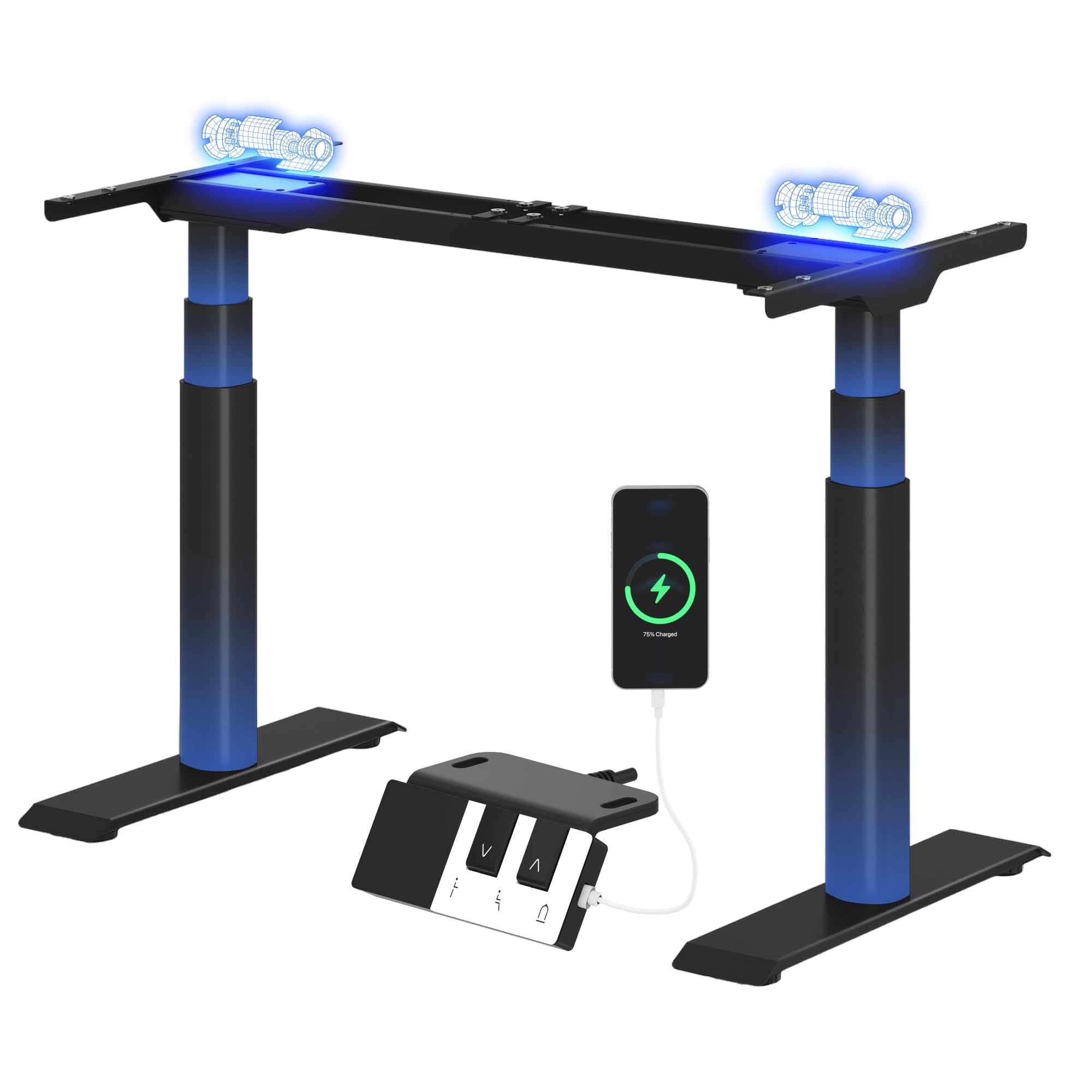
Image: The FLEXISPOT CylineX Pro Electric Standing Desk Frame with a black tabletop in a home office environment.
2. Informacje dotyczące bezpieczeństwa
Aby zapewnić bezpieczną obsługę i zapobiec obrażeniom lub uszkodzeniom, należy przestrzegać następujących środków ostrożności:
- Przed użyciem upewnij się, że wszystkie elementy są bezpiecznie zamocowane.
- Podczas pracy urządzenia należy trzymać dzieci i zwierzęta z dala od biurka.
- Nie należy zbliżać rąk ani innych przedmiotów do ruchomych części.
- Avoid overloading the desk beyond its specified weight capacity.
- Nie siadaj ani nie stawaj na ramie biurka.
- Odłącz zasilanie przed czyszczeniem lub konserwacją.
- Używaj wyłącznie dołączonego zasilacza i akcesoriów.
- If any unusual noise, smell, or malfunction occurs, immediately unplug the desk and contact customer support.
- The anti-collision system is designed to prevent damage, but users should still exercise caution during height adjustments.

Image: The integrated anti-collision system provides safer movement by automatically reversing if an obstacle is detected.
3. Instrukcja montażu
The FLEXISPOT CylineX Pro desk frame is designed for straightforward assembly. It typically takes about 20 minutes to assemble. Please ensure you have received all packages, as the desk frame may be shipped in multiple boxes.
3.1 Zawartość opakowania
Verify that all parts listed in the included user manual are present before beginning assembly. Contact customer support if any parts are missing or damaged.
3.2 Montaż krok po kroku
- Rozpakuj komponenty: Ostrożnie wyjmij wszystkie części z opakowania i połóż je na miękkiej, czystej powierzchni, aby zapobiec zarysowaniom.
- Złóż poprzeczkę: Connect the two halves of the crossbar (if applicable) and secure them according to the detailed instructions in your physical manual.
- Zamontuj kolumny podnoszące: Securely attach the lifting columns (legs) to the assembled crossbar.
- Montaż stóp: Attach the foot supports to the bottom of each lifting column.
- Podłącz skrzynkę sterowniczą: Mount the control box to the designated area on the frame and connect the motor cables and power cable.
- Podłącz panel sterowania: Mount the piano-style control panel to the desired location on the desk frame or tabletop.
- Mount Tabletop: Carefully place your chosen tabletop onto the assembled frame. Ensure it is centered and aligned, then secure it using the provided screws.
- Zarządzanie kablami: Organize and secure all cables using the included cable ties or management accessories.

Image: Components of the desk frame laid out, illustrating the ease of assembly.
4. Instrukcja obsługi
The CylineX Pro features an intuitive piano-style control panel for easy height adjustment and personalized settings.

Image: The piano-style control panel offers simple and intuitive control with memory functions, sit/stand reminder, child lock, and a USB port.
4.1 Podstawowa regulacja wysokości
- Naciśnij W górę (^) przycisk do podnoszenia biurka.
- Naciśnij W dół (v) przycisk do obniżania biurka.
- Release the button to stop the desk at the desired height.
4.2 Ustawianie ustawień pamięci
Panel sterowania umożliwia zapisanie do trzech preferowanych ustawień wysokości:
- Dostosuj wysokość biurka do swoich potrzeb za pomocą przycisków Góra/Dół.
- Naciśnij "M" button (Memory) followed by one of the numbered preset buttons (1, 2, or 3). The display will show "S-" followed by the number to confirm the setting is saved.
- To recall a saved height, simply press the corresponding numbered preset button.
4.3 Sit/Stand Reminder
Activate the sit/stand reminder to prompt you to change positions at regular intervals:
- Naciśnij Regulator czasowy button (often depicted as a clock icon) to cycle through reminder intervals (e.g., 30, 45, 60 minutes).
- The desk will beep or vibrate when it's time to change position.
4.4 Funkcja blokady przed dziećmi
To prevent accidental adjustments, activate the child lock:
- Naciśnij i przytrzymaj Zamek button (often depicted as a padlock icon) for a few seconds until "LOC" appears on the display.
- To unlock, press and hold the Lock button again until "LOC" disappears.
4.5 porty USB do ładowania
The control panel includes a USB port for convenient charging of your mobile devices.
5. Konserwacja
Regular maintenance ensures the longevity and optimal performance of your FLEXISPOT CylineX Pro desk frame.
- Czyszczenie: Przetrzyj ramę biurka miękką szmatką.amp cloth. Avoid abrasive cleaners or solvents that could damage the finish. Ensure no liquid enters the electrical components.
- Zarządzanie kablami: Periodically check and tidy up cables to prevent tangling or damage, which could interfere with desk movement.
- Kontrola elementów złącznych: Every few months, check all screws and bolts to ensure they are tight. Re-tighten if necessary.
- Smarowanie: The lifting columns are pre-lubricated and generally do not require additional lubrication. If you notice any unusual friction, contact customer support.
6. Rozwiązywanie Problemów
Jeśli napotkasz jakiekolwiek problemy z biurkiem, zapoznaj się z poniższymi typowymi czynnościami rozwiązywania problemów:
| Problem | Możliwa przyczyna | Rozwiązanie |
|---|---|---|
| Biurko się nie rusza / Brak zasilania | Power cable disconnected, power outlet issue, control box malfunction. | Check power connections. Ensure the outlet is working. Try a different outlet. If still no power, contact support. |
| Desk moves unevenly or stops | Overload, obstruction, uneven weight distribution, synchronization issue. | Reduce weight on the desk. Check for obstructions. Ensure weight is evenly distributed. Perform a reset (see below). |
| Wyświetlono kod błędu (np. E01, E02) | Motor fault, sensor issue, overheating. | Refer to your physical manual for specific error code meanings. Often, a reset or power cycle can resolve temporary errors. If persistent, contact support. |
| Anti-collision system triggers too easily/not at all | Sensitivity setting, obstruction. | Check for obstructions. Consult your physical manual for instructions on adjusting anti-collision sensitivity. |
| Nietypowy hałas lub zapach | Internal component issue, motor strain. | Immediately unplug the desk. Do not use. Contact FLEXISPOT customer support. |
6.1 Procedura resetowania
A reset can often resolve minor operational issues. The exact procedure may vary slightly, but a common method is:
- Naciśnij i przytrzymaj W dół (v) button until the desk reaches its lowest position and then slightly rises and lowers again.
- Alternatively, some models require holding the "M" przycisk i W dół (v) button simultaneously, or a specific combination of buttons. Refer to your physical manual for the precise reset sequence for your CylineX Pro model.
7. Specyfikacje
Key technical specifications for the FLEXISPOT CylineX Pro Electric Standing Desk Frame:

Image: Detailed dimensions and performance specifications of the CylineX Pro desk frame.
| Funkcja | Specyfikacja |
|---|---|
| Model | CylineX Pro |
| Zakres regulacji wysokości | 60 cm - 125 cm (23.6" - 49.2") |
| Prędkość podnoszenia | 35 mm/s |
| Nośność statyczna | Do 200 kg (440 funta) |
| Dynamiczna nośność | Do 160 kg (352 funta) |
| Typ silnika | Podwójny system silnikowy |
| Poziom hałasu | Mniej niż 50 dB |
| Pobór mocy w trybie czuwania | Mniej niż 0.5 W |
| Kompatybilna szerokość blatu | 120 cm - 200 cm (47.2" - 78.7") |
| Compatible Tabletop Depth | 60 cm - 80 cm (23.6" - 31.5") |
| Panel sterowania | Piano-style with Memory Presets, Sit/Stand Reminder, Child Lock, USB Charging Port |
| Funkcje bezpieczeństwa | System antykolizyjny |

Image: The desk's robust construction supports a maximum static load of 200 kg and a dynamic load of 160 kg.
8. Gwarancja i wsparcie
FLEXISPOT is committed to providing high-quality products and excellent customer service.
8.1 Informacje o gwarancji
The FLEXISPOT CylineX Pro desk frame comes with a 10-letnia gwarancja. This warranty covers defects in materials and workmanship under normal use. Please retain your proof of purchase for warranty claims. For full warranty terms and conditions, please refer to the official FLEXISPOT webodwiedź witrynę lub skontaktuj się z obsługą klienta.
8.2 Obsługa klienta
If you have any questions, require assistance with assembly, or encounter any issues not covered in this manual, please do not hesitate to contact FLEXISPOT customer support. Our team is available to help you.
- Wsparcie online: Odwiedź oficjalną stronę FLEXISPOT webwitryna z odpowiedziami na często zadawane pytania, artykułami pomocy i formularzami kontaktowymi.
- Wsparcie e-mailowe: Refer to your purchase documentation for the appropriate email address.
- Wsparcie telefoniczne: Check the FLEXISPOT webwitryna z regionalnymi numerami kontaktowymi.