
Wstęp
This manual provides detailed instructions for the operation and maintenance of your RadioShack Portable CD Player Boombox. Please read this manual thoroughly before using the device to ensure proper function and to maximize your listening experience. This boombox combines classic CD playback with modern connectivity options including Bluetooth, FM radio, USB, and AUX input.
Co jest w pudełku

Rysunek 1: Zawartość pudełka. This image displays the items included with your purchase: the boombox unit, AC power cord, remote control, and telescopic antenna.
- 1x RadioShack Portable CD Player Boombox Unit
- Kabel zasilający 1x
- 1x Pilot zdalnego sterowania
- 1x Telescopic Antenna (pre-attached)
- 1x Instrukcja obsługi (ten dokument)
Note: 4 C batteries are required for portable operation and are not included.
Produkt ponadview i funkcje
The RadioShack Portable CD Player Boombox offers multiple audio playback options and user-friendly controls.

Rysunek 2: Główne cechy. This diagram highlights the boombox's main functionalities including Bluetooth 5.0, various CD formats, USB MP3 playback, FM radio, AUX input, and playback modes.
- Odtwarzanie płyt CD: Obsługuje formaty CD, CD-R, CD-RW i CD-MP3.
- Łączność Bluetooth: Przesyłaj strumieniowo dźwięk bezprzewodowo ze zgodnych urządzeń.
- Radio FM: Built-in tuner with telescopic antenna and 18 preset stations.
- Odtwarzanie z USB: Odtwórz MP3 filebezpośrednio z dysku USB.
- Wejście AUX: Podłącz zewnętrzne urządzenia audio za pomocą kabla 3.5 mm.
- Tryby odtwarzania: Includes random, repeat, and program play functions.
- Zdalne sterowanie: Do wygodnej obsługi z odległości.
Organizować coś
1. Włączanie urządzenia

Figure 3: Power Options. The boombox can be powered by the included AC cord or by 4 C batteries for portable use.
Your boombox can be powered in two ways:
- Zasilanie prądem zmiennym: Connect the included AC power cord to the AC input jack on the back of the boombox and then plug it into a standard wall outlet (110V-240V).
- Moc baterii: For portable use, open the battery compartment on the bottom of the unit and insert 4 "C" size batteries (not included), ensuring correct polarity (+/-). Close the compartment securely.
2. Antenna Setup (FM Radio)
Aby uzyskać optymalny odbiór radia FM, należy całkowicie rozłożyć antenę teleskopową znajdującą się z tyłu urządzenia. Dostosuj jej położenie, aby uzyskać najlepszy sygnał.
Instrukcja obsługi
Sterowanie ogólne
- Przycisk zasilania (⏻): Naciśnij, aby włączyć lub wyłączyć urządzenie.
- Pokrętło głośności: Obróć zgodnie z ruchem wskazówek zegara, aby zwiększyć głośność, lub przeciwnie do ruchu wskazówek zegara, aby ją zmniejszyć.
- Przycisk funkcyjny (FUNC): Press to cycle through playback modes: CD, Bluetooth, FM, USB, AUX.
- Odtwórz/Wstrzymaj (⏸/⏸) Przycisk: Rozpoczyna lub wstrzymuje odtwarzanie.
- Zatrzymać (⏹) Przycisk: Zatrzymuje odtwarzanie.
- Skip/Search (⏮ / ⏭) Przyciski: Press briefly to skip tracks. Press and hold to search within a track.
Odtwarzanie CD
- Otwórz pokrywę komory na płyty CD.
- Place a CD (CD, CD-R, CD-RW, or CD-MP3) onto the spindle with the label side facing up.
- Zamknij dokładnie pokrywę komory na płytę CD.
- Naciśnij FUNC Naciskaj przycisk, aż wybierzesz tryb „CD”.
- Płyta CD rozpocznie odtwarzanie automatycznie. Jeśli nie, naciśnij przycisk Odtwórz/Pauza przycisk.
Parowanie Bluetooth

Figure 4: Bluetooth Streaming. Easily stream audio from your smartphone or tablet to the boombox.
- Naciśnij FUNC button until "BT" (Bluetooth) mode is selected. The display will show "BT" and flash, indicating it's in pairing mode.
- Na urządzeniu z włączoną funkcją Bluetooth (smartfonie, tablecie) przejdź do ustawień Bluetooth i wyszukaj dostępne urządzenia.
- Select "RadioShack Boombox" from the list.
- Once paired, the "BT" indicator on the boombox display will stop flashing and remain solid.
- Teraz możesz odtwarzać muzykę ze swojego urządzenia przez boombox.
Obsługa radia FM

Figure 5: FM Presets and Programmed Playback. Use the SCAN button to automatically save FM stations and REP/PROG for custom playback sequences.
- Naciśnij FUNC Naciskaj przycisk, aż wybierzesz tryb „FM”.
- Auto Scan and Save Presets: Naciśnij i przytrzymaj SKANDOWAĆ button (often combined with Play/Pause). The radio will automatically scan for and save up to 18 available FM stations.
- Strojenie ręczne: Naciśnij krótko Pomiń/Wyszukaj guziki (⏮ / ⏭) to fine-tune the frequency.
- Wybieranie ustawień wstępnych: Naciśnij krótko ŻARCIE button (often combined with Repeat) to cycle through saved preset stations.
Odtwarzanie USB
- Włóż dysk flash USB zawierający plik MP3 files do portu USB.
- Naciśnij FUNC przycisk, aż wybierzesz tryb „USB”.
- Boombox automatycznie wykryje i rozpocznie odtwarzanie plików MP3 filez dysku USB.
- Użyj Odtwórz/Pauza, Zatrzymywać się, I Pomiń/Wyszukaj przyciski do sterowania odtwarzaniem.
Wejście AUX
- Podłącz jeden koniec kabla audio 3.5 mm (nie ma go w zestawie) do gniazda AUX IN w boomboxie.
- Podłącz drugi koniec kabla do gniazda słuchawkowego lub wyjścia audio w zewnętrznym urządzeniu audio (np. odtwarzaczu MP3, smartfonie).
- Naciśnij FUNC przycisk, aż wybierzesz tryb „AUX”.
- Steruj odtwarzaniem i głośnością z zewnętrznego urządzenia audio.
Użycie pilota zdalnego sterowania
The included remote control allows for convenient operation of most functions from a distance. Ensure the remote has working batteries (typically 2x AAA, not included) and point it towards the front of the boombox.
- Moc: Włącz/wyłącz urządzenie.
- FUNKCJA: Select input mode (CD, BT, FM, USB, AUX).
- Głośność +/-: Dostosuj poziom głośności.
- Play/Pause, Stop, Skip/Search: Kontroluj odtwarzanie.
- REP/PROG: Access repeat and program functions.
- SKANDOWAĆ: Auto-scan FM stations.
- EQ/SLEEP: Adjust equalizer settings or set sleep timer (refer to specific remote markings for details).
Playback Modes (CD/USB)
- Repeat (REP): Naciśnij ROZPUSTNIK button (on unit or remote) to cycle through repeat modes:
- Repeat One: Repeats the current track.
- Repeat All: Repeats all tracks on the CD/USB.
- Repeat Folder (for MP3 CDs/USB): Repeats all tracks in the current folder.
- Program (PROG): Allows you to program a specific order of tracks for CD or USB playback.
- In CD or USB mode, with playback stopped, press the ŻARCIE przycisk.
- Użyj Pomiń/Wyszukaj buttons to select your desired track.
- Naciskać ŻARCIE again to confirm and add the track to the program list.
- Repeat steps 2-3 to add more tracks.
- Naciskać Odtwórz/Pauza Aby rozpocząć odtwarzanie zaprogramowane.
- Random/Shuffle: Some models may have a dedicated shuffle button (often labeled "RDM" or "SHUF") or it may be part of the REP/PROG cycle. This plays tracks in a random order.
Konserwacja
- Czyszczenie: Use a soft, dry cloth to clean the exterior of the boombox. Do not use abrasive cleaners or solvents. For the CD lens, use a specialized CD lens cleaner disc.
- Składowanie: W przypadku dłuższego nieużywania wyjmij baterie, aby zapobiec wyciekowi. Przechowuj urządzenie w chłodnym, suchym miejscu, z dala od bezpośredniego światła słonecznego i ekstremalnych temperatur.
- Wymiana baterii: Replace all 4 "C" batteries simultaneously when they are depleted. Do not mix old and new batteries or different types of batteries.
- Pielęgnacja płyt CD: Trzymaj płyty CD za krawędzie. Utrzymuj je w czystości i bez zarysowań. Przechowuj je w pudełkach, gdy nie są używane.
Rozwiązywanie problemów
| Problem | Możliwa przyczyna | Rozwiązanie |
|---|---|---|
| Brak zasilania | Przewód zasilający nie jest podłączony; baterie są rozładowane lub nieprawidłowo włożone. | Ensure AC cord is securely plugged in. Replace batteries with new ones, checking polarity. |
| Brak dźwięku | Volume too low; Incorrect input mode; Headphones connected. | Increase volume. Press FUNC to select correct mode. Disconnect headphones. |
| Płyta CD przeskakuje lub nie odtwarza się | Płyta CD brudna lub porysowana; płyta CD włożona nieprawidłowo; kieszeń na płytę CD nie zamknięta. | Clean CD. Reinsert CD correctly. Close lid firmly. Try another CD. |
| Bluetooth nie łączy się | Boombox not in BT mode; Device too far; Device already paired to another unit. | Ensure boombox is in BT mode and flashing. Move device closer. Disconnect from other devices. |
| Słaby odbiór FM | Antena nie jest rozciągnięta lub nie jest prawidłowo ustawiona. Obszar o słabym sygnale. | Całkowicie rozłóż i wyreguluj antenę teleskopową. Spróbuj przenieść urządzenie w inne miejsce. |
| USB nie odtwarza | Dysk USB nie został prawidłowo włożony; Files not MP3 format; USB drive corrupted. | Włóż ponownie dysk USB. Upewnij się, filePliki są w formacie MP3. Spróbuj użyć innego dysku USB. |
Specyfikacje
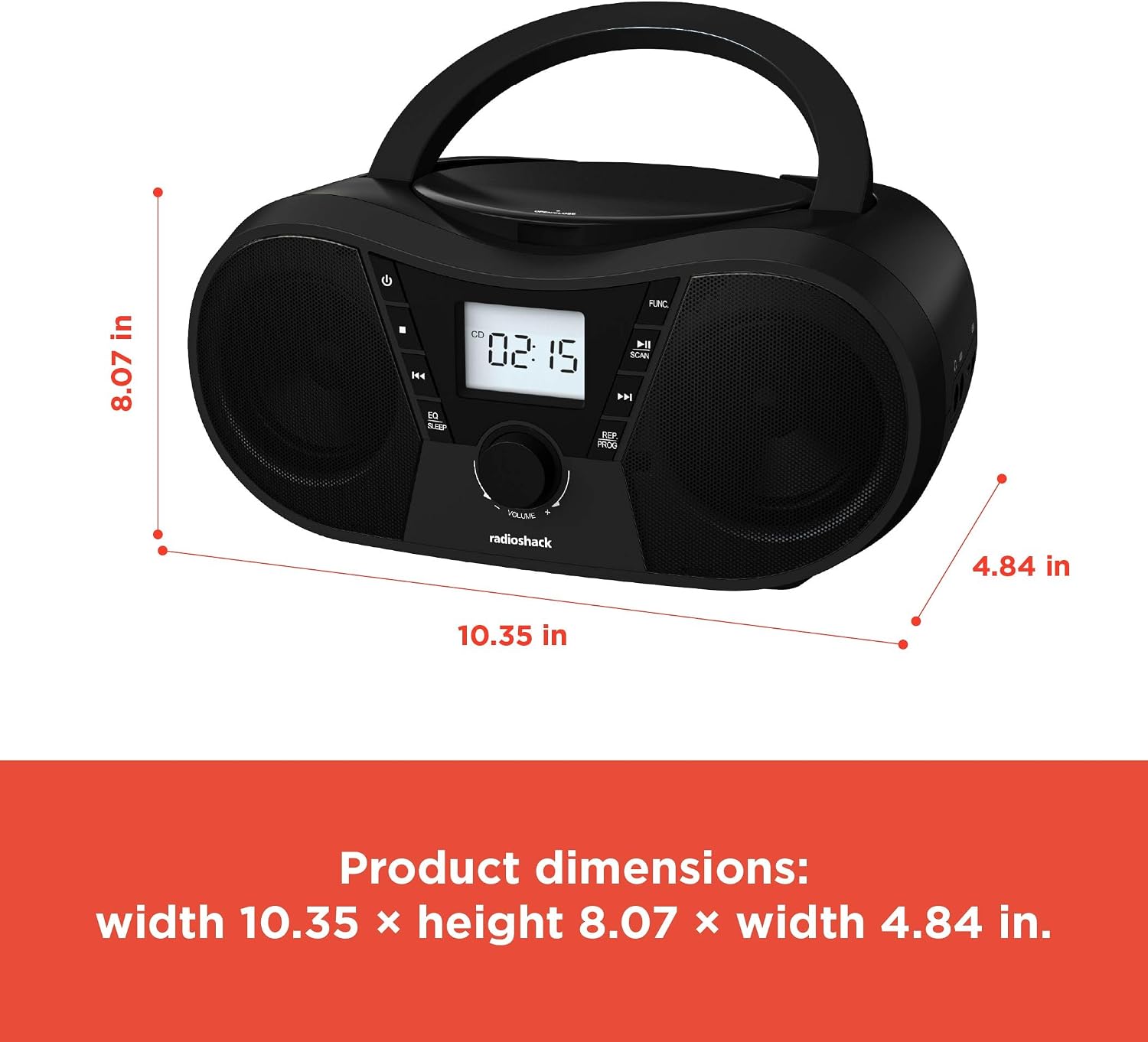
Rysunek 6: Wymiary produktu. The boombox measures approximately 10.35 inches wide, 8.07 inches high, and 4.84 inches deep.
| Funkcja | Szczegół |
|---|---|
| Numer modelu | 1402010 |
| Źródło zasilania | AC 110V-240V ~ 50/60Hz or 4 x "C" Batteries (DC 6V) |
| Obsługiwane media | CD, CD-R, CD-RW, CD-MP3, USB (MP3), Bluetooth, FM Radio, AUX Input |
| Wersja Bluetooth | 5.0 (Kompatybilny) |
| Zakres częstotliwości FM | 87.5 - 108 MHz |
| Tryb wyjścia audio | Stereofoniczny |
| Ilość głośników | 2 (Built-in Stereo Speakers) |
| Cotage | 10 watów |
| Odpowiedź częstotliwościowa | 20 Hz - 20 000 Hz |
| Wymiary (szer. x wys. x gł.) | Około 10.35 x 8.07 x 4.84 cala |
| Kolor | Czarny |
Gwarancja i wsparcie
This RadioShack Portable CD Player Boombox (Model 1402010) comes with a 1-roczna ograniczona gwarancja od daty zakupu. Niniejsza gwarancja obejmuje wady produkcyjne materiałów i wykonania powstałe w wyniku normalnego użytkowania.
For warranty claims, technical support, or customer service inquiries, please contact RadioShack customer support through their official webstronę lub dane kontaktowe podane w dokumentacji zakupu.
Prosimy zachować dowód zakupu w celach gwarancyjnych.
