
1. Wprowadzenie i koniecview
The STRONG LEAP-NOVA-X TV Stick is a compact streaming device designed to transform any television with an HDMI port into a 4K Ultra HD smart TV. It operates on Android 14, offering access to over 5000 streaming applications. Key features include Dolby Vision, HDR10+ for superior picture quality, Dolby Audio for immersive sound, Wi-Fi 6 for stable connectivity, and integrated Chromecast for easy content sharing. The device also supports voice control via its included remote.
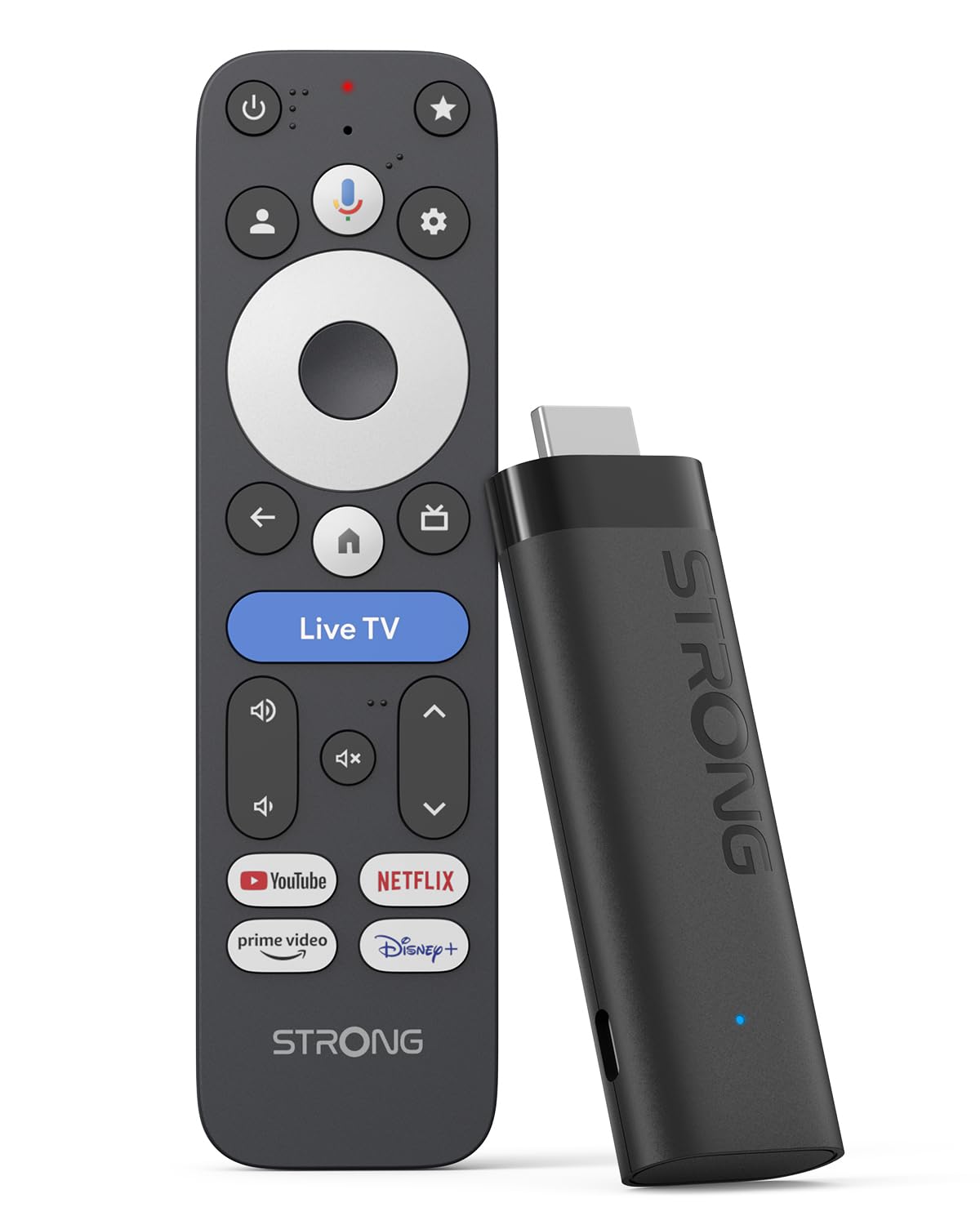
Image: The STRONG LEAP-NOVA-X TV Stick, a compact black streaming device.
2. Co znajduje się w pudełku
Ostrożnie rozpakuj pudełko i upewnij się, że znajdują się w nim wszystkie elementy:
- 1x TV Stick LEAP-NOVA-X
- 1x 10W 5V/2A Power Adapter
- 1x 1m USB-C Power Cable
- 1x HDMI Extension Cable
- Szybki przewodnik 1x
- 1x Pilot zdalnego sterowania
- 2 baterie AAA

Image: The contents of the STRONG LEAP-NOVA-X TV Stick package, including the TV stick, power adapter, USB-C cable, HDMI extension cable, quick guide, remote control, and AAA batteries.
3. Instrukcje konfiguracji
Follow these steps to set up your STRONG LEAP-NOVA-X TV Stick:
- Połącz z telewizorem: Insert the LEAP-NOVA-X TV Stick directly into an available HDMI port on your television. If space is limited, use the provided HDMI extension cable.
- Włączanie: Connect the USB-C power cable to the TV Stick and the other end to the power adapter. Plug the power adapter into a wall outlet.
- Wybierz wejście HDMI: Turn on your TV and use your TV remote to select the correct HDMI input source to which the TV Stick is connected.
- Sparuj pilota zdalnego sterowania: Insert the two AAA batteries into the provided remote control. Follow the on-screen instructions to pair the remote with your TV Stick.
- Połącz się z Wi-Fi: Once the initial setup screen appears, follow the prompts to connect your TV Stick to your home Wi-Fi network. Enter your Wi-Fi password when requested.
- Konfiguracja konta Google: Zaloguj się na swoje konto Google, aby uzyskać dostęp do funkcji Google TV, pobierać aplikacje i personalizować swoje doświadczenie.
- Rozpocznij transmisję strumieniową: After completing the setup, you can begin exploring apps and streaming content.

Image: A three-step visual guide demonstrating how to set up the TV Stick: 1. Connect to TV's HDMI port, 2. Connect to Wi-Fi, 3. Start streaming.
4. Instrukcja obsługi
4.1 Nawigacja w Google TV
The LEAP-NOVA-X TV Stick uses the Google TV interface, which organizes content from all your streaming services into one personalized home screen. Use the directional pad on your remote to navigate through menus, select apps, and browse content.

Image: A television displaying the Google TV interface with various streaming app icons, including Netflix, Disney+, and YouTube.
4.2 Sterowanie głosowe za pomocą Asystenta Google
The included remote control features a dedicated button for Google Assistant. Press and hold this button, then speak your command or question. You can ask to find movies, launch apps, control playback, or get information.

Image: A woman using the voice control feature of the remote to interact with Google Assistant on the TV, displaying voice commands like 'Play my favorite playlist on YouTube' and 'Show me trending movies'.
4.3 Wbudowany Chromecast
The LEAP-NOVA-X TV Stick has Chromecast built-in, allowing you to cast content directly from your compatible smartphone, tablet, or computer to your TV screen. Look for the Cast icon (rzucać ) within supported apps on your mobile device.

Image: Multiple screens (TV, tablet, smartphone) displaying a basketball game, illustrating the Google Cast (Chromecast) feature for sharing content across devices.
4.4 Instalacja aplikacji
Access the Google Play Store directly from your TV Stick to download and install additional streaming apps, games, and utilities. With 32GB of internal storage, you have ample space for numerous applications.
5. Główne cechy
5.1 System operacyjny Android 14
Experience a smarter and faster interface with the integrated Android 14 operating system. This provides ultra-fluid entertainment and optimized background performance for a responsive user experience.

Image: A side-by-side comparison showing the faster performance of Android 14 on the LEAP-NOVA-X TV Stick versus an older Android version, illustrated by a racing game.
5.2 4K UHD with Dolby Vision and HDR10+
Enjoy stunning 4K Ultra HD resolution (3840 x 2160 pixels) with exceptional clarity and detail. Support for Dolby Vision and HDR10+ delivers extraordinary contrast, vibrant colors, and enhanced brightness for a cinematic viewzdobywania doświadczenia.

Image: A man watching an action movie with fighter jets on a television, illustrating the immersive visual experience with Dolby Vision.
5.3 Dźwięk Dolby
Immerse yourself in rich, clear, and powerful sound with Dolby Audio support. This technology enhances your audio experience, making movies, music, and games more engaging.

Image: A couple enjoying a concert on television, with sound waves emanating from the screen, highlighting the Dolby Audio experience.
5.4 Wi-Fi 6 and Bluetooth 5.2
The device features Wi-Fi 6 for ultra-stable and low-latency 4K streaming, even in congested network environments. Bluetooth 5.2 ensures reliable connectivity with accessories like headphones, game controllers, and speakers.

Image: A split screen showing a smooth streaming experience with Wi-Fi 6 and Bluetooth 5.2 (right) versus a buffering experience with older Wi-Fi 5 and Bluetooth 5.0 (left), using an animated movie scene.
5.5 32GB Storage and 2GB RAM
With 32GB of internal storage, you can install dozens of apps and games without worrying about running out of space. The 2GB of RAM ensures smooth operation and quick transitions between applications.

Image: A visual comparison between a standard 2+8GB TV stick and the STRONG LEAP-NOVA-X with 2GB RAM + 32GB Storage, highlighting the increased memory capacity.
6. Specyfikacje
| Nazwa modelu | LEAP-NOVA X |
| Marka | Mocny |
| Technologia łączności | HDMI |
| Rezolucja | 4K UHD (3840 x 2160 pikseli) |
| System operacyjny | Android 14 (Google TV) |
| BARAN | 2 GB |
| Pojemność magazynowa | 32 GB |
| Cechy specjalne | Google TV, Chromecast, Dolby Vision & Audio, HDR10+, Wi-Fi 6, Bluetooth 5.2, HDMI 2.1, Voice Control |
| Typ kontrolera | Sterowanie głosowe, zdalne sterowanie |
| Wymiary (dł. x szer. x wys.) | 9 dł. x 3 szer. x 1.5 wys. cm |
| Kolor | Czarny |
7. Rozwiązywanie Problemów
If you encounter issues with your STRONG LEAP-NOVA-X TV Stick, refer to the following common troubleshooting steps:
- Brak zasilania/brak wyświetlacza:
- Ensure the power adapter is securely connected to the TV Stick and a working power outlet.
- Verify that your TV is on the correct HDMI input source.
- Wypróbuj inny port HDMI w telewizorze.
- Pilot nie odpowiada:
- Check if the AAA batteries are correctly inserted and have sufficient charge. Replace if necessary.
- Re-pair the remote control by following the initial setup instructions or consulting the Quick Guide.
- Problemy z łącznością Wi-Fi:
- Sprawdź, czy router Wi-Fi jest włączony i działa prawidłowo.
- Restart your Wi-Fi router and the TV Stick.
- Go to the TV Stick's network settings and re-enter your Wi-Fi password.
- Move the TV Stick closer to your Wi-Fi router if possible, or ensure no major obstructions are blocking the signal.
- Awaria lub zawieszanie się aplikacji:
- Zamknij i uruchom ponownie aplikację powodującą problem.
- Clear the cache for the app in the TV Stick's settings (Settings > Apps > [App Name] > Clear Cache).
- Ensure the app and the TV Stick's operating system are updated to the latest versions.
- If the issue persists, try uninstalling and reinstalling the app.
- Słaba jakość obrazu/dźwięku:
- Check your internet connection speed; 4K streaming requires a stable and fast connection.
- Ensure your TV supports 4K UHD, HDR10+, and Dolby Vision for optimal visual quality.
- Verify that your TV's audio settings are correctly configured for Dolby Audio.
8. Konserwacja
To ensure the longevity and optimal performance of your STRONG LEAP-NOVA-X TV Stick:
- Trzymaj urządzenie w dobrze wentylowanym pomieszczeniu, aby zapobiec przegrzaniu.
- Regularly check for and install system and app updates to benefit from new features and security patches.
- Clean the device with a soft, dry cloth. Avoid using liquid cleaners or abrasive materials.
- Nie wystawiaj urządzenia na działanie ekstremalnych temperatur, wilgoci ani bezpośredniego światła słonecznego.
9. Gwarancja i wsparcie
The STRONG LEAP-NOVA-X TV Stick comes with a 2-letnia gwarancja producenta. Zachowaj dowód zakupu na wypadek roszczeń gwarancyjnych.
For technical support, product information, or warranty inquiries, please refer to the contact information provided in your Quick Guide or visit the official Strong webstrona.