
1. Wprowadzenie
Dziękujemy za zakupasing the EUHOMY 2.6kW Portable Spot Cooler. This manual provides essential information for the safe and efficient operation of your appliance. Please read it thoroughly before use and retain it for future reference.

Image 1.1: The EUHOMY 2.6kW Portable Spot Cooler unit.
2. Informacje dotyczące bezpieczeństwa
Aby zminimalizować ryzyko pożaru, porażenia prądem elektrycznym lub obrażeń ciała, należy zawsze przestrzegać podstawowych zasad bezpieczeństwa podczas korzystania z tego urządzenia.
- Upewnij się, że zasilanie jest zgodne z objtage podano na tabliczce znamionowej.
- Nie używaj urządzenia z uszkodzonym przewodem lub wtyczką.
- Trzymaj urządzenie z dala od wody i innych płynów.
- Do not block air inlets or outlets. Maintain at least 50cm clearance from the front and rear, and 30cm from the sides.
- Always ensure the exhaust duct is properly installed to vent hot air outside the room.
- Przed czyszczeniem lub jakąkolwiek konserwacją należy odłączyć urządzenie od zasilania.
- To urządzenie nie jest przeznaczone do użytku przez osoby o ograniczonych zdolnościach fizycznych, sensorycznych lub umysłowych, chyba że są pod nadzorem.
3. Zawartość opakowania
Sprawdź, czy w opakowaniu znajdują się wszystkie elementy:
- Spot Cooler Main Unit (1)
- Window Panels (4)
- Exhaust Duct (1)
- Wąż spustowy (1)
- Exhaust Nozzle (1)
- Duct End Connector (1)
- Zdalne sterowanie (1)
- Instrukcja obsługi (1)

Image 3.1: Included components of the EUHOMY Portable Spot Cooler.
4. Funkcje produktu
4.1. Powerful Cooling Performance
The EUHOMY Spot Cooler provides a powerful 2.6kW (60Hz) cooling capacity, capable of lowering room temperature by 5°C within 15 minutes. It is designed for effective cooling in areas up to 10 tatami (approximately 16.5 square meters), making it suitable for living rooms, bedrooms, garages, and warehouses.

Obraz 4.1: Koniecview of cooling capabilities and specifications.
4.2. Three Operating Modes
This unit offers three versatile operating modes to suit various seasonal needs:
- Tryb chłodzenia: Provides rapid cooling for hot environments.
- Tryb osuszania: Removes up to 28.98 liters of moisture per day, helping to maintain a comfortable humidity level between 40% and 60% RH, especially useful during rainy seasons.
- Tryb wentylatora: Circulates air with two adjustable fan speeds (Weak/Strong) to provide ventilation.

Image 4.2: Three-in-one functionality for year-round comfort.
4.3. Inteligentny tryb uśpienia
The smart sleep mode adjusts the set temperature gradually to ensure comfortable sleep. After 1 hour, the temperature increases by 1°C, and after 2 hours, it increases by another 1°C (total 2°C increase from initial setting). The unit then maintains this temperature, preventing overcooling or overheating during the night. This mode also reduces power consumption by approximately 25% over 8 hours compared to normal operation.
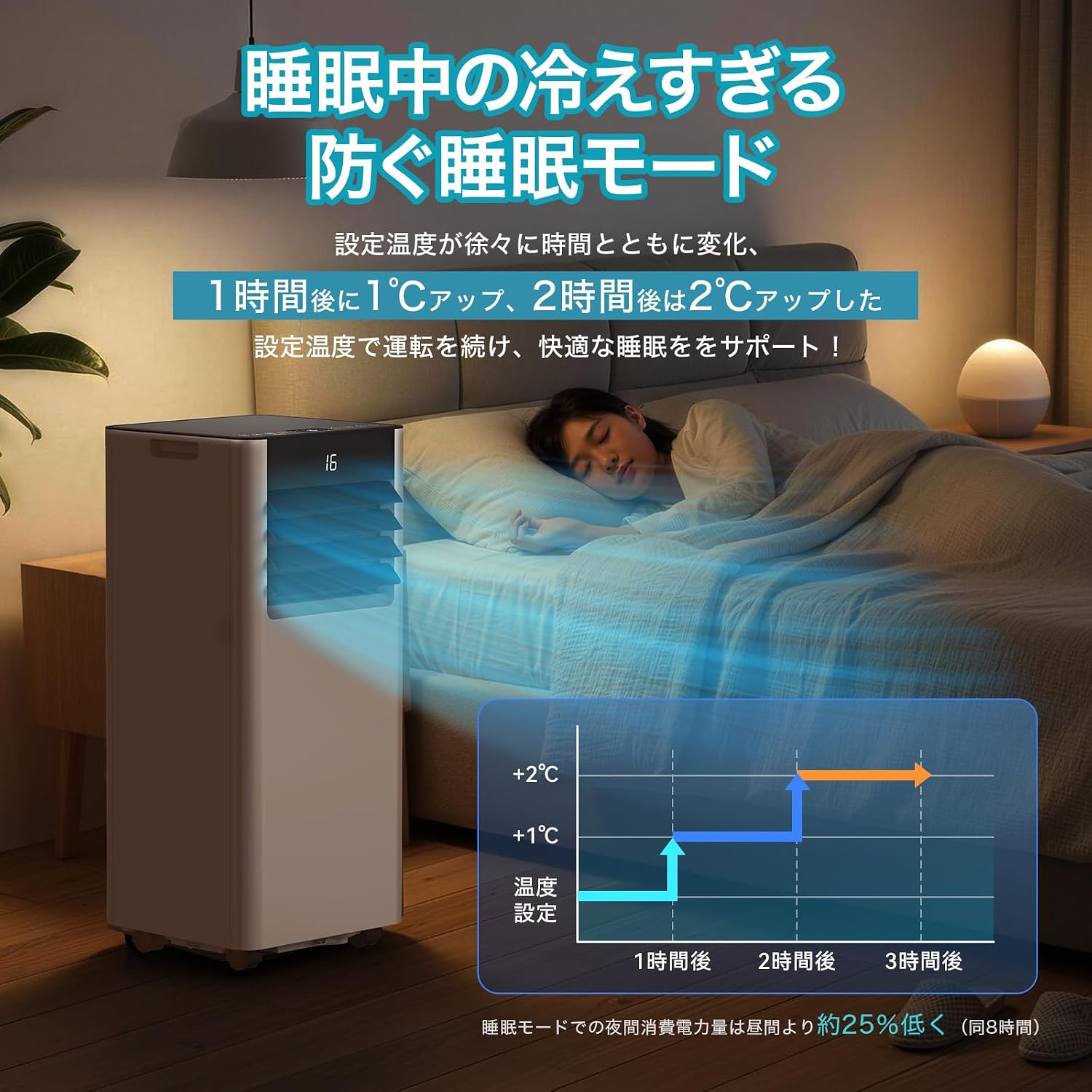
Image 4.3: Smart Sleep Mode for optimized overnight comfort and energy saving.
4.4. Funkcja timera 24-godzinnego
Set the unit to automatically turn on or off within a 1 to 24-hour period. This feature allows for efficient operation, ensuring the room is cooled before you arrive home or turns off after you leave, saving energy.
5. Konfiguracja i instalacja
The EUHOMY Spot Cooler is designed for easy installation without requiring professional construction. Follow these steps for setup:
5.1. Pozycjonowanie jednostki
Place the unit on a flat, stable surface. Ensure there is adequate clearance around the unit for proper airflow (at least 50cm from front/rear, 30cm from sides). The unit is equipped with casters for easy movement between rooms.
5.2. Window Panel Installation
Assemble the window panels according to your window size. The panels are adjustable from 50cm to 135cm to fit various window types (sliding or vertical sash windows). Secure the panels in the window frame using screws. The 2026 model includes four window panels for improved adaptability and sealing.

Image 5.1: Window panel installation guide.
5.3. Exhaust Duct Connection
Attach the exhaust duct to the unit's exhaust outlet and then connect the other end to the window panel. Ensure a secure connection to prevent hot air from re-entering the room. The improved exhaust duct design in the 2026 model enhances sealing performance by 50%.
6. Działanie
The unit can be operated using the touch control panel on top of the unit or the included remote control.

Image 6.1: Control panel and remote control layout.
6.1. Włączanie/wyłączanie zasilania
Wciśnij przycisk zasilania (運転入/切) na panelu sterowania lub pilocie, aby włączyć lub wyłączyć urządzenie.
6.2. Wybór trybu
Naciśnij przycisk Tryb (モード) to cycle through Cooling (冷房モード), Dehumidifying (除湿モード), and Fan (送風モード) tryby.
6.3. Regulacja temperatury
In Cooling mode, use the Up (+) i w dół (-) buttons to set the desired temperature between 16°C and 32°C.
6.4. Regulacja prędkości wentylatora
In Fan mode, press the Fan Speed button (風量) to select between Weak (弱) and Strong (強) airflow.
6.5. Ustawienie timera
Naciśnij przycisk timera (タイマー機能) to set the auto-on or auto-off time in 1-hour increments, from 1 to 24 hours.
6.6. Sleep Mode Activation
Naciśnij przycisk Uśpij (睡眠) to activate the smart sleep mode for quiet and comfortable overnight operation.
6.7. Louver Adjustment
Manually adjust the vertical louvers to direct the airflow as desired.
7. Konserwacja
Regular maintenance ensures optimal performance and longevity of your spot cooler.
7.1. Drenaż
The unit is designed with a non-drainage system for cooling mode, where condensed water is evaporated and expelled with the exhaust air. However, in high humidity conditions or during dehumidifying mode, significant water accumulation may occur. Connect the included drain hose to the drainage port for continuous drainage to prevent overflow.
7.2. Czyszczenie filtra
Periodically clean the air filter to maintain air quality and unit efficiency. Refer to the detailed instructions in the printed user manual for filter removal and cleaning procedures.
7.3. Czyszczenie zewnętrzne
Wytrzyj obudowę urządzenia miękką, damp płótno. Nie używaj ostrych środków chemicznych ani ściernych środków czyszczących.
8. Rozwiązywanie Problemów
Przed skontaktowaniem się z obsługą klienta zapoznaj się z poniższymi typowymi problemami i rozwiązaniami:
| Problem | Możliwa przyczyna | Rozwiązanie |
|---|---|---|
| Jednostka się nie włącza | Brak zasilania; Przewód zasilający nie jest podłączony; Wyłącznik automatyczny zadziałał. | Sprawdź połączenie zasilania; zresetuj wyłącznik automatyczny. |
| Niewystarczające chłodzenie | Windows/doors open; Exhaust duct not properly installed; Air filter dirty; Room size too large. | Close windows/doors; Ensure duct is sealed; Clean air filter; Use in recommended room size. |
| Wyciek wody | Drain hose not connected or blocked; Water tank full (if applicable). | Connect drain hose; Clear any blockages; Ensure continuous drainage in high humidity. |
| Urządzenie jest głośne | Jednostka nie stoi na płaskiej powierzchni; Filtr powietrza jest brudny; Dźwięk pracy jest normalny. | Place on a flat surface; Clean air filter; Some operating noise is normal for portable ACs. |
9. Specyfikacje
| Funkcja | Szczegół |
|---|---|
| Marka | EUHOMIA |
| Numer modelu | OL-A016UC26N4 |
| Wydajność chłodzenia | 2.3kW (50Hz) / 2.6kW (60Hz) |
| Obszar zastosowania | 8-10 Tatami |
| Zakres ustawień temperatury | 16°C do 32°C |
| Zasilacz | 100 V (50/60 Hz) |
| Pobór mocy chłodzenia | 750 W (50 Hz) / 800 W (60 Hz) |
| Wydajność osuszania | 28.98 litrów na dzień |
| Poziom hałasu | 55dB (Operating Sound: 43dB) |
| Chłodziwo | R-410A |
| Wymiary jednostki (gł. x szer. x wys.) | Wymiary 30.3 x 28.95 x 67.3 cm |
| Waga jednostkowa | Około 20.5 kg |
| Typ kontrolera | Sterowanie dotykowe |

Obraz 9.1: Szczegółowe specyfikacje i wymiary produktu.
10. Gwarancja i wsparcie
10.1. One-Year Quality Guarantee
This product comes with a one-year quality guarantee from the date of purchase. Please retain your proof of purchase for warranty claims.

Image 10.1: One-Year Quality Guarantee.
10.2. Obsługa klienta
For any questions regarding the product or delivery, please contact our customer support. You can reach us via email or inquiry. For inquiries after purchase, navigate to 'Order History' > 'Problem with order' > 'View zawodowiecfile' > 'Ask a question' or refer to the contact information in the Japanese instruction manual.

Image 10.2: Customer support contact options.