
1. Wprowadzenie
Dziękujemy za zakupasing the Audizio Laredo Bluetooth Turntable. This manual provides essential information for the safe and correct operation of your device. Please read it thoroughly before use and keep it for future reference.
Główne cechy:
- Integrated HiFi speakers with 160W total power output.
- Bidirectional Bluetooth for wireless audio streaming (in and out).
- High-quality Audio Technica cartridge for precise playback.
- Supports 7, 10, and 12-inch vinyl records at 33 and 45 RPM.
- Adjustable counterweight on the aluminum tonearm.
- RCA Line Out for external ampgłośniki/głośniki.
- AUX Input for connecting external audio sources.
- Elegant bamboo finish.
Zawartość pudełka:
- Audizio Laredo Turntable Unit
- Instrukcja obsługi
- Zasilacz
- 45 RPM Adapter for singles
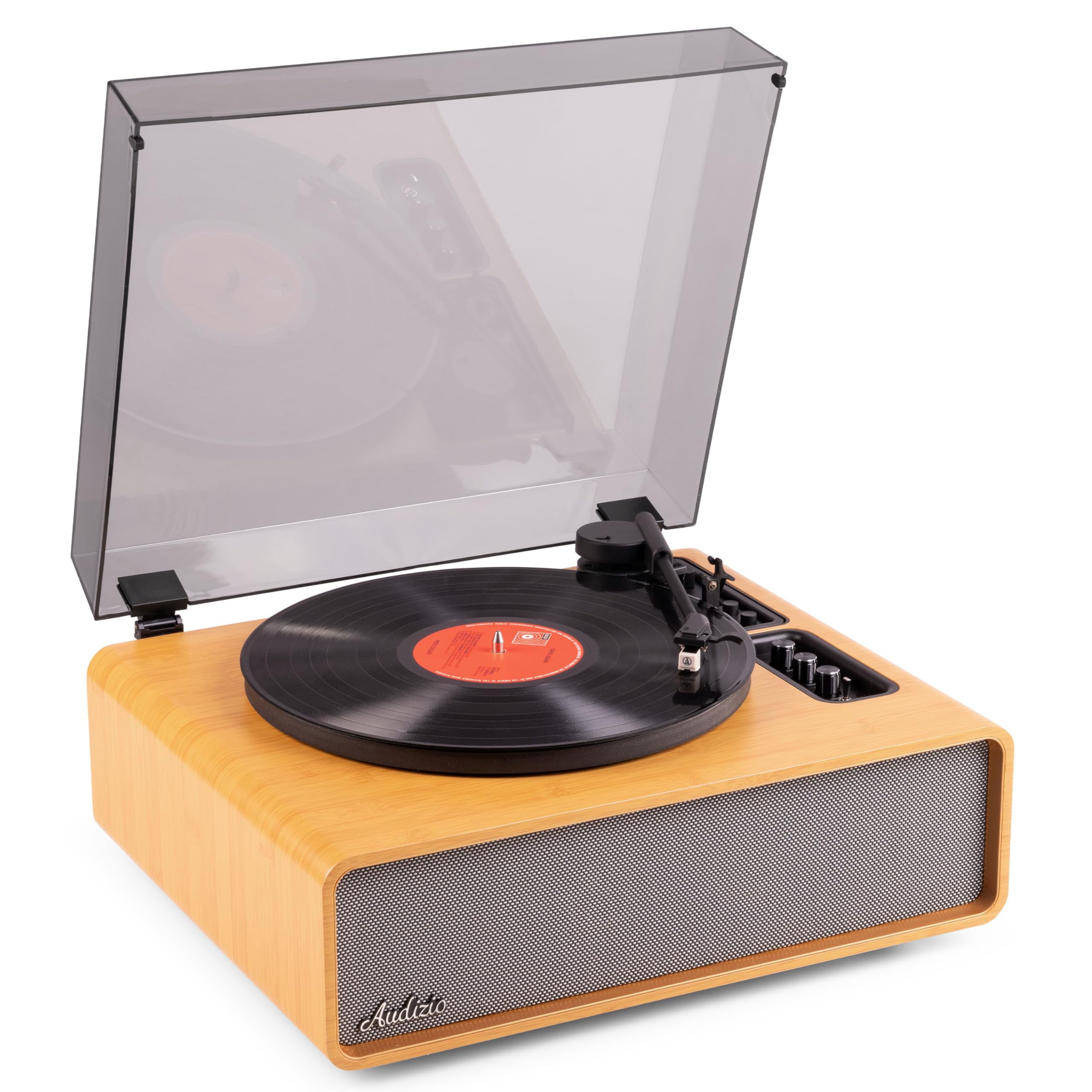
Figure 1.1: Audizio Laredo Turntable, overall view.
2. Instrukcje bezpieczeństwa
Please read and follow these safety instructions carefully to prevent damage to the unit and ensure your safety.
- Aby uniknąć pożaru lub porażenia prądem, nie wystawiaj urządzenia na działanie deszczu i wilgoci.
- Nie otwierać casing. Wewnątrz nie ma żadnych części, które mogłyby być naprawiane przez użytkownika. Wszelkie prace serwisowe należy zlecać wykwalifikowanemu personelowi.
- Aby zapobiec jego upadkowi, ustaw urządzenie na stabilnej i równej powierzchni.
- Trzymaj urządzenie z dala od bezpośredniego światła słonecznego, źródeł ciepła i nadmiernej ilości kurzu.
- Zapewnij odpowiednią wentylację wokół urządzenia. Nie blokuj otworów wentylacyjnych.
- Używaj wyłącznie dostarczonego zasilacza.
- Odłącz urządzenie od zasilania podczas burzy z piorunami lub gdy nie jest używane przez dłuższy czas.
3. Koniec produktuview
Familiarize yourself with the components and controls of your Audizio Laredo turntable.
Główne składniki:
- Talerz: Obsługuje płyty winylowe.
- Ramię: Mieści wkładkę i igłę.
- Cartridge & Stylus: Reads the grooves of the record. (Audio Technica ATN-3600)
- Osłona przeciwpyłowa: Chroni talerz i ramię gramofonu przed kurzem.
- Zintegrowane głośniki: Do bezpośredniego odtwarzania dźwięku.
- Panel sterowania: For power, volume, tone, and mode selection.
- Połączenia tylne: RCA Line Out, AUX In, Power Input.

Rysunek 3.1: Góra view of the turntable with key components visible.

Figure 3.2: Control Panel for volume, bass, and treble adjustments.

Figure 3.3: Audio Technica ATN-3600 Cartridge and Stylus.

Figure 3.4: Tonearm base with speed and auto-stop controls.

Figure 3.5: Rear connection panel.
4. Konfiguracja
4.1 Rozpakowanie
- Ostrożnie wyjmij gramofon z opakowania.
- Remove all protective materials, including the stylus guard.
- Zachowaj opakowanie, aby móc je później transportować lub przechowywać.
4.2 Umieszczenie
- Place the turntable on a stable, level surface to prevent vibrations and ensure proper playback.
- Avoid placing the unit near strong magnetic fields, heat sources, or areas with high humidity.
4.3 Montaż osłony przeciwpyłowej
- Align the hinges of the dust cover with the slots on the back of the turntable.
- Gently push down until the cover is securely in place.
- The dust cover can be removed for playback if desired.

Figure 4.1: Turntable with dust cover.
4.4 Połączenie zasilania
- Connect the power adapter to the DC IN port on the rear of the turntable.
- Plug the adapter into a suitable wall outlet (220V).
4.5 Konfiguracja ramienia i wkładki
- The Audio Technica cartridge is pre-installed.
- The tonearm features an adjustable counterweight. Refer to the detailed instructions in the included manual for precise counterweight adjustment to optimize tracking force.
5. Instrukcja obsługi
5.1 Odtwarzanie płyty
- Place a vinyl record on the platter. If playing a 7-inch single, use the included 45 RPM adapter.
- Select the appropriate speed (33 or 45 RPM) using the speed selector switch near the tonearm base.
- Delikatnie podnieś ramię gramofonu za pomocą dźwigni.
- Position the tonearm over the desired track of the record.
- Powoli opuść ramię za pomocą dźwigni. Igła dotknie płyty i rozpocznie się odtwarzanie.
- Po zakończeniu płyty funkcja automatycznego zatrzymania automatycznie zatrzyma obrót talerza. Podnieś ramię gramofonu i ustaw je w pozycji spoczynkowej.

Figure 5.1: Playing a vinyl record.
5.2 Bluetooth Operation (Bidirectional)
The Laredo turntable supports both Bluetooth input (receiving audio from a device) and Bluetooth output (sending audio to a Bluetooth speaker/headphones).
Wejście Bluetooth (BT IN):
- Press the MODE/POWER button to select Bluetooth mode. The LED indicator will flash.
- On your smartphone or tablet, enable Bluetooth and search for 'Audizio Laredo'.
- Select the turntable to pair. Once connected, the LED will glow solid.
- You can now stream audio from your device to the turntable's integrated speakers.
Bluetooth Output (BT OUT):
- Upewnij się, że słuchawki lub głośnik Bluetooth są w trybie parowania.
- Set the BT OUT switch (located near the tonearm base) to 'ON'.
- The turntable will automatically search for and connect to the nearest Bluetooth audio device.
- Once connected, the audio from your vinyl record will be transmitted to your Bluetooth device.

Figure 5.2: Bidirectional Bluetooth functionality.
5.3 Wejście AUX
- Connect an external audio device (e.g., MP3 player, CD player) to the AUX IN port on the rear of the turntable using a 3.5mm audio cable.
- Press the MODE/POWER button to select AUX mode.
- Audio from the external device will play through the turntable's speakers.
Wyjście liniowe 5.4 RCA
- Aby podłączyć gramofon do zewnętrznego amplifier or powered speakers, use an RCA cable (not included) to connect the LINE OUT ports on the rear of the turntable to the corresponding input on your audio system.
- Ensure the 'Speaker ON/OFF' switch on the rear is set to 'OFF' if you only want sound from external speakers.
5.5 Regulacja głośności i tonu
- Use the VOLUME knob on the control panel to adjust the overall playback volume.
- Adjust the BASS and TREBLE knobs to fine-tune the audio output to your preference.
6. Konserwacja
6.1 Czyszczenie urządzenia
- Przetrzyj pokrywę przeciwkurzową i obudowę miękką, suchą ściereczką.
- Nie należy używać środków czyszczących o właściwościach ściernych, wosków ani rozpuszczalników.
- For the platter, use a slightly damp ściereczką i dokładnie osuszyć.
6.2 Pielęgnacja i wymiana igły
- Rysik to delikatny element. Obchodź się z nim ostrożnie.
- Igłę należy czyścić regularnie miękką szczoteczką przeznaczoną do czyszczenia igieł, przesuwając ją od tyłu do przodu.
- A stylus typically lasts for approximately 300-500 hours of playback. If you notice a decrease in sound quality or increased skipping, it may be time to replace the stylus.
- Replacement styli (e.g., Audio Technica ATN-3600L or compatible) can be purchased from authorized dealers. Refer to the detailed instructions provided with the replacement stylus for installation.
7. Rozwiązywanie Problemów
If you encounter issues with your turntable, please consult the following table before contacting support.
| Problem | Możliwa przyczyna | Rozwiązanie |
|---|---|---|
| Brak zasilania | Zasilacz nie jest podłączony; gniazdko elektryczne nie działa. | Sprawdź, czy zasilacz jest prawidłowo podłączony do urządzenia i czy gniazdko jest sprawne. |
| Brak dźwięku z głośników | Volume too low; Speaker ON/OFF switch is OFF; Incorrect mode selected. | Increase volume; Set 'Speaker ON/OFF' switch to ON; Select correct input mode (Phono, BT IN, AUX). |
| Skipping records | Record is dirty or damaged; Stylus is worn or dirty; Turntable not level; Tracking force incorrect. | Clean record; Clean or replace stylus; Place turntable on a level surface; Adjust tonearm counterweight. |
| Problemy z parowaniem Bluetooth | Urządzenie znajduje się za daleko; Gramofon nie jest w trybie parowania; Zakłócenia. | Ensure devices are within range; Re-enter pairing mode; Turn off other Bluetooth devices. |
| Zniekształcenie dźwięku | Volume too high; Stylus worn; Record damaged. | Reduce volume; Replace stylus; Try a different record. |
8. Specyfikacje
Technical specifications for the Audizio Laredo Turntable.
| Funkcja | Specyfikacja |
|---|---|
| Nazwa modelu | Laredo (101.537) |
| Wymiary (dł. x szer. x wys.) | 43.2 x 43.2 x 21 cm (17 x 17 x 8.3 cala) |
| Waga produktu | 7.65 kg (16.86 funta) |
| Tworzywo | Wood (Bamboo finish) |
| Prędkości obrotowe | 33 obr./min., 45 obr./min. |
| Rodzaj kasety | Audio Technica (ATN-3600) |
| Typ silnika | Napęd pasowy |
| Format sygnału | Analog |
| Zintegrowane głośniki | Yes, 160W total output |
| Wersja Bluetooth | 5.4 (Bidirectional) |
| Łączność | Bluetooth (In/Out), RCA Line Out, AUX In |
| Źródło zasilania | Przewodowy elektryczny |
| Tomtage | 220 wolty |
| Kompatybilne urządzenia | Speakers, Headphones, Smartphone, Tablet |
9. Gwarancja i wsparcie
9.1 Informacje o gwarancji
This Audizio Laredo Turntable comes with a 2-letnia gwarancja from the date of purchase. This warranty covers manufacturing defects and faults under normal use. It does not cover damage caused by misuse, accidents, unauthorized modifications, or normal wear and tear (e.g., stylus wear).
Proszę zachować dowód zakupu na potrzeby roszczeń gwarancyjnych.
9.2 Obsługa klienta
If you have any questions, require technical assistance, or need to make a warranty claim, please contact your retailer or visit the official Audizio webwitryna zawierająca zasoby pomocy technicznej i informacje kontaktowe.
Official Audizio Webstrona: www.audizio.pl