
Wstęp
Dziękujemy za zakupasing the Aiwa 14-inch Portable Media Player Travel Kit. This device is designed to provide versatile entertainment on the go, allowing you to enjoy DVDs, CDs, and other media without relying on internet connectivity. This manual provides essential information for setting up, operating, and maintaining your portable media player.
Informacje dotyczące bezpieczeństwa
Przed użyciem produktu należy uważnie przeczytać wszystkie instrukcje bezpieczeństwa. Zachowaj instrukcję do wykorzystania w przyszłości.
- Nie wystawiaj urządzenia na działanie deszczu, wilgoci ani ekstremalnych temperatur.
- Unikaj umieszczania urządzenia w pobliżu źródeł ciepła lub w miejscu bezpośrednio nasłonecznionym.
- Use only the provided power adapters (AC/DC and car adapter) to charge the device.
- Nie próbuj demontować ani modyfikować urządzenia. Wszelkie prace serwisowe zlecaj wykwalifikowanemu personelowi.
- Handle discs carefully to prevent scratches or damage.
- Podczas korzystania z urządzenia należy zapewnić odpowiednią wentylację.
Zawartość opakowania
Sprawdź, czy w przesyłce znajdują się wszystkie elementy:
- Aiwa 14-inch Portable Media Player (Main Unit)
- Zdalne sterowanie
- Słuchawki przewodowe
- Torba ochronna
- Zasilacz AC/DC
- Zasilacz samochodowy (12 V)
- Instrukcja obsługi
Produkt ponadview
Familiarize yourself with the components and controls of your portable media player.
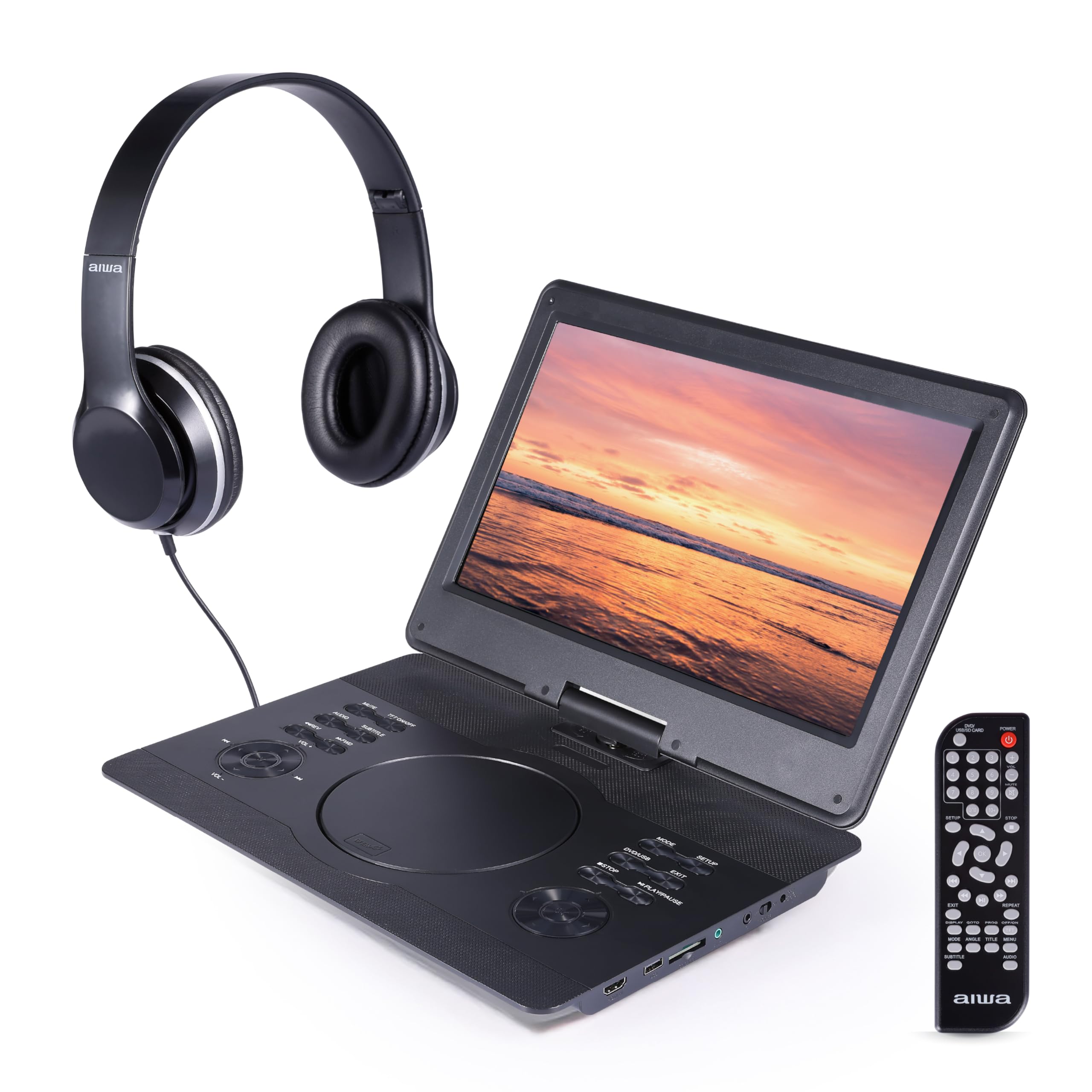
Rysunek 1: Przód view of the Aiwa Portable Media Player with included remote control.

Rysunek 2: Strona view showing the open disc tray and headphone connection.
Funkcje jednostki głównej:
- 14-inch Swiveling LCD Screen: Zapewnia elastyczność viewing angles and can fold flat.
- Taca na płytę: Do wkładania płyt DVD i CD.
- Przyciski sterujące: Play/Pause, Stop, Skip, Volume, Menu, Setup, Mode, etc.
- Wbudowane głośniki stereo: Do odtwarzania dźwięku bez słuchawek.
- Wejście HDMI: Connect external devices like gaming consoles or streaming sticks.
- Port USB: Do odtwarzania multimediów z dysków flash USB.
- Gniazdo karty SD: For playing media from SD memory cards.
- Gniazdo słuchawkowe: Do prywatnego słuchania.
- Pobór mocy: For connecting AC/DC or car adapters.

Rysunek 3: The screen can swivel and fold flat for compact use.
Organizować coś
1. Ładowanie akumulatora
- Connect the AC/DC power adapter to the DC IN port on the player and then to a wall outlet.
- Zaświeci się kontrolka ładowania. Pełne naładowanie trwa zazwyczaj 2-3 godzin.
- Alternatively, use the car power adapter to charge the device in a vehicle.
2. Włączanie/wyłączanie zasilania
- Aby włączyć, naciśnij i przytrzymaj MOC przycisk na urządzeniu lub pilocie.
- Aby wyłączyć, naciśnij i przytrzymaj MOC naciśnij przycisk ponownie.
3. Podłączanie słuchawek
- Plug the included wired headphones into the SŁUCHAWKI jack on the side of the player.
- The built-in speakers will automatically mute when headphones are connected.
4. Using the Carrying Bag

Rysunek 4: The included carrying bag for transport and protection.
- Place the media player and its accessories into the protective carrying bag for safe transport.
Operacyjny
1. Odtwarzanie płyt (DVD/CD)
- Otwórz pokrywę tacy na płytę.
- Ostrożnie umieść płytę DVD lub CD na wrzecionie etykietą do góry.
- Close the disc tray cover firmly.
- Odtwarzacz automatycznie wykryje płytę i rozpocznie odtwarzanie lub wyświetli menu płyty.
- Use the control buttons on the unit or remote (Play/Pause, Stop, Skip, Menu, etc.) to navigate and control playback.
2. Odtwarzanie z USB/karty SD
- Włóż dysk flash USB do portu USB lub kartę SD do gniazda karty SD.
- Naciśnij TRYB button on the unit or remote to select USB or SD mode.
- Poruszaj się po swoim fileza pomocą przycisków kierunkowych i naciśnij ODTWÓRZ/WEJDŹ to select and play media.
3. Wejście HDMI
- Connect an external device (e.g., gaming console, streaming stick) to the HDMI IN port on the player using an HDMI cable (not included).
- Naciśnij TRYB button on the unit or remote to select HDMI input.
- The player's screen will display the content from the connected HDMI device.
4. Regulacja ekranu

Rysunek 5: The screen can be swiveled and tilted for optimal viewing.
- The screen can swivel up to 180 degrees and tilt for various viewkąty.
- It can also be folded flat against the base unit, transforming the device into a tablet-like form factor.
5. Regulacja głośności
- Dostosuj głośność za pomocą Objętość + I TOM- przycisków na urządzeniu lub pilocie.
Konserwacja
Czyszczenie urządzenia
- Wipe the screen and exterior surfaces with a soft, dry, lint-free cloth.
- W przypadku uporczywych plam, delikatnieamppl szmatkę wodą lub łagodnym, nieściernym środkiem czyszczącym.
- Nie należy używać silnych środków chemicznych ani materiałów ściernych, gdyż mogą one uszkodzić wykończenie.
- Keep the disc tray and ports free of dust and debris.
Składowanie
- When not in use, store the player in its protective carrying bag in a cool, dry place.
- Unikać przechowywania w miejscach o ekstremalnych temperaturach i dużej wilgotności.
Rozwiązywanie problemów
Jeśli napotkasz problemy, zapoznaj się z poniższymi typowymi problemami i rozwiązaniami:
| Problem | Możliwa przyczyna | Rozwiązanie |
|---|---|---|
| Brak zasilania | Battery depleted; Power adapter not connected or faulty. | Charge the battery using the AC/DC or car adapter. Ensure connections are secure. |
| Płyta nie jest odtwarzana / błąd „Brak płyty” | Płyta włożona nieprawidłowo; Płyta jest brudna lub porysowana; Niezgodny format płyty. | Ensure disc is inserted label-side up. Clean the disc. Try a different disc. Verify disc is DVD/CD/VCD format. |
| Brak dźwięku | Volume too low; Headphones connected; Mute function active. | Increase volume. Disconnect headphones if using speakers. Check if mute is active on remote. |
| Niska jakość obrazu | Disc quality; Screen viewing angle; Low resolution content. | Ensure disc is clean and undamaged. Adjust screen angle. Note that native resolution is 800x480. |
| Pilot nie działa | Batteries depleted; Obstruction between remote and player; Remote sensor blocked. | Replace remote batteries. Ensure clear line of sight to the player's IR sensor. |
Specyfikacje
| Funkcja | Szczegół |
|---|---|
| Marka | Aiwa |
| Numer modelu | AI7017-BLK-T37-6 |
| Rozmiar ekranu | 14 cali |
| Typ wyświetlacza | LCD |
| Rozdzielczość natywna | 800x480 |
| Obsługa typów mediów | DVD, CD, CD-R, DVD-R, VCD, USB, SD Card |
| Łączność | HDMI Input, USB Port, SD Card Slot, Headphone Jack |
| Audio | Built-in Stereo Speakers, Headphone Output |
| Źródło zasilania | Rechargeable Battery, AC/DC Adapter, Car Adapter (12V) |
| UPC | 021331134455 |
Informacje o gwarancji
This product is covered by a limited manufacturer's warranty. Please refer to the warranty card included in your package or contact customer support for details regarding warranty terms and conditions.
Obsługa klienta
For technical assistance, troubleshooting, or warranty inquiries, please contact Aiwa customer support. Contact information can typically be found on the product packaging or the official Aiwa webstrona.