
Produkt ponadview
The AT&T EL2131-11 is a DECT 6.0 cordless landline phone designed for reliable communication. It features a powerful call blocker, caller ID, a full-duplex speakerphone, and a backlit display and keypad for enhanced visibility. This model includes one handset.
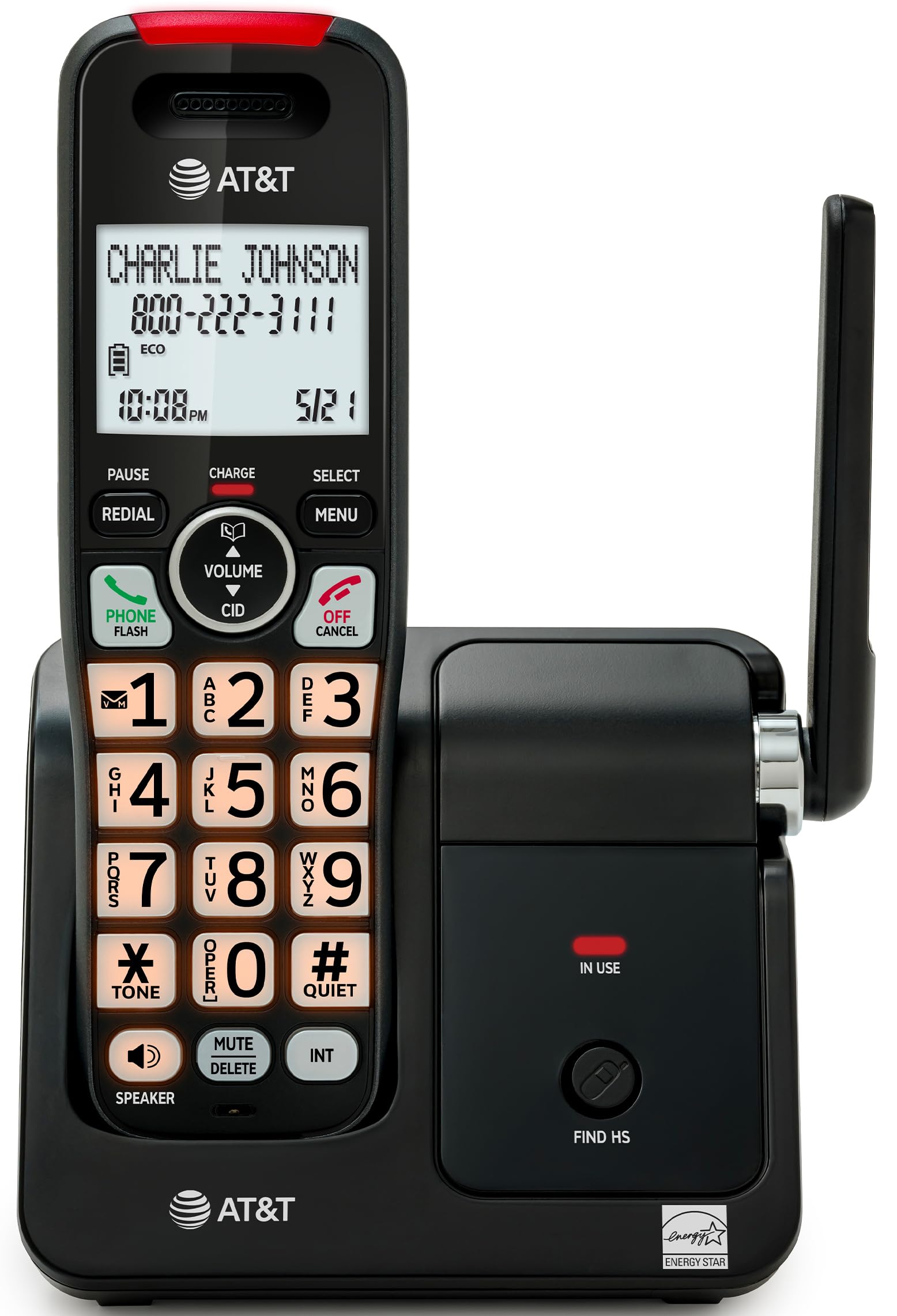
Image: The AT&T EL2131-11 cordless phone, showing the handset docked in its base unit.
Główne cechy:
- Blokada połączeń: Blocks up to 50 unwanted numbers.
- Identyfikator dzwoniącego: Zapisuje do 50 połączeń, wyświetlając nazwę, numer, godzinę i datę.
- Pełnodupleksowy zestaw głośnomówiący: Allows both parties to speak and listen simultaneously.
- Podświetlany wyświetlacz i klawiatura: Zapewnia wyraźną widoczność w warunkach słabego oświetlenia.
- Tryb cichy: Silences the ringer instantly.
- Tryb ekologiczny: Reduces power consumption and extends battery life.
- Technologia DECT 6.0: Ensures interference-free communication and extended range.
Organizować coś
Zawartość pudełka:
- Jednostka bazowa
- 1 bezprzewodowa słuchawka
- Zasilacz 1
- Przewód telefoniczny
- 2 ogniw baterii
- Szybki przewodnik
- Uchwyt ścienny
1. Instalacja baterii
- Znajdź komorę baterii z tyłu słuchawki.
- Insert the two supplied battery cells, ensuring correct polarity (+ and -).
- Dokładnie zamknij pokrywę komory baterii.
2. Podłączenie jednostki bazowej
- Connect the small end of the power adapter to the power jack on the back of the base unit.
- Podłącz większy koniec zasilacza do standardowego gniazdka elektrycznego.
- Podłącz jeden koniec przewodu telefonicznego do gniazda TEL LINE z tyłu jednostki bazowej.
- Podłącz drugi koniec przewodu telefonicznego do gniazdka telefonicznego w ścianie.
3. Ładowanie początkowe
Place the handset in the base unit with the display facing forward. The handset will begin charging. Allow the handset to charge for at least 16 hours before initial use to ensure optimal battery performance.

Image: The handset charging in its base, with an overlay indicating a 5-day battery life on a single charge.
Instrukcja obsługi
Wykonywanie i odbieranie połączeń
- Zadzwonić: Naciskać TELEFON / FLASH, a następnie wybierz numer.
- Aby odebrać połączenie: Gdy telefon zadzwoni, naciśnij TELEFON / FLASH lub dowolnego klawisza wybierania (0-9, * lub #).
- Aby zakończyć połączenie: Naciskać WYŁĄCZ/ANULUJ lub odłóż słuchawkę z powrotem na bazę.
Korzystanie z zestawu głośnomówiącego
Podczas połączenia naciśnij GŁOŚNIK button to activate the full-duplex speakerphone. Press it again to switch back to the handset earpiece.

Image: A man holding a small dog, speaking hands-free using the phone's speakerphone function. The phone's base unit is visible on a table.
Identyfikator dzwoniącego
When a call comes in, the caller's information (name and number) will appear on the handset display if you subscribe to Caller ID service. The phone stores up to 50 caller ID records.

Image: A close-up of the phone's display showing a caller's name and number, along with the time and date.
Blokada połączeń
The call blocker feature allows you to block up to 50 unwanted numbers. To block a number:
- During a call or from the Caller ID log, press MENU.
- Scroll to 'Call Blocker' and press WYBIERAĆ.
- Follow the on-screen prompts to add the number to the block list.

Image: A visual representation of the call blocker feature, showing a list of blocked numbers on the phone's display.
Tryb cichy
To temporarily silence the ringer, press and hold the #CICHY button on the handset. The ringer will be silenced for a set period, typically 1 to 12 hours, which can be adjusted in the settings.

Image: A close-up of the phone's display indicating that 'Quiet mode' is active.
Tryb ekologiczny
The ECO mode automatically adjusts power consumption to conserve battery life. This mode is typically active by default and indicated by an 'ECO' icon on the display.

Image: The phone's display showing the 'ECO' icon, indicating power-saving mode is active.
Ponowne wybieranie
Aby ponownie wybrać ostatnio wybrany numer, naciśnij PONOWNIE przycisk.

Image: The phone's display showing the 'Redial' function with a previously dialed number.
Podświetlany wyświetlacz i klawiatura
The handset features a backlit LCD display and illuminated keypad for easy readability and operation in various lighting conditions.

Image: A hand holding the phone, demonstrating its bright backlit screen and illuminated keypad in a low-light environment.
Konserwacja
Czyszczenie telefonu
- Użyj miękkiego, lekko damp cloth to clean the surfaces of the phone and base unit.
- Nie należy używać środków czyszczących w sprayu ani silnych środków chemicznych, gdyż mogą one uszkodzić wykończenie lub podzespoły elektroniczne.
- Ensure the phone is unplugged from the power outlet before cleaning.
Pielęgnacja baterii
- For optimal battery life, keep the handset in the base unit when not in use.
- If the phone will be unused for an extended period, remove the batteries to prevent leakage.
- Wymień baterie, gdy przestaną skutecznie trzymać ładunek. Używaj wyłącznie baterii określonego typu.
Rozwiązywanie problemów
If you experience issues with your AT&T EL2131-11 phone, refer to the following common troubleshooting steps:
| Problem | Rozwiązanie |
|---|---|
| Brak sygnału wybierania |
|
| Słuchawka się nie ładuje |
|
| Nie można wykonywać/odbierać połączeń |
|
| Słaba jakość dźwięku/zakłócenia |
|
Specyfikacje
| Funkcja | Szczegół |
|---|---|
| Marka | AT&T |
| Numer modelu | EL2131-11 |
| Typ telefonu | Bezprzewodowy |
| Technologia | DECT 6.0 |
| Kolor | Czarny i srebrny |
| Tworzywo | Plastikowy |
| Źródło zasilania | Zasilany bateryjnie |
| Pozycja Wymiary (dł. x szer. x wys.) | 5.06 x 4.65 x 7.23 cala (jednostka podstawowa) |
| Czas rozmów telefonicznych | 10 godzin |
| Czas czuwania telefonu | 5 dni |
| Identyfikacja dzwoniącego | Tak |
| Operacja wieloliniowa | Praca jednoliniowa |
| Typ systemu odbierającego | NIE |
| UPC | 650530034510 |

Image: The AT&T EL2131-11 base unit with handset, showing its height (7.23 inches), length (5.06 inches), and width (4.65 inches).
Informacje o gwarancji
This AT&T EL2131-11 Cordless Landline Phone comes with a 1-roczna ograniczona gwarancja from the manufacturer. Please retain your proof of purchase for warranty claims. For specific terms and conditions, refer to the warranty card included in your product packaging or visit the official AT&T support webstrona.
Obsługa klienta
For further assistance, technical support, or to inquire about replacement parts, please contact AT&T customer service. You can typically find contact information on the official AT&T website or in the quick start guide provided with your phone.
Online resources may include FAQs, detailed user manuals, and support forums.


