
Wstęp
This manual provides instructions for the RadioShack Mechanical Gaming Keyboard, Model 2607135. This keyboard features a 98-key layout, mechanical switches designed for durability, adjustable rainbow backlighting, 25-key anti-ghosting, and an integrated rotary knob for volume control. It is designed for plug-and-play operation via USB and is compatible with Windows operating systems.
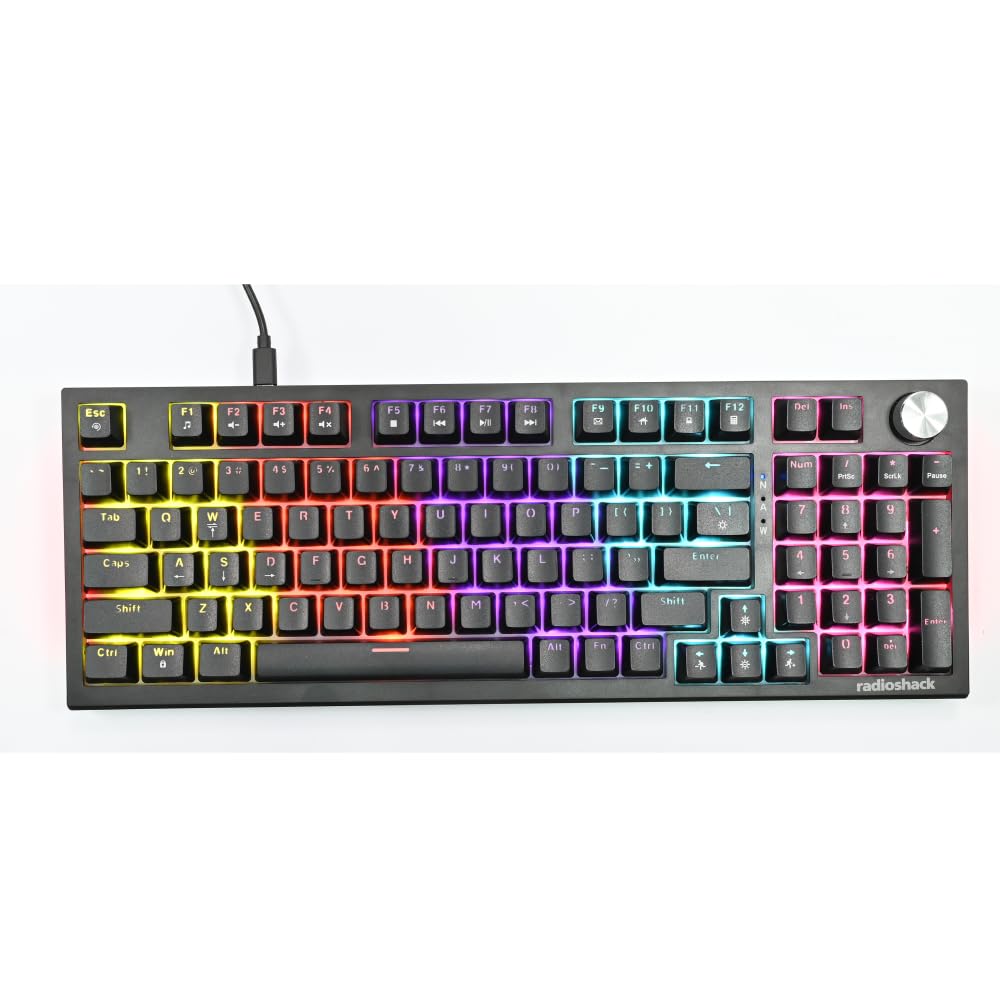
Image: The RadioShack Mechanical Gaming Keyboard, showcasing its 98-key layout and vibrant rainbow backlighting.
Zawartość opakowania
Sprawdź zawartość paczki, aby upewnić się, że znajdują się w niej wszystkie elementy:
- 1x RadioShack Mechanical Gaming Keyboard
- 1x kabel USB
- 1x Instrukcja obsługi (ten dokument)

Image: A graphic illustrating the contents of the product package, including the gaming keyboard and user manual.
Organizować coś
- Rozpakuj klawiaturę: Ostrożnie wyjmij klawiaturę i kabel USB z opakowania.
- Połącz z komputerem: Włóż wtyczkę USB-A dołączonego kabla USB do wolnego portu USB w komputerze.
- Instalacja sterownika: The keyboard is plug-and-play. Your operating system (Windows XP-10 compatible) will automatically detect and install the necessary drivers. No additional software installation is required.
- Umieszczenie: Place the keyboard on a stable, flat surface. Adjust the rear feet for your preferred typing angle.

Image: An illustration highlighting key features such as the 1.5m USB cable length and compatibility with Windows XP through 10.
Instrukcja obsługi
Keyboard Layout and Functions
The keyboard features a 98-key layout, providing a compact design while retaining essential keys, including a numeric keypad.
Funkcje pokrętła obrotowego
The dedicated rotary knob located on the top right of the keyboard controls audio volume.
- Obróć zgodnie z ruchem wskazówek zegara: Zwiększa głośność.
- Obrót przeciwnie do ruchu wskazówek zegara: Zmniejsza głośność.
- Naciśnij w dół: Wycisza/włącza dźwięk.

Image: A close-up of a hand interacting with the rotary knob, demonstrating its use for volume adjustment.
Kontrola podświetlenia
The keyboard features adjustable rainbow backlighting with multiple modes and side-light effects. Specific key combinations (often Fn + a function key) are used to cycle through lighting modes, adjust brightness, or change speed. Refer to the keycap legends for specific lighting control functions.
- Przełączanie trybu: Typically Fn + Ins, Home, PgUp, Del, End, PgDn.
- Regulacja jasności: Zwykle Fn + klawisze strzałek w górę/w dół.
- Regulacja prędkości: Zwykle Fn + klawisze strzałek w lewo/w prawo.

Image: A collage showing the keyboard with various backlighting patterns and side-light effects, illustrating the 17 available lighting modes.
Anty-ghosting
The keyboard supports 25-key anti-ghosting, ensuring that multiple simultaneous key presses are registered accurately, which is crucial for gaming and fast typing.

Image: A user actively typing on the keyboard during a gaming session, emphasizing the accuracy provided by 25 anti-ghosting keys.
Konserwacja
- Czyszczenie: Use a soft, dry cloth to wipe the surface of the keyboard. For deeper cleaning, use compressed air to remove dust and debris from between the keycaps. Avoid using liquid cleaners directly on the keyboard.
- Składowanie: Jeśli klawiatura nie będzie używana przez dłuższy czas, należy ją przechowywać w czystym i suchym miejscu, z dala od bezpośredniego światła słonecznego i ekstremalnych temperatur.
- Unikaj wycieków: Liquids can damage the internal components. Exercise caution to prevent spills on the keyboard.
Rozwiązywanie problemów
Klawiatura nie odpowiada
- Sprawdź, czy kabel USB jest prawidłowo podłączony do klawiatury i komputera.
- Spróbuj podłączyć klawiaturę do innego portu USB w komputerze.
- Uruchom ponownie komputer.
- Przetestuj klawiaturę na innym komputerze, aby ustalić, czy problem dotyczy klawiatury czy portu USB/sterowników komputera.
Podświetlenie nie działa
- Check if the backlighting has been turned off using the keyboard's function keys (e.g., Fn + brightness down key).
- Cycle through the lighting modes to see if it reactivates.
Keys Not Registering / Ghosting Issues
- Upewnij się, że klawiatura jest czysta i wolna od zanieczyszczeń, które mogą blokować przełączniki klawiszy.
- The keyboard features 25-key anti-ghosting. If more than 25 keys are pressed simultaneously, some inputs may not register.
Specyfikacje
| Numer modelu | 2607135 |
| Marka | RadioShack |
| Typ klawiatury | Mechaniczna klawiatura do gier |
| Układ klawiszy | Klucz 98 |
| Łączność | USB-A (Corded Electric) |
| Trwałość przełącznika | Do 50 milionów naciśnięć klawiszy |
| Podświetlenie | Rainbow (Adjustable modes, brightness, speed) |
| Anty-ghosting | Klucz 25 |
| Cechy specjalne | Rotary Volume Knob, Ergonomic Design |
| Kompatybilne urządzenia | Laptop, PC (Windows XP-10) |
| Zawarte komponenty | Kabel USB |

Obraz: szczegółowy view of a mechanical switch, illustrating the 50-million keystroke life for long-term reliability.
Wsparcie
For further assistance or inquiries, please refer to the official RadioShack support channels or webstrona.