
1. Wprowadzenie
Thank you for choosing the Sharp 40HF2265E Full HD Google TV. This manual provides essential information for setting up, operating, and maintaining your television. Featuring integrated Google TV, HDR10 support, Dolby Digital audio, and Bluetooth connectivity, your new TV offers a rich entertainment experience. Please read this manual thoroughly before use to ensure proper operation and to maximize your viewsprawia mi przyjemność.

Obraz 1.1: Przód view of the Sharp 40HF2265E Full HD Google TV.
2. Co znajduje się w pudełku
Ostrożnie rozpakuj telewizor i sprawdź, czy znajdują się w nim wszystkie poniższe elementy:
- Sharp 40HF2265E Television
- Kabel zasilający
- Pilot zdalnego sterowania (wymaga 2 baterii AAA, nie zawsze są dołączone)
- Instrukcja obsługi (ten dokument)
- Karta gwarancyjna
If any items are missing or damaged, please contact your retailer or Sharp customer support immediately.
3. Konfiguracja
3.1 Instalacja stojaka
To install the TV stand, place the TV screen-down on a soft, flat surface to prevent scratches. Align the stand feet with the corresponding slots on the bottom of the TV and secure them with the provided screws. Ensure the stand is firmly attached before placing the TV upright.

Obraz 3.1: Przód view of the TV with stand feet attached.
3.2 Montaż na ścianie
If you prefer to wall-mount your TV, you will need a VESA-compatible wall mount (not included). The Sharp 40HF2265E supports a VESA mounting standard of 200 x 200 mm. Refer to the wall mount's instructions for installation. Always ensure the wall can support the weight of the TV and the mount.

Obraz 3.2: Tył view of the TV, highlighting VESA mounting points and ports.
3.3 Podłączanie urządzeń peryferyjnych
Connect your external devices to the appropriate ports on the back and side of the TV. The TV features multiple HDMI, USB, and other connectivity options.
- Porty HDMI: Do podłączania odtwarzaczy Blu-ray, konsol do gier, dekoderów itp.
- Porty USB: Do podłączania urządzeń pamięci masowej USB w celu odtwarzania multimediów lub aktualizacji oprogramowania.
- Port Ethernet: Do przewodowego połączenia internetowego.
- Wejście antenowe/kablowe: Do podłączenia anteny lub sygnału telewizji kablowej.
- Wyjście audio: Do podłączania zewnętrznych systemów audio.
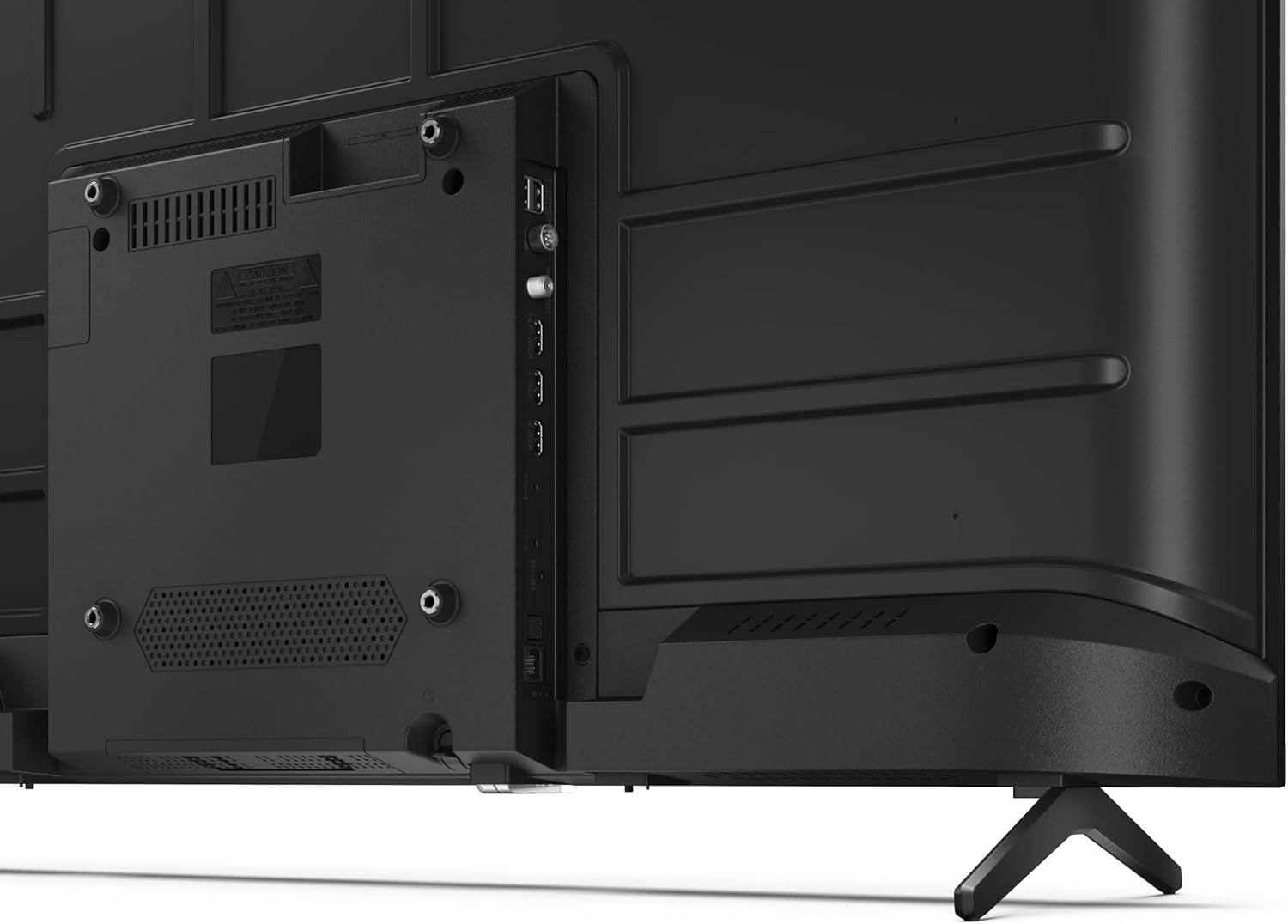
Rysunek 3.3: Szczegółowy view portów łączności telewizora.
3.4 Pierwsze włączenie i konfiguracja Google TV
After connecting all necessary cables, plug the power cable into an electrical outlet. Press the power button on the remote control or on the TV. Follow the on-screen instructions to complete the initial setup, including network connection, Google account login, and channel scanning.
4. Obsługa
4.1 Funkcje zdalnego sterowania
The remote control allows you to navigate the TV's features. Common buttons include Power, Volume Up/Down, Channel Up/Down, Input Source, Home (Google TV), Navigation (directional arrows, OK), Back, and Google Assistant.
4.2 Interfejs Google TV
Your Sharp TV runs on Google TV, providing a personalized home screen with content recommendations from your subscriptions. Use the remote's navigation buttons to browse movies, shows, apps, and your library.

Image 4.1: The Google TV home screen on the Sharp 40HF2265E.
4.3 Wybór wejścia
To switch between connected devices (e.g., HDMI 1, HDMI 2, TV tuner), press the 'Input' or 'Source' button on your remote control and select the desired input from the on-screen menu.
4.4 Ustawienia obrazu i dźwięku
Access the TV's settings menu to adjust picture modes (Standard, Vivid, Cinema, Game), brightness, contrast, color, and sound modes (Standard, Music, Movie, Speech). The TV supports HDR10 for enhanced contrast and color, and Dolby Digital for rich audio.

Image 4.2: Visual representation of HDR (High Dynamic Range) technology.
4.5 Asystent Google i Chromecast
Use the built-in Google Assistant for voice control. Press the Google Assistant button on your remote and speak your commands, such as searching for content, controlling smart home devices, or getting information. Chromecast allows you to cast content directly from compatible devices like smartphones or tablets to your TV.

Image 4.3: Google Assistant integration for voice commands.
4.6 Łączność Bluetooth
Pair Bluetooth-enabled devices such as headphones or soundbars with your TV for a wireless audio experience. Navigate to the TV's settings menu, select 'Remotes & Accessories', and then 'Pair new device' to connect.
5. Konserwacja
5.1 Czyszczenie telewizora
Zawsze odłączaj telewizor od zasilania przed czyszczeniem. Do przecierania ekranu i obudowy telewizora używaj miękkiej, suchej ściereczki. W przypadku uporczywych zabrudzeń delikatnie przetrzyj.ampen the cloth with water or a specialized screen cleaner. Never use abrasive cleaners, waxes, or solvents.
5.2 Aktualizacje oprogramowania
Your Google TV may receive automatic software updates. Ensure your TV is connected to the internet to receive these updates, which can improve performance and add new features. You can also manually check for updates in the settings menu.
6. Rozwiązywanie Problemów
Jeśli masz problemy z telewizorem, zapoznaj się z poniższymi typowymi rozwiązaniami:
- Brak zasilania: Sprawdź, czy kabel zasilający jest prawidłowo podłączony do telewizora i gniazdka ściennego. Upewnij się, że gniazdko jest sprawne.
- Brak obrazu/dźwięku: Sprawdź, czy wybrano prawidłowe źródło sygnału wejściowego. Sprawdź wszystkie połączenia kablowe (HDMI, antena). Spróbuj ponownie uruchomić telewizor.
- Pilot nie działa: Wymień baterie (2 AAA). Upewnij się, że między pilotem a czujnikiem podczerwieni telewizora nie ma żadnych przeszkód.
- Problemy z połączeniem sieciowym: For Wi-Fi, check your router and ensure the TV is within range. For wired connections, check the Ethernet cable. Try restarting your router and the TV.
- Problemy z jakością obrazu: Dostosuj ustawienia obrazu (jasność, kontrast, ostrość). Upewnij się, że źródło sygnału wejściowego zapewnia wysoką jakość.
For more complex issues, consult the comprehensive troubleshooting section in the full digital manual or contact Sharp customer support.
7. Specyfikacje
Below are the technical specifications for the Sharp 40HF2265E Full HD Google TV:

Image 7.1: Dimensions of the Sharp 40HF2265E TV.
| Funkcja | Specyfikacja |
|---|---|
| Marka | Ostry |
| Numer modelu | 40HF2265E |
| Nazwa modelu | Seria HF |
| Rok modelowy | 2025 |
| Rozmiar ekranu | 40 cala (81 centymetra) |
| Technologia wyświetlania | PROWADZONY |
| Rezolucja | 1080p (Pełna rozdzielczość HD) |
| Częstotliwość odświeżania | 60 Hz |
| Proporcje obrazu | 16:9 |
| Współczynnik kontrastu | 100000:1 |
| Screen Finish | Matowy |
| Czas reakcji | 8 milisekund |
| Technologia podświetlenia | PROWADZONY |
| Supported HDR Format | HDR10, HLG |
| Poprawa jakości obrazu | Dynamic Contrast, HDR10, HLG |
| Motion Enhancement Technology | Motion Interpolation |
| System operacyjny | Telewizja Google |
| Internet Applications | Apple TV, Google TV, Hulu, Prime Video, YouTube |
| Cechy specjalne | Bluetooth, Chromecast, Dolby Digital, HD Tuner |
| Technologia łączności | Ethernet, USB, Wi-Fi |
| Technologia bezprzewodowa | Bluetooth |
| Wersja Bluetooth | 5.0 |
| Screen Mirroring Technology | Chromecast, Google Cast |
| Wszystkie porty HDMI | 3 |
| Total USB 2.0 Ports | 2 |
| Number of Composite Video Inputs | 1 |
| Wejście audio | Mini composite/CVBS + audio input |
| Total Audio Output Ports | 2 |
| Tryb wyjścia audio | Stereofoniczny |
| Kodowanie dźwięku | DD |
| Integrated Surround Sound Format | Dolby AC-4, Dolby Digital, Dolby Digital Plus |
| Maksymalna moc wyjściowa głośnika | 16 watów (2x8 W) |
| Liczba kanałów audio | 2.0 |
| System transmisji | DVB-T2/C/S/S2 |
| Kodowanie wideo | MKV |
| Wymiary produktu (gł. x szer. x wys.) | 8.4P x 89.2l x 50.9H cm |
| Waga przedmiotu | 5.4 kilograma |
| Waga bez podstawy | 5.4 kilograma |
| Szerokość podstawy | 765 milimetrów |
| Standard montażowy VESA | 200x200mm |
| Pobór mocy | 37 watów |
| Tomtage | 230 wolty |
| Remote Control Battery Size | AAAA |
| Remote Control Battery Quantity | 2 |
| Parental Control Technology | Kindersicherung Über Google Tv |
| Dostępność części zamiennych w UE | 7 lat |
8. Gwarancja i wsparcie
8.1 Gwarancja na produkt
The Sharp 40HF2265E television comes with a 2-year manufacturer's warranty. Please refer to the included Warranty Card for detailed terms and conditions regarding coverage and service. Keep your proof of purchase for warranty claims.
8.2 Obsługa klienta
If you require further assistance, have questions not covered in this manual, or need technical support, please contact Sharp customer service. Contact information can typically be found on the Warranty Card or the official Sharp webstrona.