
Wstęp
This manual provides detailed instructions for the operation and maintenance of your LAUNCH X431 PROS Elite diagnostic scanner and LAUNCH CR319 OBD2 check engine code reader. These devices are designed to assist in vehicle diagnostics, maintenance, and repair tasks, offering comprehensive system analysis and code reading capabilities.
Produkt ponadview
The LAUNCH X431 PROS Elite is an advanced diagnostic tablet offering extensive vehicle coverage and functions, while the LAUNCH CR319 is a compact, user-friendly OBD2 code reader for basic engine diagnostics.
LAUNCH X431 PROS Elite Diagnostic Scanner

Obraz: The LAUNCH X431 PROS Elite main interface, displaying options such as Intelligent Diagnose, Local Diagnose, Service Function, Remote Diagnose, Software Update, and Diagnostic History.
The X431 PROS Elite features a robust tablet design with a user-friendly interface. It provides access to advanced diagnostic functions including online coding, personalization, V.A.G guided functions, and comprehensive all-system diagnosis. It supports modern vehicle protocols like CANFD and DoIP.
LAUNCH CR319 Check Engine Code Reader
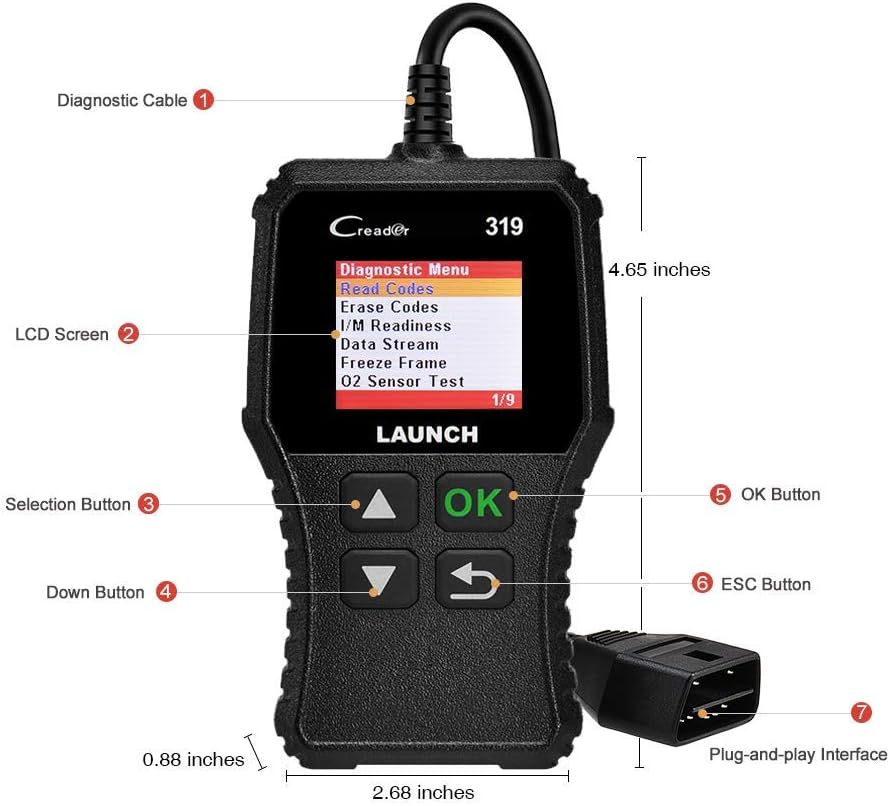
Obraz: The LAUNCH CR319 device, highlighting its diagnostic cable, LCD screen, selection buttons (Up, Down, OK, ESC), and plug-and-play interface. Dimensions are also indicated.
The CR319 is a compact, handheld device designed for quick and easy reading and clearing of OBD2 trouble codes. It features a clear LCD screen and intuitive buttons for navigation, making it suitable for basic engine diagnostics and checking emission readiness.
Organizować coś
WPROWADŹ X431 PROS Elite
- Naładuj urządzenie: Before first use, ensure the X431 PROS Elite tablet is fully charged using the provided power adapter.
- Włączanie: Naciśnij i przytrzymaj przycisk zasilania, aby włączyć urządzenie.
- Początkowe ustawienia: Follow the on-screen prompts to select language, connect to Wi-Fi, and register your device. This is crucial for software updates and online functions.
- Połącz z pojazdem: Locate the vehicle's OBD2 port (usually under the dashboard). Connect the diagnostic cable from the X431 PROS Elite to the vehicle's OBD2 port. Turn the vehicle's ignition to the ON position (engine off).
WYSTRZEL CR319
- Zlokalizuj port OBD2: Find the vehicle's 16-pin OBD2 Data Link Connector (DLC), typically located under the dashboard on the driver's side.
- Podłącz urządzenie: Plug the CR319's diagnostic cable directly into the vehicle's OBD2 port. The device will power on automatically.
- Zapłon włączony: Przekręć zapłon pojazdu do pozycji ON (silnik wyłączony).
Operating the LAUNCH X431 PROS Elite
The X431 PROS Elite offers a wide range of diagnostic and service functions. Ensure the device is properly connected to the vehicle and powered on before proceeding.
Diagnostyka wszystkich systemów

Obraz: The X431 PROS Elite displaying various service functions like Brake Reset, Oil Reset, SAS Reset, and ABS Bleeding, alongside indicators for Auto VIN, Read ECU Information, Read/Clear DTCs, and View Live Data across systems like ABS, TPMS, Engine, AT, and SRS.
This function allows you to scan all available electronic control units (ECUs) in the vehicle, including Engine, Transmission, ABS, SRS, TPMS, and more. It can read and clear Diagnostic Trouble Codes (DTCs), view live data streams, and retrieve ECU information. Select "Intelligent Diagnose" or "Local Diagnose" from the main menu to begin.
Zaawansowane kodowanie ECU

Obraz: An illustration of the X431 PROS Elite performing ECU coding, with text indicating functions such as ECU Replacement, Component Matching, Personalization, Modification & Retrofit, and Programmable Module Installation. It also lists compatible brands for ECU Online Coding.
The X431 PROS Elite supports online and offline ECU coding. This allows for replacing or recoding new modules, performing component matching, personalization (e.g., flashing auto start-stop, folding mirrors), modifications, retrofits, and programmable module installations. This function is typically found under specific vehicle brand menus or advanced functions.
38+ Service Functions
Access common maintenance and reset functions directly from the "Service Functions" menu. These include, but are not limited to:
- Reset oleju
- Reset hamulca (EPB)
- Reset czujnika kąta skrętu (SAS)
- Resetowanie TPMS
- Dopasowanie baterii
- Resetowanie opon
- Krwawienie z ABS
- Reset czujnika NOX
- Resetowanie dachu przesuwnego
- Zmiana języka
- And many more, accessible through specific vehicle brands and systems.
Bi-directional Control (Active Tests)

Obraz: An illustration showing the X431 PROS Elite sending commands to a vehicle and receiving feedback, with examples of controlled components like doors, windows, lights, and wipers. The image also highlights Diagnostic Feedback, Repair Information, 2-Year Free Updates, and 25+ Languages.
This function allows the diagnostic tool to send commands to vehicle systems and components to test their functionality. Examples include activating solenoids, relays, lights, wipers, or performing injector tests. This helps in pinpointing faulty components quickly.
Vehicle Coverage and Protocols

Obraz: A graphic detailing the wide vehicle coverage of the X431 PROS Elite, including 150+ main brands and 100,000+ models. It also specifies compatibility with CAN FD (GM models), DOIP (BMW E/F/G Chassis, Jaguar, Land Rover), FCA SGW Vehicle Access (Fiat, Chrysler, Dodge, Alfa Romeo), and VAG Guided Functions (VW, Audi, Skoda, Seat).
The X431 PROS Elite supports over 150 vehicle brands and 100,000 models from 1996 to 2026. It includes support for advanced protocols such as CANFD (compatible with GM models) and DoIP (compatible with BMW E/F/G Chassis, Jaguar, Land Rover). It also offers FCA SGW access for Fiat, Chrysler, Dodge, and Alfa Romeo vehicles, and V.A.G guided functions for VW, Audi, Skoda, and Seat.
Operating the LAUNCH CR319 Check Engine Code Reader
The CR319 is designed for quick and efficient OBD2 diagnostics. Once connected to the vehicle's OBD2 port and the ignition is on, the device will power up and display the main menu.
Pełne funkcje OBD2

Obraz: A grid of nine images illustrating the CR319's full OBD2 functions: Read Codes, Erase Codes, Live Data, I/M Readiness, Freeze Frame, O2 Sensor Test, On-board Monitor Test, Vehicle Information, and EVAP System (Mode 8).
Navigate through the menu using the UP/DOWN buttons and confirm selections with the OK button. The CR319 supports all 10 OBD2 test modes:
- Przeczytaj kody: Wyświetla aktualne, oczekujące i stałe kody błędów diagnostycznych (DTC).
- Usuń kody: Usuwa kody DTC z komputera pojazdu i wyłącza kontrolkę Check Engine (MIL).
- Gotowość I/M: Sprawdza gotowość systemów monitorowania emisji.
- Dane na żywo: Wyświetla dane w czasie rzeczywistym z czujników pojazdu.
- Stopklatka: Shows a snapshot of vehicle operating conditions at the time a DTC was set.
- Test czujnika O2: Pobiera wyniki testu monitorowania czujnika O2.
- Test monitora pokładowego (tryb 6): Pobiera wyniki dotyczące komponentów i układów napędowych związanych z emisją, które nie są monitorowane w sposób ciągły.
- Test układu EVAP (tryb 8): Rozpoczyna test układu kontroli emisji par.
- Informacje o pojeździe (tryb 9): Retrieves vehicle information such as VIN, Cal ID, and CVN.
Turning Off the Check Engine Light
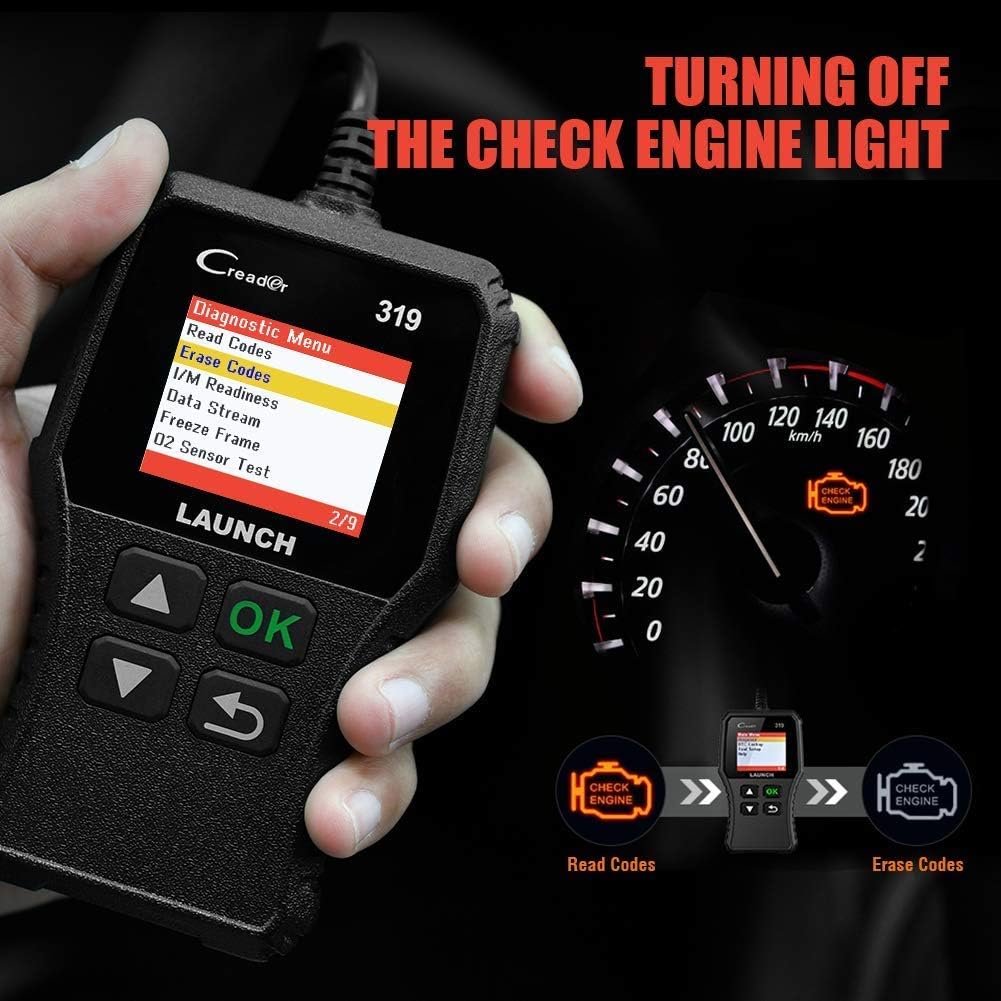
Obraz: The CR319 displaying "Erase Codes" on its screen, with an illustration showing the process of reading codes, then erasing them to turn off the Check Engine Light on the vehicle's dashboard.
After reading and understanding the trouble codes, you can use the "Erase Codes" function to clear the DTCs and turn off the Malfunction Indicator Lamp (MIL). Ensure the underlying issue has been resolved before clearing codes, as they may reappear if the problem persists.
Konserwacja
- Czyszczenie: Use a soft, dry cloth to clean the device screens and bodies. Avoid abrasive cleaners or solvents.
- Składowanie: Store the devices in a cool, dry place, away from direct sunlight and extreme temperatures. Keep them in their protective cases when not in use.
- Software Updates (X431 PROS Elite): Regularly check for and install software updates to ensure optimal performance, expanded vehicle coverage, and new features. Connect the device to Wi-Fi and use the "Software Update" function.
- Pielęgnacja kabli: Inspect diagnostic cables regularly for any signs of damage. Do not bend or crimp cables excessively.
Rozwiązywanie problemów
- Urządzenie nie włącza się:
- For X431 PROS Elite, ensure the battery is charged.
- For CR319, ensure it is securely plugged into the vehicle's OBD2 port and the vehicle ignition is ON.
- Check the vehicle's fuse for the OBD2 port.
- Błąd komunikacji:
- Verify the diagnostic cable is securely connected to both the device and the vehicle.
- Upewnij się, że zapłon pojazdu jest WŁĄCZONY.
- Confirm the vehicle is OBD2 compliant (most vehicles 1996 and newer).
- Wypróbuj inny pojazd, aby wykluczyć problem związany z danym pojazdem.
- Software Freezes/Slow Performance (X431 PROS Elite):
- Uruchom ponownie urządzenie.
- Ensure sufficient storage space.
- Wykonaj aktualizację oprogramowania.
- Kody nieczytelne:
- Ensure the underlying fault has been repaired. Some codes cannot be cleared if the fault is still present.
- Follow the specific clearing procedure for your vehicle model if applicable.
Specyfikacje
WPROWADŹ X431 PROS Elite
- Pokrycie pojazdu: 1996-2026 models, 150+ brands
- Obsługiwane protokoły: OBD2, CANFD, DoIP, and more
- Funkcje: All-System Diagnostics, ECU Coding (Online/Offline), 38+ Service Functions, Bi-directional Control, V.A.G Guided Functions, FCA SGW Access
- Aktualizacje: 2-Year NO-fee software updates
- Gwarancja: 5-letnia gwarancja
WYSTRZEL CR319
- Zgodność: OBD2 compliant vehicles (1996 and newer)
- Funkcje: Read/Clear DTCs, I/M Readiness, Live Data, Freeze Frame, O2 Sensor Test, On-Board Monitor Test, EVAP System Test, Vehicle Information
- Interfejs: 16-pin OBD2 connector
- Moc: Vehicle battery via OBD2 port
Gwarancja i wsparcie
Your LAUNCH X431 PROS Elite comes with a 5-letnia gwarancja i obejmuje 2-Year NO-fee software updates. For the LAUNCH CR319, standard manufacturer warranty applies.
For technical support, warranty claims, or further assistance, please contact LAUNCH customer service through their official website or the contact information provided with your product packaging. Ensure you have your product model and serial number ready when contacting support.
Zasoby internetowe: Odwiedź oficjalną stronę LAUNCH website for FAQs, software downloads, and additional product information. Sklep LAUNCH na Amazon