
1. Wprowadzenie
This manual provides essential information for setting up, operating, maintaining, and troubleshooting your vivo V70 5G smartphone. Please read this guide thoroughly to ensure optimal performance and longevity of your device.
2. Co znajduje się w pudełku
Sprawdź, czy w opakowaniu produktu znajdują się wszystkie elementy:
- vivo V70 5G Smartphone
- Kabel USB
- Zasilacz
- Wysuwacz tacy na kartę SIM
- Etui na telefon
- Folia ochronna na ekran (wstępnie nałożona lub w pudełku)
3. Układ urządzenia
Familiarize yourself with the physical components of your vivo V70 5G.

Obraz: Przód i tył view of the vivo V70 5G smartphone, highlighting the display and camera module.
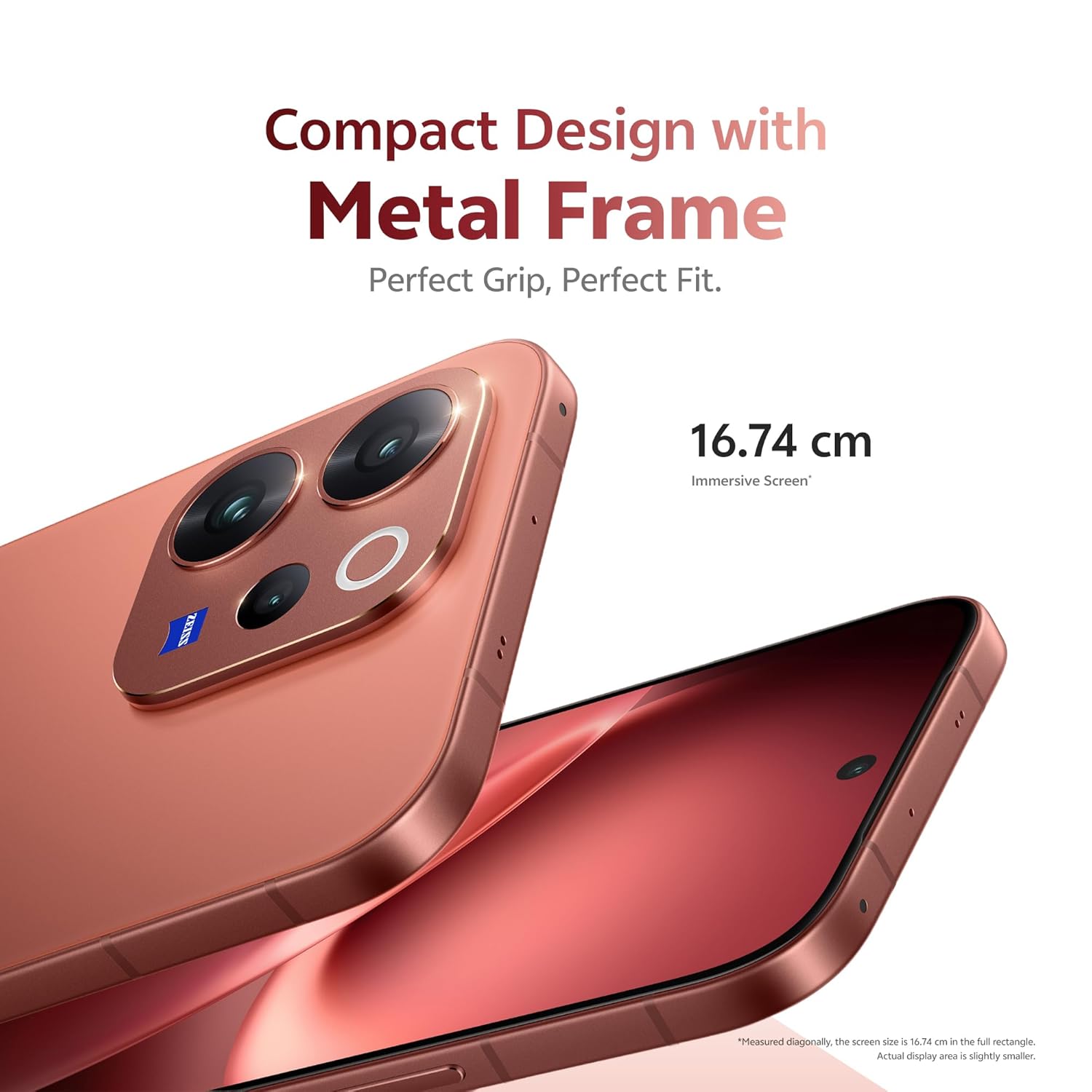
Obraz: Strona view of the vivo V70 5G, showing the power button and volume rocker.

Obraz: Spód view of the vivo V70 5G, displaying the USB Type-C port, speaker grille, and SIM tray slot.
4. Konfiguracja
4.1. Wkładanie karty SIM
- Znajdź tackę na kartę SIM znajdującą się z boku urządzenia.
- Włóż narzędzie do wyjmowania tacki karty SIM w mały otwór obok tacki i mocno naciśnij, aż tacka wyskoczy.
- Place your Nano-SIM card(s) into the tray with the gold contacts facing down. Ensure proper orientation. The device supports Dual SIM.
- Ostrożnie włóż tackę karty SIM z powrotem do telefonu.
4.2. Pierwsze włączenie i konfiguracja
- Naciśnij i przytrzymaj przycisk zasilania, aż pojawi się logo vivo.
- Postępuj zgodnie z instrukcjami wyświetlanymi na ekranie, aby wybrać swój język, połączyć się z siecią Wi-Fi i skonfigurować konto Google.
- Configure security features such as fingerprint unlock (3D Ultrasonic Fingerprint 2.0) and screen lock.
5. Obsługa urządzenia
5.1. Funkcje wyświetlacza
The vivo V70 5G features a 16.74 cm (6.59 inches) 1.5K Ultra Clear OLED Display, offering vibrant visuals and smooth interactions.
- Rezolucja: 2750 × 1260 pikseli
- Częstotliwość odświeżania: Częstotliwość odświeżania 120 Hz zapewnia płynne przewijanie i granie.
- Zagęszczenie pikseli: 459 PPI for unmatched clarity.
- Jasność: Up to 5000 nits local peak brightness for excellent outdoor visibility.

Obraz: Visual representation of the 1.5K Ultra Clear OLED Display, highlighting 459 PPI, 1.07 billion colors, 120 Hz refresh rate, and 5000 nits brightness.
5.2. System kamer
The device features a ZEISS Professional Portrait Camera system, designed for high-quality photography.
- Kamera tylna: 50MP ZEISS OIS Main Camera (Sony IMX766), 50 MP ZEISS Super Telephoto Camera (up to 100x zoom), and an 8MP Ultra Wide-Angle lens.
- Przednia kamera: 50 MP ZEISS Group Selfie Camera with AF, f/2.0, and 92° FOV.
- ZEISS Multifocal Portraits: Capture cinematic portraits with five classic focal lengths (23mm to 100mm) and iconic ZEISS bokeh styles.

Obraz: Diagram illustrating the ZEISS Professional Portrait Camera setup, including the 50 MP ZEISS Group Selfie Camera, 50 MP ZEISS OIS Main Camera, ZEISS Ultra Wide-Angle Camera, and 50 MP ZEISS Night Telephoto Camera.

Obraz: Example of the 10X Zoom-In Portrait feature, showing a couple on a beach with a zoomed-in effect.
5.3. Wydajność
The vivo V70 5G is powered by the Next-Gen Snapdragon 7 Gen 4 processor, built on a 4nm process, ensuring efficient and powerful performance.
- Wydajność procesora: 27% increase compared to the previous generation.
- GPU Performance: 30% better for graphics-intensive tasks.
- Pamięć i przechowywanie: Equipped with LPDDR5X RAM and UFS 4.1 Storage for faster operating speeds and data transfer.

Obraz: Graphic detailing the Snapdragon 7 Gen 4 processor, highlighting its 4nm flagship chip process, 30% GPU performance increase, and 27% CPU performance increase.

Obraz: Visual representation of LPDDR5X High-Performance Memory and UFS 4.1 Storage chips.
5.4. Bateria i ładowanie
The device is equipped with a large 6500mAh BlueVolt Battery and supports 90W FlashCharge technology.
- Pojemność baterii: 6500 mlnamp Godziny (mAh).
- Szybkie ładowanie: 90W FlashCharge for rapid recharging.

Obraz: Graphic showing the 6500mAh BlueVolt Battery and 90W FlashCharge, with estimated usage times for navigation, gaming, and 4K video recording.
5.5. Bezpieczeństwo
Unlock your phone quickly and securely with the 3D Ultrasonic Fingerprint 2.0 sensor, which functions even with wet or sweaty fingers.
5.6. Trwałość
The vivo V70 5G is built with IP68 & IP69 durability ratings, providing resistance against dust and water. It can be submerged in fresh water up to 1.5 meters for 30 minutes.
5.7. Funkcje sztucznej inteligencji
Explore unique AI-powered features for enhanced photography and user experience.
- AI Holi Portrait: Automatically adds vibrant, culturally celebratory elements to your photos.
- AI Floral Blessing: Integrates floral elements into images.
- AI Magic Weather: Transforms weather conditions in photos.

Obraz: Before and after comparison demonstrating the AI Holi Portrait feature, adding festive colors to a photo of a couple.

Obraz: Before and after comparison showing the AI Floral Blessing feature, adding floral elements to a photo of a couple on a beach.

Obraz: Examples of the AI Magic Weather feature, transforming a single image into clear sky, morning glow, evening glow, and twilight scenes.
6. Konserwacja
6.1. Czyszczenie urządzenia
- Do czyszczenia ekranu i obudowy należy używać miękkiej, niepozostawiającej włókien ściereczki.
- Unikaj stosowania silnych środków chemicznych, materiałów ściernych i aerozoli.
- W przypadku uporczywych plam delikatnieampPrzetrzyj ściereczkę wodą lub płynem do czyszczenia ekranów przeznaczonym do urządzeń elektronicznych.
6.2. Aktualizacje oprogramowania
Regular software updates are provided to enhance security, improve performance, and introduce new features. Your vivo V70 5G is designed to receive 6 years of security updates.
- Przed rozpoczęciem aktualizacji sprawdź, czy urządzenie jest podłączone do sieci Wi-Fi i czy bateria jest wystarczająco naładowana.
- Przejdź do Ustawienia > System > Aktualizacja systemu aby sprawdzić i zainstalować dostępne aktualizacje.

Obraz: Graphic indicating "6 Years of Security Updates" for the device, emphasizing long-term security and performance.
6.3. Pielęgnacja baterii
- Unikaj ekstremalnych temperatur, które mogą skrócić żywotność baterii.
- Use only the official vivo charger and cable for optimal charging and safety.
- W przypadku długotrwałego przechowywania naładuj baterię do poziomu około 50% i wyłącz urządzenie.
7. Rozwiązywanie Problemów
This section addresses common issues you might encounter with your vivo V70 5G.
7.1. Urządzenie się nie włącza
- Ensure the battery is charged. Connect the device to the charger and wait a few minutes before attempting to power on.
- Naciśnij i przytrzymaj przycisk zasilania przez co najmniej 10–15 sekund, aby wymusić ponowne uruchomienie.
7.2. Problemy z ładowaniem
- Verify that the charging cable and power adapter are securely connected to both the device and the power outlet.
- Try using a different power outlet or a different compatible charger and cable.
- Inspect the USB Type-C port on your phone for any debris or damage.
7.3. Aparat nie działa
- Uruchom ponownie aplikację aparatu.
- Clear the cache and data of the camera app via Ustawienia > Aplikacje > Aparat > Pamięć.
- Upewnij się, że obiektywy kamer nie są zakryte żadną przeszkodą fizyczną.
- Uruchom ponownie telefon.
7.4. Problemy z łącznością sieciową
- Sprawdź, czy tryb samolotowy jest włączony. Jeśli tak, wyłącz go.
- Uruchom ponownie telefon.
- Reinsert your SIM card to ensure it is properly seated.
- Reset network settings via Ustawienia > System > Resetuj opcje > Resetuj Wi-Fi, sieć komórkową i Bluetooth.
If issues persist, please refer to the Support section for further assistance.
8. Specyfikacje
| Funkcja | Szczegół |
|---|---|
| Marka | żywy |
| Model | Wersja 70 5G |
| System operacyjny | OriginOS 6 |
| Rozmiar zainstalowanej pamięci RAM | 12 GB |
| Pojemność pamięci masowej | 256 GB |
| Rozmiar ekranu | 6.59 cali |
| Kolor | Pasja Czerwona |
| Liczba gniazd karty SIM | Podwójna karta SIM |
| Typ złącza | USB typu C |
| Poziom wodoodporności | Waterproof (IP68 & IP69) |
| Front Photo Sensor Resolution | 50 MP |
| Rear Facing Camera Photo Sensor Resolution | 50 MP (Main) |
| Pojemność baterii | 6500 mlnamp Godziny |
| Waga przedmiotu | 194 gram |
| Wymiary przedmiotu | 15.8 x 7.4 x 0.8 centymetrów |
| Maksymalna rozdzielczość wyświetlacza | 2750 × 1260 pikseli |
| Częstotliwość odświeżania | 120 Hz |
| Typ wyświetlacza | AMOLED |
| Technologia komórkowa | 5G |
| Rok modelowy | 2026 |
| Kraj pochodzenia | Indie |
9. Gwarancja i wsparcie
9.1. Informacje o gwarancji
Your vivo V70 5G comes with a 1-letnia gwarancja producenta for the device and 6 miesięcy gwarancji for in-box accessories from the date of purchase.
Proszę zachować dowód zakupu na potrzeby roszczeń gwarancyjnych.
9.2. Kontakt z producentem
For technical support, service, or warranty inquiries, please contact vivo Mobile India Pvt Ltd.
- Producent: vivo Mobile India Pvt Ltd
- Adres: Plot No 08, Sector 24, Yamuna Expressway Area, Gautam Buddha Nagar, Uttar Pradesh, 201310
Visit the official vivo website for the most up-to-date support contact information and service center locations.


