
1. Wprowadzenie
The TOPDON TOPBT600PLUS is a professional-grade 2-in-1 Battery and Resistance Tester designed for comprehensive battery diagnostics in various automotive and industrial settings. This device accurately tests 6V, 12V, and 24V battery systems, providing reliable data for flooded, AGM, GEL, and EFB lead-acid batteries. Additionally, it supports internal resistance measurements for lithium, alkaline, and carbon-zinc batteries. Featuring a bright 3.5-inch display and an onboard power supply, the BT600PLUS offers fast, versatile, and dependable performance.
2. Informacje dotyczące bezpieczeństwa
Przed użyciem produktu należy przeczytać wszystkie ostrzeżenia i instrukcje dotyczące bezpieczeństwa. Nieprzestrzeganie tych instrukcji może spowodować porażenie prądem, pożar lub poważne obrażenia.
- Ochrona oczu: Pracując w pobliżu akumulatorów, zawsze należy nosić okulary ochronne zatwierdzone przez ANSI.
- Wentylacja: Podczas testowania akumulatorów należy zapewnić odpowiednią wentylację, ponieważ mogą one wydzielać wybuchowe gazy.
- Kwas akumulatorowy: Unikać kontaktu z kwasem akumulatorowym. W przypadku kontaktu natychmiast przepłukać wodą i zwrócić się o pomoc lekarską.
- Iskry i płomienie: Trzymaj akumulatory z dala od źródeł iskier, płomieni i materiałów wybuchowych.
- Narzędzia izolowane: Aby zapobiec przypadkowym zwarciom, należy używać izolowanych narzędzi.
- Prawidłowe połączenie: Connect the tester leads correctly to the battery terminals (red to positive, black to negative).
- Środowisko operacyjne: Nie używaj urządzenia wamp lub w wilgotnych warunkach.
3. Koniec produktuview
The TOPBT600PLUS features a robust design for professional use. Its main components include a 3.5-inch color display, control buttons, and two sets of test leads for versatile connection options.
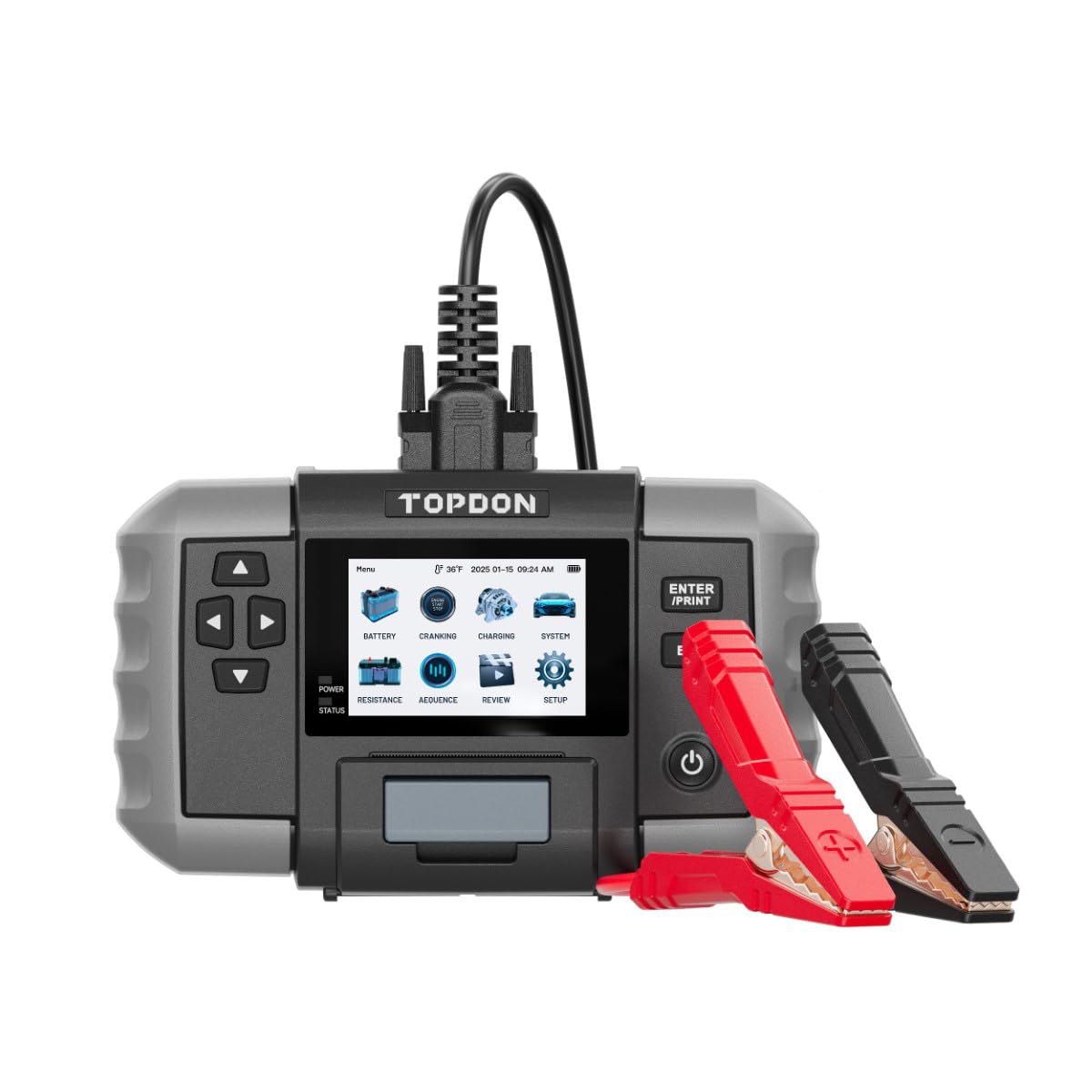
Rysunek 1: Przód view of the TOPDON TOPBT600PLUS device. This image displays the main unit with its 3.5-inch screen and control buttons, along with the attached test leads.
The device's onboard power source allows for testing batteries down to 2V, enhancing its flexibility for various diagnostic scenarios.
4. Konfiguracja
Follow these steps to prepare your TOPBT600PLUS for operation:
- Rozpakowywanie: Carefully remove the TOPBT600PLUS from its packaging and inspect for any damage.
- Początkowe uruchomienie: The device is equipped with an internal power source. Press the power button to turn it on.
- Podłączanie przewodów pomiarowych: Ensure the test leads are securely connected to the device. The red clamp jest dla zacisku dodatniego (+), a czarny clamp is for the negative (-) terminal.
- Przygotowanie baterii: Aby uzyskać dokładne odczyty, należy upewnić się, że zaciski akumulatora są czyste i nie mają śladów korozji.
5. Instrukcja obsługi
The TOPBT600PLUS offers various testing modes for comprehensive battery analysis.
5.1. Test baterii
This mode performs cranking, charging, and system tests for 6V, 12V, and 24V batteries.
- Podłącz do akumulatora: Dołącz czerwony klamp do dodatniego (+) zacisku akumulatora i czarnego klamp do ujemnego (-) zacisku akumulatora.
- Wybierz typ baterii: On the device screen, select the appropriate battery type (e.g., Flooded, AGM, GEL, EFB).
- Input Battery Specifications: Wprowadź zimny rozruch akumulatora Amps (CCA) or other relevant ratings as prompted.
- Rozpocznij test: Follow the on-screen instructions to initiate the test. The device will guide you through cranking and charging system checks.
- View Wyniki: The 3.5-inch display will show detailed results, including battery voltage, CCA value, internal resistance, and overall battery health status.
5.2. Test rezystancji
This mode measures the internal resistance of various battery chemistries.
- Podłącz do akumulatora: Dołącz czerwony klamp do dodatniego (+) zacisku akumulatora i czarnego klamp do ujemnego (-) zacisku akumulatora.
- Select Resistance Test: Navigate to the Resistance Test option on the device menu.
- Select Battery Chemistry: Choose the correct battery chemistry (e.g., Lithium, Alkaline, Carbon-Zinc) if prompted.
- Rozpocznij test: Initiate the test. The device will measure and display the internal resistance.
- Interpretacja wyników: Compare the measured resistance with the manufacturer's specifications for the battery to assess its condition.
5.3. Sequence Testing
The TOPBT600PLUS supports sequence testing for up to 500 batteries across 10 groups, ideal for batch testing.
- Setup Thresholds: Skonfiguruj objętośćtage or resistance thresholds within the device settings to automatically identify underperforming units.
- Wykonaj testy: Connect and test batteries sequentially. The device will alert you if a battery falls outside the set parameters.
6. Konserwacja
Proper maintenance ensures the longevity and accuracy of your TOPBT600PLUS.
- Czyszczenie: Przetrzyj urządzenie miękką, suchą ściereczką. Nie używaj środków czyszczących o właściwościach ściernych ani rozpuszczalników.
- Składowanie: Store the tester in a dry, cool environment, away from direct sunlight and extreme temperatures.
- Opieka wiodąca: Inspect test leads regularly for damage. Replace if insulation is cracked or wires are exposed.
- Aktualizacje oprogramowania: Check the official TOPDON webOdwiedzaj tę witrynę okresowo, aby uzyskać aktualizacje oprogramowania sprzętowego i zapewnić optymalną wydajność i kompatybilność.
7. Rozwiązywanie Problemów
If you encounter issues with your TOPBT600PLUS, refer to the following common problems and solutions:
| Problem | Możliwa przyczyna | Rozwiązanie |
|---|---|---|
| Urządzenie nie włącza się | Low internal battery; device malfunction | Ensure the internal battery is charged. If issue persists, contact support. |
| Niedokładne odczyty | Poor connection; dirty battery terminals; incorrect battery type selected | Wyczyść zaciski akumulatora. Upewnij się, żeamps are securely attached. Verify correct battery type and specifications are entered. |
| Brak wyjścia wyświetlacza | Screen damage; software error | Restart the device. If the screen remains blank, contact customer support. |
| Clamps get hot during testing | Loose connection; excessive current draw | Zapewnij clamps are tightly secured. Discontinue test if excessive heat is observed and check battery condition. |
8. Specyfikacje
Key technical specifications for the TOPDON TOPBT600PLUS:
- Marka: NAJLEPSZY
- Model: TOPBT600PLUS
- Źródło zasilania: Zasilany bateryjnie (wewnętrznie)
- Minimalna objętość roboczatage: 2 wolty
- Waga: 4.41 funtów
- Wyświetlacz: 3.5-calowy kolorowy ekran
- Supported Battery Types (Lead-Acid): Zalany, AGM, GEL, EFB
- Supported Battery Chemistries (Resistance Test): Lithium, Alkaline, Carbon-Zinc
- Objętość systemutage: 6V, 12V, 24V
9. Gwarancja i wsparcie
For detailed warranty information, please refer to the warranty card included with your product or visit the official TOPDON webWarunki gwarancji zazwyczaj obejmują wady produkcyjne przez określony czas od daty zakupu.
For technical support, troubleshooting assistance, or service inquiries, please contact TOPDON customer support through their official webwitrynę lub dane kontaktowe podane w dokumentacji produktu.