
1. Wprowadzenie
This manual provides detailed instructions for the safe and effective use of the HABOTEST HT821A Thermal Imager. The HT821A is a professional-grade handheld thermal imaging camera designed for fast, accurate, and intuitive temperature detection across various applications. It features a temperature measurement range of -20°C to 550°C (-4°F to 1022°F) and an infrared resolution of 96x96, which can be enhanced to 240x240 using super-resolution technology. Please read this manual thoroughly before operating the device.
2. Informacje dotyczące bezpieczeństwa
Aby zapewnić bezpieczną obsługę i zapobiec uszkodzeniu urządzenia, należy przestrzegać następujących środków ostrożności:
- Do not point the thermal imager directly at strong energy sources, such as the sun or high-power lasers, as this may damage the detector.
- Unikaj wystawiania urządzenia na działanie ekstremalnych temperatur, wysokiej wilgotności lub środowiska korozyjnego.
- Nie rozmontowuj ani nie modyfikuj urządzenia. Naprawy powinny być wykonywane wyłącznie przez autoryzowany personel serwisowy.
- Należy używać wyłącznie wskazanego kabla ładującego i zasilacza.
- Trzymaj urządzenie z dala od wody i innych płynów.
- Podczas pracy należy upewnić się, że urządzenie jest pewnie trzymane, aby zapobiec jego przypadkowemu upuszczeniu.
- Baterię i urządzenie należy utylizować zgodnie z lokalnymi przepisami.
3. Koniec produktuview i komponenty
The HABOTEST HT821A Thermal Imager package includes the following items:
- HABOTEST HT821A Thermal Imager
- Kabel danych USB
- Instrukcja obsługi (ten dokument)
Familiarize yourself with the main parts of the thermal imager:

Rysunek 3.1: Przód view of the HABOTEST HT821A Thermal Imager, showing the display screen and control buttons.
4. Konfiguracja
4.1 Ładowanie urządzenia
The HT821A Thermal Imager is equipped with a built-in 2000mAh Lithium battery. Before initial use, ensure the device is fully charged.
- Connect the provided USB-C data cable to the USB-C port on the thermal imager.
- Podłącz drugi koniec kabla USB-C do kompatybilnego zasilacza USB (brak w zestawie) lub do portu USB komputera.
- The charging indicator on the device will illuminate, indicating that charging is in progress.
- Once fully charged, the indicator light will change (refer to device display for battery status).
4.2 Włączanie/wyłączanie
- Włączanie: Naciśnij i przytrzymaj przycisk zasilania (zazwyczaj oznaczony symbolem zasilania), aż ekran się podświetli.
- Aby wyłączyć: Naciśnij i przytrzymaj przycisk zasilania, aż urządzenie się wyłączy.
5. Instrukcja obsługi
5.1 Podstawowy pomiar temperatury
The HT821A provides real-time temperature readings with automatic tracking of the highest, lowest, and center temperatures on the screen.

Rysunek 5.1: Display showing automatic tracking of highest and lowest temperature points.
The device automatically identifies and displays the maximum, minimum, and center point temperatures within the field of view, providing immediate insights into temperature distribution.
5.2 Tryb superrozdzielczości
Enhance the clarity of thermal images by activating the super-resolution mode. This technology increases the infrared resolution from 96x96 to 240x240.
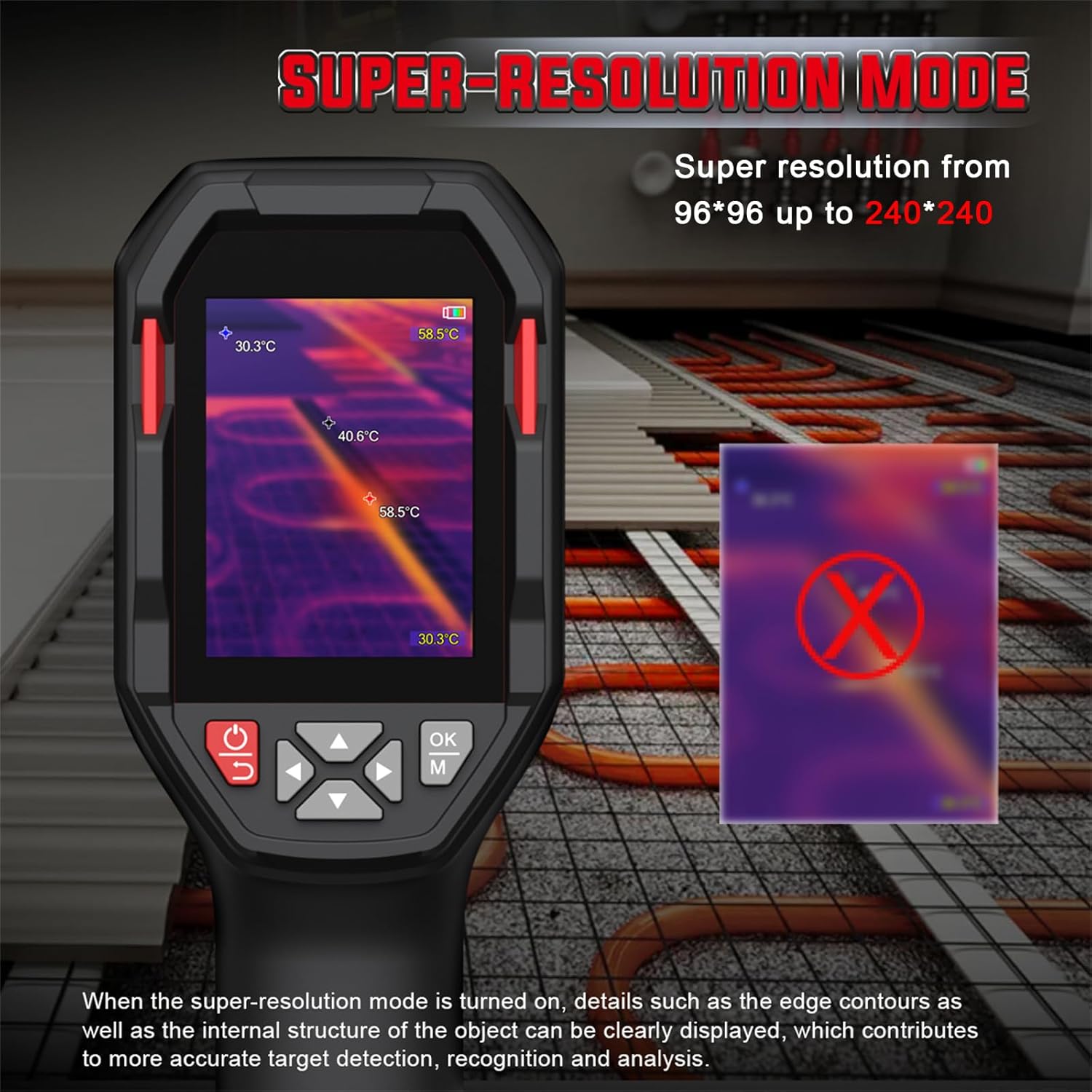
Rysunek 5.2: Comparison of standard and super-resolution thermal images, showing enhanced detail.
- Refer to the device menu for activating or deactivating the super-resolution feature.
- When active, details such as edge contours and internal structures of objects become clearer, aiding in precise target detection and analysis.
5.3 Multiple Color Palettes
The HT821A offers 8 pseudocolor palettes to visualize temperature differences. Different palettes can highlight specific temperature ranges or details, making them suitable for various inspection scenarios.
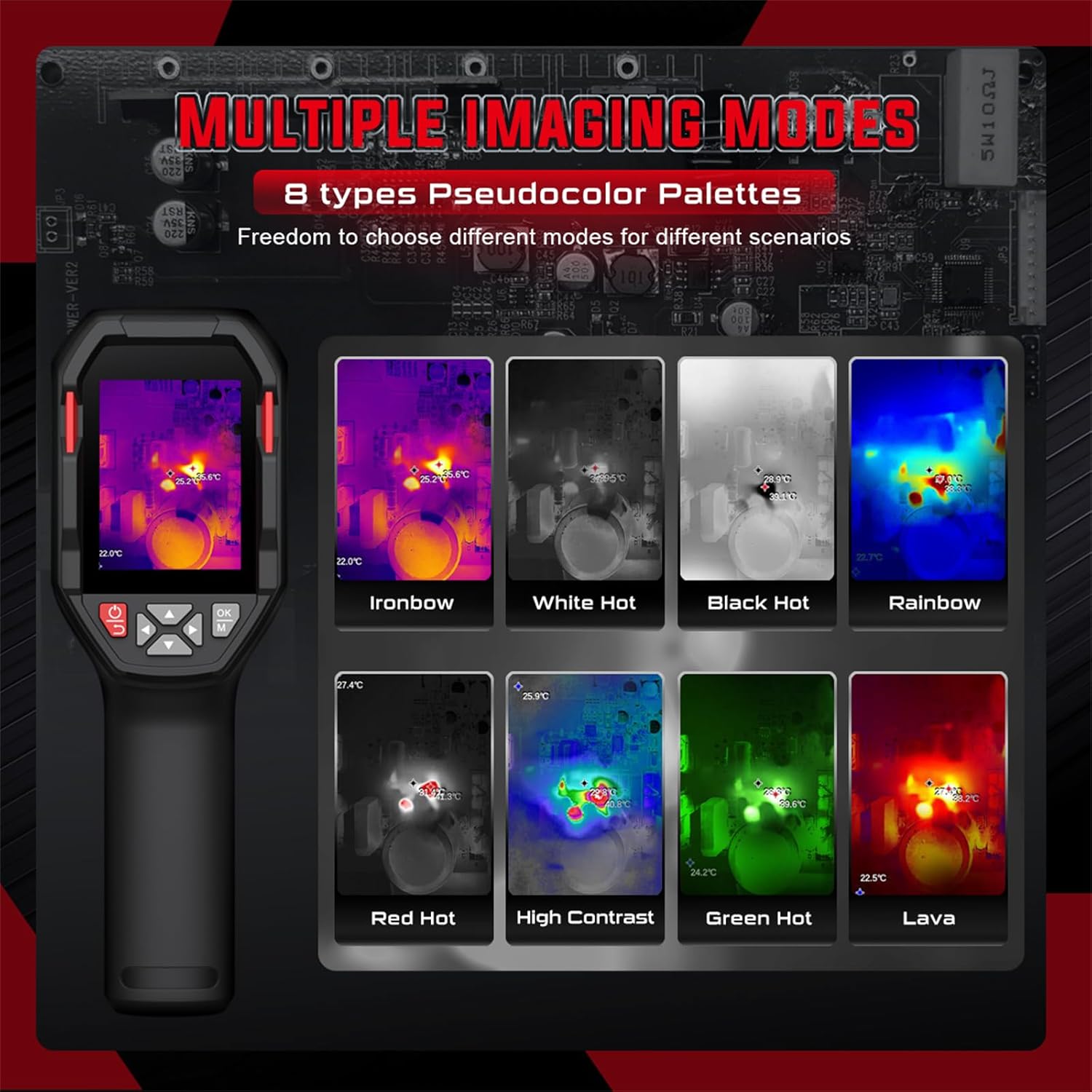
Rysunek 5.3: Examples of different pseudocolor palettes available on the HT821A.
- Common palettes include Ironbow, White Hot, Black Hot, Rainbow, Red Hot, High Contrast, Green Hot, and Lava.
- Navigate through the device menu to select the desired color palette.
5.4 Alarm wysokiej i niskiej temperatury
Set custom temperature limits to trigger an alarm when measured temperatures exceed or fall below the defined thresholds.

Rysunek 5.4: Visual representation of high and low temperature alarm functionality.
- Access the alarm settings in the device menu.
- Define the upper and lower temperature limits.
- The device will provide a visual or audible alert when temperatures fall outside the set range.
5.5 Area Temperature Measurement
The device allows for fixed-area temperature measurement, enabling you to analyze temperatures within a specific region of interest.

Rysunek 5.5: Display with a fixed-area measuring frame, showing center, maximum, and minimum temperatures within that frame.
- Activate the area measurement function through the menu.
- A frame will appear on the screen, and the device will measure the center, maximum, and minimum temperatures exclusively within this frame.
5.6 Distance Compensation and Emissivity
- Kompensacja odległości: The HT821A supports distance compensation for improved accuracy, with settings for 0.5 M, 1 M, 2 M, and 3 M. Adjust this setting based on your distance to the target object.
- Regulowana emisyjność: The device features adjustable emissivity to ensure accurate readings across different material surfaces. Consult a table of common material emissivities and adjust the setting in the menu accordingly.
5.7 Ustawienia językowe
The HT821A supports multiple languages for user interface navigation.
Rysunek 5.6: Language selection menu on the HT821A.
- Navigate to the language settings in the device menu.
- Select from available languages including English, Spanish, French, German, Dutch, Japanese, Korean, Russian, Arabic, Simplified Chinese, and Traditional Chinese.
5.8 Image Storage and Data Transfer
- Przechowywanie obrazu: The device has built-in memory to store thermal images in JPG format. Press the capture button (refer to device layout) to save an image.
- Transfer danych: Connect the thermal imager to a computer using the provided USB-C cable. The device will appear as a removable storage device, allowing you to transfer stored images for further analysis.
5.9 Funkcja latarki
The HT821A includes a built-in flashlight for reliable operation in dark or low-light environments. Activate the flashlight through the device menu or a dedicated button (refer to device layout).
6. Aplikacje
The HABOTEST HT821A Thermal Imager is a versatile tool suitable for a wide range of professional and home inspection scenarios.

Rysunek 6.1: Examples of the HT821A in use for various inspection tasks.
- Building Inspection: Detecting insulation deficiencies, moisture issues, and air leaks.
- Konserwacja instalacji elektrycznych: Identifying overheating components in electrical panels, circuits, and motors.
- HVAC Performance: Inspecting heating and cooling systems for blockages or inefficiencies.
- Mechanical Equipment: Monitorowanie maszyn pod kątem nietypowych śladów ciepła wskazujących na zużycie lub nieprawidłowe działanie.
- Instalacja wodociągowa: Locating hidden water leaks behind walls or under floors.
- Automotive Inspection: Diagnosing engine overheating, brake issues, or HVAC system problems.
7. Konserwacja
7.1 Czyszczenie urządzenia
- Use a soft, dry cloth to clean the exterior of the thermal imager.
- For the lens and screen, use a lens cleaning cloth and a specialized lens cleaning solution. Do not use abrasive materials or harsh chemicals.
- Upewnij się, że do otworów urządzenia nie dostanie się wilgoć.
7.2 Pielęgnacja baterii
- Aby zachować sprawność baterii, należy ją regularnie ładować, nawet jeśli nie używasz urządzenia.
- Unikaj częstego całkowitego rozładowywania akumulatora.
- Przechowuj urządzenie w chłodnym i suchym miejscu, jeśli nie będziesz go używać przez dłuższy czas.
7.3 Przechowywanie
When storing the thermal imager, ensure it is kept in its protective packaging or a suitable case to prevent damage from impacts or dust. Avoid storing it in direct sunlight or areas with extreme temperature fluctuations.
8. Rozwiązywanie Problemów
If you encounter issues with your HT821A Thermal Imager, refer to the following common problems and solutions:
| Problem | Możliwa przyczyna | Rozwiązanie |
|---|---|---|
| Urządzenie nie włącza się. | Niski poziom naładowania baterii lub awaria urządzenia. | Charge the device for at least 2 hours. If it still doesn't power on, contact customer support. |
| Obraz jest rozmazany lub niewyraźny. | Dirty lens, incorrect focus (if applicable), or environmental factors. | Clean the lens with a soft cloth. Ensure the object is within the optimal measurement range. Activate Super-Resolution mode for enhanced clarity. |
| Niedokładne odczyty temperatury. | Incorrect emissivity setting, distance compensation, or environmental interference. | Adjust the emissivity setting to match the target material. Verify distance compensation is set correctly. Avoid measuring through reflective surfaces. |
| Nie można przesłać obrazów do komputera. | Faulty USB cable, incorrect connection, or driver issue. | Ensure the USB-C cable is securely connected to both the device and the computer. Try a different USB port or cable. Restart both devices. |
If the problem persists after attempting these solutions, please contact HABOTEST customer support for further assistance.
9. Specyfikacje
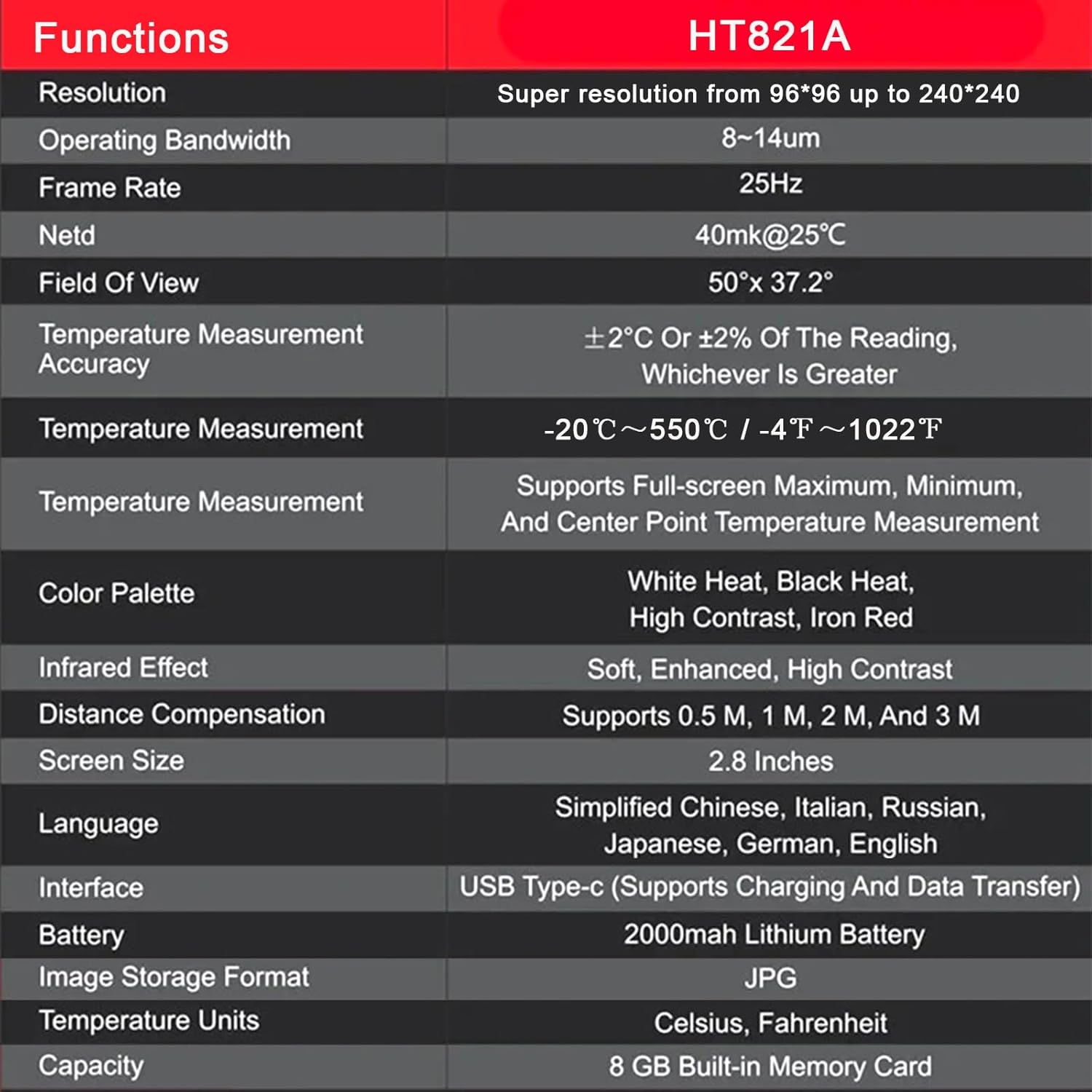
The following table outlines the key technical specifications of the HABOTEST HT821A Thermal Imager:
| Funkcja | Szczegół |
|---|---|
| Model | HT821A |
| Rezolucja | 96x96 (Super resolution up to 240x240) |
| Przepustowość operacyjna | 8-14µm |
| Szybkość klatek | 25 Hz |
| NETTO | 40mk@25°C |
| Pole View | 50 ° × 37.2 ° |
| Dokładność pomiaru temperatury | ±2°C lub ±2% odczytu, w zależności od tego, która wartość jest większa |
| Zakres pomiaru temperatury | -20°C do 550°C (-4°F do 1022°F) |
| Funkcje pomiaru temperatury | Supports Full-screen Maximum, Minimum, and Center Point Measurement |
| Palety kolorów | White Heat, Black Heat, High Contrast, Iron Red (and others) |
| Efekt podczerwieni | Miękki, ulepszony, o wysokim kontraście |
| Kompensacja odległości | Obsługuje 0.5 M, 1 M, 2 M i 3 M |
| Rozmiar ekranu | 2.8 cali |
| Wsparcie językowe | Simplified Chinese, Italian, Russian, Japanese, German, English, Spanish, French, Dutch, Korean, Arabic, Traditional Chinese |
| Interfejs | USB typu C (obsługuje ładowanie i przesyłanie danych) |
| Bateria | Bateria litowa 2000mAh |
| Format przechowywania obrazu | Plik JPG |
| Jednostki temperatury | Celsjusza, Fahrenheita |
| Pamięć wewnętrzna | 8 GB Wbudowana karta pamięci |
| Materiał zewnętrzny | Plastikowy |
10. Gwarancja i wsparcie
10.1 Informacje o gwarancji
HABOTEST products are manufactured to high-quality standards. For specific warranty terms and conditions, please refer to the warranty card included with your product or visit the official HABOTEST webGwarancja zazwyczaj obejmuje wady materiałowe i wykonawcze wynikające z normalnego użytkowania.
10.2 Obsługa klienta
If you have any questions, require technical assistance, or need to report a problem with your HABOTEST HT821A Thermal Imager, please contact HABOTEST customer support.
- Wsparcie online: Visit the official HABOTEST webwitryna z odpowiedziami na często zadawane pytania, rejestracją produktów i formularzami kontaktowymi.
- Wsparcie e-mailowe: Zapoznaj się z opakowaniem produktu lub oficjalnym webstrona zawierająca adres e-mail działu obsługi klienta.
Please have your product model number (HT821A) and purchase information ready when contacting support.