
1. Konfiguracja
Follow these steps to set up your ATTACK SHARK R68HE wired gaming keyboard:
- Rozpakuj klawiaturę: Ostrożnie wyjmij klawiaturę i wszystkie akcesoria z opakowania.
- Podłącz kabel USB-C: Locate the USB-C port on the back of the keyboard. Connect one end of the provided USB-C cable to the keyboard and the other end to an available USB port on your computer, laptop, or compatible gaming console.
- Instalacja sterownika (opcjonalnie): For advanced customization and features, download the official driver software from the ATTACK SHARK website. The driver link is typically provided in the product packaging or can be found at www.QMK.TOPPostępuj zgodnie z instrukcjami wyświetlanymi na ekranie, aby przeprowadzić instalację.

Image: The ATTACK SHARK R68HE keyboard connected to a device using its coiled USB-C cable, illustrating the wired connection.
The keyboard is compatible with various devices including PCs, notebooks, tablets, and gaming consoles.
2. Instrukcja obsługi
The ATTACK SHARK R68HE keyboard features a 68-key QWERTY layout with Magnetic Hall Effect Switches and Rapid Trigger technology for precise and responsive input.

Image: The ATTACK SHARK R68HE keyboard, emphasizing its 8000Hz polling rate and 256K scan rate for instant response and ultimate precision.
Główne cechy:
- Magnetic Hall Effect Switches: These switches offer adjustable actuation points and rapid trigger functionality, allowing for quick key resets and repeated inputs.
- Wysoka wydajność: Features an 8000Hz polling rate, 256K scanning sampling rate, and 16K global sampling rate for minimal latency.
- Dynamiczne podświetlenie RGB: Customize your keyboard's appearance with over 20 preset lighting effects.
- Trwała konstrukcja: Built with CNC aluminum alloy and carbon fiber composite material for enhanced durability.
- Jakość dźwięku: Incorporates a six-layer padding system for improved acoustic performance.
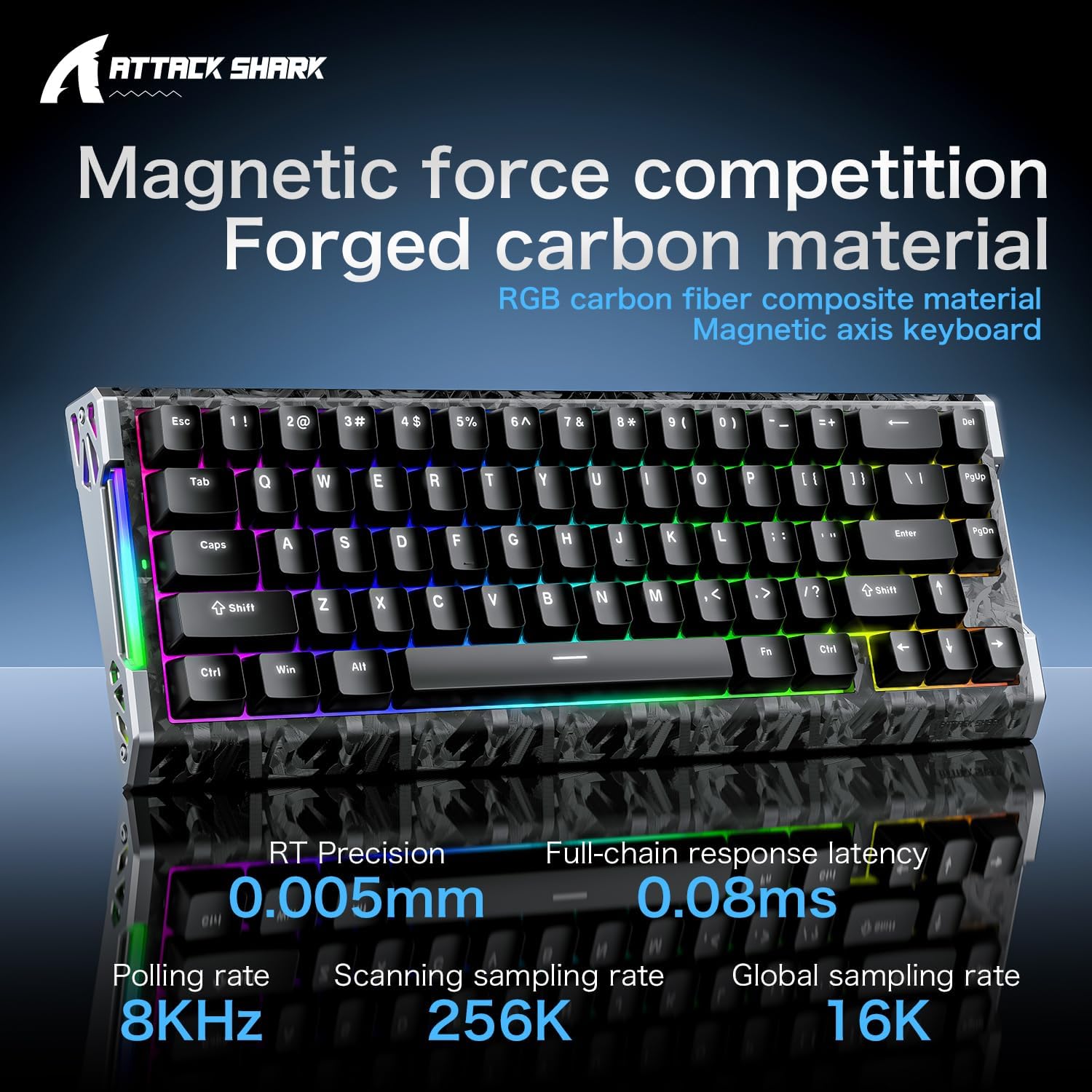
Image: The ATTACK SHARK R68HE keyboard showcasing its magnetic force competition features, including 0.005mm RT precision and 0.08ms full-chain response latency.
Sterowanie oświetleniem RGB:
Use the Function (Fn) key in combination with other keys to control the keyboard's lighting:
- Fn + Z: Switch light effects for the side RGB lighting strips.
- Fn + X: Switch light color for the side RGB lighting strips.
- Fn + C: Turn the side RGB lighting strips on/off.
- Fn + Enter: Switch backlight color for the keycaps.
- Fn + \|: Switch backlight effects for the keycaps.
- Fn + Tab: Activate white light backlight for the keycaps.

Obraz: szczegółowy view of the ATTACK SHARK R68HE keyboard's CNC aluminum alloy frame and RGB lighting strips, with key combinations for controlling the side lights.

Image: The ATTACK SHARK R68HE keyboard displaying its dynamic RGB backlighting with over 20 preset light effects, along with key combinations for controlling the keycap backlights.
Magnetic Hall Effect Switches and Rapid Trigger:
The keyboard features linear magnetic switches with an actuation range of 0.005-3.4mm and a lifespan of 100 million clicks. The Rapid Trigger function allows for instant key reset upon release, providing a competitive edge in fast-paced applications.

Image: An illustration explaining the Magnetic Hall Effect Switches and the Rapid Trigger mechanism, comparing it to a regular switch's activation and reset points.
Oprogramowanie do personalizacji:
Utilize the dedicated software (available via the driver link mentioned in Setup) to tailor your gaming setup. This software allows for:
- Ustawienia oświetlenia RGB
- Programowalne kluczowe funkcje
- FN Layer Settings
- Ustawienia makr
- Advanced Key Mapping

Image: A screenshot of the ATTACK SHARK keyboard's web driver interface, showing options for RGB lighting, key settings, macro creation, and advanced key mapping.
3. Konserwacja
Właściwa konserwacja zapewnia długowieczność i optymalną wydajność klawiatury.
- Czyszczenie: Regularly clean the keyboard with a soft, dry cloth. For dust and debris between keycaps, use compressed air. Avoid using harsh chemicals or abrasive materials.
- Ekspozycja na płyny: Keep liquids away from the keyboard. In case of accidental spills, immediately disconnect the keyboard and allow it to dry completely before reconnecting.
- Demontaż klawiszy i przełączników: The keyboard is hot-swappable, meaning switches can be replaced. A 'DIY tool' is typically provided for safe removal of keycaps and switches. Exercise caution to avoid damaging the components.
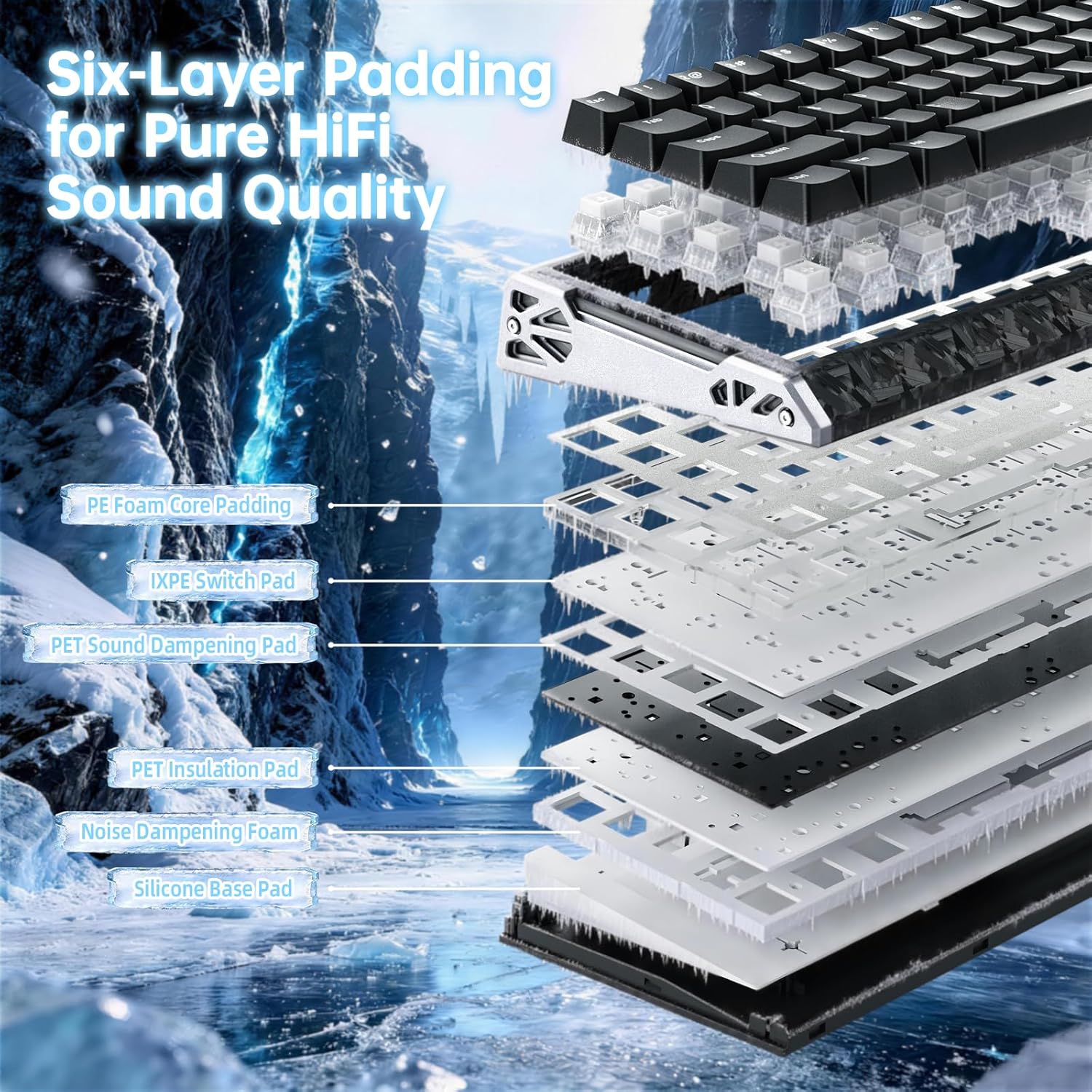
Obraz: Wybuch view of the ATTACK SHARK R68HE keyboard, illustrating its internal six-layer padding structure designed for pure HiFi sound quality, including PE foam, IXPE switch pad, and sound dampwarstwy wzmacniające.
4. Rozwiązywanie Problemów
Jeśli masz problemy z klawiaturą ATTACK SHARK R68HE, zapoznaj się z poniższymi typowymi rozwiązaniami:
- Klawiatura nie odpowiada:
- Sprawdź, czy kabel USB-C jest prawidłowo podłączony do klawiatury i urządzenia.
- Spróbuj podłączyć klawiaturę do innego portu USB w urządzeniu.
- Przetestuj klawiaturę na innym komputerze, aby wykluczyć problem związany z urządzeniem.
- Oświetlenie RGB nie działa:
- Check if the lighting is turned off using the Fn + C key combination.
- Sprawdź, czy jasność nie jest ustawiona na minimum.
- If using the customization software, verify that lighting effects are enabled and configured correctly.
- Klawisze nie rejestrują się lub są wpisywane podwójnie:
- This can sometimes be resolved by updating the keyboard firmware via the official software.
- Jeśli konkretny przełącznik ulegnie uszkodzeniu, można go wymienić dzięki konstrukcji umożliwiającej wymianę w trakcie pracy.
- Problemy z oprogramowaniem:
- Ensure you have the latest version of the ATTACK SHARK driver software installed.
- Try reinstalling the software if problems persist.
For further assistance, consult the official ATTACK SHARK support resources.
5. Specyfikacje
| Marka | ATAK REKIN |
| Model | R68HE |
| Technologia łączności | USB-C (przewodowy) |
| Kompatybilne urządzenia | PC, Notebook, Tablet, Gaming Console |
| Układ klawiatury | QWERTY |
| Liczba kluczy | 68 |
| Typ przełącznika | Magnetic Hall Effect Switches (Linear) |
| Zakres aktywacji | 0.005 - 3.4 mm |
| Współczynnik sondowania | 8000 Hz |
| Scanning Sampling Oceń | 256 tys. |
| Global Sampling Oceń | 16 tys. |
| Podświetlenie | RGB (20+ preset effects) |
| Cechy specjalne | Ergonomic, Rapid Trigger, Hot-swappable switches |
| Tworzywo | Carbon Fiber, Aluminum |
6. Gwarancja i wsparcie
Informacje o gwarancji:
Specific warranty details for the ATTACK SHARK R68HE keyboard are not provided in this manual. Please refer to the product packaging, the official ATTACK SHARK webAby zapoznać się ze szczegółowymi warunkami gwarancji, odwiedź witrynę lub punkt zakupu.
Obsługa klienta:
For technical support, troubleshooting assistance, or inquiries regarding your ATTACK SHARK R68HE keyboard, please visit the official ATTACK SHARK website. The driver software portal at www.QMK.TOP may also provide support resources and FAQs.