
1. Wprowadzenie
Thank you for choosing the Tyler TM710-14 14-inch Portable LCD HD TV. This device is designed for versatility, serving as a portable television, a monitor for various devices, or a display for security cameras. Its compact size makes it ideal for use in RVs, kitchens, campers, bathrooms, and bedrooms. This manual provides essential information for the safe and efficient operation of your new portable TV.
Główne cechy:
- Elegancka i kompaktowa konstrukcja: 14-inch widescreen LED HDTV, optimized for small spaces.
- Wszechstronna łączność: HDMI, USB, SD/MMC inputs for external audio/video playback.
- Zintegrowany dźwięk: Built-in speakers and headphone jack.
- Tuner telewizji cyfrowej: Full band digital TV tuner (ATSC, NTSC compatible).
- Opcje zasilania: AC/DC power compatibility, includes car charger.
- Convenient Stand: Built-in stand for easy placement.
- Szeroka kompatybilność: Connects with streaming sticks (Roku, Fire Stick, Apple TV), gaming consoles, computers, and security cameras.
2. Informacje dotyczące bezpieczeństwa
Przed użyciem produktu należy uważnie przeczytać wszystkie instrukcje bezpieczeństwa. Zachowaj instrukcję do wykorzystania w przyszłości.
- Aby uniknąć pożaru lub porażenia prądem, nie wystawiaj urządzenia na działanie deszczu i wilgoci.
- Nie otwieraj szafki. Zleć naprawę wyłącznie wykwalifikowanemu personelowi.
- Unikaj umieszczania urządzenia w pobliżu źródeł ciepła, takich jak grzejniki, kratki wentylacyjne, piece lub inne urządzenia (w tym amp(lifiers) wytwarzające ciepło.
- Chroń przewód zasilający przed deptaniem i przytrzaśnięciem, zwłaszcza przy wtyczkach, gniazdkach i miejscach, w których wychodzi z urządzenia.
- Stosować wyłącznie dodatki/akcesoria wskazane przez producenta.
- Odłączaj urządzenie od zasilania podczas burzy z piorunami lub jeśli nie używasz go przez dłuższy czas.
- Czyścić wyłącznie suchą szmatką.
- Zapewnij odpowiednią wentylację, nie blokuj żadnych otworów wentylacyjnych.
3. Co znajduje się w pudełku
Sprawdź, czy w opakowaniu znajdują się wszystkie elementy:
- Tyler TM710-14 Portable TV
- Kabel zasilający (zasilacz sieciowy)
- Zdalne sterowanie
- Wbudowana podstawka
- Antena
- Car Charger (DC Adapter)
- Adapter RCA
4. Koniec produktuview
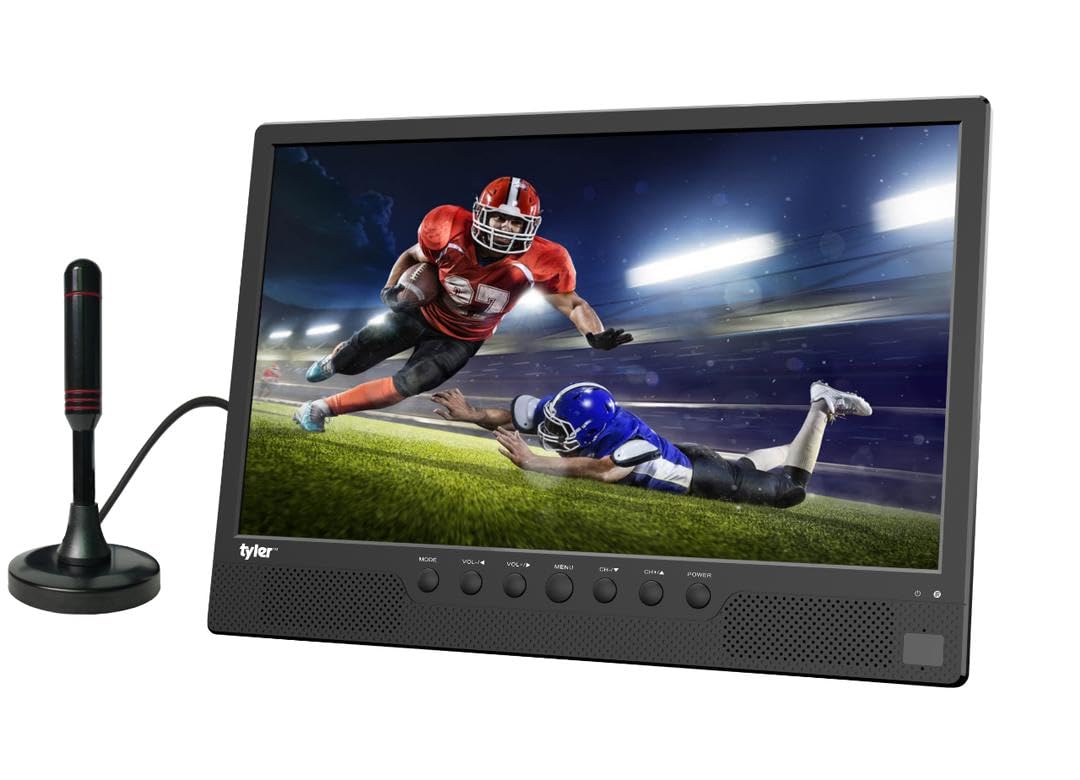
Rycina 4.1: Przód view of the Tyler TM710-14 portable TV, showing the screen, control buttons, and an attached antenna.

Rysunek 4.2: Tył view of the TV with the built-in stand extended, showing the DC 12V input, AV-OUT, AV-IN, HDMI input, and ANT input on the right side, and USB, SD/MMC input on the left.

Rysunek 4.3: Szczegółowy widok z tyłu view of the TV, illustrating the location of the DC 12V input, AV-OUT, AV-IN, HDMI input, ANT input, USB port, and SD/MMC card slot.
Przyciski sterujące (panel przedni):
- Sposób użycia: Switches between input sources (TV, AV, HDMI, USB, SD/MMC).
- GŁOŚNOŚĆ-/GŁOŚNOŚĆ+: Adjusts volume down/up.
- MENU: Dostęp do menu ekranowego.
- CH-/CH+: Changes channels or navigates menu options.
- MOC: Włącza/wyłącza telewizor.
5. Konfiguracja
5.1 Mocowanie stojaka
The TM710-14 features a built-in stand. Gently pull the stand out from the back of the unit until it locks into position. Ensure the TV is placed on a stable, flat surface.
5.2 Podłączanie zasilania
- Zasilanie prądem zmiennym: Connect the provided AC power adapter to the "DC 12V" input port on the back of the TV, then plug the adapter into a standard wall outlet.
- DC Power (Car Charger): For portable use, connect the car charger to the "DC 12V" input port and plug the other end into your vehicle's 12V power socket.
5.3 Connecting an Antenna
For receiving over-the-air broadcast channels, connect the included antenna to the "ANT" input port on the back of the TV. Position the antenna for optimal signal reception.
5.4 Pierwsze włączenie zasilania
Naciśnij MOC button on the front panel or the remote control to turn on the TV. The first time you power on, the TV may guide you through an initial setup process, including language selection and channel scanning.
6. Instrukcja obsługi
6.1 Wybór źródła sygnału wejściowego
Naciśnij TRYB przycisk na telewizorze lub ŹRÓDŁO button on the remote control to cycle through available input sources: TV (Antenna), AV, HDMI, USB, SD/MMC.
6.2 TV Mode (Antenna)
- Wybierz „TV” jako źródło sygnału wejściowego.
- Uzyskaj dostęp do MENU and navigate to "Channel Setup" or "Auto Scan".
- Initiate an auto scan to find available digital (ATSC) and analog (NTSC) channels.
- Używać CH-/CH+ przyciski do zmiany kanałów.
6.3 Podłączanie urządzeń zewnętrznych
- HDMI: Connect a streaming stick (Roku, Fire Stick, Apple TV), gaming console, or computer to the Wejście HDMI port. Select "HDMI" as the input source.
- Wejście AV: Use the RCA adapter to connect older devices like DVD players to the AV-IN port. Select "AV" as the input source.
- USB/SD/MMC: Insert a USB flash drive or SD/MMC card into the respective slots. Select "USB" or "SD/MMC" as the input source to browse and play compatible media files (AVI, MOV, MPEG, MP4, MP3, JPEG, etc.).
6.4 Wyjście audio
The TV has built-in speakers. For private listening, connect headphones to the headphone jack (AV-OUT port can also function as audio out with appropriate adapter).
7. Konserwacja
7.1 Czyszczenie ekranu
Delikatnie przetrzyj ekran miękką, niepozostawiającą włókien ściereczką. W przypadku uporczywych zabrudzeń delikatnie przetrzyjampPrzetrzyj ściereczkę wodą lub specjalnym płynem do czyszczenia ekranów LCD/LED. Nie rozpylaj płynu bezpośrednio na ekran.
7.2 Czyszczenie obudowy
Przetrzyj obudowę telewizora miękką, suchą ściereczką. Unikaj stosowania środków czyszczących o właściwościach ściernych i rozpuszczalników.
7.3 Przechowywanie
If storing the TV for an extended period, unplug it from the power source and store it in a cool, dry place, away from direct sunlight and extreme temperatures.
8. Rozwiązywanie Problemów
| Problem | Możliwa przyczyna | Rozwiązanie |
|---|---|---|
| Brak zasilania | Power cable not connected; outlet not working; power adapter faulty. | Ensure power cable is securely connected. Test the outlet with another device. Try a different power adapter if available. |
| Brak obrazu/Brak sygnału | Incorrect input source selected; antenna not connected/positioned correctly; external device not powered on or connected properly. | Naciskać TRYB/ŹRÓDŁO to select the correct input. Adjust antenna position or rescan channels. Check connections and power for external devices. |
| Brak dźwięku | Volume too low or muted; external device audio settings. | Naciskać Objętość + or unmute the TV. Check audio settings on connected external devices. |
| Pilot nie działa | Batteries depleted or inserted incorrectly; obstruction between remote and TV; remote sensor blocked. | Replace batteries. Ensure correct polarity. Remove any obstructions. Clean the remote sensor on the TV. |
9. Specyfikacje
| Funkcja | Szczegół |
|---|---|
| Numer modelu | TM710-14 |
| Rozmiar ekranu | 14 cali |
| Technologia wyświetlania | LCD |
| Rezolucja | 1080p |
| Częstotliwość odświeżania | 120 Hz |
| Proporcje obrazu | 16:9 |
| Łączność | HDMI (1), USB (1), AV, Antenna |
| Odtwarzanie multimediów | USB, SD/MMC (AVI, MOV, MPEG 1/2/3/4, XVID, AVC, MP4, H.264, HEVC(H.265), FLV, MKV, MP3, JPEG, WMV, RMVB, MKY, 3GP) |
| Audio | Built-in speakers (2.0 channels), Headphone Jack (AV-OUT) |
| Zasilacz | AC/DC (12V DC input) |
| Wymiary produktu (Gł. x Szer. x Wys.) | 1" gł. x 14" szer. x 11" wys. |
| Kolor | Czarny |
10. Informacje o gwarancji
The Tyler TM710-14 Portable LCD HD TV comes with a 1-roczna ograniczona gwarancja from the date of purchase. This warranty covers manufacturing defects in materials and workmanship under normal use. It does not cover damage caused by misuse, accidents, unauthorized modifications, or external causes.
Zachowaj dowód zakupu na wypadek roszczeń gwarancyjnych. Szczegółowe warunki gwarancji znajdziesz w dokumentacji dołączonej do produktu lub skontaktuj się z obsługą klienta.
11. Obsługa klienta
If you encounter any issues or have questions regarding your Tyler TM710-14 Portable LCD HD TV that are not addressed in this manual, please contact Tyler customer support.
- Webstrona: Visit the official Tyler webStrona z odpowiedziami na często zadawane pytania i zasobami pomocy.
- E-mail: Aby uzyskać adres e-mail pomocy technicznej, zapoznaj się z opakowaniem produktu lub kartą gwarancyjną.
- Telefon: Numer telefonu do działu obsługi klienta znajdziesz na opakowaniu produktu lub na karcie gwarancyjnej.
When contacting support, please have your model number (TM710-14) and proof of purchase ready.