
1. Wprowadzenie
This manual provides detailed instructions for the installation, operation, and maintenance of your E-YEEGER GT830 Dual Channel Dash Camera. Please read this manual thoroughly before using the device to ensure proper function and safety.
Zawartość opakowania
- E-YEEGER GT830 Front Dash Camera
- Kamera tylna
- Karta Micro SD 32 GB (wstępnie zainstalowana)
- Ładowarka samochodowa (11.5 stóp)
- Instrukcja obsługi
- Szybka porada
- Zapasowa podkładka samoprzylepna 3M
- Naklejka elektrostatyczna x2
- Łatwe narzędzie do podważania
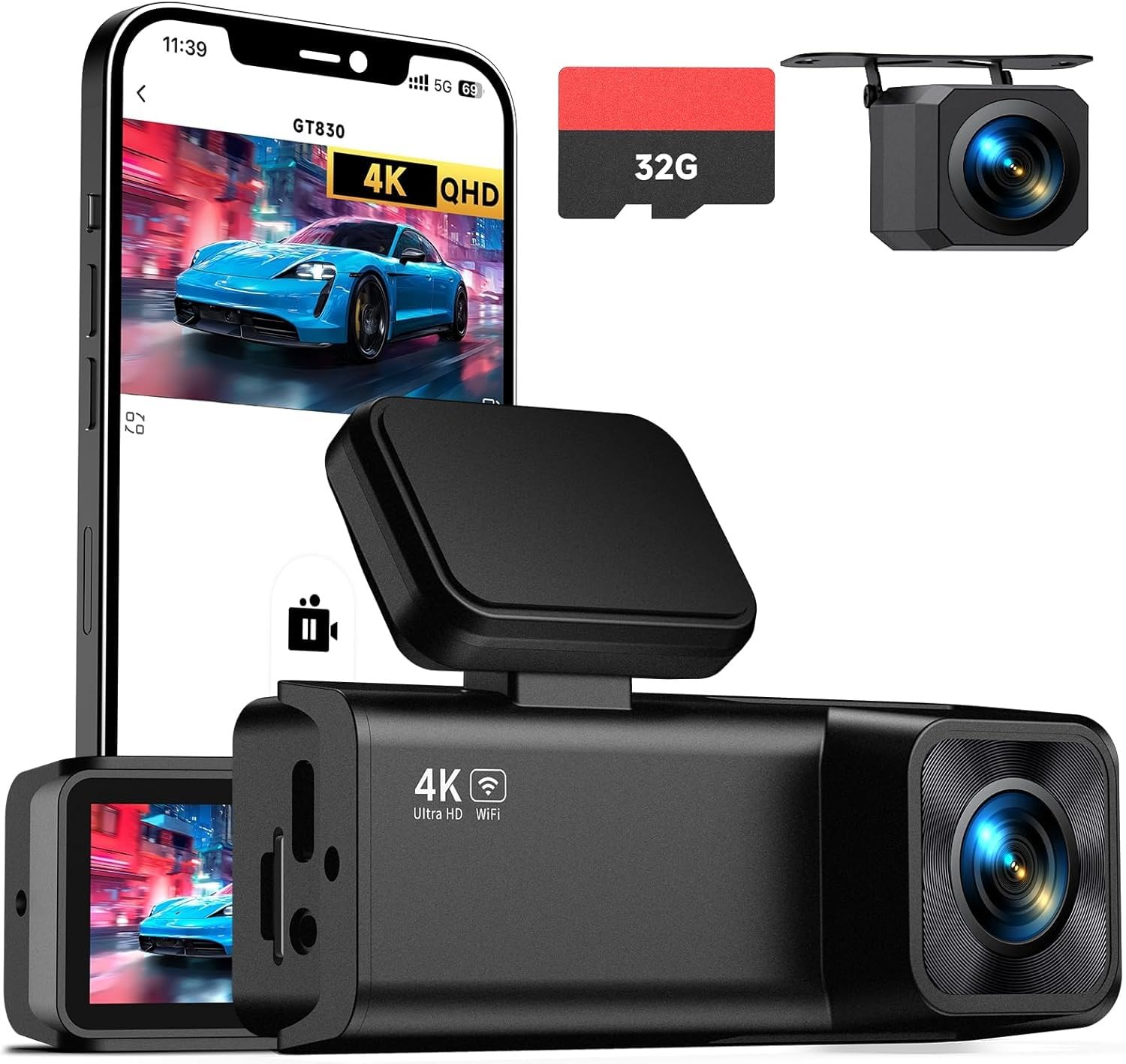
Image: The E-YEEGER GT830 Dash Camera and its included components.
2. Koniec produktuview
The E-YEEGER GT830 is a dual-channel dash camera system designed to record both front and rear views of your vehicle. It features high-resolution recording, night vision capabilities, and smart parking surveillance.
Główne cechy:
- 4K UHD Front & 1080P Rear Recording: Nagrywa wyraźne wideo footagz obu kierunków.
- Ekran IPS 1.97": Provides a clear display for live view i odtwarzanie.
- Super noktowizor: F1.6 large aperture and 6-glass lens enhance low-light recording.
- Obiektyw ultraszerokokątny 170°: Covers a broad field of view.
- Czujnik G: Automatically locks and saves video clips upon sudden impact or collision.
- Nagrywanie w pętli: Nadpisuje najstarsze filegdy karta pamięci jest pełna, zapewniając ciągłe nagrywanie.
- Monitoring parkingowy 24h: Monitors your vehicle while parked (requires Type-C hardwire kit, sold separately).
- Łączność Wi-Fi i sterowanie aplikacją: Umożliwia w czasie rzeczywistym viewpobieranie, udostępnianie i pobieranie plików footage via the VeeCar App.
- Obsługuje karty Micro SD o pojemności do 256 GB: Zapewnia ample storage for extended recording.
Obraz: Przód view of the E-YEEGER GT830 Dash Camera.

Image: Diagram illustrating the dual-channel recording capabilities of the dash cam.

Image: Comparison demonstrating enhanced night vision clarity provided by the dash cam.
3. Konfiguracja i instalacja
3.1 Wkładanie karty Micro SD
The GT830 comes with a 32GB Micro SD card pre-installed. If you need to replace or upgrade the card, ensure the camera is powered off before inserting or removing the card. The device supports Micro SD cards up to 256GB.

Image: Illustration of inserting a Micro SD card into the dash camera.
3.2 Instalacja przedniej kamery
- Wyczyść obszar przedniej szyby, na którym zostanie zamontowana kamera samochodowa.
- Apply an electrostatic sticker to the windshield first, then attach the dash cam's adhesive mount to the sticker. This allows for easier removal without leaving residue.
- Mount the front camera discreetly behind your rearview lustro, aby nie zasłaniać view.
- Ustaw obiektyw kamery tak, aby wyraźnie uchwycił drogę przed Tobą.

Image: The E-YEEGER GT830 Dash Cam mounted on a car windshield.
3.3 Instalacja kamery tylnej
- Connect the rear camera cable to the main front camera unit.
- Route the rear camera cable along the vehicle's headliner and trim to the rear of the vehicle. Use the included pry tool to tuck the cable neatly.
- Zamontuj tylną kamerę na tylnej szybie, aby zapewnić wyraźny obraz. view.
- Adjust the rear camera angle as needed.
3.4 Połączenie zasilania
- Podłącz ładowarkę samochodową do gniazda zapalniczki w pojeździe.
- Connect the other end of the car charger cable to the main front camera unit.
- Kamera samochodowa włączy się automatycznie i rozpocznie nagrywanie po uruchomieniu pojazdu.

Image: The dash cam connected to the car charger.
4. Instrukcja obsługi
4.1 Podstawowe nagrywanie
Once powered on, the GT830 dash cam automatically begins recording. The front camera records in 4K UHD (3840*1080P) and the rear camera in 1080P. FootagDane są zapisywane na karcie Micro SD.

Obraz: Byłyample of high-resolution video capture from front (4K) and rear (1080P) cameras.
4.2 Nagrywanie w pętli
The dash cam records video in continuous loops (e.g., 1, 3, or 5-minute segments). When the Micro SD card is full, the oldest unlocked files are automatically overwritten to make space for new recordings. This ensures uninterrupted recording.

Image: Visual representation of loop recording, where older footage jest nadpisywane przez nowe nagrania.
4.3 Czujnik G (nagrywanie awaryjne)
The built-in G-Sensor detects sudden impacts or collisions. When triggered, it automatically locks the current video segment, preventing it from being overwritten by loop recording. These emergency files are stored in a protected folder on the SD card.

Image: Illustration of the G-Sensor detecting a collision and locking the video footage.
4.4 24-Hour Parking Surveillance
To enable 24-hour parking monitoring, a Type-C hardwire kit (not included, ASIN: B0D93LHW94) is required. When properly installed, the dash cam will automatically record when motion or impact is detected while your vehicle is parked, protecting against scratches, theft, or vandalism.

Image: Diagram showing a car protected by 24/7 parking mode, with an icon for the optional hardwire kit.
4.5 Łączność Wi-Fi i sterowanie aplikacją
The GT830 features built-in 2.4G Wi-Fi. Download the "VeeCar" App (available for Android & iOS) to connect your smartphone to the dash cam. This allows you to:
- View foo w czasie rzeczywistymtage.
- Pobieraj nagrane filmy bezpośrednio na swój telefon.
- Share clips to social media.
- Dostosuj ustawienia aparatu.

Image: Screenshot of the VeeCar App showing options for managing dash cam footagi ustawienia.
Video: Official E-YEEGER GT830 dash cam overview, demonstrating features like 4K recording, night vision, and app connectivity.
5. Konserwacja
5.1 Zarządzanie kartą Micro SD
- Formatowanie: It is recommended to format the Micro SD card regularly (e.g., once a month) within the camera's settings to ensure optimal performance and prevent data corruption.
- Pojemność: The included 32GB card provides approximately 3 hours of recording. The camera supports cards up to 256GB, offering up to 16 hours of recording.
- Wymiana: Replace the Micro SD card if you notice recording errors or degraded performance.
5.2 Czyszczenie soczewek i ekranu
Use a soft, lint-free cloth to gently clean the camera lenses and the IPS screen. Avoid using abrasive cleaners or solvents that could damage the surfaces.
6. Rozwiązywanie Problemów
- Kamera nie włącza się: Ensure the car charger is securely connected to both the dash cam and the vehicle's power outlet. Check the vehicle's cigarette lighter fuse.
- Problemy z nagrywaniem:
- Sprawdź, czy karta Micro SD jest włożona prawidłowo i czy nie jest zapełniona.
- Format the Micro SD card within the camera settings.
- Try a different, high-speed (Class 10 or U3 recommended) Micro SD card.
- Problemy z połączeniem aplikacji:
- Sprawdź, czy w kamerze samochodowej i na Twoim smartfonie włączona jest funkcja Wi-Fi.
- Confirm you are connected to the dash cam's Wi-Fi network.
- Uruchom ponownie kamerę samochodową i smartfon.
- Ensure the VeeCar App is updated to the latest version.
- Fujtage nie viewable on app: If recordings are not showing up on the app, ensure the app has necessary permissions on your phone. Try downloading files directly to your phone. If issues persist, contact customer support.
- Czujnik G jest zbyt czuły/niewystarczająco czuły: Adjust the G-Sensor sensitivity setting in the camera's menu.
7. Specyfikacje
| Funkcja | Szczegół |
|---|---|
| Marka | E-YEEGER |
| Nazwa modelu | GT830 |
| Rozdzielczość przechwytywania wideo | Przód: 4K (2160p), Tył: 1080P |
| Typ wyświetlacza | IPS (1.97") |
| Pole View | 170 stopni |
| Technologia łączności | Wi-Fi (2.4 G) |
| Cechy specjalne | G-Sensor, Loop Recording, 24H Parking Mode (with optional hardwire kit), Night Vision |
| Rozmiar dołączonej karty pamięci | 32 GB |
| Maksymalny obsługiwany rozmiar pamięci Flash | 256 GB |
| Szybkość klatek | 30 klatek na sekundę |
| Typ montażu | Mocowanie do przedniej szyby |
| Wymiary przedmiotu (gł. x szer. x wys.) | 1.25" gł. x 3.6" szer. x 1.9" wys. |
8. Gwarancja i wsparcie
The E-YEEGER GT830 Dash Camera comes with a 24-miesięczna gwarancja. E-YEEGER provides lifetime technical support and 24/7 customer service. For any setup guidance, troubleshooting, or warranty claims, please contact the E-YEEGER support team.
Informacje kontaktowe: Refer to the contact details provided in your product packaging or visit the official E-YEEGER webwitryna wsparcia.