
1. Wprowadzenie
Thank you for choosing the BLUETTI Elite 300 Portable Power Station. This manual provides essential information for the safe and efficient use of your device. Please read it thoroughly before operation and retain it for future reference.
The BLUETTI Elite 300 is a compact 3 kWh portable power station designed for reliable energy supply in various scenarios, including home backup, camping, and RV travel. It features a LiFePO4 battery, high power output, and smart app control.

Image: The BLUETTI Elite 300, highlighted as the world's most compact 3 kWh portable power station, shown in an outdoor setting with a camper and tent at night.
2. Instrukcje bezpieczeństwa
Your safety is our top priority. Please observe the following safety guidelines:
- Nie demontuj, nie naprawiaj ani nie modyfikuj urządzenia.
- Unikaj długotrwałego narażenia na działanie deszczu, wilgoci lub bezpośredniego światła słonecznego.
- Trzymać z dala od źródeł ciepła, otwartego ognia i materiałów łatwopalnych.
- Używaj wyłącznie akcesoriów i kabli ładujących zatwierdzonych przez BLUETTI.
- Podczas użytkowania i ładowania należy zapewnić odpowiednią wentylację.
- Przechowywać w miejscu niedostępnym dla dzieci i zwierząt domowych.
- Przechowywać w chłodnym i suchym miejscu, gdy nie jest używany.
- The BLUETTI Elite 300 utilizes ultra-safe LiFePO4 battery cells and premium BMS technology for enhanced reliability and durability.
3. Zawartość opakowania
Po rozpakowaniu sprawdź, czy w przesyłce znajdują się wszystkie wymienione poniżej elementy:
- Przenośna stacja zasilania BLUETTI Elite 300
- Kabel ładowania AC
- Śruba uziemiająca
- Instrukcja obsługi (ten dokument)
If any items are missing or damaged, please contact BLUETTI customer support.
4. Koniec produktuview
The BLUETTI Elite 300 is equipped with various ports and a clear display for intuitive operation. Familiarize yourself with the layout:
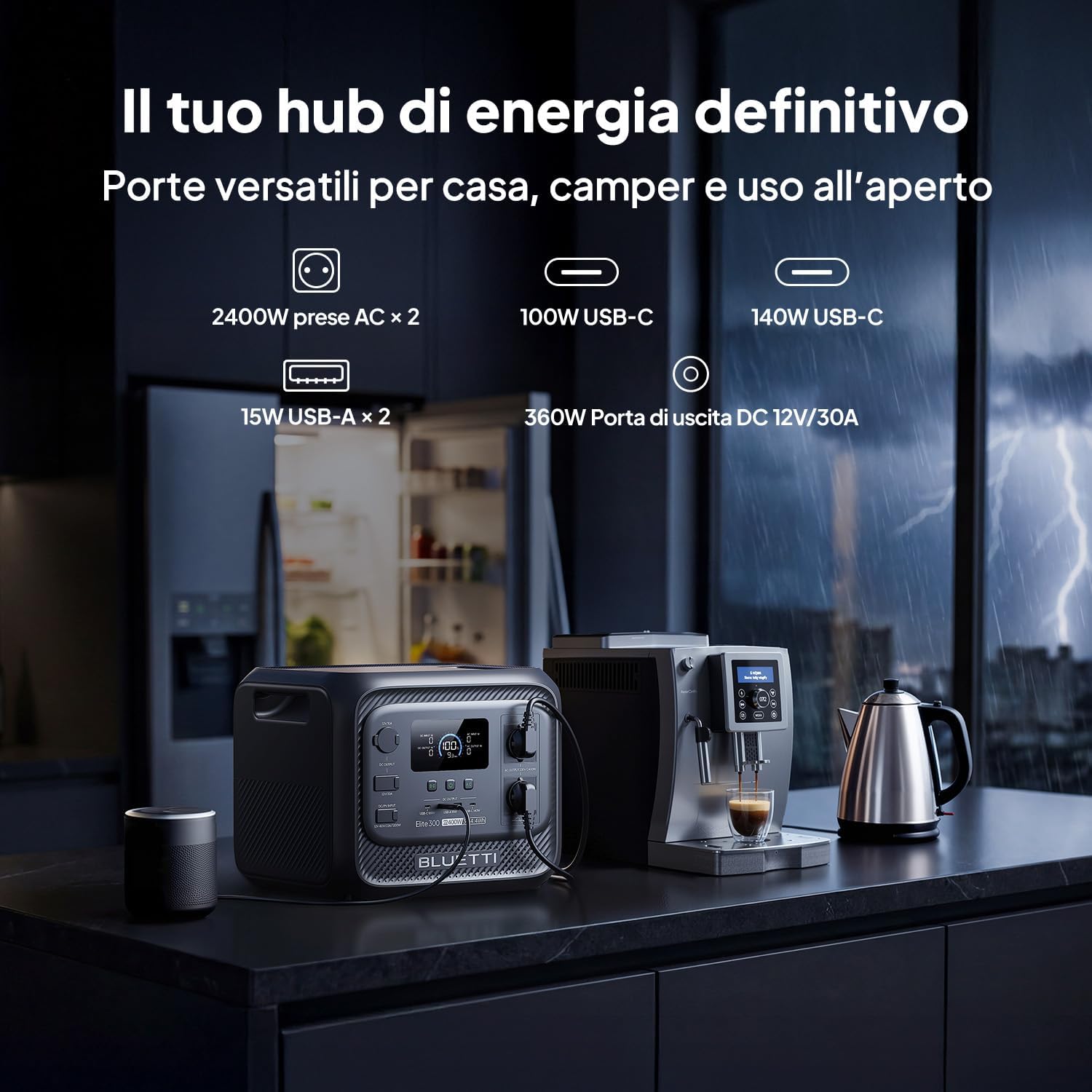
Obraz: Przód view of the BLUETTI Elite 300, illustrating its versatile ports including AC outlets, USB-C, USB-A, and a 12V/30A DC output, alongside its digital display.
Porty i wyjścia:
- Gniazdka prądu zmiennego (x2): 2400W continuous AC power, 4800W peak.
- Porty USB-C: 100W and 140W for fast charging compatible devices.
- Porty USB-A (x2): 15W total for standard USB devices.
- DC 12V/30A Output: 360W dedicated port for RV appliances and other essential outdoor gear.
The integrated display provides real-time information on battery level, input/output power, and operational status.
5. Konfiguracja
Before first use, ensure the power station is fully charged. Follow these steps:
- Rozpakować: Carefully remove the BLUETTI Elite 300 and all accessories from the packaging.
- Opłata początkowa: Connect the AC charging cable to the power station and then to a wall outlet. The display will indicate charging status.
- Pełne naładowanie: Allow the unit to charge completely before its first use. This typically takes approximately 1.8 hours for 0-80% AC charging.
6. Instrukcja obsługi
6.1 Ładowanie elektrowni
The Elite 300 supports multiple charging methods:
- Gniazdko elektryczne: Connect the AC charging cable to a standard wall outlet. Max 2300W input.
- Panele słoneczne: Connect compatible solar panels (up to 1200W Max) to the solar input port.
- Ładowanie samochodu: Charge the unit while driving using a compatible car charger (Max 1200W input, full charge in 3.2 hours).
- Podwójne ładowanie (prąd przemienny + energia słoneczna): Combine AC and solar charging for faster recharge times (up to 2400W Max, 80% in 78 minutes).

Image: Visual representation of the BLUETTI Elite 300 being charged via AC wall outlet, a car charger, and solar panels, highlighting rapid charging capabilities.

Image: An illustration showing the BLUETTI Elite 300 being charged inside an RV while the vehicle is in motion, demonstrating the 'Charge while driving' feature.
6.2 Discharging and Powering Devices
To power your devices:
- Włączyć coś: Naciśnij główny przycisk zasilania, aby włączyć urządzenie.
- Wybierz wyjście: Activate the desired output ports (AC, DC, USB) by pressing their respective buttons.
- Podłącz urządzenia: Plug your devices into the appropriate ports.
- Monitor: The display will show the current output wattage and estimated remaining runtime.
The Elite 300 delivers 2400W of continuous AC power with a 4800W peak, capable of running high-demand appliances like kettles, air conditioners, and power tools.

Image: The BLUETTI Elite 300 connected to and powering a refrigerator, oven, air conditioner, induction hob, chainsaw, and drill, indicating estimated runtimes for each.

Image: A person using a power saw outdoors, powered by the BLUETTI Elite 300, demonstrating its capability to run demanding tools with prolonged autonomy.

Image: The BLUETTI Elite 300 powering an air conditioner, microwave, refrigerator, and coffee machine in an RV kitchen, illustrating its use for off-grid comfort.
6.3 Funkcja zasilacza awaryjnego (UPS)
The Elite 300 features a reliable UPS function with a <10ms switchover time. In the event of a power outage, it instantly switches to battery power, ensuring critical devices like routers, computers, and refrigerators remain operational without interruption.

Image: A BLUETTI Elite 300 connected to a computer setup, illustrating its instant power switchover (<10ms) during a power outage to prevent data loss or work interruption.

Image: A person working on a computer during a simulated blackout, with the BLUETTI Elite 300 powering the computer, router, and refrigerator, emphasizing continuous power supply.
6.4 Inteligentna kontrola aplikacji
Manage your power remotely with the BLUETTI app. The app allows you to:
- Monitor power usage and battery status.
- Porty wyjściowe sterujące.
- Set charging schedules.
- Otrzymuj powiadomienia.

Image: A hand holding a smartphone displaying the BLUETTI app interface, showing remote control and monitoring features for the power station in a kitchen setting.
7. Konserwacja
To ensure the longevity and optimal performance of your BLUETTI Elite 300, follow these maintenance guidelines:
- Regularne czyszczenie: Przetrzyj zewnętrzną część suchą, miękką ściereczką. Nie używaj środków czyszczących o właściwościach ściernych ani rozpuszczalników.
- Składowanie: If storing for extended periods, charge the unit to 50-80% every 3-6 months to preserve battery health. Store in a cool, dry environment.
- Wentylacja: Upewnij się, że otwory wentylacyjne są czyste, bez kurzu i zanieczyszczeń.
- Stan baterii: Unikaj częstego całkowitego rozładowywania akumulatora, ponieważ może to skrócić jego żywotność.
8. Rozwiązywanie Problemów
If you encounter issues with your BLUETTI Elite 300, refer to the following common problems and solutions:
| Problem | Możliwa przyczyna | Rozwiązanie |
|---|---|---|
| Jednostka się nie włącza | Akumulator jest całkowicie rozładowany; przycisk zasilania nie został wciśnięty prawidłowo. | Naładuj urządzenie za pomocą zasilacza sieciowego. Naciśnij i przytrzymaj przycisk zasilania przez 3 sekundy. |
| Wyjście AC nie działa | Wyjście AC nie jest włączone; Zabezpieczenie przed przeciążeniem zostało aktywowane; Moc urządzenia przekracza 2400 W. | Press the AC output button; Reduce the load; Check device wattage. |
| Powolne ładowanie | Using a low-power charger; High ambient temperature; Solar input insufficient. | Use the provided AC charger or higher wattage solar panels; Ensure good ventilation; Check solar panel orientation. |
| Problemy z połączeniem aplikacji | Bluetooth/Wi-Fi off; App not updated; Unit too far from phone. | Ensure Bluetooth/Wi-Fi is active on your phone; Update the BLUETTI app; Move closer to the unit. |
For further assistance, please contact BLUETTI customer support.
9. Specyfikacje
Detailed technical specifications for the BLUETTI Elite 300 Portable Power Station:
| Funkcja | Specyfikacja |
|---|---|
| Nazwa modelu | BLUETTI Elite 300 |
| Typ baterii | LiFePO4 |
| Pojemność | 3014.4 Watt-hours (3 kWh) |
| Moc wyjściowa AC | 2400 W (ciągła), 4800 W (szczytowa) |
| Objętość wyjścia ACtage | 230 V (prąd przemienny) |
| Wyjście USB-C | 100W, 140W |
| Wyjście USB-A | 15W (x2) |
| Wyjście DC | 12 V/30 A (360 W) |
| Maks. wejście AC | 2300 W |
| Maksymalne wejście słoneczne | 1200 W |
| Max Combined Input (AC+Solar) | 2400 W |
| Funkcja UPS | <10ms Switchover Time |
| Wymiary (dł. x szer. x wys.) | 36.5 dł. x 30.5 szer. x 29.5 wys. cm |
| Waga | 26.3 kilogramów |
| Kraj pochodzenia | Chiny |
10. Gwarancja i wsparcie
For warranty information, please refer to the warranty card included with your product or visit the official BLUETTI website. BLUETTI is committed to providing reliable power solutions and excellent customer service.
If you require technical support, have questions about your product, or need to claim warranty service, please contact BLUETTI customer support through their official channels. Contact details are typically found in the included user manual or on the BLUETTI webstrona.