
1. Wprowadzenie
This manual provides detailed instructions for the installation, operation, and maintenance of your ANJIELO SMART 4-Wire Video Door Intercom System. Please read this manual thoroughly before installation and use to ensure proper function and safety. Keep this manual for future reference.
2. Koniec produktuview
The ANJIELO SMART 4-Wire Video Door Intercom System offers enhanced security and convenience for your home. It features a 7-inch WiFi-enabled monitor and a 1080p outdoor doorbell camera. Key functionalities include two-way audio communication, remote monitoring via the Tuya app, night vision, and multiple unlocking methods.
Główne cechy:
- Dwukierunkowy dźwięk: Communicate with visitors at your door from the indoor monitor or your smartphone.
- 7-calowy monitor dotykowy: High-resolution display with touch controls and hands-free function.
- 1080p Doorbell Camera: Features a 120° wide-angle lens, built-in infrared sensor for night vision, and an IP65 waterproof and dustproof rating.
- Tuya WiFi Smart Home Compatible: Seamless integration with the Tuya app for remote monitoring and control.
- 3-in-1 Unlock Methods: Unlock your door using an IC card, the Tuya app, or directly from the indoor monitor.
- Rozszerzalny system: Supports up to 1 outdoor unit and 4 indoor monitors, allowing internal communication between monitors.

Obraz: Ponadview of the ANJIELO SMART 4-Wire Video Door Intercom System, highlighting its main components and smart home integration.
3. Co znajduje się w pudełku
Ostrożnie rozpakuj pudełko i upewnij się, że wszystkie elementy są obecne i w dobrym stanie. Jeśli któregokolwiek z nich brakuje lub jest uszkodzony, skontaktuj się z obsługą klienta.
- Zewnętrzny dzwonek do drzwi
- 7-calowy monitor wewnętrzny
- Zasilacz (15 V 1.2 A)
- Instrukcja obsługi
- Kabel odblokowujący
- Kabel 4-pinowy
- Screws and Rubber Plugs for mounting
- Hanging Plate for monitor
- Karty IC (w zestawie 7)

Image: All components included in the product package, such as the outdoor doorbell, indoor monitor, cables, power supply, mounting hardware, and IC cards.
4. Konfiguracja i instalacja
The system uses a 4-wire connection for communication between the outdoor doorbell and the indoor monitor. Ensure power is disconnected before beginning installation.
4.1 Montaż dzwonka zewnętrznego
- Choose a suitable location near your entrance, approximately 1.5 meters (5 feet) from the ground, avoiding direct sunlight or rain exposure (though the unit is IP65 rated).
- Use the provided screws and rubber plugs to securely mount the doorbell unit.
- Upewnij się, że kamera ma czyste i niezakłócone pole widzenia. view wejścia.

Image: The outdoor doorbell camera providing a 120-degree ultra-wide-angle view strefy wejściowej.
4.2 Montaż monitora wewnętrznego
- Select a convenient indoor location for the monitor, such as a wall in your living room or kitchen.
- Attach the hanging plate to the wall using screws.
- Connect the wiring to the monitor as per the wiring diagram (refer to the included instruction manual for detailed diagram).
- Mount the monitor onto the hanging plate.
4.3 połączeń przewodów
Connect the outdoor doorbell unit to the indoor monitor using the provided 4-pin cable. Ensure correct polarity and secure connections. If connecting an electronic lock, use the unlock cable and refer to the detailed wiring diagram in the included manual.
4.4 Połączenie zasilania
Connect the 15V 1.2A power adapter to the indoor monitor and plug it into a standard power outlet. The system will power on automatically.
4.5 Konfiguracja aplikacji Tuya
- Pobierz aplikację Tuya Smart lub Smart Life ze sklepu z aplikacjami na swoim smartfonie.
- Zarejestruj się lub zaloguj na swoje konto.
- Follow the in-app instructions to add your ANJIELO SMART monitor to the app. This typically involves putting the monitor into pairing mode and connecting it to your home WiFi network.
5. Instrukcja obsługi
5.1 Odbieranie połączenia
When a visitor presses the doorbell button, the indoor monitor(s) will ring, and a live video feed from the outdoor camera will appear. Your smartphone (if connected via Tuya app) will also receive a notification.
- Z monitora: Tap the 'Answer' icon on the screen to initiate two-way audio communication.
- Ze smartfona: Open the Tuya app and tap the notification to view the live feed and communicate.

Image: Illustration of the two-way video intercom function, demonstrating communication between a visitor at the doorbell and a resident using the indoor monitor.
5.2 Odblokowanie drzwi
You have three methods to unlock a connected electronic lock:
- Za pośrednictwem monitora wewnętrznego: Podczas rozmowy telefonicznej lub podczas viewing the live feed, tap the 'Unlock' icon on the monitor screen.
- Za pośrednictwem aplikacji Tuya: Z koncertu view in the app, tap the 'Unlock' button.
- Za pomocą karty IC: Present a pre-programmed IC card to the card reader on the outdoor doorbell unit.
5.3 Zdalne monitorowanie
Using the Tuya app on your smartphone, you can view the live feed from the outdoor doorbell camera anytime, anywhere, as long as your monitor is connected to WiFi and your phone has internet access.

Image: Users accessing the video intercom system remotely via their smartphones, enabling two-way audio and viewing from different locations.
5.4 Surveillance Footage Odtwarzanie
The system supports 24-hour real-time monitoring and recording. You can review recorded video clips directly from the indoor monitor or through the Tuya app.
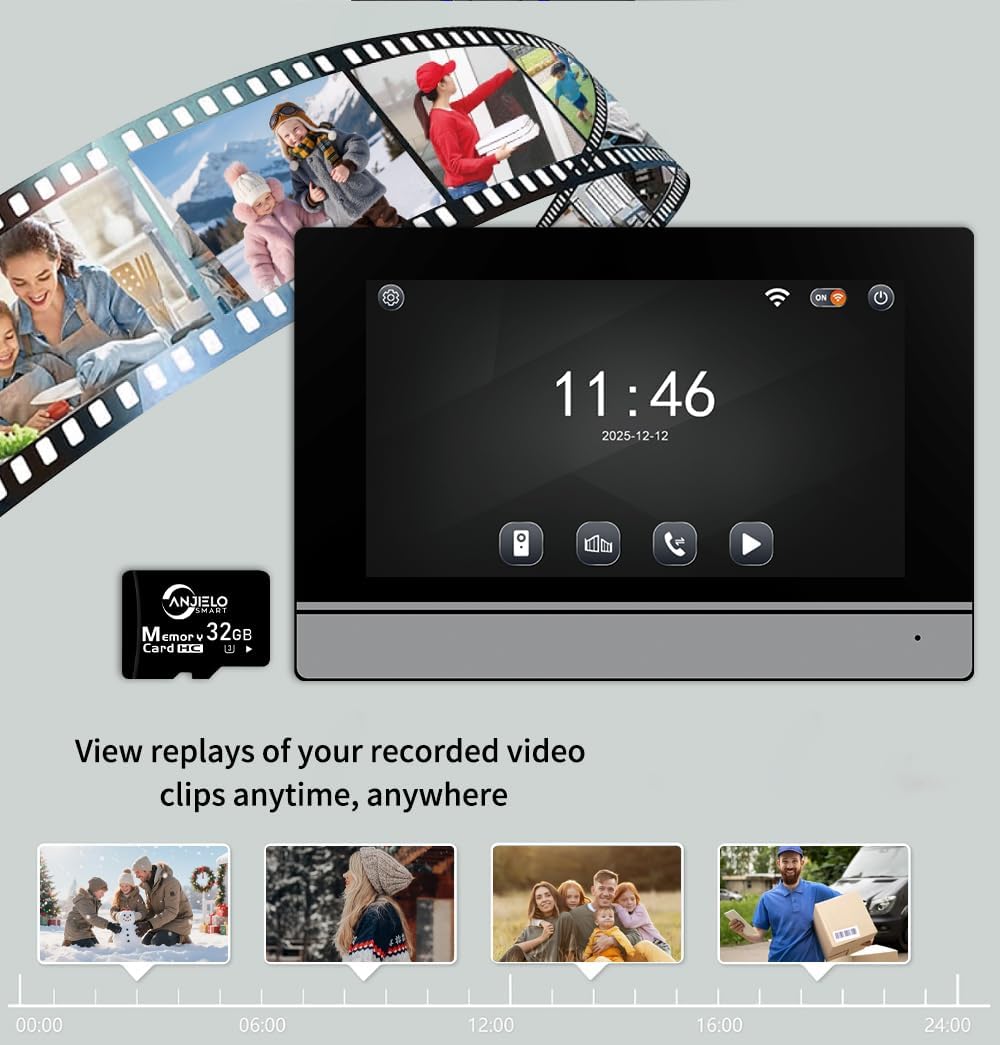
Image: The indoor monitor screen showing a timeline for playback of recorded surveillance footage, demonstrating 24-hour monitoring.
5.5 Internal Communication (Multi-Monitor Systems)
If you have multiple indoor monitors, they can communicate with each other (audio only). Refer to the detailed instructions in the included manual for initiating internal calls.

Image: A diagram illustrating the system's capability to support one outdoor unit and up to four indoor units, with internal communication between monitors.
6. Konserwacja
Regularna konserwacja zapewnia długowieczność i optymalną wydajność Twojego systemu domofonowego.
- Czyszczenie: Użyj miękkiego, damp cloth to clean the outdoor doorbell camera lens and the indoor monitor screen. Avoid abrasive cleaners or solvents.
- Kontrola połączenia: Okresowo sprawdzaj wszystkie połączenia przewodów, aby mieć pewność, że są solidne i nie są skorodowane.
- Aktualizacje oprogramowania: Keep the Tuya app updated to the latest version. Check the app or manufacturer's website for any firmware updates for the monitor or doorbell.
- Ochrona środowiska: While the outdoor unit is IP65 rated, extreme weather conditions can still affect performance. Ensure proper installation to minimize exposure to harsh elements.

Image: The outdoor doorbell unit, showcasing its IP65 protection rating, indicating resistance to dust and water.
7. Rozwiązywanie Problemów
Jeśli napotkasz problemy z systemem, zapoznaj się z poniższymi typowymi problemami i rozwiązaniami:
| Problem | Możliwa przyczyna | Rozwiązanie |
|---|---|---|
| Brak obrazu na monitorze/aplikacji | Luźne okablowanie, problemy z zasilaniem, awaria kamery. | Check all 4-wire connections. Ensure power adapter is plugged in. Restart the system. |
| Brak dźwięku podczas połączenia | Problem z mikrofonem/głośnikiem, problem z okablowaniem. | Verify wiring. Check monitor volume settings. |
| Cannot unlock door | Electronic lock not connected, wiring issue, IC card not programmed. | Ensure electronic lock is properly wired. Program IC cards as per manual. |
| Połączenie Wi-Fi jest niestabilne | Weak WiFi signal, incorrect password, router issue. | Ensure monitor is within WiFi range. Re-enter WiFi password. Restart router. |
| Nie działa noktowizor | Infrared sensor blocked or faulty. | Clean the camera lens. Ensure no obstructions. |
Jeśli po wypróbowaniu tych rozwiązań problem nadal występuje, skontaktuj się z obsługą klienta ANJIELO SMART.
8. Specyfikacje
| Funkcja | Szczegół |
|---|---|
| Marka | ANJIELO INTELIGENTNY |
| Numer modelu | 64008F-B+67024C-B |
| Źródło zasilania | Przewodowy elektryczny (15V 1.2A) |
| Technologia łączności | Przewodowy (4-żyłowy), WiFi (do aplikacji) |
| Rozdzielczość przechwytywania wideo | 1080p |
| Kąt kamery dzwonka do drzwi | 120° szeroki kąt |
| Metoda kontroli | Aplikacja, dotyk |
| Kompatybilne urządzenia | Smartphone (Tuya App) |
| Maksymalny zasięg | 100 Meters (wired connection) |
| Pozycja Wymiary (dł. x szer. x wys.) | 5.9 x 1.9 x 8.6 cale (w przybliżeniu) |
| Protection Rating (Outdoor Unit) | IP65 pyłoszczelna i wodoodporna |
| Temperatura pracy | -30°C do +60°C |
| Metoda instalacji | Wkręcane |
9. Gwarancja i wsparcie
For warranty information and customer support, please refer to the warranty card included in your product package or visit the official ANJIELO SMART webMożesz również skontaktować się ze sprzedawcą bezpośrednio za pośrednictwem swojej platformy zakupowej, aby uzyskać pomoc.
Producent: ANJIELO INTELIGENTNY
ASIN: B0GL212P4W